ManaGunZ

PS3 ManaGunZ - PS3 Backup Manager by Zar v1.41

Hello @Zar, thanks for the fast reply. My backup is stored on USB formated with FAT32. The game is NBA2K18 in JB format. Yes, I have inserted physical disk with 160GB. Also my PS3 is ultraslim 4004a. I have install and uninstall 3 times but same problem. @CFW-Us3r on MGZ 1.36 the payload is set to Cobra for HEN. Thanks in advance!

Edit: I forgot to mention that I have Irisman and Webman mod installed on my PS3. Maybe MGZ have conflict with the mention backup managers.
 
Last edited:
Hello @Zar, thanks for the fast reply. My backup is stored on USB formated with FAT32. The game is NBA2K18 in JB format. Yes, I have inserted physical disk with 160GB. Also my PS3 is ultraslim 4004a. I have install and uninstall 3 times but same problem. @CFW-Us3r on MGZ 1.36 the payload is set to Cobra for HEN. Thanks in advance!

Edit: I forgot to mention that I have Irisman and Webman mod installed on my PS3. Maybe MGZ have conflict with the mention backup managers.
He meant to insert a PS3 bluray disc inside the drive

When you are inside managunz, select the game and click X to mount it... this takes you out of managunz (back to the main XMB)

At that point try to insert a PS3 bluray disc
 
He meant to insert a PS3 bluray disc inside the drive

When you are inside managunz, select the game and click X to mount it... this takes you out of managunz (back to the main XMB)

At that point try to insert a PS3 bluray disc
Yes, I have clicked X to mount the game, but when it takes me to XMB the game doesn't shows up. And what's the point if I insert blueray disk, if I want to play with BD I wont rip the game. Irisman and WebMan Mod load the game without any problem without inserting blueray disc.
 
Yes, I have clicked X to mount the game, but when it takes me to XMB the game doesn't shows up.
This is when you should try to insert a PS3 game bluray disc, and you will see the game loaded is the backup (not the game on the disc)

The PS3 thinks that is loading the real disc... but it loads the backup instead

And what's the point if I insert blueray disk, if I want to play with BD I wont rip the game. Irisman and WebMan Mod load the game without any problem.
Are different combinations of settings to mount the backup, what zar is suggesting you by inserting a real PS3 disc game in the drive is one of the old "classic methods" used time ago
There was a time where everybody needed to insert a bluray disc in the drive

An alternative to this is to enable the option "mount in APP_HOME" (available for the PS3 JB format, in game settings in managunz)
This way the game is mounted in the APP_HOME icon of XMB game column... and is not needed to insert a bluray disc
 
Last edited:
This is when you should try to insert a PS3 game bluray disc, and you will see the game loaded is the backup (not the game on the disc)


Are different combinations of settings to mount the backup, what zar is suggesting you by inserting a real PS3 disc game in the drive is one of the old "classic methods" used time ago
There was a time where everybody needed to insert a bluray disc in the drive

An alternative to this is to enable the option "mount in APP_HOME" (available for the PS3 JB format, in game settings in managunz)
I've tryed the alternative method to enable mount in APP_HOME but still the same, then I have tryed enable direct boot and now when I press X to load MGZ I am facing with black sreen. :(
 
I've tryed the alternative method to enable mount in APP_HOME but still the same, then I have tryed enable direct boot and now when I press X to load MGZ I am facing with black sreen. :(
I dont know which options are available for HEN, but this is what i use in CFW for PS3 games in JB format, try it and report back if it works
3tv5WIN.jpg
 
Last edited:
I've tryed the alternative method to enable mount in APP_HOME but still the same, then I have tryed enable direct boot and now when I press X to load MGZ I am facing with black sreen. :(
Direct boot is very 'unstable' only few games are working with this method. It boot directly the game without going back to the XMB.
 
I could reproduce your issue. It's hapening when you don't have a BlueRay inserted. The function to insert virtually a fake blueray isn't working. I'll investigate tomorrow to fix it. The hard part is done ;)
 
STLcardsWS updated ManaGunZ with a new update entry:

ManaGunZ v1.36

Add : Support PS3HEN. I removed every feature unsupported by the HEN (tested on HEN 2.3.1).
Add : Updated widescreen db from pcsx2 github.
Add : If you don't use R2 to manage speed, the speed is increased when you hold a button.
Add : For UI FLOW, a scroll bar appears when you browse quickly your backups list.
Add : Changed VRAM mapping to manage more backups. See notes(1).
Add : Show RGBA values when you edit a color.
Change : When you hold...

Read the rest of this update entry...
 
@Zar I'm not sure if you saw my last comment or not, but I have a screenshot to help explain my issue. If you look at the below screenshot, you'll see that I can't open dev_bdvd. I'd like to mention that this wasn't an issue with ManaGunZ v1.35. I'm not sure if It's something on my end, or if it's a problem with ManaGunZ v1.36. For context, in that screenshot I have Grand Theft auto V inserted in the blu-ray drive.
ManaGunZ v1.36.png
 
I made a update to fix the issue reported here and to support 4.85C

https://github.com/Zarh/ManaGunZ/releases/tag/1.37


@CFW-Us3r

Just before I uploaded it on github, I added an option to create an ISO from dev_bdvd. It's not in changelog because I didn't tested it yet. Select dev_bdvd then option> convert to iso . If it's working, your iso will be at "/dev_hdd0/dev_bdvd.iso"

I'll test it tomorrow, & let you know if it's working or not :)
 
  • Like
Reactions: Zar
@Zar it worked. It created dev_bdvd.iso in dev_hdd0 like you said, but when I used "Check files (IRD)" it says every file is modified. So I guess there was a problem.
How you did it ?, there are 2 ways

You moved the iso with the filemanager from "/dev_hdd0/dev_bdvd.iso" to "/dev_hdd0/PS3ISO/name.iso", then reboot/reload managunz, and in the game selector screen, open the game settings ---> check IRD ?

Or... in the filemanager, select the iso file, then file options ---> check IRD ?
 
How you did it ?, there are 2 ways

You moved the iso with the filemanager from "/dev_hdd0/dev_bdvd.iso" to "/dev_hdd0/PS3ISO/name.iso", then reboot/reload managunz, and in the game selector screen, open the game settings ---> check IRD ?

Or... in the filemanager, select the iso file, then file options ---> check IRD ?

I used the first method you mentioned.
 
@Zar

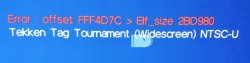
I cannot apply widescreen fixes or PNACH patching to PS2 ISOs. I'm using ManaGunZ v1.37.

I always get an error about offset and elf size as shown in the attachment in many different games.

The widescreen fixes work on the same ISOs (match with Redump database) in PCSX2.

How can I fix this?
 

Attachments

  • managunz_error.jpg
    managunz_error.jpg
    36.8 KB · Views: 191
@Vegeta
Thanks to you, I managed to improve the function to apply these pnach. I think i was using the wrong value to convert EE offset used in pnach to ELf offset.
I improved this function a lot on each update; I tested several backups (~20) and it was working on all of them, so, I was pretty confident. I guess I was just lucky to test the backup that had same value for entrypoint value and virtual adress of the programs.

So, I'm not going to tell you "it's perfect", but it's definitely better now than before.

I made a commit on github, I won't release an update now but it will be in 1.38 for sure ;)
 
how long until the next update with the fixed shortcut pkg in?since i been using han before hen for a good time i been acostumed to select my games directly from the xmb so this function would be fantastic to the hen only games.
 
@Vegeta
Thanks to you, I managed to improve the function to apply these pnach. I think i was using the wrong value to convert EE offset used in pnach to ELf offset.
I improved this function a lot on each update; I tested several backups (~20) and it was working on all of them, so, I was pretty confident. I guess I was just lucky to test the backup that had same value for entrypoint value and virtual adress of the programs.

So, I'm not going to tell you "it's perfect", but it's definitely better now than before.

I made a commit on github, I won't release an update now but it will be in 1.38 for sure ;)
Have you thought in adding some more info in that error screen ?, i think could be handy to display the ID of the game, this way you dont need to ask about it incase someone reports an error with that patchings

Also, additionally you could add a sugestion like... "press L2+R2 to take an screenshot on dev_hdd0/photo/error.bmp and report the error"

Are just ideas, i dont know the code, so maybe you could even use different info for different errors when applying the pnach patches
 
Back
Top