PS3 ManaGunZ v1.36 & v1.37: NEW PS3HEN Support , New Features & 4.85 (CEX) Support by Zar

Developer @Zar made an update for 4.85 firmware (cex) support for the popular ps3 homebrew ManaGunZ, but also late last month the developer made a huge update, that has added many new features to the popular Game Manager that always comes equipped with plenty of other features for your exploited PS3. Not only is this homebrew for CFW any longer, but since v1.36 ManaGunZ is now both compatible with PS3 Custom FirmWare and also PS3HEN, also zar did not stop there as there has been tons of new additions (seen in the changelogs provided below) and various fixes/optimizations have been brought forward as well in these recent updates that have emerged from developer @Zar. Checkout all the latest details below surrounding ManaGunZ for the PS3.

ManaGunZ v1.31_1.png
ScreenShot of 3D-Cover Flow UI for Game Management


  • ManaGunZ PS3 Backup Manager by Zar.png
    ManaGunZ v1.37 - Released on Sept. 11
    • Add : Support the firmware 4.85C.
    • Fix : Issue with syscall 35. It fix the function to mount JB backups with cobra or mamba, among others.
    • Fix FileManager : Issue to open /dev_bdvd.
    • Add FileManager : Symbolic links. See Notes (1).
    Notes :
    (1) It use cobra/mamba syscall 35.
    For example if you want to redirect app_home to dev_bdvd
    • _ Select app_home (square)
    • _ Option (triangle) then select "SymLink source" (cross)
    • _ Select dev_bdvd (square)
    • _ Option (triangle) then select "Symlink target" (cross)


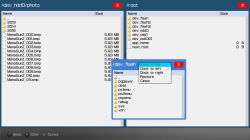
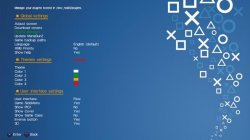
    ManaGunZ_007.png Mana3.jpg
    Random Screenshots (File Manager / Settings Page)


    ManaGunZ v1.36 - Released on Aug. 23
    • Add : Support PS3HEN. I removed every feature unsupported by the HEN (tested on HEN 2.3.1).
    • Add : Updated widescreen db from pcsx2 github.
    • Add : If you don't use R2 to manage speed, the speed is increased when you hold a button.
    • Add : For UI FLOW, a scroll bar appears when you browse quickly your backups list.
    • Add : Changed VRAM mapping to manage more backups. See notes(1).
    • Add : Show RGBA values when you edit a color.
    • Change : When you hold circle to quit, there is only one loading ring instead of 3.
    • Add : You can add a color filter on some pictures. See notes (2).
    • Add : Settings menu is splitted in 3 level instead of 2.
    • Add : Platform filter for UI XMB.
    • Fix : It scan dev_cf (compact flash) instead of dev_cd.
    • Add : 'Yes/No' settings are replaced by a toggle.
    • Add : New theme icons for the toggle.
    • Fix : Rawseciso isn't a fself anymore. It fix issue with iso from ntfs with a PS3HEN.
    • Fix : Issue with ps2 elf crc. It fix several issues with iso patching options like when 'disable widescreen' was unavailable.
    • Fix : Pnach wasn't properly translated to .CONFIG, wrong endianness in replacement opcode.
    • Fix : To avoid issues with some characters, the name of game settings files use title_id instead of title.
    • Remove : I removed "Shortcut pkg" option because it's broken. I'll fix it later.
    • Add FileManager : More informations of devices : capacity, file system, name, label, writable.
    • Add FileManager : Several predefined root display is available. Also, you can customize your own display in settings.
    • Add FileManager : Specifics options are available if you select several files with the same extension. For example, you can extract 3 pkg in a row.
    • Add FileManager : New theme icons used for the closebox, the dockbox and the cursor.
    • Add FileManager : Support UTF8 filename and also their content with the TXTviewer.
    • Add OffsetFinder : It generate every files to update managunz to a new firmware. Type 'make update'.
    Notes :
    (1)
    Every game pictures are stored in a 512KB slot memory in bitmap format.
    For Flow3D, it's stored in 2MB slots, there is less slots.
    The dimention of the game pictures is limited.
    We can calculate its size = Width x Height x Pitch
    I use ARGB texture, the pitch is 4.
    The picture size must respect :
    Width x Height < 0x20000 = (512 x 1024) /4
    And in Flow3D :
    Width x Height < 0x80000 = (2 x 1024 x 1024) /4
    To not have any memory issue, I suggest you to use the following dimensions:
    Picture Width Height
    ICON0 320 176
    COVER PS1 250 250
    COVER PS2 250 350
    COVER PS3 260 300
    COVER PSP 200 340
    COVER3D PS1 FRONT 450 450
    COVER3D PS1 BACK 600 450
    COVER3D PS2 570 850
    COVER3D PS3 525 950
    COVER3D PSP 800 640
    (2) You can choose the color filter with (R1) in settings.
    It's available for BG, BGS, SIDEBAR, BOXBODY, BOXHEAD and NOTIF pictures.
    You can add these colors in colorset.ini file too.
    They are named COLOR_BG, COLOR_BGS, COLOR_SIDEBAR, COLOR_BOXBODY, COLOR_BOXHEAD and COLOR_NOTIF.
    If you don't write a colors in colorset.ini it will be disabled.

Download: https://github.com/Zarh/ManaGunZ/releases

Release / Support Thread @: psx-place.com/forums/...
/Additional information pertaining to 4.85 firmware > > > HERE
 
Last edited:
@Zar This is such a well made software, thanks for keep supporting it!
I know I've reached out to you via PM about this before, but I can't help to ask about the PKG shortcuts:
  • "Remove : I removed "Shortcut pkg" option because it's broken. I'll fix it later."

Will the PKG shortcuts ever be extended to target any ISO file (PS3/PS2/PSX)?
I think this feature is amazing and I'd still donate towards it feature if would help!

Again, really love what you're doing!
 
Only 3 letters ? this worths a better explain :'(
@Zar This is such a well made software, thanks for keep supporting it!
I know I've reached out to you via PM about this before, but I can't help to ask about the PKG shortcuts:
  • "Remove : I removed "Shortcut pkg" option because it's broken. I'll fix it later."

Will the PKG shortcuts ever be extended to target any ISO file (PS3/PS2/PSX)?
I think this feature is amazing and I'd still donate towards it feature if would help!

Again, really love what you're doing!
The "create shorcut PKG" for PS3 games was removed because 2 reasons:
-It was not working in HEN
-The way how it was made was an initial approach, but is better to do it with symlinks, and overall it needed a review to improve it

It looks the "create shorcut PKG" was one of the cases where is better to demolish the old building and construct it again from scratch
As you can see, in ManaGunZ v1.37 there is a new function related with sysmlinks, to me it looks like an intermediate step (something needed) to restore the "create shorcut PKG"

Theoretically... the "create shorcut PKG" for PS3 will be restored first, because is relativelly easy compared with the other game formats
For PS1/PS2/PSP is going to be tricky, is a bigger challenge because is needed to deal with the "placeholders/launchers" and the database
 
i use ManagunZ's file manager to drag PSP isos into game/PSPISO on hdd.download and install a PSP Placeholder.in ManaGunZ,your psp iso will appear under the psp folder far right.select,press x,ps3 returns to xmb.game icon appears on placeholder,start game.
Thank you, probably you mean PSP Launcher? PSP Placeholder I did not find. Everything works, checked.
 
Thank you, probably you mean PSP Launcher? PSP Placeholder I did not find. Everything works, checked.


Keep in mind that the PSP had the Mini's launcher and Remasters versions. Some games refuse to run via one or the other. But it's best to try the Remasters first as it upscales the games to HD and it also can be configured a bit with the MINIS2.EDAT
 
Keep in mind that the PSP had the Mini's launcher and Remasters versions. Some games refuse to run via one or the other. But it's best to try the Remasters first as it upscales the games to HD and it also can be configured a bit with the MINIS2.EDAT
Thanks, I'll try.
 
Keep in mind that the PSP had the Mini's launcher and Remasters versions. Some games refuse to run via one or the other. But it's best to try the Remasters first as it upscales the games to HD and it also can be configured a bit with the MINIS2.EDAT
could you point me in
Keep in mind that the PSP had the Mini's launcher and Remasters versions. Some games refuse to run via one or the other. But it's best to try the Remasters first as it upscales the games to HD and it also can be configured a bit with the MINIS2.EDAT
i'd like to configure the MINIS2.EDAT but not sure how.i had a read on the devwiki but
Keep in mind that the PSP had the Mini's launcher and Remasters versions. Some games refuse to run via one or the other. But it's best to try the Remasters first as it upscales the games to HD and it also can be configured a bit with the MINIS2.EDAT
Id like to try to configure the MINIS2.EDAT but not sure what settings to try.i only have 4 games and all work with the remaster launcher but then dont after a restart.in fact im getting an unhandled exception error when unpacking the remaster .pkg. is there a tutorial somewhere?
 
could you point me in

i'd like to configure the MINIS2.EDAT but not sure how.i had a read on the devwiki but

Id like to try to configure the MINIS2.EDAT but not sure what settings to try.i only have 4 games and all work with the remaster launcher but then dont after a restart.in fact im getting an unhandled exception error when unpacking the remaster .pkg. is there a tutorial somewhere?


There is no guide as it is all a matter of testing. Most have up tweaking the PSP as only about 30% of the PSP flash0 is actually emulated. Here is the settings that can be tweaked. If you are using HEN then make sure you decrypt the MINIS2.EDAT to MINIS2.TXT make your changes then encrypt again using scetool with 3.55 keys.

https://www.psdevwiki.com/ps3/PSP_Emulation
 
thank you so much.i'll have a mess this evening.i was reading the psp emu selector (for cfw) thread and i was beginning to suspect that the configs were trial and error so you've answered that for me,cheers.i'm not sure if the pspemu gets broken or just incorrectly configured as it wont even boot a psn purchased mini at present so i think OFW>HFW>HEN before i try anything.much appreciated.
 
There is no guide as it is all a matter of testing. Most have up tweaking the PSP as only about 30% of the PSP flash0 is actually emulated. Here is the settings that can be tweaked. If you are using HEN then make sure you decrypt the MINIS2.EDAT to MINIS2.TXT make your changes then encrypt again using scetool with 3.55 keys.

https://www.psdevwiki.com/ps3/PSP_Emulation
did some testing and i'm thinking my problem isn't the MINIS2.EDAT.i should have pointed out that i'm not getting as far as the placeholder option screen.i'm assuming the configs aren't used until you select start game.my problem seems to be some kind of conflict with my ps3 pkgs and the launcher,if i can get the launcher working i have to redo the .rap files on my ps3 pkgs the next time i play but once i've done that the launcher stops working.if i sign the launcher it works again but the ps3 pkgs,well,you get it.i know it's bananas but that's what's happening.
i dont wanna sound ungrateful,i get so much more use from my ps3 than i used to,megadrive games on ps3 are a blast! the psp thing is the only issue i have,everything else runs spot on,i never have issues installing HFW or HEN,1st time everytime and HEN feels a little faster and stronger with every update.
 
my managunz is running at chinese at default. how can i change this ?! :O im on a 40004 super slim with hen 3.0.0 with german system language.
 
  • Like
Reactions: Zar
@Zar , can you make it display a short summary of the IRD check , instead of having to scroll all the way down to visually check each file ?
 
  • Like
Reactions: Zar
It's a good idea.
I'll insert a sum-up to the top of the result, something like
"Result : it's all good !"
or
"Result : The following files are modified or missing." (then It write the list of the files)


Is it what you meant ?
 
just to report,after installing 4.86.1 HFW and HEN 3.0.1 ,ManaGunZ 1.37 (and 1.35-J) is freezing when trying to mount a game,there have been changes to the cobra payload so bear this in mind when updating.best hang on until Zar and friends have worked their magic.
 

Featured content

Trending content

Back
Top