PS2 Manual installation guide for PSX games in the APP section of OPL via USB.

In this tutorial we will learn step by step how to install PSX games to load them in Open PS2 Loader (OPL) from the applications menu.

Before continuing, it is necessary to have read the following tutorial "Guide to Install APPS in Open PS2 Loader via USB" since it will be referred to later, you can read it at the following link:

https://www.psx-place.com/threads/guide-to-install-apps-in-open-ps2-loader-via-usb.41054/

What do we need?

1.-Have the POPSTARTER emulator installed.

does it mean copying folder and related files from USB to mc0:/

or for example

Popstarter =mass:/PS2SMB/APPS/POPStarter_20190605/POPStarter.ELF
 
Last edited:
does it mean copying folder and related files from USB to mc0:/
or for example
Popstarter =mass:/PS2SMB/APPS/POPStarter_20190605/POPStarter.ELF

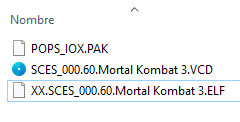
It means having the files necessary for the operation of the Emulator seen in the tutorial, all within the POPS folder.
 
Hello :)
i have followed your tutorial but i would like to run psx games without the use of OPL.

so for my game i have prepared the usb key as that:
https://i.imgur.com/p4NwxrE.png

do you think for any games i have to rename the file .elf with the game title as in your example or that is necessary just if i want to use OPL ?

because from ulauncher elf i will need that .elf file to run "POPStarter"
 
Hello :)
i have followed your tutorial but i would like to run psx games without the use of OPL.

so for my game i have prepared the usb key as that:
https://i.imgur.com/p4NwxrE.png

do you think for any games i have to rename the file .elf with the game title as in your example or that is necessary just if i want to use OPL ?

because from ulauncher elf i will need that .elf file to run "POPStarter"

The procedure is the same.
"XX" is to run the games from a USB whether you use UlaunchElf or OPL.
 
The procedure is the same.
"XX" is to run the games from a USB whether you use UlaunchElf or OPL.
ok so
The procedure is the same.
"XX" is to run the games from a USB whether you use UlaunchElf or OPL.

1)so there i just have to run "XX.SCES_123.80.GRANTURISMO2" and the game will start right ?
DiUNMAT.png


2)do you think is possible create a subfolder "for any game" under POPS where there will be every time a .pak - elf and .vcd file?

3)i have downloaded the .pak files from somewhere on google, or there is another option to find it maybe on the game CD ? let's hope will be a save file
 
1)so there i just have to run "XX.SCES_123.80.GRANTURISMO2" and the game will start right ?

Correct.

2)do you think is possible create a subfolder "for any game" under POPS where there will be every time a .pak - elf and .vcd file?

Why would you want to do that?

3)i have downloaded the .pak files from somewhere on google, or there is another option to find it maybe on the game CD ? let's hope will be a save file

Topic prohibited by forum regulations.
 
Why would you want to do that?
because in this way when i will put the usb key in the ps2 i will have different folders for any game (inside the POPS folder) so will be more quickly find the right name, but is okay anyway.

another question, is possible create shortcuts for .elf files in ulauncherELF files that are located in MC0 for example ?

put the shortcut to the .elf file in that position for example:
main_screen-b.gif

the screenshot in this case is an example took online
 
Last edited:
because in this way when i will put the usb key in the ps2 i will have different folders for any game (inside the POPS folder) so will be more quickly find the right name, but is okay anyway.

In my opinion there would be more files because you must put a "POPSTARTER.ELF" plus the "IGR" files for each folder, and the list you have in folders is equivalent to the list you have in ELF files.

another question, is possible create shortcuts for .elf files in ulauncherELF files that are located in MC0 for example ?
put the shortcut to the .elf file in that position for example:

I haven't tried it friend so I don't know about that.
 
In my opinion there would be more files because you must put a "POPSTARTER.ELF" plus the "IGR" files for each folder, and the list you have in folders is equivalent to the list you have in ELF files.


I haven't tried it friend so I don't know about that.
ok i will keep as standard.

i have tried GT2 and run fine but at one moment, not while i was playing but when i was buying a car i lost video signal at any moment and i don't understand why so I have restarted the PS2 but I couldn't see anything on the TV, so I tried to move the Scart cable and the signal reappeared but everything was fuchsia in color :(
then I moved it a little more and the color was good again and i played without issues with GT4 on OPL so i think is the cable, but strange because that cable never give me a completly black screen with ps2 games so far...in the past days i have just noticed some change of colours that slowly shifed on fuchsia but was never happed a full non signal !

in the past a full non signal was been caused by another scart cable.

----------------------------------

is there a way to transfer and use game saves of GT2 that i have on a PS1 memory card with PS2 and with the game played with POPS ?
let me know if i have to open another discussion for that question
 
Last edited:
ok i will keep as standard.

i have tried GT2 and run fine but at one moment, not while i was playing but when i was buying a car i lost video signal at any moment and i don't understand why so I have restarted the PS2 but I couldn't see anything on the TV, so I tried to move the Scart cable and the signal reappeared but everything was fuchsia in color :(
then I moved it a little more and the color was good again and i played without issues with GT4 on OPL so i think is the cable, but strange because that cable never give me a completly black screen with ps2 games so far...in the past days i have just noticed some change of colours that slowly shifed on fuchsia but was never happed a full non signal !

in the past a full non signal was been caused by another scart cable.

----------------------------------

is there a way to transfer and use game saves of GT2 that i have on a PS1 memory card with PS2 and with the game played with POPS ?
let me know if i have to open another discussion for that question

The cable thing is already "a different matter" my friend, the important thing is that you have already learned how to install PSX games.
Could you open another thread for the problem you present.
As for the saved ones, maybe this guide will help you.

https://www.psx-place.com/threads/t...-card-and-use-them-with-the-popstarter.41352/
 
Is there an easier way to load PSX games in 2024? I saw videos of games in a tab on a much fancier looking OPL than I seem to have, and no manual work seemed to be necessary. So is there an update for how to do this in modern times? Thanks!

Charles.
 
Is there an easier way to load PSX games in 2024? I saw videos of games in a tab on a much fancier looking OPL than I seem to have, and no manual work seemed to be necessary. So is there an update for how to do this in modern times? Thanks!

Charles.


The version you saw is the "Daily Builds". A version that in my case has presented considerable errors.
The version shown here is the Official one, as far as I know, the only way to add PSX games to OPL is the one shown in this tutorial.
 
The version you saw is the "Daily Builds". A version that in my case has presented considerable errors.
The version shown here is the Official one, as far as I know, the only way to add PSX games to OPL is the one shown in this tutorial.

I did try this and it didn't work at all in OPL. No games displayed even with apps set to auto. I could navigate to the elf files and run them from ulaunchelf, But I hadn't upgraded to the latest opl. So I guess I'll try it again with 1.0.0 and 1.1.0 and see what happens.

This is a lot of work, and it really should be in the OPL documentation somewhere.
 
Last edited:
I did try this and it didn't work at all in OPL. No games displayed even with apps set to auto. I could navigate to the elf files and run them from ulaunchelf, But I hadn't upgraded to the latest opl. So I guess I'll try it again with 1.0.0 and 1.1.0 and see what happens.

This is a lot of work, and it really should be in the OPL documentation somewhere.

If you follow this tutorial to the letter you will be able to install them successfully.
It's not that it's a lot of work, once you get the hang of it you'll see everything easier.
luck.
 
Wanted to share with you my overly drawn out file placements for USB users, maybe it could be of some help for others or incorporated into your guide. Apps page VCD listings is a common request in the PS2 Scene discord.

Official POPStarter Pages :
https://bitbucket.org/ShaolinAssassin/popstarter-documentation-stuff/wiki/Home
https://www.psx-place.com/threads/popstarter.19139/
Official POPSLoader Page :
https://www.psx-place.com/resources/popsloader.1396/
BDM Assault (Adding exFAT compatibility to POPStarter) :
https://github.com/israpps/BDMAssault
Latest wLE_kHn (20200810) :
https://web.archive.org/web/2023110...485258/742327866854998116/wLE_kHn_20200810.7z
HugoPocked POPStarter Fixes :
https://www.youtube.com/@hugopocked6695
https://www.psx-place.com/threads/hugopocked-fixes-for-popstarter.39750/


USB Mass Storage File Structures Confirmed Working For POPS Setups on latest Grimdoomer, DB, and Official Betas versions of OPL
(fat32 w/32kb clusters or exfat w/32kb clusters & BDMAssault)


OPL ALL VERSIONS APPS PAGE Setup of "Soul Blade" for Example:
mass:/POPS/SLUS_002.40.Soul Blade.VCD - Converted from bin/cue PS1 backup
mass:/POPS/POPS_IOX.PAK
mass:/POPS/POPSTARTER.ELF
mass:/APPS/Soul Blade/XX.SLUS_002.40.Soul Blade.ELF - Renamed POPSTARTER.ELF file
mass:/APPS/Soul Blade/title.cfg - Created with Notepad and saved as title.cfg NOT title.txt

title.cfg is created with notepad and reads:
title=[PS1] Soul Blade
boot=XX.SLUS_002.40.Soul Blade.ELF


OPL DB PS1 PAGE Setup of "Soul Blade" for Example:
mass:/POPS/POPSTARTER.ELF
mass:/POPS/SLUS_002.40.Soul Blade.VCD - Converted from bin/cue PS1 backup
mass:/POPS/POPS_IOX.PAK


Hugopocked POPSTARTER Fixes Setup of "Soul Blade" for Example:
mass:/POPS/SLUS_002.40.Soul Blade/HugopockedSoulBladeFixesGoHere


BDM Assault/exFAT Compatibility Enabler for USB Mass Storage Devices Setup:
mc?:/POPSTARTER/usbd.irx
mc?:/POPSTARTER/usbhdfsd.irx
mc?:/SYS-CONF/USBD.IRX- Renamed bdm_assault.irx file
mc?:/SYS-CONF/USBHDFSD.IRX - Renamed usbd_bd_assault.irx file


wLE_kHn VCD Launcher USB Setup with Soul Blade for Example:
mc0:/BOOT/BOOT.ELF`` - Renamed wLE_kHn_20200810.ELF file
mass:/POPS/POPS_IOX.PAK
mass:/POPS/SLUS_002.40.Soul Blade.VCD - Converted from bin/cue PS1 Backup
mass:/POPS/POPSTARTER.ELF
mass:/APPS/wLE_kHn_20200810/wLE_kHn_20200810.ELF
mass:/APPS/wLE_kHn_20200810/title.cfg - Created with Notepad and saved as* title.cfg not title.txt

title.cfg is created with notepad and reads:
title=wLE_kHn_20200810 VCD Launcher
boot=wLE_kHn_20200810.ELF


POPSLoader APP USB Setup:
mass:/POPSLOADER.ELF
mass:/BOOT.ELF`` - Renamed POPSLOADER.ELF file
mass:/POPS/POPS_IOX.PAK
mass:/POPS/PATCH_5.BIN
mass:/POPSLDR/PATCH_5.BIN
mass:/POPSLDR/UDPTTY_NANO.IRX
mass:/POPSLDR/images.lua
mass:/POPSLDR/pops_profiles.lua
mass:/POPSLDR/system.lua
mass:/POPSLDR/ui.lua
mass:/POPSLDR/PROFILES/DEBUG/POPSTARTER.ELF
mass:/POPSLDR/PROFILES/MAIN/POPSTARTER.ELF
mass:/POPSLDR/PROFILES/USBDELAY/POPSTARTER.ELF
mass:/POPSLDR/PROFILES/USBDELAY_DEBUG/POPSTARTER.ELF
mass:/POPSLDR/IMG/circle.png
mass:/POPSLDR/IMG/cross.png
mass:/POPSLDR/IMG/down.png
mass:/POPSLDR/IMG/HDD.png
mass:/POPSLDR/IMG/L1.png
mass:/POPSLDR/IMG/L2.png
mass:/POPSLDR/IMG/L3.png
mass:/POPSLDR/IMG/left.png
mass:/POPSLDR/IMG/PSL.png
mass:/POPSLDR/IMG/R1.png
mass:/POPSLDR/IMG/R2.png
mass:/POPSLDR/IMG/R3.png
mass:/POPSLDR/IMG/right.png
mass:/POPSLDR/IMG/select.png
mass:/POPSLDR/IMG/SMB.png
mass:/POPSLDR/IMG/square.png
mass:/POPSLDR/IMG/start.png
mass:/POPSLDR/IMG/triangle.png
mass:/POPSLDR/IMG/up.png
mass:/POPSLDR/IMG/USB.png
mass:/APPS/POPSLOADER.ELF
mass:/APPS/title.cfg - Created with Notepad and saved as title.cfg not title.txt

title.cfg`` is created with notepad and reads:
title=POPSLOADER
boot=POPSLOADER.ELF
 
Is there a solution for "It just takes me to the same screen LaunchELF 4.43X_ISR"?

I am using OPL 1.2.0 Beta-2082 and a 256GB ExFAT Card.
PS2 ISOs are working, I also can see the PS1 games with covers, but after a short loading time I am back in LaunchELF 4.43 ISR.
Loading with LaunchELF also opens LaunchELF again after a few seconds.

I used POPStarterGameInstallerforOPL 1.0.0.1.

Any idea?
 
Last edited:
Is there a solution for "It just takes me to the same screen LaunchELF 4.43X_ISR"?

I am using OPL 1.2.0 Beta-2082 and a 256GB ExFAT Card.
PS2 ISOs are working, I also can see the PS1 games with covers, but after a short loading time I am back in LaunchELF 4.43 ISR.
Loading with LaunchELF also opens LaunchELF again after a few seconds.

I used POPStarterGameInstallerforOPL 1.0.0.1.

Any idea?
You need bdmAssault because exfat.
 

Similar threads

Back
Top
