Memory Maxx, a unlicensed ps2 utility with seemingly no online presence

Wustywab

Forum Noob
Hello!

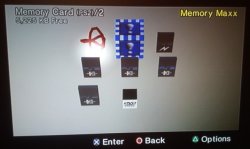
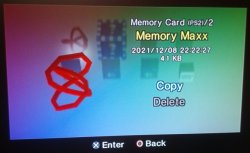
I have found a physical copy of an unlicensed ps2 utility called Memory Maxx, it is stated to be by the makers of Xploder which is apparently a cheat device for the ps2. This utility is used to copy (to other memory cards), zip, format, unzip, and delete saves on a ps2 memory card. The most interesting abilities of these is the feature to zip/compress your saves directly on your memory card as I am unsure of how that works yet. I have not tried this disc on my ps2 yet but I do plan to very soon. I got this from a ebay auction as I had never heard of it and looking it up online gives no good results. The only related things that show up are xploder and 2 ebay listings, both of which are done and one of which is no longer available. I am not sure if it is allowed for me to provide a rip backup of my physical copy but I will if it is allowed.


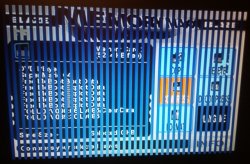
Here are some photos:
https://imgur.com/a/eOAMf6f
 
i remember this, it isn't as good as it sounds, all it does is zip the files on the memory card, you can't actually play the zipped files (so if you want your save back you need to unzip it) its great if you want to store saves for games you are not playing right now to give you space though, i also remember some game saves it wouldn't compress (not sure why)
I would also like to mention they also made Memory Maxx V2 which came with Xploder V3 Professional (not sure on the differences other then the fact the Xploder V3 comes with cheats too and this is only saves)
 
That and dumping these disc can be a bit of a pain in the arse. They intentionally have bad sectors to thwart copies being made. It can be done but you must dump sector by sector to get a full dump then you have to hex edit the tracks together.
 
  • Like
Reactions: TnA
That and dumping these disc can be a bit of a pain in the arse. They intentionally have bad sectors to thwart copies being made. It can be done but you must dump sector by sector to get a full dump then you have to hex edit the tracks together.

Often times with these sorts of third party releases, the entirety of the program is contained within a single file, which can be copied and renamed with an ELF extension.
 
Around ~2005 I made a Dreamcast homebrew app called VMZip, that did the same thing: it allowed to compress and decompress DC save-games on the VMU.

I don't know about this Memory Maxx tool, but perhaps mine was even older than this. In the end, the compression ratio depends on the data on the file. For vmzip I used BZip2 and the results were quite good, specially with bigger saves that used many blocks.

Nowadays it doesn't make much sense to build such tool, because you can easily transfer to USB, etc.
 
The tool is old stuff and not really needed.
It can compress your saves, but to use them in-game you ha e to uncompress them again.

That and dumping these disc can be a bit of a pain in the arse. They intentionally have bad sectors to thwart copies being made. It can be done but you must dump sector by sector to get a full dump then you have to hex edit the tracks together.
There is an easier way to do it! Dump it on the PS2 (ISO9660 Layer or extracting files only)! ;)

Often times with these sorts of third party releases, the entirety of the program is contained within a single file, which can be copied and renamed with an ELF extension.
Actually most of the time it is NOT!
Stuff like HDLoader and/or HDAdvance as well as most Datei-products had to be "cracked" to embed the IRXs and so on.
 
update: It does seem like for me to back it up I'll have to go sector by sector. I tried ISO buster, ultraiso, and imgburn and all did not even make a dent into creating a img file after letting each run for an entire day. I guess I will have to figure something else out if I want to back it up as an iso. I did directly copy the files and export a LBA.
 
Wanted to dump the PAL release of it, but...
Sans titre.PNG

Up to CHECK_CONDITION/MEDIUM_ERROR and ODD crash. DIC cannot dump it :( .
My precious GCE-8483B drive is nowhere to be found and the archived backup was lost. Damn.


EDIT : better than nothing, here's the ELF :
Code:
https://pastebin.com/raw/eT381W1Y
 
Last edited:
Tried repacked and this is how it looks for me: ;p

blaze_memory_maxx_2.jpg

About compression:
So. This application taking save (which means: whole folder or folder contents) and pack it. After that, it dropping it, to "mc0:/MCM/<Save ID>" as one compressed file (it doesn't deleting original file). And... breaking MCFS. ;p

blaze_memory_maxx_3.jpg blaze_memory_maxx_4.jpg

Judging by compression efficiency, it is kind of ZIP (Deflate) but I do not recognize the magic number. Anyone know what is this? All saves getting 78DAEDh (magic number?).
@krHACKen ? :D

blaze_memory_maxx_1.png
 
@krHACKen
Bro, that's awesome you found a pal version. By any chance did/have you seen anything else made by Blaze/ the creators of xploder, other then the xploder cheat device? Along with the memory max disc and manual, it also came with this foldout poster of their other products. I am interested in the virtual fireplace and the other screen savers, as well as the game accelerator. I haven't gone too far into researching these other products yet but I think it will be quite a bit of searching to find anything about them if they're as hard to research as Memory Maxx. If where you found memory maxx has any of these other products, it would be awesome to know, :)

Here's the poster, I added the other side of it here as well just so this thread will have all the pictures of the game/application.
https://imgur.com/a/OQNHtXF
 
I dumped that 17 years or so ago. Either copy the files and rebuild the image with the proper layout or dump it via HDLoader.
 

Similar threads

Back
Top