
- Forums
- PlayStation 3 (PS3)
- PS3 Homebrew
- PS3 Homebrew Apps / Plugins / Emulators
- Emulators for PS3
- PS1/PS2/PSP on PS3
You are using an out of date browser. It may not display this or other websites correctly.
You should upgrade or use an alternative browser.
You should upgrade or use an alternative browser.
PS3 Multi-Track PS1 Games on PS3
- Thread starter insanetoker89
- Start date


Lambada
Member
Guys, I converted/compressed some backup PS1 BIN/cue image games to .bin.ecm.
This game in question is a multi-track PS1 game. Normally, should it work with audio if it's compressed in .bin.ecm? My CUE is pointing to .BIN and not to .BIN.ECM and the audio is not playing in my PS3. Any tips?
Should I decompress it back to BIN/CUE to listen to the multi-track audio?
I'm using webmanMOD by @aldostools latest version.
My best regards.
This game in question is a multi-track PS1 game. Normally, should it work with audio if it's compressed in .bin.ecm? My CUE is pointing to .BIN and not to .BIN.ECM and the audio is not playing in my PS3. Any tips?
Should I decompress it back to BIN/CUE to listen to the multi-track audio?
I'm using webmanMOD by @aldostools latest version.
My best regards.

insanetoker89
Member
Guys, I converted/compressed some backup PS1 BIN/cue image games to .bin.ecm.
This game in question is a multi-track PS1 game. Normally, should it work with audio if it's compressed in .bin.ecm? My CUE is pointing to .BIN and not to .BIN.ECM and the audio is not playing in my PS3. Any tips?
Should I decompress it back to BIN/CUE to listen to the multi-track audio?
I'm using webmanMOD by @aldostools latest version.
My best regards.
These days I use CHDMAN to compress multi track ps1 games to .chd format and then uncompress them back to bin/cue. The end result will give you only one .bin and one .cue , I haven't had any problems since I started using this method.

Berion
Developer
@Lambada If You want use such compression (useless today, better is LZMA i.e in 7z), then You must first merge all tracks into one disc image, and after that compress it.
https://www.psx-place.com/threads/merging-multiple-tracks-into-onedisc-image.33591/
@insanetoker89 Quicker would be to use IsoBuster. But of course if You have many games to "convert", then CHD Manager is more handy because of unattended processing.
https://www.psx-place.com/threads/merging-multiple-tracks-into-onedisc-image.33591/
@insanetoker89 Quicker would be to use IsoBuster. But of course if You have many games to "convert", then CHD Manager is more handy because of unattended processing.

jcorrea
PSX-Place Supporter
CDMAGE is also a good alternative.@Lambada If You want use such compression (useless today, better is LZMA i.e in 7z), then You must first merge all tracks into one disc image, and after that compress it.
https://www.psx-place.com/threads/merging-multiple-tracks-into-onedisc-image.33591/
@insanetoker89 Quicker would be to use IsoBuster. But of course if You have many games to "convert", then CHD Manager is more handy because of unattended processing.
Lambada
Member
@Lambada If You want use such compression (useless today, better is LZMA i.e in 7z), then You must first merge all tracks into one disc image, and after that compress it.
https://www.psx-place.com/threads/merging-multiple-tracks-into-onedisc-image.33591/
@insanetoker89 Quicker would be to use IsoBuster. But of course if You have many games to "convert", then CHD Manager is more handy because of unattended processing.
So can I run PS1 ISO files compressed in 7z with WebmanMOD?
@insanetoker89 Can we run CHD games in WebmanMOD?
Berion
Developer
CDMage is great tool, so yeah, it is great alternative.
WebMAN MOD doesn't run any compressed images, it decompressing them first. 7z is supported if I remember correctly but CHD not.
CHD was designed for streaming (compression per block instead whole file), so would be awesome but this needs probably changes in Cobra itself.
WebMAN MOD doesn't run any compressed images, it decompressing them first. 7z is supported if I remember correctly but CHD not.
CHD was designed for streaming (compression per block instead whole file), so would be awesome but this needs probably changes in Cobra itself.

Lambada
Member
Hello @aldostools , as I read somewhere around here, some PS1 games work better with ps1_emu and others with ps1_netemu right? Would it be difficult to implement a new feature to webMAN-MOD to add a config per ISO? So if webMAN-MOD detects that a ISO has a CFG in the same folder, the game would load the respective prefered ps1 emu (ps1_emu or ps1_netemu). Maybe it could work similar as PS2CONFIG compatibility CFGs for PS2 but for PS1. And if for some reason you want to delete de cfg and revert the settings to the current webMAN-MOD ps1 emu settings (general one) that you saved on setup.ps3, there could be an option as well.ps1_netemu and ps1_emu are the files for PlayStation One emulators. They are found in /dev_flash/ps1emu
[...]
In webMAN MOD, hold R2 for ps1_netemu or L2 for ps1_emu when you mount the game.
Or go to /setup.ps3 and select the default emulator in the section "Scan for content"**.
**The section needs to be expanded to show options.


Hello @aldostools , as I read somewhere around here, some PS1 games work better with ps1_emu and others with ps1_netemu right? Would it be difficult to implement a new feature to webMAN-MOD to add a config per ISO? So if webMAN-MOD detects that a ISO has a CFG in the same folder, the game would load the respective prefered ps1 emu (ps1_emu or ps1_netemu). Maybe it could work similar as PS2CONFIG compatibility CFGs for PS2 but for PS1. And if for some reason you want to delete de cfg and revert the settings to the current webMAN-MOD ps1 emu settings (general one) that you saved on setup.ps3, there could be an option as well.
If the tag [netemu] is included in the file name of the CUE/BIN or ISO, webMAN MOD auto selects ps1_netemu.
Otherwise ps1_emu is used. Also you can select the emulator using L2 for ps1_emu, R2 for ps1_netemu or R1 to toggle the current one.
Also ps1_netemu can be set as the default ps1 emulator in /setup.ps3
No other psx configuration is supported by Cobra. For additional psx settings I recommend to use IRISMAN.
Lambada
Member
Very nice! Is it a new feature, the [netemu] tag?If the tag [netemu] is included in the file name of the CUE/BIN or ISO, webMAN MOD auto selects ps1_netemu.
Otherwise ps1_emu is used. Also you can select the emulator using L2 for ps1_emu, R2 for ps1_netemu or R1 to toggle the current one.
Also ps1_netemu can be set as the default ps1 emulator in /setup.ps3
No other psx configuration is supported by Cobra. For additional psx settings I recommend to use IRISMAN.
Very nice! Is it a new feature, the [netemu] tag?
That feature was added to webMAN MOD 1.45.07 on Jan 2, 2017 (almost 5 years ago).
It is a pity the ps1_netemu does not support the configs with the memory patching mechanism similar to the PS2 emulators. Therefore, for LibCrypt games you need to crack them manually (~95% of games have got a working PPF file). If I am right, even Sony did not implement any LibCrypt per-game patches in the emulator. All the European releases in the store, originally with a LibCrypt, have been released in the American versions instead (LC was present in the PAL releases only).
Devildwarf
Member
yeah it is a shame, but since PS1 games play in PS3 mode (unlike PS2 games) you might be able to patch games in real time with Artemis insteadIt is a pity the ps1_netemu does not support the configs with the memory patching mechanism similar to the PS2 emulators.

zdrasti
Member
i fix multitrack PS1 iso WITH CDmage https://www.portablefreeware.com/?id=399

GalacticBatman
Member
CDMage works, yeah. But I believe that it doesn't make an image that is identical to DIC output (might strip the first pregap). IsoBuster output files match; verified against the IMG and CUE files that are produced by Disc Image Creator.
That's odd. I've been looking for a way to deal with multi-track PSX games and just tried both IsoBuster and CDMage. I don't know how the merging of bin files is done, but it seems to keep the original multi-track information intact in a single bin file. This allows for an export of the original tracks if needed. I used that to verify the integrity of the merge. Contrary to your suggestion, CDMage kept all tracks unaltered, while Isobuster somehow changed track 4 (the last track) to be slightly smaller in size. I checked all tracks using SHA-1 checksum and track 4 was the only difference. Maybe something has to be changed in the settings. I've only tried this on one game so far, but it doesn't seem like isobuster keeps the tracks unaltered by default.
Berion
Developer
@GalacticBatman That's strange. Normal behaviour of IB is that none of data is modified, until meta file (like *.cue, *.gdi, *.mds etc.) is not proper of course.
- What version of IsoBuster are You using and on what game exactly?
- Does IsoBuster used free license or... it was cracked? I strongly recommending to not using pirated versions because messing with licensing can cause unexpected results (besides the ethical stuff obviously).
- Does this game is verified ReDump dump?
GalacticBatman
Member
I used the free version of isobusters 4.9.1. The game is Alien Resurrection (SLUS-00633) and I verified the dumped bin files recently. I ripped my PS1 collection a long time ago, maybe something happened to the cue file along the way (not sure how to check the integrity of the cue file). The single .bin method didn't work well for me anyway, since some games didn't seem to work with proper sound output. I'm going to try the pkg route instead. It'll take some work and I won't be able to play the games from an external drive, but hopefully the multitrack issues will disappear and I can have multi-disc games as a single entry.
zdrasti
Member
here is a small utility from "VIT co" if it helps to solve the problem, then all thanks to him!
https://1fichier.com/?v6atl4a7cj8m2n5o5sxi
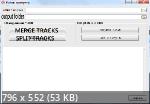
https://1fichier.com/?v6atl4a7cj8m2n5o5sxi


sondukupon
Forum Noob
Guys is there a program/app/online website I can use for android to do all these multi track combining? If so please let me know.
Similar threads
-
PS3HEN Pop-fe cannot create .pkg of multi-disc PS1 game because PSL1GHT files are missing
- Started by LionRider
- Replies: 1
-

-
PS3 OPL SMB Stopped Loading or Very Slow Loading on CECH-Axx PS3
- Started by NextGeneration9501
- Replies: 0
-
 PS3 Minor issue with PAL PS1 version of Alone in the Dark: The New Nightmare.
- Started by Xandros
- Replies: 0