PS2 [MX4SIO/SIO2SD] SD Card Adapter and SD-driver for the PS2 SIO2 interface

I am not really keen to troubleshoot any further as I don't really care how my games get in there as long as it's there doesn't matter to me

Well, not really sure what else we can do if you're not willing to troubleshoot any further.

Just to remember, if MX4SIO works for 99% of people, then maybe something is wrong at your end?
 
Right now all I care about is that I finally got it working and I can save my games after over a week as I could only load my games from the 1.2beta of OPL before just hope the VMC works on the next version.
 
Right now all I care about is that I finally got it working and I can save my games after over a week as I could only load my games from the 1.2beta of OPL before just hope the VMC works on the next version.
how did you get it fixed?

update:
Got it working now after some fiddling..

one more problem:

I set up custom title names but theyre not showing on the list, its showing the iso filename instead...
any ideas how to fix this?
 
Last edited by a moderator:
Hey, quick question! I have it all set up and its working great... for DVD games. All of the games in my CD folder don't show at all. Does it not support bin/cue? Thanks a ton!

For refernece, I have those CD games in a folder called "CD," and they are each in their own names folders as well.
 
Last edited by a moderator:
@nex86 and @longsun_zhao Please don't double-post!

@kibato9999 (Edit: Look...) I tested a lot of ISOs via BDM3. The problem certainly is on your side. Maybe a weird or too long name which can be used by OPL 1.2.0 Beta.

VMCs also worked for me on BDM3! It was just slow, during WRITING... Did the game actually freeze on it, or did it just take long and you got desperate?

...and to be frank: You claiming that @htao12 called you a liar for merely pointing out a fact (ISOs DO work on BDM3, even if YOU don't get them working yet. Gigantic difference!) and you did that right after YOU DID imply that I am a liar ("has nothing to do with original MC"), is quite hypocritical!
He actually tried to help you...

@longsun_zhao: Did you read the Readme of OPL...?
 
Last edited:
Sound like you have OPL 1627 BDM1-Testbuild (FAT only or maybe including 70k), instead of OPL 1629 BDM3.

You will know, if you connect a DS3/DS4 and it works...

Get "BDM3" from the last post on page 15! ;)

Is it possible to change/update the version of OPL on the FMCB Memory Card with just one memory card, or is two a requirement?
 
Is it possible to change/update the version of OPL on the FMCB Memory Card with just one memory card, or is two a requirement?
yea you just need to put the new OPL elf on a usb flashdrive and replace the old one on your memorycard with the new one on the usb drive using ulaunchelf.


@nex86 and @longsun_zhao Please don't double-post!

Sorry I had no chance because the edit button on my prevous post disappeared!
I think it does disappear after a while and you can only edit during a certain amount of time.
 
@nex86 and @longsun_zhao Please don't double-post!

@kibato9999 (Edit: Look...) I tested a lot of ISOs via BDM3. The problem certainly is on your side. Maybe a weird or too long name which can be used by OPL 1.2.0 Beta.

VMCs also worked for me on BDM3! It was just slow, during WRITING... Did the game actually freeze on it, or did it just take long and you got desperate?

...and to be frank: You claiming that @htao12 called you a liar for merely pointing out a fact (ISOs DO work on BDM3, even if YOU don't get them working yet. Gigantic difference!) and you did that right after YOU DID imply that I am a liar ("has nothing to do with original MC"), is quite hypocritical!
He actually tried to help you...

@longsun_zhao: Did you read the Readme of OPL...?
Hi TnA . Thanks for your work and help.
I have also meet some problem today when install the opl bdm3 to another new fmcb card, when everything configuration is set as before, I try to enter the opl bdm3 and it turns to black screen and freeze.
my last fmcb card with bdm3 works fine, but this new one fails with the same procedure. So if there is a fmcb installer containing the opl bdm will be helpful and no more such cases.
 
Last edited:
Hi TnA . Thanks for your work and help.
I have also meet some problem today when install the opl bdm3 to another new fmcb card, when everything configuration is set as before, I try to enter the opl bdm3 and it turns to black screen and freeze.
my last fmcb card with bdm3 works fine, but this new one fails with the same procedure. So if there is a fmcb installer containing the opl bdm will be helpful and no more such cases.

For sure i'm not TnA :-p ...so my suggestions aren't worth much, but have you got PADEMU = "Global" and Enabled = "On"? This problem normally happens (black screen for BDM3) when the PADEMU settings aren't enabled.
 
Couple questions
1- how does this compare speed and latency wise to a generic USB2.0-to-ethernet China adapter found on eBay and one of those 5400 drives? That was the previous workaround if one didnt want to SMB or use the crappy USB1 port on the slim.

Less cumbersome solution to be sure and enticing for that alone but just curious since thats what I previously used

can ask elsewhere but since im all about wireless controllers:
2- would you prefer a Brooke adapter to DS3/Ds4 or a BT USB dongle to use with OPL (dont even know what's on that list of compatible thats readily available, I think the T-Link UB400 was one.. would have to auto boot into OPL to make BT USB dongle not a PITA but I like that its less cumbersome too. Still Brooke is plug-n-play and already got that with my PS1
 
@nex86 and @longsun_zhao Please don't double-post!

@kibato9999 (Edit: Look...) I tested a lot of ISOs via BDM3. The problem certainly is on your side. Maybe a weird or too long name which can be used by OPL 1.2.0 Beta.

VMCs also worked for me on BDM3! It was just slow, during WRITING... Did the game actually freeze on it, or did it just take long and you got desperate?

...and to be frank: You claiming that @htao12 called you a liar for merely pointing out a fact (ISOs DO work on BDM3, even if YOU don't get them working yet. Gigantic difference!) and you did that right after YOU DID imply that I am a liar ("has nothing to do with original MC"), is quite hypocritical!
He actually tried to help you...

@longsun_zhao: Did you read the Readme of OPL...?
I honestly don't know what is going as I never said I needed help with the ISO not working I did say that I was able to get them working using the OPL PC Tools and installing the games as split files in my SD card so for me that was the end of it the file names are as short as possible no spaces and no weird characters and the ISOs are still not detected for me.

all of my games freezes when checking memory card when VMC is enabled I even waited for an hour with POP Sands of Time and RE Code Veronica X but it just never gets pass the checking your memory section and it did take a very long time to create the VMC and it did finish I can't launch the game anyway without actually finishing the creation of the VMC games get pass the memory card check when VMC is disabled I also need to make sure that PADEMU is disabled otherwise my controller does not work which seems to be different from everybody else.
 
Bonjour vous tous.

Le PADEMU du OPL-BDM3 permet-il de faire fonctionner une DS3 (ou DS4) en BlueTooth via un adaptateur USB/BT comme je le fais avec mes manettes DS3 via le OPL-0.93 rev1319 (ou rev1414) ???

Voici la liste de compatibilité confirmant mes tests, onglet DS3/BT (ou DS3/USB pour le filaire) :
==> https://docs.google.com/spreadsheet...tbqh2lkUj3lX6YQ2wPgLEx8Koo/edit#gid=262003789
==> https://docs.google.com/spreadsheet...bqh2lkUj3lX6YQ2wPgLEx8Koo/edit#gid=1350535189
Vous pouvez aussi consulter les autres onglets pour les différentes interfaces que gère OPL.


In English via G-Trad :

Hello all of you.

Does the PADEMU of the OPL-BDM3 allow you to operate a DS3 (or DS4) in BlueTooth via a USB/BT adapter as I do with my DS3 controllers via the OPL-0.93 rev1319 (or rev1414)???

Here is the compatibility list confirming my tests, DS3/BT tab (or DS3/USB for wired):
==> https://docs.google.com/spreadsheet...tbqh2lkUj3lX6YQ2wPgLEx8Koo/edit#gid=262003789
==> https://docs.google.com/spreadsheet...bqh2lkUj3lX6YQ2wPgLEx8Koo/edit#gid=1350535189
You can also consult the other tabs for the different interfaces that OPL manages.

Kind regards.

Algol "le papy".
 
Last edited:
Sorry I had no chance because the edit button on my prevous post disappeared!
I think it does disappear after a while and you can only edit during a certain amount of time.
Oh, I see! Either new user, or very few posts! Yes, that's a bot/spam-protection. ;)
Hi TnA . Thanks for your work and help.
I have also meet some problem today when install the opl bdm3 to another new fmcb card, when everything configuration is set as before, I try to enter the opl bdm3 and it turns to black screen and freeze.
my last fmcb card with bdm3 works fine, but this new one fails with the same procedure. So if there is a fmcb installer containing the opl bdm will be helpful and no more such cases.
Clone MC?
For sure i'm not TnA :-p ...so my suggestions aren't worth much, but have you got PADEMU = "Global" and Enabled = "On"? This problem normally happens (black screen for BDM3) when the PADEMU settings aren't enabled.
??? In/Before the OPL GUI???
Couple questions
1- how does this compare speed and latency wise to a generic USB2.0-to-ethernet China adapter found on eBay and one of those 5400 drives? That was the previous workaround if one didnt want to SMB or use the crappy USB1 port on the slim.
"didn't want to use SMB"?? If that USB2.0-Ethernet-thing is connected via LAN and shares a USB Storage-device, it IS sharing it via SMB!

Latency isn't really high on LAN, nor MX4SIO.
Bandwidth is lower on MX4SIO than LAN.
You can play online with MX4SIO and it is way more portable as well as Plug&Play (even during runtime).

Less cumbersome solution to be sure and enticing for that alone but just curious since thats what I previously used

can ask elsewhere but since im all about wireless controllers:
2- would you prefer a Brooke adapter to DS3/Ds4 or a BT USB dongle to use with OPL (dont even know what's on that list of compatible thats readily available, I think the T-Link UB400 was one.. would have to auto boot into OPL to make BT USB dongle not a PITA but I like that its less cumbersome too. Still Brooke is plug-n-play and already got that with my PS1
Brooke is not supporting analog input, does it? I mean pressure sensitivity.
I honestly don't know what is going as I never said I needed help with the ISO not working
Doesn't matter if you asked for help with ISOs or not. You made a claim which is false...! You claimed BDM3 doesn't load ISOs... You made that blanket statement... That generic statement is factually false, because it/BDM3 CAN load ISOs.

It fails on YOUR setup... That's a gigantic difference and I already pointed to that fact in my reply that you quoted.
Hence... Your statement was simply false...

I did say that I was able to get them working using the OPL PC
Tools and installing the games as split files in my SD card so for me that was the end of it the file names are as short as possible no spaces and no weird characters and the ISOs are still not detected for me.
Try OPLM instead!

all of my games freezes
So nothing on screen moves anymore and analog light on the controller doesn't react when pressing the button?

when checking memory card when VMC is enabled
Your ISOs and VMCs are non-fragmented?

I even waited for an hour with POP Sands of Time and RE Code Veronica X but it just never gets pass the checking your memory section and it did take a very long time to create the VMC
I already wrote before, that the MX4SIO-Driver does NOT YET support DMA-Writes and that it is hence slow during writing...

Just create the VMCs on PC, when you install the games... You could use OPLM (OPL Manager) and "Auslogics Disk Defrag" (to make sure the files are not fragmented).

When you create a VMC in OPL, it is likely to be fragmented!

and it did finish I can't launch the game anyway without actually finishing the creation of the VMC games get pass the memory card check when VMC is disabled I also need to make sure that PADEMU is disabled otherwise my controller does not work which seems to be different from everybody else.
PADEMU = Pad/Controller Emulator. It obviously shows, what needs to be connected! A DS3/DS4 via either USB or BT.

Bonjour vous tous.

Le PADEMU du OPL-BDM3 permet-il de faire fonctionner une DS3 (ou DS4) en BlueTooth via un adaptateur USB/BT comme je le fais avec mes manettes DS3 via le OPL-0.93 rev1319 (ou rev1414) ???

Voici la liste de compatibilité confirmant mes tests, onglet DS3/BT (ou DS3/USB pour le filaire) :
==> https://docs.google.com/spreadsheet...tbqh2lkUj3lX6YQ2wPgLEx8Koo/edit#gid=262003789
==> https://docs.google.com/spreadsheet...bqh2lkUj3lX6YQ2wPgLEx8Koo/edit#gid=1350535189
Vous pouvez aussi consulter les autres onglets pour les différentes interfaces que gère OPL.


In English via G-Trad :

Hello all of you.

Does the PADEMU of the OPL-BDM3 allow you to operate a DS3 (or DS4) in BlueTooth via a USB/BT adapter as I do with my DS3 controllers via the OPL-0.93 rev1319 (or rev1414)???

Here is the compatibility list confirming my tests, DS3/BT tab (or DS3/USB for wired):
==> https://docs.google.com/spreadsheet...tbqh2lkUj3lX6YQ2wPgLEx8Koo/edit#gid=262003789
==> https://docs.google.com/spreadsheet...bqh2lkUj3lX6YQ2wPgLEx8Koo/edit#gid=1350535189
You can also consult the other tabs for the different interfaces that OPL manages.

Kind regards.

Algol "le papy".
Yes, it does the exact same.
Additionally it "fixes" multiple games in MX4SIO.

An obvious requirement is a DS3/DS4/supported controller.

 
Last edited:
??? In/Before the OPL GUI???

Sorry i confused myself (easy to do) ...i meant the black screen (for me at least) happened when the OPL config folder from BDM3 wasn't working correctly (no files were inside the folder) after installing. When i added OPL v1.1.0 with its OPL config folder to FMCB this fixed the black screen issue for me.
 
"didn't want to use SMB"?? If that USB2.0-Ethernet-thing is connected via LAN and shares a USB Storage-device, it IS sharing it via SMB!

Latency isn't really high on LAN, nor MX4SIO.
Bandwidth is lower on MX4SIO than LAN.
You can play online with MX4SIO and it is way more portable as well as Plug&Play (even during runtime).


Brooke is not supporting analog input, does it? I mean pressure sensitivity.

sorry I meant if one didnt want to use a real network SMB share. I understand the generic mini routers are SMB.


Im sure SATA HDD is considerably faster than SMB or this MC2SIO. But how is MC2SIO next to SMB (both network share, and mini router route, unless theyre the same performance for all intents and purposes)

Pressure sensitivity for brooke, I dont believe so. good point there

I also have a wireless Logitech for my ps2 that works nicely and supports pressure so probably will go with that. always just been curious of a good USB BT dongle route. That guide that shows which works is appreciated but most are hard to source now compared to when the guide came out seemingly a few years ago

appreciate it!
 
...or this MC2SIO. But how is MC2SIO...

I just want to make this clear, because it bugs me...

MC2SIO is not MX4SIO.

MC2SIO is a kind of clone with differences to MX4SIO. Like the chinese clones. The guy who copied MX4SIO and called it MC2SIO is a new member called Angry Helder, and has a website selling console accessories in America. Including his MC2SIO.

I personally think he used his entry to this forum to promote the selling of his product, his PSX profile links back to his e-shop. We haven't seen much of him here since the plug of his clone product a while ago. If you gave him your money then why not contact him for support? He owes you the support in my view.

So how do we know the speed his product goes, or doesn't go? It's not MX4SIO, that which this thread is for, and not for clones using different components and changes in design from the original.

And if you are reading this Angry Helder, you know how i felt about your product plugging from your first message here, i told you straight back then. Why should we have to deal with your customers on this thread, maybe you should pay us for the support you should be giving, no?!
 
I just want to make this clear, because it bugs me...

MC2SIO is not MX4SIO.

MC2SIO is a kind of clone with differences to MX4SIO. Like the chinese clones. The guy who copied MX4SIO and called it MC2SIO is a new member called Angry Helder, and has a website selling console accessories in America. Including his MC2SIO.

I personally think he used his entry to this forum to promote the selling of his product, his PSX profile links back to his e-shop. We haven't seen much of him here since the plug of his clone product a while ago. If you gave him your money then why not contact him for support? He owes you the support in my view.

So how do we know the speed his product goes, or doesn't go? It's not MX4SIO, that which this thread is for, and not for clones using different components and changes in design from the original.

And if you are reading this Angry Helder, you know how i felt about your product plugging from your first message here, i told you straight back then. Why should we have to deal with your customers on this thread, maybe you should pay us for the support you should be giving, no?!

Thanks for clarifying, I thought at a cursory glance they were the same and interesting to know they aren't.

Beyond that, I'm not asking for "support" on a product, and I have no stake in the axe to grind. Didn't even know there was an axe to grind since you've clarified they are separate entities.
I'm merely asking a question:
is MX4SIO (since MC2SIO is separate ordeal) similar speed to SMB (be it mini router or a real network share across a non-USB router) on the slim, or a lot slower?

Either way to be completely clear - I am nothing but fond of stuff like this being offered, and even if it does take a hit performance wise, the convenience factor is a huge point. USB1 is not feasible imo, and mini router works but its cumbersome and makes the slim less an ideal package with a bunch of crap dangling off the back (and using the front USB to power the mini router, oi) and... It pushed me into going SATA modded OEM network adapter + Phat. I really love how fast GTA for example loads into game off a hard drive.

...I'm just trying to understand how big that difference is for people who have used both, don't assume I'm throwing shade.
This project has piqued my curiosity enough to take my old bios slim 90001 out of storage and give this a try, 'for science.' Because the slim IS cool as hell and its been a relic piece laying around. It was my starting point before I upgraded my OG PS2 (the exact one I had when I was young)

--

also out of curiosity what is the name of these things being sold on Ali that vary from the original project? I just want to see what else is out there other than Helder, again for knowledge. I find homebrew anything kinda interesting when comes down to implementation and offerings and different builds, etc. thx
 
Thanks for clarifying, I thought at a cursory glance they were the same and interesting to know they aren't.

Beyond that, I'm not asking for "support" on a product, and I have no stake in the axe to grind. Didn't even know there was an axe to grind since you've clarified they are separate entities.
I'm merely asking a question:
is MX4SIO (since MC2SIO is separate ordeal) similar speed to SMB (be it mini router or a real network share across a non-USB router) on the slim, or a lot slower?

Either way to be completely clear - I am nothing but fond of stuff like this being offered, and even if it does take a hit performance wise, the convenience factor is a huge point. USB1 is not feasible imo, and mini router works but its cumbersome and makes the slim less an ideal package with a bunch of crap dangling off the back (and using the front USB to power the mini router, oi) and... It pushed me into going SATA modded OEM network adapter + Phat. I really love how fast GTA for example loads into game off a hard drive.

...I'm just trying to understand how big that difference is for people who have used both, don't assume I'm throwing shade.
This project has piqued my curiosity enough to take my old bios slim 90001 out of storage and give this a try, 'for science.' Because the slim IS cool as hell and its been a relic piece laying around. It was my starting point before I upgraded my OG PS2 (the exact one I had when I was young)

--

also out of curiosity what is the name of these things being sold on Ali that vary from the original project? I just want to see what else is out there other than Helder, again for knowledge. I find homebrew anything kinda interesting when comes down to implementation and offerings and different builds, etc. thx

I was just making the issue clear for you and anyone else who might read that post, a few people have come here complaining they can't get their MC2SIO, as if the Devs and supporters here have anything to do with that lol.

I'm glad the MX4SIO project has piqued your interest enough for you to take out your old PS2. Re your question:- the other clone on Ali, is called "DIY MX4SIO" and is super over-priced, also the design and the parts used are not the original specs from MX4SIO. In fact "MX4SIO" is copyright as stated on the Trisaster.de (Takeshi - MX4SIO hardware designer) website:- "Production for private use (!) is allowed" - meaning not for commercial production.

These commercial people don't support this community, they don't give back anything to the MX4SIO project, it's all for profit in their own pockets, nothing more.

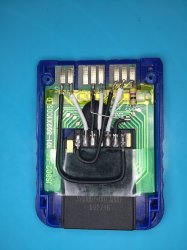
People here can either make their own DIY version of MX4SIO using parts from an old PS1/PS2 memory card, some wires, a resistor, and an SD card adapter (guide in this thread)...
IMG_0016.JPG
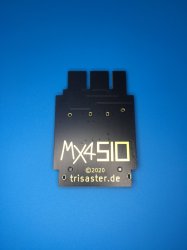
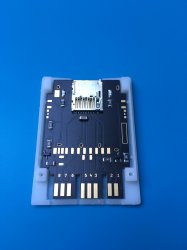
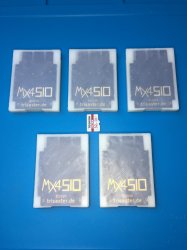
...or use the professional files, kindly given by the project team here, to order the parts for a personal one like the photos below, identical to the original specs:-

IMG_0175.JPG IMG_0171.JPG IMG_0177.JPG
The MX4SIO in the photos are the ones i made using the files, they even have the "MX4SIO" logo in gold plate! :D
 
Last edited:
beautiful PCB work sir, hats off.

looked up on Ali, and yeah its by bitfunx - they're the absolute literal worst. serpent cloners of the retro community that have their hand in everything, with everyones else hard work on the line.

not surprised. but $10+free slow international shipping doesnt seem that crazy expensive.
The bundled 'deals' with SD cards theyre selling are ridiculous though thats probably to go after people that dont know any better. and screw em (bitfunx) in any case not interested. was just curious of what's out there.

Maybe more manufacturers will come to market with MX4SIO that are closer to spec of the original project than just Helder's offering? Competition is good in the end.

Sorry if you all have been bogged down with support questions though for another product could see that being annoying

me, im just a curios one.
 

Similar threads

Back
Top