PS2 [MX4SIO/SIO2SD] SD Card Adapter and SD-driver for the PS2 SIO2 interface

I guess I will check again this weekend why mine did not work. What kind of MX4SIO are you using @psydefx ? I am using a DIY one with a multitap port and an arduino microsd board. Strange, hopefully I can make it work and edit the old post with the proper card compatibility in order to not scare anyone from buying Kioxia Exceria cards.
im using a trisaster mx4sio pcb like the first page. maybe your kioxia is a fake?
 
I guess I will check again this weekend why mine did not work. What kind of MX4SIO are you using @psydefx ? I am using a DIY one with a multitap port and an arduino microsd board. Strange, hopefully I can make it work and edit the old post with the proper card compatibility in order to not scare anyone from buying Kioxia Exceria cards.

Did you try formatting it with GUiFormat - FAT32 and 16K clusters? Also make sure not to have a USB thumb drive inserted into your PS2 when using your MX4SIO, this will result in an empty OPL games list.
 
Hello
I test this today but i have no game on my OPL...

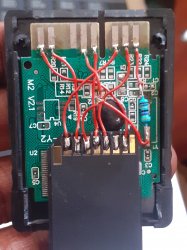
Here is my MC mod

I forgot one pin, let me test again...
 

Attachments

  • 20220401_121043.jpg
    20220401_121043.jpg
    1.3 MB · Views: 277
Last edited by a moderator:
im using a trisaster mx4sio pcb like the first page. maybe your kioxia is a fake?

I highly doubt that, bought from Amazon and amazing writing speeds on PC like 70MB. I am almost sure It is related to the quality of my MX4SIO but for some reason it works fine with my Kingston Canvas. I've even remade the soldering with a sd card adapter instead of an arduino board with no luck whatsoever.

Did you try formatting it with GUiFormat - FAT32 and 16K clusters? Also make sure not to have a USB thumb drive inserted into your PS2 when using your MX4SIO, this will result in an empty OPL games list.

Yes to all, I had taken everything you mention into consideration beforehand but thanks for keeping it in mind anyway.
I will accept that the combination of ("my" DIY MX4SIO + Exceria) is not compatible. Not that Exceria cards are not recommended.
 
Last edited:
Thanks for the advise !!!!

Also @chronoss the missing pin is normal, nothing goes there.

Here, you can compare against my DIY version for reference.

IMG_0015.JPG


So just cut the PCB traces (that go to the finger contacts) on your version then test to see if it works now.

Edit: Maybe also put a bit of electrical tape on top of the area where you cut the PCB traces (if close to the finger contacts) so your soldered wires don't make any contact to the cut traces.

You may have to desolder your finger contact wires first to get at that area, and then resolder the wires down again.

Make sure not to solder the wires too far along the finger contacts otherwise it might not allow for the correct contact when you insert the MX4SIO into the PS2. It's harder but try to solder the wires at the earliest point onto the finger contacts.
 
Last edited:
None of my cards work :( Tested 128gb Sandisk Ultra and old 8GB Sandisk Cl4 - tested both OPLs from page 15 and latest OPL 12 beta. Turned USB mode on (BDM mode in OPL 12) and game list still doesn't appear. MX4SIO is on 2nd port, green led in on and blue led is rhytmicly blinking. Both cards formatted to FAT32 with 16k cluster size. No usb drives attached.
 
None of my cards work :( Tested 128gb Sandisk Ultra and old 8GB Sandisk Cl4 - tested both OPLs from page 15 and latest OPL 12 beta. Turned USB mode on (BDM mode in OPL 12) and game list still doesn't appear. MX4SIO is on 2nd port, green led in on and blue led is rhytmicly blinking. Both cards formatted to FAT32 with 16k cluster size. No usb drives attached.

@szczuru Sandisk does not work with MX4SIO

Toshiba Exceria are the best imo, but many other brands work fine. Also best to use OPL BDM3

Edit: I tested your MX4SIO before i shipped it to you, and it worked perfectly with my Toshiba Exceria 32GB using BDM3
 
Last edited:
I just bought this Sandisk for MX4SIO xD ;D Ok, i'm gonna buy other brand. But why isn't working, what's the issue?
 
I just bought this Sandisk for MX4SIO xD ;D Ok, i'm gonna buy other brand. But why isn't working, what's the issue?

Sorry brother, it's written many times in this MX4SIO thread. It's my fault for not explaining this before shipping. I just presumed you guys were reading this thread to even know about MX4SIO, and would have read about SanDisk.

Nothing can be done about SanDisk not being compatible, it's something to do with how SanDisk cards want one of the pins pulled-up (to voltage) i think. The guys wrote about this but i can't remember on what page, they tried to make SanDisk work but in the end nothing.
 
How are you all handling saves?

just swapping FMCB card with memory card in game every time?
VMC to a USB drive / can you do it to this? Or nah?
custom FreeDVDBoot that somehow points to this device, so you have a freed up MC all the time?

some other method im not aware of?
bumping this because I'm also curious - my Magic Gate fmcb card has about 2k kb worth of data dedicated to fmcb so I can only have a small amount of game saves compared to my knockoff fmcb card.
 
Sorry brother, it's written many times in this MX4SIO thread. It's my fault for not explaining this before shipping. I just presumed you guys were reading this thread to even know about MX4SIO, and would have read about SanDisk.

Nothing can be done about SanDisk not being compatible, it's something to do with how SanDisk cards want one of the pins pulled-up (to voltage) i think. The guys wrote about this but i can't remember on what page, they tried to make SanDisk work but in the end nothing.
not your fault, its all over the thread and even google that sandisk cards arent compatible
 
It's ok i'll just buy another card and this 128GB SanDisk will be used in SD2Vita ' cause 64GB which is there now isn't enought for me. But you know for now it's like 48 pages of this thread, so maybe it's worth to put "necessary info" in first post? Not only information about SanDisk but also link do BDM OPL (no more "look at 15 page for it") or link to game compatibility chart?
 
bumping this because I'm also curious - my Magic Gate fmcb card has about 2k kb worth of data dedicated to fmcb so I can only have a small amount of game saves compared to my knockoff fmcb card.
Card swapping if you really need the extra MB.
Slimming down the FMCB from unnecessary files if you don't like the swapping idea.
Finally the multitap would be a nice in-between solution if you hate the swapping and really need the extra space. But it breaks the slimness factor with its sheer size.
 
Hello, I'm encountering one problem: for some reason, when trying to boot OPL BDM3 from page 15 I see no BDM options in settings at all, only the usual USB options.

Now, out of curiosity I went and tried OPL 1.2.0 beta (from 15 days ago). It boots normally and the BDM option does appear, and I can get to show the games on the SD card in the list, select and play them (well, at least the one game I've tried for now, Contra: Shattered Soldier) but of course, you cannot save on that version...

Could anyone have a guess as of why the BDM option doesn't even appear on OPL BDM3? My system is a 75004 console, and I'm supposedly using the correct version, "OPNPS2LD-v1.1.0-Beta-1629-e20f2ee-bdm3.ELF". I seriously don't understand what is going on...

Oh and just to add some more info: I've used a Samsung Evo Plus, 64GB and when I can actually see the BDM option in OPL, it seems to work fine, videos an all. Formatted FAT32 with 16kb clusters.

Thanks.

 
...so maybe it's worth to put "necessary info" in first post? Not only information about SanDisk but also link do BDM OPL (no more "look at 15 page for it") or link to game compatibility chart?

@TnA I have added this info to the 1st post.
I mean:
- warning about Sandisk microSDXC cards (at the bottom)
- tab with MX4SIO's compatibility list and to its form
- tab with OPL, which has a link to OPL 1629 DBM, v1.1.0 and v1.2.0 beta

Does anybody know where I can find a list with supported microSDXC cards?
 

Similar threads

Back
Top