PS2 [MX4SIO/SIO2SD] SD Card Adapter and SD-driver for the PS2 SIO2 interface

@Davide849

Hi bro, I think your issue is probably because you are not using an official PS2 8MB Sony Magic Gate memory card, i see from your previous posts you are using a chinese 64MB clone memory card for FMCB, this is most probably your problem.

Have you tried FMCB installed on an official Sony PS2 8MB Magic Gate memory card, if you haven't yet then i highly recommend you do, and if you are installing the FreeMcBoot onto your Sony PS2 8MB Magic Gate mc yourself, then do a "cross-region" install for best compatibility. Then place OPL BDM3 into the "Boot" folder of the FMCB card, then configure FMCB settings so OPL BDM3 comes up on your FMCB start up list of apps. And make sure to setup PADEMU afterwards correctly, as i explained in my previous post to you.

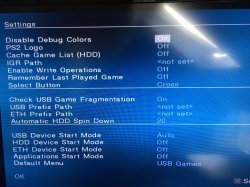
And also configure the OPL settings like below...

- USB Device Start Mode = Auto
- Default Menu = USB Games

...select "OK" and remember to "Save Settings".

OPL Settings.jpg


If you try FMCB / OPL BDM3 on an official Sony PS2 8MB Magic Gate memory card and still nothing is showing up on your clone MX4SIO (called MC2SIO) - then maybe your MC2SIO is broken, contact that angry Helder guy via his website and send it back for a replacement, or whoever sold you that clone.

Internally and externally MX4SIO, (the superior and original product), is not the same as the cheaper clone MC2SIO.
 
@Davide849

Hi bro, I think your issue is probably because you are not using an official PS2 8MB Sony Magic Gate memory card, i see from your previous posts you are using a chinese 64MB clone memory card for FMCB, this is most probably your problem.

Have you tried FMCB installed on an official Sony PS2 8MB Magic Gate memory card, if you haven't yet then i highly recommend you do, and if you are installing the FreeMcBoot onto your Sony PS2 8MB Magic Gate mc yourself, then do a "cross-region" install for best compatibility. Then place OPL BDM3 into the "Boot" folder of the FMCB card, then configure FMCB settings so OPL BDM3 comes up on your FMCB start up list of apps. And make sure to setup PADEMU afterwards correctly, as i explained in my previous post to you.

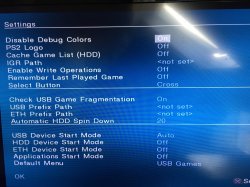
And also configure the OPL settings like below...

- USB Device Start Mode = Auto
- Default Menu = USB Games

...select "OK" and remember to "Save Settings".

View attachment 37747


If you try FMCB / OPL BDM3 on an official Sony PS2 8MB Magic Gate memory card and still nothing is showing up on your clone MX4SIO (called MC2SIO) - then maybe your MC2SIO is broken, contact that angry Helder guy via his website and send it back for a replacement, or whoever sold you that clone.

Internally and externally MX4SIO, (the superior and original product), is not the same as the cheaper clone MC2SIO.
Hi, thanks for the reply. I have a 64 MB Magic Gate memory card in which is stored FMCB, so I think is ok. The mc2sio works pretty fine, and launchs games with some opl versions that supports bdm, like ifcaro and 1.2.0 beta, but it doesn't save. I have a friend of mine memory card (magic gate, 8 MB) I can eventually try to install there FMCB: I also tried to create VCM files, but when I do, the games boots and crashes at the very beginning (tried with Castlevania and Dirge of Cerberus).

Workz 777, ok, I've tried with an original 8mb memory card, and it works! But I think I have messed up with VCM. Each time i start a game I find in the menu a Castlevania vcm, and the games crashes. How can I solve? I've also deleted the opl folder but nothing to do. Do I must format the micro sd?
 
Last edited by a moderator:
Hi guys, i want to troubleshoot my DIY MX4ISO Adapter and could use some help.

This is my System: SCPH-7704, DVD-Player 3.11E, FMCB Version 1.966
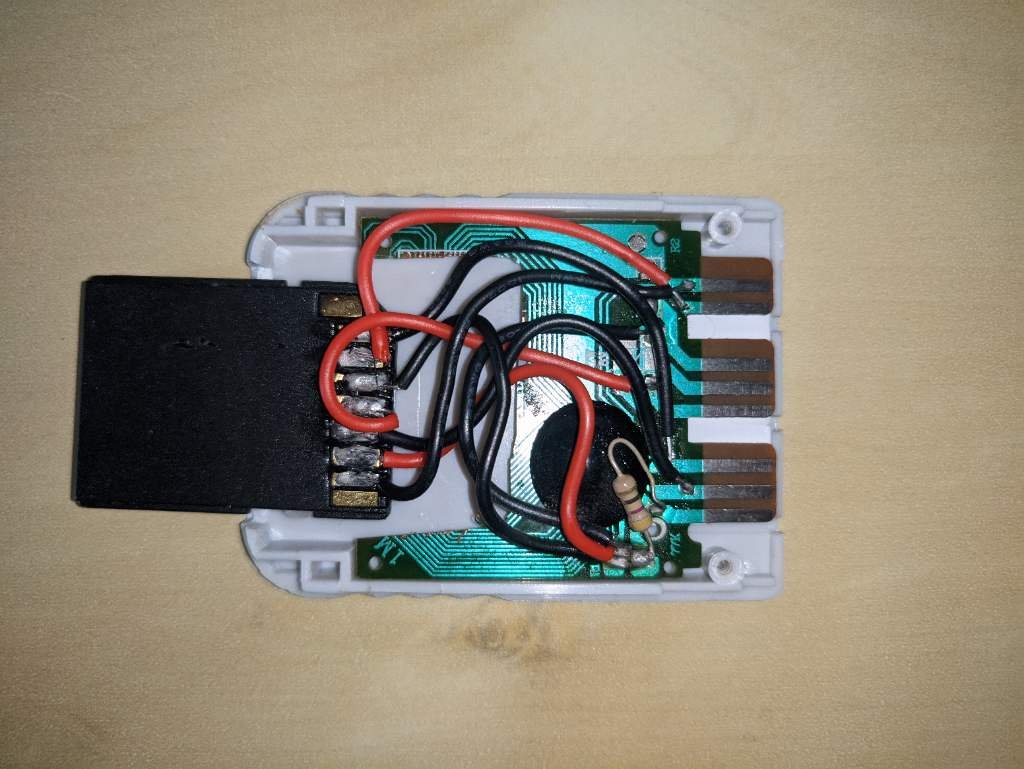
My Adapter looks like this:
I checked all the connections with a multimeter and could not find any issues.
I got a Micro-SD card that has worked in other cases before, according to the Google docs Spreadsheet: Transcend 300S Micro SD with adapter (formatted in FAT32)

After trying out different OPL Versions without success, I switched to using ps2link + test_bdm.elf for checking SD-Card compatibility.
With test_bdm I always get either of these results:
1) The program finishes correctly and reports: "No compatible devices found"
or
2) The program freezes at the point of "Invalid Err Token 00 token 00"

I tested every micro SD card I could find but always got one of those results.
You can see two example logs here: https://pastebin.com/fJHL0XSz Freezing: https://pastebin.com/DXNrbibn

As long as ps2link + test_bdm wont find a compatible device, do I have to bother with OPL or FMCB?
Or can I assume that this test is not influenced by FMCB?

How Important is the SD-card partitioning for this test?
I did not format every SD-card I tested, only the ones I would use with the system.

How can I tell if my Adapter or the SD card is the problem?

Thanks in advance!
 
Workz 777, ok, I've tried with an original 8mb memory card, and it works! But I think I have messed up with VCM. Each time i start a game I find in the menu a Castlevania vcm, and the games crashes. How can I solve? I've also deleted the opl folder but nothing to do. Do I must format the micro sd?

That's good news bro about the 8MB Sony FMCB card, i'm glad it's all working now.

(for now) VMC doesn't work on MX4SIO, so you'll just have to save to the FMCB memory card in Slot 1. Make sure you have those PADEMU settings configured in my previous messages to you.

When your FMCB card starts filling up with game saves, just transfer them to another PS2 memory card (in slot 2) using the browser app in the FMCB, i'm sure you know this already anyways.

Edit:- sorry only just saw your last question.... so just reformat your MicroSD card using GuiFormat FAT32 and select 16k cluster size. Then load up OPL Manager and it should automatically install all the OPL folders on your MicroSD.

You should be using OPL Manager anyways because it can correct any games (you've added to the MicroSD) that don't have their correct Game Titles, otherwise they might not work.
 
Hi guys, i want to troubleshoot my DIY MX4ISO Adapter and could use some help.

This is my System: SCPH-7704, DVD-Player 3.11E, FMCB Version 1.966
My Adapter looks like this:
I checked all the connections with a multimeter and could not find any issues.
I got a Micro-SD card that has worked in other cases before, according to the Google docs Spreadsheet: Transcend 300S Micro SD with adapter (formatted in FAT32)

After trying out different OPL Versions without success, I switched to using ps2link + test_bdm.elf for checking SD-Card compatibility.
With test_bdm I always get either of these results:
1) The program finishes correctly and reports: "No compatible devices found"
or
2) The program freezes at the point of "Invalid Err Token 00 token 00"

I tested every micro SD card I could find but always got one of those results.
You can see two example logs here: https://pastebin.com/fJHL0XSz Freezing: https://pastebin.com/DXNrbibn

As long as ps2link + test_bdm wont find a compatible device, do I have to bother with OPL or FMCB?
Or can I assume that this test is not influenced by FMCB?

How Important is the SD-card partitioning for this test?
I did not format every SD-card I tested, only the ones I would use with the system.

How can I tell if my Adapter or the SD card is the problem?

Thanks in advance!
What OPL versions are you using? ...you should be using OPL BDM3 for MX4SIO. It's on Page 15 of this thread, you can download it there from Maximus32's post near the end of the page. Here is the link to that post:- https://www.psx-place.com/threads/m...-ps2-sio2-interface.29210/page-15#post-275928

It's called:- "OPNPS2LD-v1.1.0-Beta-1629"

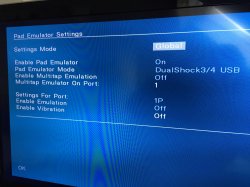
Try with that version of OPL and the OPL settings should be like this... *see images below

OPL Settings...
OPL Settings.jpg

PADEMU settings...
pandemu settings.jpg

Don't forget to press "OK" after you made the changes, and then "Save Settings" after.

Also for best results, use an official Sony PS2 8MB memory card for FMCB, otherwise problems can happen.

EDIT: Also @MrNuggetJr ...please can you post a photo of your DIY MX4SIO so we can take a look at the wiring and see if there is any problem, just to rule stuff out, so we can figure out where your problem is.
 
Last edited:
That's good news bro about the 8MB Sony FMCB card, i'm glad it's all working now.

(for now) VMC doesn't work on MX4SIO, so you'll just have to save to the FMCB memory card in Slot 1. Make sure you have those PADEMU settings configured in my previous messages to you.

When your FMCB card starts filling up with game saves, just transfer them to another PS2 memory card (in slot 2) using the browser app in the FMCB, i'm sure you know this already anyways.

Edit:- sorry only just saw your last question.... so just reformat your MicroSD card using GuiFormat FAT32 and select 16k cluster size. Then load up OPL Manager and it should automatically install all the OPL folders on your MicroSD.

You should be using OPL Manager anyways because it can correct any games (you've added to the MicroSD) that don't have their correct Game Titles, otherwise they might not work.
Ok, thank you. In solved the problem with vmu but I have a problem with compatibility. Many games doesn't work (half of them), and I don't know why. What I have to do to correct already existing game on the memory card? I must change something on game settings (like modes and so on)? Thanks again.
 
Ok, thank you. In solved the problem with vmu but I have a problem with compatibility. Many games doesn't work (half of them), and I don't know why. What I have to do to correct already existing game on the memory card? I must change something on game settings (like modes and so on)? Thanks again.

Few things for game compatibilty...

First check if the games you are testing are on the MX4SIO compatibiliy list as working (green) or not working (red) see link here:- https://docs.google.com/spreadsheets/d/1zHxhwT4nSkrCCAqJNlSndw1Yeh_9g3eL/edit#gid=2095482473...

Just incase...
• Games (ISOs) smaller than 4GB place them into the DVD folder on your MicroSD.
• Games larger than 4GB use app USBUtil to split them into smaller parts, and place on the root of your MicroSD (not in any folders).

• Load up OPL Manager, it will tell you if any of your games have the wrong Game Title, OPL Manager can rename your games with the correct game titles.

Important one... make sure you have PADEMU settings configured to "Global" and "Enabled (ON)" - like the image in my previous posts, don't forget to press "OK" and Save afterwards.

• Don't use a PS1 Dualshock1 controller, because many racing games and a few others won't work with a PS1 DualShock1 connected to the PS2, for best compatibility use a PS2 Dualshock2 controller, or can be a PS3 DualShock3 also.
 
@Workz_777 Here are some uncompressed photos of the adapter: https://postimg.cc/gallery/tJdn8BJ

I just formated the SD card to FAT32 with 16k Blocksize using guiformat, created all the directorys with OPL Manger and copied one iso to the dvd directory. OPL Manager fixed the filename for me.

Also I am now using OPNPS2LD-v1.1.0-Beta-1629 from Maximus32's post. The settings are as you suggested, even though I can not see the Pademu Menu (if i remember correctly this option appears only in a games option menu).

Sadly with the newly set up SD-Card and the new OPNPS2LD I still can not see the game.

btw: I am from Germany.
 
@Workz_777 thanks very much for the list. Tomorrow I will have some try. On Castlevania LOI I had to deactivate the PADEMU (on the US, EU version crashes anyway after a couple of screens), I cannot get to work Dirge, that is said to work. Anyway, even if a good starting point, is a very pain in the a** to get it working properly and 100% :glee:
 
@Workz_777 Here are some uncompressed photos of the adapter: https://postimg.cc/gallery/tJdn8BJ

I just formated the SD card to FAT32 with 16k Blocksize using guiformat, created all the directorys with OPL Manger and copied one iso to the dvd directory. OPL Manager fixed the filename for me.

Also I am now using OPNPS2LD-v1.1.0-Beta-1629 from Maximus32's post. The settings are as you suggested, even though I can not see the Pademu Menu (if i remember correctly this option appears only in a games option menu).

Sadly with the newly set up SD-Card and the new OPNPS2LD I still can not see the game.

btw: I am from Germany.

Thanks bro for the large photos... sorry last night it got late and i didn't reply because it was like 2:30am your time. I looked over your DIY MX4SIO and i noticed a possible short circuit on 2 pins, it seems (from the photos the wires could be touching) ...see the photo here, please check the pins with a multimeter to see if there is a short.

short maybe_MrNuggetJr_MX4SIO.png


EDIT: ...also just incase - never have a USB thumb drive inserted into the PS2 when using MX4SIO, otherwise the list of games on MX4SIO will not show anything - and will result in a blank list.
 
Last edited:
@Workz_777 thanks very much for the list. Tomorrow I will have some try. On Castlevania LOI I had to deactivate the PADEMU (on the US, EU version crashes anyway after a couple of screens), I cannot get to work Dirge, that is said to work. Anyway, even if a good starting point, is a very pain in the a** to get it working properly and 100% :glee:

@Davide849 ...100% do not turn off PadEmu bro, just ask @Algol - he tested lots of games with MX4SIO, and at first he had PADEMU configured to "Per Game" instead of "Global" and many games were not working this way. Then Algol changed PADEMU to "Global" and many games, that weren't working before, now these games worked fine.

MX4SIO + OPL BDM3 needs PadEmu turned on / enabled and set to "Global" to function correctly, without that setting most games might not work.

If the game is already in red on the MX4SIO game compatibility list, then it's probably not going to work for you, with or without PADEMU settings. So look over the list and work with games that are already tested to work (green) and keep PadEmu = Enabled / On and set to Global.

I personally tested 180+ games with PadEmu enabled + global and about 90% of the games worked perfectly with super smooth FMVs.
 
En effet, j'ai indiqué cette option (per game ou pas) quand les jeux en ont besoin. La plupart des compte-rendus en Français sur des jeux PAL ont été fait par moi-même ou par mes amis, sur ma console et chez moi (SCPH-39004). Nous allons les reprendre avec ma Slim (SCPH-70004) et bien plus tard avec ma FAT de modèle SCPH-50004, tous nos jeux seront repris pour vérifier les comptabilités. J'espère que très bientôt @belek666 nous permettra d'avoir des VMCs qui fonctionnent parfaitement sur tous les modèles de consoles possibles.

@+++

Indeed, I indicated this option (per game or not) when the games need it. Most of the reviews in French on PAL games have been done by myself or by my friends, on my console and at home (SCPH-39004). We will resume them with my Slim (SCPH-70004) and much later with my FAT model SCPH-50004, all our games will be resumed to check the compatibility. I hope very soon @belek666 will allow us to have VMCs that work perfectly on all possible console models.
 
@Davide849 ...100% do not turn off PadEmu bro, just ask @Algol - he tested lots of games with MX4SIO, and at first he had PADEMU configured to "Per Game" instead of "Global" and many games were not working this way. Then Algol changed PADEMU to "Global" and many games, that weren't working before, now these games worked fine.

MX4SIO + OPL BDM3 needs PadEmu turned on / enabled and set to "Global" to function correctly, without that setting most games might not work.

If the game is already in red on the MX4SIO game compatibility list, then it's probably not going to work for you, with or without PADEMU settings. So look over the list and work with games that are already tested to work (green) and keep PadEmu = Enabled / On and set to Global.

I personally tested 180+ games with PadEmu enabled + global and about 90% of the games worked perfectly with super smooth FMVs.
Ok, I am here now, I will try as you said. The modes (you know, mode 1, mode 2 and so on, must be all off right?). I will let you know later how is going ;)
 
Ok, I am here now, I will try as you said. The modes (you know, mode 1, mode 2 and so on, must be all off right?). I will let you know later how is going ;)
In the game compatibility list i think games are tested without any modes enabled to begin with, but then if the games doesn't work people tried different modes, and hopefully added that information to the notes in the compatibility spread-sheet.

There is an older site that has (older versions of OPL) modes tested for USB, SMB, HDD and game compatibility, might be worth trying the modes, you can do a search per game and see what modes worked or not there and try them for MX4SIO:- http://sx.sytes.net/oplcl/games.aspx
 
@Workz_777 Thanks for your advise.

I checked the wires with a multimeter but could not find a short. Looking at this pair from the side I can see that the wires do not touch.
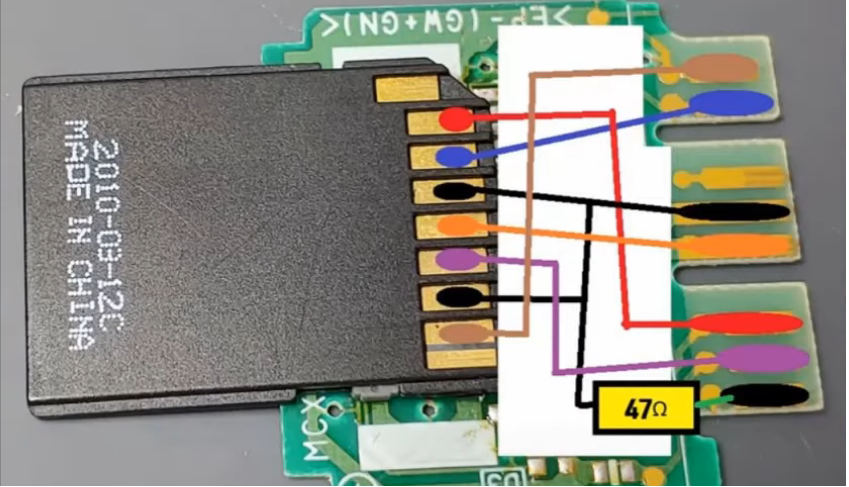
On that note, I checked all of the connection pairwise and can assure that everything corresponds to this diagram:
mx4iso-diagram.png

(alt link: https://postimg.cc/30RTsFzM)
Hardware wise the only things I noticed: My Multimeter shows only 46.5 Ohms for the Resistor. And the Micro-SD Card adapter is slightly out of shape because I got too close to the small plastic parts with the soldering iron (you can also see this in the previous photos)

Thanks for reminding me to remove the usb stick. In some tests I left it plugged.
I did more tests without any USB-Device connected but could not see the game on the SD-card.

I noticed one odd thing software wise: With OPL 1.1.0-Beta-1629 I sometimes can not save the settings changes to mc0.
(it is stuck at "Saving config..." with the 4-dot-symbol turning in the corner)
When I first saw this yesterday I assumed the Memory Card got too hot, after freshly installing FMCB + OPL.
Because After having the console turned off for like 30min everything worked fine again.
But today I ran into this error again, at the first start of the console.

It is not like I have the wrong settings selected when testing. I always double check that USB-Device Start Mode is turned on.
I just have issues saving changes. Maybe this error is inherent to this OPL Beta version. I did not have problems with saving in other OPL Versions (like 1.2) or with saving FMCB-Configurator config.

btw: I am using an original 8MB Sony MemoryCard
 
I tried this afternoon, and I get to work almost all games except for Dirge, that crashes after the first screen, and re4, that crashes in the first loading screen. Something odd happened: Castlevania curse of darkness, that was working very fine until this afternoon, now doesn't boot anymore. I changed nothing in the settings. Anyway I will search for a Phat model+HDD, MC2SIO in not so great as I thought XD
 

Similar threads

Back
Top