
PS2 [MX4SIO/SIO2SD] SD Card Adapter and SD-driver for the PS2 SIO2 interface

I tried this afternoon, and I get to work almost all games except for Dirge, that crashes after the first screen, and re4, that crashes in the first loading screen. Something odd happened: Castlevania curse of darkness, that was working very fine until this afternoon, now doesn't boot anymore. I changed nothing in the settings. Anyway I will search for a Phat model+HDD, MC2SIO in not so great as I thought XD

MX4SIO is amazing! ...it just needs setting up correctly, then the game compatibility is high. I tested RE4 and it works perfectly. The game compatibility list speaks for itself.

If you can't get games working that are proven to work on the compatibility list, maybe it's not fair to say the product isn't good, maybe the fault is with your setup. I don't know about the cheaper clone called "MC2SIO" it's a different product to MX4SIO, so maybe the problem is with the design of MC2SIO and it's faulty.

Let's not confuse MC2SIO with MX4SIO, m'kay ;)
 
@Workz_777 Thanks for your advise.

I checked the wires with a multimeter but could not find a short. Looking at this pair from the side I can see that the wires do not touch.
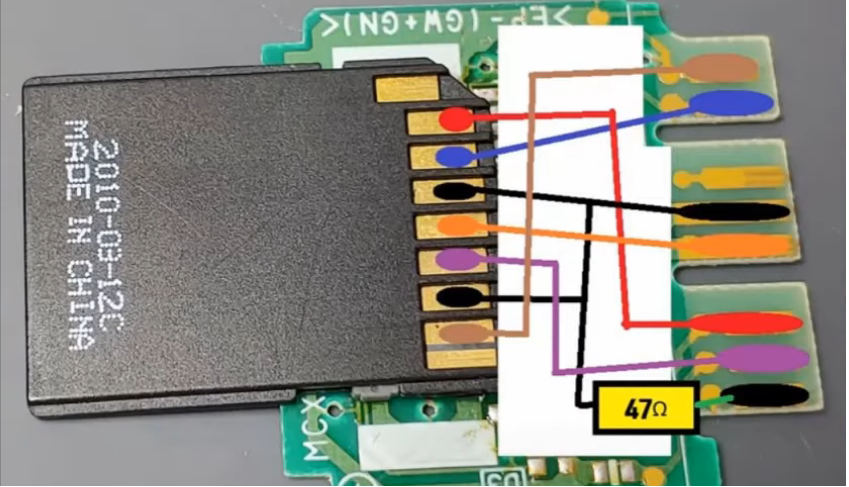
On that note, I checked all of the connection pairwise and can assure that everything corresponds to this diagram:
mx4iso-diagram.png

(alt link: https://postimg.cc/30RTsFzM)
Hardware wise the only things I noticed: My Multimeter shows only 46.5 Ohms for the Resistor. And the Micro-SD Card adapter is slightly out of shape because I got too close to the small plastic parts with the soldering iron (you can also see this in the previous photos)

Thanks for reminding me to remove the usb stick. In some tests I left it plugged.
I did more tests without any USB-Device connected but could not see the game on the SD-card.

I noticed one odd thing software wise: With OPL 1.1.0-Beta-1629 I sometimes can not save the settings changes to mc0.
(it is stuck at "Saving config..." with the 4-dot-symbol turning in the corner)
When I first saw this yesterday I assumed the Memory Card got too hot, after freshly installing FMCB + OPL.
Because After having the console turned off for like 30min everything worked fine again.
But today I ran into this error again, at the first start of the console.

It is not like I have the wrong settings selected when testing. I always double check that USB-Device Start Mode is turned on.
I just have issues saving changes. Maybe this error is inherent to this OPL Beta version. I did not have problems with saving in other OPL Versions (like 1.2) or with saving FMCB-Configurator config.

btw: I am using an original 8MB Sony MemoryCard

Ah good to hear you have no short circuit on those two wires bro. Also saving to OPL BDM3 shouldn't be a problem, it works fine normally. Strange that everything worked fine when the PS2 was turned off for 30mins. It could be something to do with diy adapter maybe?
 
MX4SIO is amazing! ...it just needs setting up correctly, then the game compatibility is high. I tested RE4 and it works perfectly. The game compatibility list speaks for itself.

If you can't get games working that are proven to work on the compatibility list, maybe it's not fair to say the product isn't good, maybe the fault is with your setup. I don't know about the cheaper clone called "MC2SIO" it's a different product to MX4SIO, so maybe the problem is with the design of MC2SIO and it's faulty.

Let's not confuse MC2SIO with MX4SIO, m'kay ;)
May I ask you where I can buy the MX4SIO? I've seen many at Aliexpress but they seems cheap and maybe not so good. Thanks very much ;)
 
May I ask you where I can buy the MX4SIO? I've seen many at Aliexpress but they seems cheap and maybe not so good. Thanks very much ;)

That "Bitfunx" is not MX4SIO either bro, it's a clone and not designed the same.

This is the real MX4SIO (with gold contacts and gold MX4SIO logo), i make these, this is one i made recently for the PSX-Place MX4SIO Mega Pack free give away / lottery. They are 100% to the original dev specs, all the components, everything. If you want one just PM me here on PSX Place.

photo-4-B.jpg
 
That "Bitfunx" is not MX4SIO either bro, it's a clone and not designed the same.

This is the real MX4SIO (with gold contacts and gold MX4SIO logo), i make these, this is one i made recently for the PSX-Place MX4SIO Mega Pack free give away / lottery. They are 100% to the original dev specs, all the components, everything. If you want one just PM me here on PSX Place.

View attachment 37754
PM Sent!
 
Still, how to prepare SD card that isn't small? I got it working few times with exFAT but due to massive fragmentation I had to format it and now doesn't even lists games. I, obviously, mean OPL betas 1.2.0. :D
 
Still, how to prepare SD card that isn't small? I got it working few times with exFAT but due to massive fragmentation I had to format it and now doesn't even lists games. I, obviously, mean OPL betas 1.2.0. :D

Hey @Haker120, yes i have been reading your progress and reports with exFAT + MX4SIO testing for Acid Snake's exFAT OPL Beta v1.2.0 thread, it's a shame it's not working yet with exFAT, that would be so cool for games larger than 4GB, wouldn't need to use USBUtil for spitting them down in parts anymore. Hopefully they can get it working for MX4SIO, but maybe that's not Acid Snake's priority with this project.

EDIT: But does it work for larger SD/MicroSD cards? Like 128GB cards that are already in exFAT format?
 
It did for me until fragmentation messed up with my 256GB Verbatim mSD card. Shame I don't remember how it was formatted. XD
 
It did for me until fragmentation messed up with my 256GB Verbatim mSD card. Shame I don't remember how it was formatted. XD

Oooooo... so first your 256GB Verbatim was exFAT when you originally got it, then you formatted it to FAT32 for MX4SIO, then you formatted it back to exFAT for the OPL v1.2.0 beta exFat tests, and back again to FAT32? ...but now it's not showing any games, oh no.

Have you been using GUiFormat for the formatting process?

I would also like to test, but i can't risk my 128GB Toshiba Exceria not working after :dejection:
 
You don't risking of stop working a storage just by changing logic structure (in assumption that this logic structure is supported by target device/app). In other words: You can format card for whatever You want, doesn't matter if this is FAT32 or exFAT etc. Currently OPL supporting only FAT12/16/32 on MBR for all BDM devices, and exFAT on MBR for USB. Another factor worth to take in mind is cluster size (I don't know how large is supported) and game fragmentation (which shouldn't be any). If logic structure is supported but card stopped to be recognized, problem lies elsewhere.
 
You don't risking of stop working a storage just by changing logic structure (in assumption that this logic structure is supported by target device/app). In other words: You can format card for whatever You want, doesn't matter if this is FAT32 or exFAT etc. Currently OPL supporting only FAT12/16/32 on MBR for all BDM devices, and exFAT on MBR for USB. Another factor worth to take in mind is cluster size (I don't know how large is supported) and game fragmentation (which shouldn't be any). If logic structure is supported but card stopped to be recognized, problem lies elsewhere.

Ahh i see, thanks @Berion ...so for now OPL beta v1.2.0 doesn't support MX4SIO with exFAT. I wonder how @Haker120 managed to get his 256GB MicroSD formatted so it was (kind of) working with MX4SIO + OPL v1.2.0 + exFAT.

Maybe Haker120 you need to re-format your 256GB card with fresh MBR partition and FAT32 so you can use it again with MX4SIO and OPL BDM3 if you are having problems. For this i use "GParted" for creating MBR partitions and also for formatting, but it needs to be on a bootable USB drive. You can use Rufus for making the bootable USB drive.

Here is the GParted link:- https://gparted.org/download.php

Edit:- When you are using GParted, first select the 256GB microSD from the drop down menu, then right click on the 256GB MicroSD and select "Delete" > "Apply"

Once done, then select "Device" > "Create New Partitions" > MBR.

Then once that is done, right click again on the empty 256GB card and select "New" > "Fat32" and "Apply".

That should fix your MicroSD card bro, and get it working again with MX4SIO on FAT32 like before.
 
Last edited:
I 'updated' OPL, I mean from initial exFAT fork to official beta 1.2.0 and again few versions and stopped working between updates iirc., few days is a lot of time, and quick format to FAT32 with one CD compatible game proves this mSD is still compatible with MX4SIO. :)
 
I 'updated' OPL, I mean from initial exFAT fork to official beta 1.2.0 and again few versions and stopped working between updates iirc., few days is a lot of time, and quick format to FAT32 with one CD compatible game proves this mSD is still compatible with MX4SIO. :)

Oh so it's working again, ah cool ok, well please ignore my previous message about GParted lol, all good :D
 
The odd thing, now exFAT formatted mSD lists only CD games without covers, when on, and OPL cannot run any and listing and choosing any is extremely slow.
 
The odd thing, now exFAT formatted mSD lists only CD games without covers, when on, and OPL cannot run any and listing and choosing any is extremely slow.

You mean with OPL Beta v1.2.0 with exFat fork? ...or just regular OPL Beta v1.2.0? Well bro see my previous post about "GParted" and refomatting with new / fresh MBR partitions, sounds like (from what you describe) this would help your mSD card come back to working at 100% again.
 
Maybe Haker120 you need to re-format your 256GB card with fresh MBR partition and FAT32
You misleading two different things. Partition table like e.g MBR is something totally different than partition iteself (formatted to whatever filesystem, e.g FAT32). Any storage could even don't have any partition table (but OPL will not see it unfortunately).

For this i use "GParted" for creating MBR partitions and also for formatting (...) Once done, then select "Device" > "Create New Partitions" > MBR.
Completely wrong. ;) Partition table user can choose from different menu, and it is not called "MBR" but "msdos" there.

And BTW: GParted is great tool.

but it needs to be on a bootable USB drive. You can use Rufus for making the bootable USB drive.
Again, no! :P "Bootable USB" is quite wide term because in MBR, bootable app is put inside MBR, while ie. on GPT is put inside partition called EFS. In MBR, bootable partition (to which bootstrap in MBR pointing to) is flagged as "boot". However, OPL don't understand it, don't need it, ignoring it. This is not anyhow related to PS2 and OPL but for PC and operating systems which can be launched by two above methods (and BIOS, EFI or UEFI must understand it too).
 
You misleading two different things. Partition table like e.g MBR is something totally different than partition iteself (formatted to whatever filesystem, e.g FAT32). Any storage could even don't have any partition table (but OPL will not see it unfortunately).


Completely wrong. ;) Partition table user can choose from different menu, and it is not called "MBR" but "msdos" there.

And BTW: GParted is great tool.


Again, no! :P "Bootable USB" is quite wide term because in MBR, bootable app is put inside MBR, while ie. on GPT is put inside partition called EFS. In MBR, bootable partition (to which bootstrap in MBR pointing to) is flagged as "boot". However, OPL don't understand it, don't need it, ignoring it. This is not anyhow related to PS2 and OPL but for PC and operating systems which can be launched by two above methods (and BIOS, EFI or UEFI must understand it too).

Thank you @Berion, it's important to learn something new every day, and you have helped me learn and understand this better.
 
Hey everyone, hopefully those who have MX4SIO or a variant of it having good times, and to those who are still working out troubleshooting issues, well, hopefully you figure it out too.

A question for @Workz_777 or anyone else related to BDM3 opl 1629 build.

So on my official Sony 8MB memory card, using official OPL 1.1.0, I can save my OPL settings fine.

Now I go load up BDM3, and I change my settings to match what I had basically for OPL 1.1.0, and when I go to save settings, I get the circle cursor thing in the lower right hand corner and it spins forever, it is like it never saves.

I've done things like delete the OPL folder using Ulaunchelf, and try to save settings with BDM3 first, and that doesn't work.

I know I got this to work properly in the past, but I'm not sure what I did now where it is not working. Maybe I should just format the memory card, reinstall FMCB, and try this fresh again?

Any other tips please share. I think I had too much sun or something and I am missing some small detail... :)
 
Hey everyone, hopefully those who have MX4SIO or a variant of it having good times, and to those who are still working out troubleshooting issues, well, hopefully you figure it out too.

A question for @Workz_777 or anyone else related to BDM3 opl 1629 build.

So on my official Sony 8MB memory card, using official OPL 1.1.0, I can save my OPL settings fine.

Now I go load up BDM3, and I change my settings to match what I had basically for OPL 1.1.0, and when I go to save settings, I get the circle cursor thing in the lower right hand corner and it spins forever, it is like it never saves.

I've done things like delete the OPL folder using Ulaunchelf, and try to save settings with BDM3 first, and that doesn't work.

I know I got this to work properly in the past, but I'm not sure what I did now where it is not working. Maybe I should just format the memory card, reinstall FMCB, and try this fresh again?

Any other tips please share. I think I had too much sun or something and I am missing some small detail... :)

Hey @Versatile how are you bro? ...yeah it's been a while since i had that problem too.

Like you said, you could try to re-format the PS2 (FMCB) memory card and then install "cross-region" FMCB v1.966 and install OPL BDM3 only. This is what i always do now and don't have the OPL save config issue. I think this BDM3 save config problem might be happening with "Multi-Install" / "Cross-model" installation of FMCB memory cards, but i've not tested it myself.

If the problem is still there after you tried that, then install OPL v.1.1.0 and try to change and save the settings with that version, then open OPL BDM3 and again try to change and save some settings, if you still get that never ending circle when trying to save settings with BDM3 - then restart PS2 > open UlaunchELF > file browse the FMCB on mc0 and check inside the OPL folder for any files with 0 bytes (or 1 byte only) and delete them. Then restart and try again with OPL BDM3 settings and see if they save now.
 
Last edited:
Hi all,

Been tinkering around with Helder's MC2SIO and having no luck loading into anything, unfortunately.

Running latest version of FMCB (1.966), and the specified version of OPL that his site has up for the MC2SIO. I have a 77000 Silver model, so I'm using the OPLPS2LD2.ELF file rather than the standard one for below the 7000 series. My SD card is a TEAMGROUP GAMING 256GB SDXC, formatted to FAT32 with GUIFormat, 16KB clusters (took forever). I chose this card as multiple people have confirmed that TEAMGROUP SD cards are working, both here and on Reddit, and it was on sale and has a hefty amount of storage space. My PS2 is hooked up via OEM Component Cables to an Open Source Scan Converter, and led via HDMI into my LG CX65 OLED.

Followed both Nacho and MrMario's videos to a T, and have basically gotten all the way to the end - OPL loads up properly, and shows all my games (at this point in time, just R-TYPE FINAL and Ridge Racer V for testing, as they are listed as Working in the compatibility Google Spreadsheet). I just can't boot into anything. I launch the game from OPL, and am met with a black screen nearly every time. I've tried on almost a dozen ISOs now, and the only thing that has ever booted in at all is F1 2002 (EA), which got to the main menu but failed to load up gameplay or FMVs. Every other game has not booted. I've tried all major game strata - USBUTIL-split >4GB games, <4GB ISOs and <700MB CD games, all the same. Black screen on launch, MC2SIO light unresponsive.

I've tried compatibility modes as well, to no avail. For example, Ridge Racer V apparently works better with only Mode 6 enabled, but changingthat didn't do anything for me either.

I'm starting to wonder if it's the SD card, or a compatibility problem, or I've simply arrived too early to this project. I've even deleted and repasted a fresh /OPL folder on my FMCB card to see if it was something wrong with OPL itself, but that's not looking likely. I may just load games onto my USB drive itself and see if anything boots, even though I abandoned doing that years ago when I saw how bad the FMV stutter was.

I'd appreciate confirmation/help from anyone that's come across this issue, as this project is looking like a dead end for me for now if I simply can't load into anything.

Cheers.

I'm in the same boat as this user as of yesterday.

I bought a FMCB and MC2SIO memory card both from Helder's Tech back in mid April to try to extend life out of my PS2 slim (Model SCPH-70001, US region), which has been struggling to read discs lately. I was sold from the Nacho video that it looked like a relatively easy and cheap setup to do. I also purchased the TEAMGROUP 256GB SD card and formatted it to FAT32. Everything seemed to work as expected for the first couple of months. Games listed as working as compatible would work, and games I didn't see on the list were a diceroll if it worked or not.

I had been using a Dualshock 2 controller in slot 1 for all the games and decided to try out an adapter to use a more modern controller for the system, so I purchased a Brook Super Converter to try out the PS4 controller. The adapter worked, but on the same day I'm now unable to launch any of the games through OPL anymore - I get the flashing colors followed by a screen flicker and then finally black screen, even for games that were previously working and categorized as compatible in the spreadsheet.

Switching back to the Dualshock 2 hasn't yielded any productive results, I already had PADEMU activated, and I've tried enabling the different Mode's in OPL settings and haven't had any luck there either. I want to think that using the adapter might have messed some setting up in FMCB or in OPL, but I'm not too experienced with modding this system much other than what I've learned from getting MC2SIO setup.

Thanks.
 

Similar threads

Back
Top