
PS2 [MX4SIO/SIO2SD] SD Card Adapter and SD-driver for the PS2 SIO2 interface

I'd like to request some support with my MX4SIO setup.
The first time I use the SD card (after setting it up on Windows) OPL detects it and the games run fine (tested Metal Slug Anthology and God Of War (DVD9) isos).
But the card corrupts when I shutdown/reboot the PS2.
And by corrupts I mean OPL doesn't detect it afterwards and when I plug it back on Windows it says it must be formatted in order to be used.

I'd appreciate any suggestions for things to change/test.

My setup:
PS2 PAL 90004
Original 8MB memory card as MC0
Latest FMCB and OPL (v1.2 - 1.1 has the same behavior)
DIY MX4SIO adapter (image below) as MC1
SD cards: Kingston Canvas Select Plus 32GB, Patriot EP Series MICRO SDXC V30 A1 128GB (same behavior)
SD formatted with either GuiFormat (FAT 16KB sectors) or Windows 10 format (exFAT 64KB sectors)
Card prepared with OPL Manager (creates folders)
Games copied to SD with Windows (in DVD folder)
Then OPL Manager used to fix filenames (I don't download Art).
Then I run Deflaggler in case it requires defragging.

MX4-SIO-diy.jpg
 
Last edited:
Any progress for Slim support? Tested all three opl bdm (two 1.1 and 1.2) and all i've got is loadrd games list (if even - on 1.2 can't detect mx4sio). Test on slim scph-77004.
 
  1. Slims are supported since years...
  2. There is no OPL 1.2.0... Just a 1.2.0 Beta.
I mean OPL builds from m page 15

I'm asking 'cause i' m using the same sony mc, the same mx4sio with sd on my phat and everything works good, byt now i've got slim and tried to boot. And results are:
Build 1627 does not work - act like there is no mx4sio connected
Build 1629 bdm3 load game list then freeze
Build 1.2.0 beta the same like 1627

I didn't check for new OPL (BDM4) - and with it it works like a charm :D
 

Thanks this worked for me on a Samsung Evo Select

but how do i make the 2nd Opl show up in the menu after boot? Thanks​
 
Does enyone tried usb accesiories? I've tried Singstar mics and game "theoreticly" detects them (if i run game withou usb mic plugged popup appers that mics aren't connected and this popup dissapear when i connect them). But "ingame" both mics aren't working - no sound detected :(
 
Does enyone tried usb accesiories? I've tried Singstar mics and game "theoreticly" detects them (if i run game withou usb mic plugged popup appers that mics aren't connected and this popup dissapear when i connect them). But "ingame" both mics aren't working - no sound detected :(

Yeah I got keyboard + mouse to work on Half-Life.
Though the USB Mouse controls are not that good lol... don't know if its supposed to be like that or not.
 
Didn't test them from smb/hdd, only from mx4sio via opl bdm4 and disc drive.

Thanks this worked for me on a Samsung Evo Select

but how do i make the 2nd Opl show up in the menu after boot? Thanks​

Use FMCB Configurator from main menu (which is called OSDSYS). In this configurator select "configure osdsys options" then "configure item X" (x is next free number after last used entry). There write name, select path to elf and click ok. Remember to save configuration to mc0.

Does enyone tried usb accesiories? I've tried Singstar mics and game "theoreticly" detects them (if i run game withou usb mic plugged popup appers that mics aren't connected and this popup dissapear when i connect them). But "ingame" both mics aren't working - no sound detected :(

Self quoting :D

Singstar mics are WORKING :) Pademu must be disabled. Tested Singstar 80's.
 
Last edited by a moderator:
Dummy Data removal to reduce ISO size.
I have used the free trial version of UltraISO to succesfully delete dummy data from games such as Pitfal Mayan Adventure and Rubble Roses to reduce ISO size with no impact on game play, however it cannot handle Sonic Mega Collection Plus. (I learned of UltraISO from The Coleco Colem threads for which it works perfectly).
Thanks to Tna for the advice around LBA. I'm still new to all this and had to look that up. I can confirm that the LBA numbers remain the same after removing dummy data as above using UltraISO and those reduced ISO's work perfectly. However Anyburn does change LBA.
 
I'd like to request some support with my MX4SIO setup.
The first time I use the SD card (after setting it up on Windows) OPL detects it and the games run fine (tested Metal Slug Anthology and God Of War (DVD9) isos).
But the card corrupts when I shutdown/reboot the PS2.
And by corrupts I mean OPL doesn't detect it afterwards and when I plug it back on Windows it says it must be formatted in order to be used.

I'd appreciate any suggestions for things to change/test.

Your situation sounds very similar to what I had several months ago. My issues were all solved when I began using BDM4. Is that what you're using right now?

Yeah I got keyboard + mouse to work on Half-Life.
Though the USB Mouse controls are not that good lol... don't know if its supposed to be like that or not.
Singstar mics are WORKING :) Pademu must be disabled. Tested Singstar 80's.
Do either of you know if Lightgun accessories work with BDM4?
 
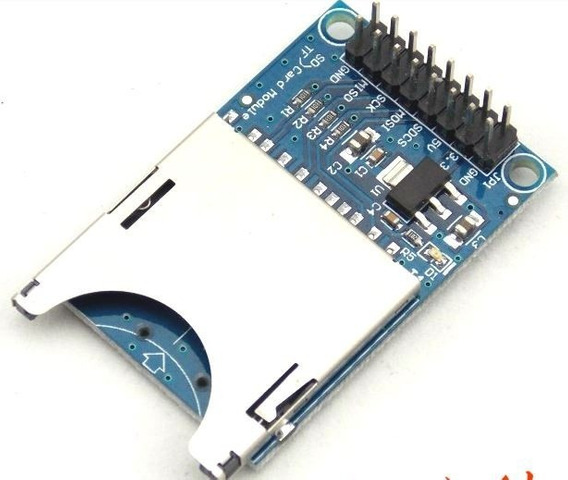
Hi guys, first of all I don't speak English, I'm using the google translator; I would like to know if you could help me with a problem that I have with this arduino sd module that I am using in my PS2; the game loads normally but at some point in the game the console freezes; help me :(
D-NQ-NP-891970-MLA27968899733-082018-W.jpg
 

Similar threads

Back
Top