PS2 My ps2 freezes in the first loading screen *[SOLVED]*

I think i have 16gb usb does it work ?

Not all of them work, I also have a 16GB one and if it works for me, it's a matter of trying.

And how do i check the opl compatibility list ?

https://www.psx-place.com/threads/open-ps2-loader-game-compatibility-lists.19037/

Oh by the way when i turn on my ps2 i hear a weird clicking sound could it be physical chip ?.

One click? The console makes noise and it is normal but a click? By not listening to it I wouldn't be able to know if it's normal.


I tried to run the game with different usb but still the same problem
I don't think it will ever work

Make a backup of what you have and format it to fat32 and only put a game that doesn't work for you, of course, as long as it is compatible with OPL (see compatibility).
 
I see. As I said, if your Ps2 is previous to 5000X it would be much better to use an USB HDD instead of a pendrive (or even better an internal one). But most probably the issue about Berserk is a bad ISO.

That game, with or without ita/eng patch works with any OPL version (on some OPL versions it freezes when accessing the "World of Berserk" screen but everything else works).
I downloaded the latest fmcb and opl versions but still it doesn't work fu*k this game I'll play other games man

تم الإرسال من RMX2170 باستخدام Tapatalk
 
There is no physical chip then.

Have you gotten God of War 2 working? It is already profit.

The second thing, as @arcadekidflo said, try another USB device and I recommend that you make one game at a time from the ones that don't work yet, don't forget to check the OPL compatibility list.
I downloaded the latest fmcb and opl versions and this didn't work too.

تم الإرسال من RMX2170 باستخدام Tapatalk
 
I downloaded the latest fmcb and opl versions and this didn't work too.

تم الإرسال من RMX2170 باستخدام Tapatalk

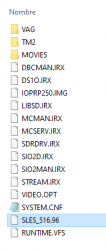
Check what region ID you have
1.- Right click on the iso image
2.-Open with Windows Explorer
3.- See "ID"

ejemplo_id_region_iso_ps2.png

Try the region ID "SLPM_656.88" of the Bersek game (Japanese version).
 
Not all of them work, I also have a 16GB one and if it works for me, it's a matter of trying.


https://www.psx-place.com/threads/open-ps2-loader-game-compatibility-lists.19037/


One click? The console makes noise and it is normal but a click? By not listening to it I wouldn't be able to know if it's normal.


Make a backup of what you have and format it to fat32 and only put a game that doesn't work for you, of course, as long as it is compatible with OPL (see compatibility).
I don't know it's like fast button clicking

I already did format my usb to fat32 but i guess this game is unfixable

تم الإرسال من RMX2170 باستخدام Tapatalk
 
There is only one region which it's Japanese and my version is japanese of course
And it's id slpm_656.18

تم الإرسال من RMX2170 باستخدام Tapatalk

I don't know if there are two versions but the one I told you about is in this compatibility list which I told you to check.
https://docs.google.com/spreadsheets/d/1MLEw7TIKvn9MCwd5Ptbqh2lkUj3lX6YQ2wPgLEx8Koo/edit#gid=0

Of course it says that it is for internal HDD but you don't lose anything by trying, you still have the possibility of trying it over the network but we go in steps.
 
I don't know if there are two versions but the one I told you about is in this compatibility list which I told you to check.
https://docs.google.com/spreadsheets/d/1MLEw7TIKvn9MCwd5Ptbqh2lkUj3lX6YQ2wPgLEx8Koo/edit#gid=0

Of course it says that it is for internal HDD but you don't lose anything by trying, you still have the possibility of trying it over the network but we go in steps.
Well i don't want to buy internal hhd because it's a little expensive and im trying to collect some money to buy a pc so i will definitely play berserk on pc

تم الإرسال من RMX2170 باستخدام Tapatalk
 
Well i don't want to buy internal hhd because it's a little expensive and im trying to collect some money to buy a pc so i will definitely play berserk on pc

تم الإرسال من RMX2170 باستخدام Tapatalk

Again you misunderstood me, I am not telling you to buy a hard drive, when I said that you had nothing to lose by trying I meant that you should try via USB.

It seems suspicious to me that you have another "ID". Maybe your iso is wrong, that's why I tell you to try the iso with the ID "SLPM_656.88"
 
Again you misunderstood me, I am not telling you to buy a hard drive, when I said that you had nothing to lose by trying I meant that you should try via USB.

It seems suspicious to me that you have another "ID". Maybe your iso is wrong, that's why I tell you to try the iso with the ID "SLPM_656.88"
Oh sorry i meant SLPM_656.88 i wrote .18 instead

تم الإرسال من RMX2170 باستخدام Tapatalk
 
Oh sorry i meant SLPM_656.88 i wrote .18 instead

تم الإرسال من RMX2170 باستخدام Tapatalk

I just tested it on an American Slim console with a Matrix chip and here is my report:

This is what I used:

1.- Official OPL 1.1.0
2.-Kingston 16 GB USB flash drive to FAT 32 recently formatted and with a single game.
3.- The game with the ID "SLPM_656.88" and with an English patch.


USB method:

The game works fine.

Network Method:

You must activate mode 6 in the OPL configuration or the screen will remain black.

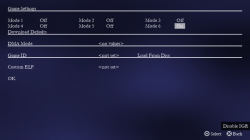
To do this, once OPL is launched and the game is highlighted, press "triangle" to enter the game settings.

Once there click on "Game Settings"
OPL_Game_Settings.png

Activate "Mode6" click "OK" and save the changes.

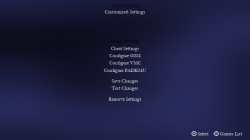
OPL_Modes.png

Edit: Use USButil to move the game into memory.
 
I just tested it on an American Slim console with a Matrix chip and here is my report:

This is what I used:

1.- Official OPL 1.1.0
2.-Kingston 16 GB USB flash drive to FAT 32 recently formatted and with a single game.
3.- The game with the ID "SLPM_656.88" and with an English patch.


USB method:

The game works fine.

Network Method:

You must activate mode 6 in the OPL configuration or the screen will remain black.

To do this, once OPL is launched and the game is highlighted, press "triangle" to enter the game settings.

Once there click on "Game Settings"
View attachment 41432

Activate "Mode6" click "OK" and save the changes.

View attachment 41433

Edit: Use USButil to move the game into memory.
thats right the game is 4gb it needs usbutil i will do this tomorrow.

And what do you mean by network method?

تم الإرسال من RMX2170 باستخدام Tapatalk
 
thats right the game is 4gb it needs usbutil i will do this tomorrow.

And what do you mean by network method?

تم الإرسال من RMX2170 باستخدام Tapatalk


OPL allows you to connect your console to a shared folder from your PC, the cinematics of some games flow better than via USB.
 
OPL allows you to connect your console to a shared folder from your PC, the cinematics of some games flow better than via USB.
Does activating mode 6 just include network method or i can do it with usb method?

تم الإرسال من RMX2170 باستخدام Tapatalk
 
First try the USB method with USBUtil. As I said, let's go in steps.


In my case it only needed to be done with the network method, you don't lose anything by trying via USB.
It didn't work.
My version is japanese version not the English patch does it make difference?

تم الإرسال من RMX2170 باستخدام Tapatalk
 
which surprises me, since it works on an American console and the game is Japanese and you have a Japanese console.
It could be that your iso is wrong, try the one with the English patch that I used.


The only way to know is to try it.
I didn't download the English patch yet because of my internet its so slow i dont know why.

But i just discovered something i remembered that i have 1.1.0 opl and tried to run berserk with it and and an error shows up "error. The game is fragmented"
I went to my laptop and opened auslogic now im defragging it im hoping for the best

تم الإرسال من RMX2170 باستخدام Tapatalk
 
I didn't download the English patch yet because of my internet its so slow i dont know why.

But i just discovered something i remembered that i have 1.1.0 opl and tried to run berserk with it and and an error shows up "error. The game is fragmented"
I went to my laptop and opened auslogic now im defragging it im hoping for the best

تم الإرسال من RMX2170 باستخدام Tapatalk
great now it doesn't want to be defragmented, theres some red boxes that its related to berserk which it needs to be defragmented but when i press defrag it doesn't get defragmented the problem with this game will never get to an end

تم الإرسال من RMX2170 باستخدام Tapatalk
 

Similar threads

Back
Top