PS3 NEED HELP 1MBPS

hi i really need help ive been having this problem for around 6 months and cant find no way to solve it on google, im sorry if this is posted in wrong section its my first time posting on here.

anyway im on rebug 4.82 dex running latest rebug toolbox everything is up to date, i have been trying to transfer gta (17GB) and everything i transfer is writting to my hdd at 1mbps. ive tryed ftp over wifi, ftp over ethernet and usb but everything is transferring at 1mbps even game updates from sony are 1mbps. ive completely formatted my hard drive and reinstalled rebug ive tryed several hard drives ive tryed everything i personally think its a setting i may have changed in the past and cant figure it out please HELP!!!
 
Which version of windows are you using?.
Have you tried bridging connections using ethernet?

Edit: You've tried several harddrives it seems... So you're not bridging the connections properly
 
Last edited:
im running windows 7 as i dont like windows 10 but yes i did bridge the connection but besides that ive tryed with an external hard drive but still 1mbps and ive tryed several internal hard drives
 
I'll make this as simple as I can

Requirements : http://www.psx-place.com/resources/pkg-linker-v1-0-scan-and-serve-packages-to-ps3-from-pc.630/

Pc STEPS:
1)Connect pc and ps3 via ethernet
2) On your pc Go to networksettings>wireless>properties>IPv4
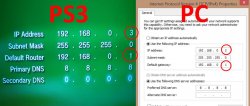
3) add a Fake Gateway/Default Router ex :192.168.0.1 & add any IP adress you like for instance 192.168.1.102,
4) Subnet mask must be 255.255.255.0 & dns servers (for making it static) 8.8.8.8, 8.8.4.4

PS3 STEPS
1) Go to network settings>when you reach ipadress click manual
2) Add the same gateway for DEfault router :192.168.0.1 & ADD a different adress from which you gave your pc like if your pc uses 192.168.1.102, use 192.168.1.103 on your ps3
3) Use the dns 8.8.8.8, 8.8.4.4 (It doesn't change anything but to make sure) & use subnet mask 255.255.255.0
4) Rescan with app and then Install Package_List.pkg again manually via USB after any port or IP change on the server.

Now you must get speeds upto 1GPBS.
 

Attachments

  • cHerXik.jpg
    cHerXik.jpg
    67.6 KB · Views: 164
Make sure to download PKG Linker...

Also Are you sure updates from sony *INSTALL (not download) 1mbps only? if so you might have a failing HDD

no i had this problem a while ago and i took the 1tb hdd from my ps3 and put it in my laptop and put my laptop hdd in my ps3 and reinstalled cfw and i think this is the 3rd drive ive tryed in there with the same problem
 

Attachments

  • Untitled.png
    Untitled.png
    182.6 KB · Views: 205
Last edited by a moderator:
You could try manually setting the priorities of LAN and Wifi so your internet is going through the wfi and FTP through LAN.

upload_2018-12-31_10-23-20.png


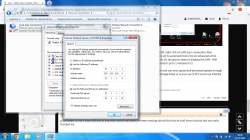
Right click on Network, then properties, Then select Change adaptor properties to the left, right click on LAN your connection, then properties, select Internet protocol version 4 then properties. Make sure IP and DNS are set to automatic then click on advanced at the bottom. On the next bit uncheck automatic metric, then in interface metric put 2. then ok, ok ,ok back to where it displays the LAN - Wifi connections and then do the same for WiFi but when you get to the last bit in Interface metric put a 1 instead of a 2.

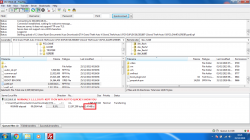
Now your PC will use the WiFi for internet leaving the LAN conection free of data traffic that can slow upload and download speeds through FTP, and then you can set you ps3 up for LAN connection to your router and then use Package linker or as your on CFW I would use FileZilla to connect to your PS3 and transfer files.
 
to be honest im not a noob with cfw or any other tech to be honest ive been messing with all this kind of stuff since a kid but this has really stumped me

You could try manually setting the priorities of LAN and Wifi so your internet is going through the wfi and FTP through LAN.

View attachment 14240

Right click on Network, then properties, Then select Change adaptor properties to the left, right click on LAN your connection, then properties, select Internet protocol version 4 then properties. Make sure IP and DNS are set to automatic then click on advanced at the bottom. On the next bit uncheck automatic metric, then in interface metric put 2. then ok, ok ,ok back to where it displays the LAN - Wifi connections and then do the same for WiFi but when you get to the last bit in Interface metric put a 1 instead of a 2.

Now your PC will use the WiFi for internet leaving the LAN conection free of data traffic that can slow upload and download speeds through FTP, and then you can set you ps3 up for LAN connection to your router and then use Package linker or as your on CFW I would use FileZilla to connect to your PS3 and transfer files.


did that aswell when i was trying to sort it earlier still 1-2mbps
 

Attachments

  • Untitled.png
    Untitled.png
    332.5 KB · Views: 107
Last edited by a moderator:
I must point out though that I have a separate router with no internet access (All my PS3 are connected to my PC this way) and one with internet access to do this but this way should work like a charm either way, if not you have serious issue with your PS3.
 
I must point out though that I have a separate router with no internet access (All my PS3 are connected to my PC this way) and one with internet access to do this but this way should work like a charm either way, if not you have serious issue with your PS3.


ive stripped the system to barebone before aswell and all looks good
 
If all Hope is lost.. whether to confirm if it's the prob with PS3 Or not try
Putting that harddrive in a Desktop/Laptop & completely reformat it.
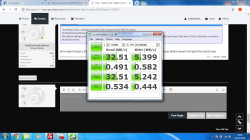
No need to defrag, but check for bad sectors. Then download some app that checks hdd transfer speed and report that here. If that's bad then you have a faulty hard drive.
 
If all Hope is lost.. whether to confirm if it's the prob with PS3 Or not try
Putting that harddrive in a Desktop/Laptop & completely reformat it.
No need to defrag, but check for bad sectors. Then download some app that checks hdd transfer speed and report that here. If that's bad then you have a faulty hard drive.


ok gonna have a little bit of fun while its working then ill try it and ill let you know thanks for the help will report back soon
 
Try going into the configuration window in Cypher's first screenshot, then go to Configure > Advanced > Link Speed & Duplex

Change this to the maximum speed, after doing this you shouldn't be throttled at all unless it's a problem with your PC, ethernet cable or other setup issue.
 
If all Hope is lost.. whether to confirm if it's the prob with PS3 Or not try
Putting that harddrive in a Desktop/Laptop & completely reformat it.
No need to defrag, but check for bad sectors. Then download some app that checks hdd transfer speed and report that here. If that's bad then you have a faulty hard drive.


ok im about to put a 1tb drive in the console AGAIN im going to run hard drive speed test on pc before aswell i will post the results soon
 
If all Hope is lost.. whether to confirm if it's the prob with PS3 Or not try
Putting that harddrive in a Desktop/Laptop & completely reformat it.
No need to defrag, but check for bad sectors. Then download some app that checks hdd transfer speed and report that here. If that's bad then you have a faulty hard drive.


i dont know if this is good or bad never used this program and im about to put my 1tb in after ive backed it up ill run speed test on it then ill put it in ps3
 

Attachments

  • Untitled.png
    Untitled.png
    262.1 KB · Views: 140
Back
Top