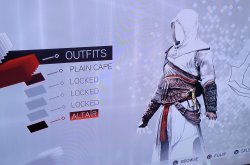
@Devildwarf Do I need to get *my* AC2 save? Or do I need one from another user and resign it with my IDS? How do I manage the OPTION file? Do I need to create a save using BSD and then inject the option file into it? I'm lost. Help! Haha.
Also, for the OPTION file, I just need to copy-paste the contents of the lastest OPTION file post into a txt file and then change it to dat, correct?

Ubi made it so that you cannot copy AC2 savefiles from PS3 to an USB, so you cannot bring them to your pc. This means that you need to use an OPTIONS file uploaded by someone else who got it from a CFW(Custom Firmware, not Original Firmware, the ps3 without any modifications). While you cannot transfer an AC2 OPTIONS file from PS3 to USB, you can do it the other way around; you can override the PS3 AC2 OPTIONS file by another OPTIONS file stored in an USB.
I would recommend backing up all your PS3 data before trying to do this just in case something goes wrong. Your AC2 PS3 savefile (the .sav one, no the OPTIONS one) shouldn't modified at all, only the OPTIONS file is going to be overriden by the one that has uplay stuff unlocked.
You can download an AC2 PS3 save file
here. That link has an entire set of save datas and one OPTIONS folder where the options file is included. You need to unzip it and then go to bruteforce save data, click on the 3 dots button and open the folder containing the OPTIONS folder (its name is BLUS30364AC2OPT). This is the folder you will need to transfer to your USB later on, not only the OPTIONS file, but the entire folder, or else your PS3 won't recognize it as an OPTIONS file. That folder also needs to be inside a folder named "SAVEDATA" and the SAVEDATA folder must be inside a folder named "PS3", that is, the path in your USB should be PS3/SAVEDATA/BLUS30364AC2OPT , although the first part of the OPTIONS folder name will need to be changed according to your game region
BLUS30364AC2OPT. More about this later, when I talk about resigning the OPTIONS file.
Once you have opened the folder containing the OPTIONS file in bruteforce save data there are 2 ways of modifying it:
1. Using BSD script (I don't know how to do this, but if anyone does, feel free to post how to do it)
2. Modifying it yourself (the one I'm going to explain)
Now you have to double click on the OPTIONS file to open it. If it doesn't work, you may need to append these lines
Code:
; "Assassin's Creed II"
[BLUS30364/NPUB30423/BLES00669/NPEB00462/NPUB30423/NPUB90267/NPEB00462/NPEJ00036/NPEJ00046/BLES00669/BLES00670/BLES00751/BLES00897/BLES00898/BLES00899/BLJM60233/BLAS50159/BLAS50359/BLKS20167/BLJM60185/BLUS30364/BLUS30446]
;disc_hash_key=
secure_file_id:*=0D0E0A0D0B0E0E0F0A0A0A0A0A0A0A0A
at the end of the file games.conf, which should be located in C:\Program Files)x86)\Bruteforce Save Data
After you clicked on it, a hex text editor named HxD should open the file. Now you need to replace some 00's by 01's. Every byte is identified by a number that you can see at the bottom of the HxD window (right after the "Offset" text). The next lines show the identifiers/locations of the bytes that you may want to modify:
Auditore crypt Uplay map 498
Uplay Altairs outfit 486
Uplay knives upgrade 474
Verizon App Store Bonus skin 41A
Maria Thorpe LongSword 56B
Fredricks Hammer 56C
Mace of the Bull 56D
Dark Oracle Bone Dagger 56E
Twins Rapier 56F
Boucharts blade 570
Arsenale di Venezia 3F6
Santa Maria dei Frari 3E4
Palazzo Medicci 3D2
Click on every pair of 0's in those locations (or just the ones you want to modify) and replace them by "01".
After you have finished doing modifications you also need modify the bytes located from offset 4 to 7 (both included). The value you need to type there is calculated using this tool:
http://www.sunshine2k.de/coding/javascript/crc/crc_js.html
Here you need to select this configuration:
CRC Width: CRC-32
CRC parametrization: custom
Input reflected: yes
Result reflected: yes
Polynomial: 0x4c11db7
Initial value: 0x0000000
Final Xor value: 0x1bf3278a
CRC input Data: select Bytes and copy-paste all the bytes of the OPTIONS file (after you've modified it) from byte 8 to the end of the file (bothj included)
Then click calculate CRC and paste the Result CRC Value in the bytes located from 4 to 7 (both included). Now save and close HxD Editor.
The final step in bruteforce save data is resigning the OPTIONS file so that it can be used in your PS3 with your game (not all AC2 games are the same, the region can be different). You can resign it following this tutorial:
Now you need to copy the folder with the OPTIONS file into your USB. Notice that the name of the folder may be different from the one you initially downloaded, since the name of the folder matches the game's region/edition.
Finally, plug into your PS3 and copy it from your USB to your PS3, overriding the existing one.
Again, make sure to backup your ps3 data before doing it just in case something goes wrong.
Hope it helps, let me know if you don't understand something!



 ). How do I proceed with this? Do I need to get *my* AC2 save? Or do I need one from another user and resign it with my IDS? How do I manage the OPTION file? Do I need to create a save using BSD and then inject the option file into it? I'm lost. Help! Haha.
 Is there a way to modify it using BSD?