PS3 Need help modifying Assassin's Creed II save file

Nope, I didn't unlock those because I wanted to unlock them in ye olde style.
I haven't tested this bruteforce savedata script myself, but it should unlock the bloodlines weapons too:
Code:
;BLUS30364
; assassin creed 2
; crc fix by devildwarf

[Enable Maria Thorpe LongSword]
0000056B 00000001

[Enable Fredricks Hammer]
0000056C 00000001

[Enable Mace of the Bull]
0000056D 00000001

[Enable Dark Oracle Bone Dagger]
0000056E 00000001

[Enable Twins Rapier]
0000056F 00000001

[Enable Boucharts blade]
00000570 00000001

@ChestnutEnjoyer , are these new codes for Assassin Creed 2? if someone can test and confirm they work, I'll add them to Apollo so anyone with HEN/CFW can apply these easily.
 
@bucanero Yes, sorry I couldn't tested them myself, I've been unable to do it this week. Someone in the replies mentions it worked fir them. @Rogan thank you for testing them!

edit: added mention since I forgot to post this as a reply.
 
Last edited:
Hahaha indeed we have.

Honestly, I lost interest in figuring this out when I couldn't find any leads a couple of years ago. I figured it was something I couldn't do myself, and I didn't want to bother anyone else with what I figured no one else but me cared about. My life has gotten extremely busy the last couple of years, even moreso in the last few months, so I didn't really have much more time to devote to this other than a cursory search every once and a while. I did actually find this thread a while ago but it looked dead at that point, and about the only thing I thought I could contribute (that the unlocks were linked to the options file) you already knew, so I figured there was no reason to necro the thread. It was honestly dumb luck that I decided to look yesterday and found that it was actually solved!

I do, however, think I have something to contribute now, if people are interested. Assassin's Creed II was the only game I wasn't able to connect to UPlay before the servers shut down. I have the rest of the Assassin's Creed Series (Brotherhood, Revelations, III, Black Flag, Liberation, and Rogue) for the PS3, and I was able to connect to UPlay and (at the very least) generate the options file for all of them, with the exception of Rogue, but that one is still online so I can even do that one, too. If people are serious about wanting to figure out the flags in the options files for the UPlay downloadables, I'd be willing to upload all that I have.
Do you have Project Legacy capes unlocked in Brotherhood? If so, could you upload the options file and save file?
 
Do you have Project Legacy capes unlocked in Brotherhood? If so, could you upload the options file and save file?
the project legacy capes are tied to the save files from what i've seen from a save file for the pc version of Brotherhood that has them unlocked, maybe some fella who played that game before it got closed and still has his uplay account linked with his facebook account might be able to help out unlocking them for the PS3 version aswell
 
Do you have Project Legacy capes unlocked in Brotherhood? If so, could you upload the options file and save file?
Maybe. I didn't unlock them myself but I know I found a save file that had them unlocked. I'll need to look around for it. Probably not tonight since it's past 10 PM where I am, but tomorrow or Wednesday.
 
the project legacy capes are tied to the save files from what i've seen from a save file for the pc version of Brotherhood that has them unlocked, maybe some fella who played that game before it got closed and still has his uplay account linked with his facebook account might be able to help out unlocking them for the PS3 version aswell

You're 100% correct, the capes are tied to the save files, not the options file.

I finally found the save file with the capes. I missed it the first couple of searches because I was so focused on the options file that I was ignoring saves that didn't have it, but now that I think about it I wasn't screwing around with the profile when I first stumbled on this two or so years ago, so it makes total sense.

It's far too late for me to post this tonight, I'll get it up tomorrow night. My profile has all the Uplay stuff unlocked so if I upload both that should be all the downloadables we can no longer get.
 
I'm afraid step 1 won't work with OFW since AC2 is copy protected.
I thought the protection was just another layer of encryption, i didnt think it stopped a save being transfered to USB, but i also haven't been on OFW for a long time so i will take your word for it, Thanks for correcting me.

Wow, I never thought I would actually see that someone got this to work!

I was trying to figure this out this exact problem a couple of years ago, as Assassin's Creed II was the only game I never connected to the UPlay servers. I got as far as figuring out that the unlocks were linked to the options file, but gave up when I realized I might need to try hex editing, which went completely over my head. I did make a few posts around the web to see if I could find a game save with the options file, and at least one of those posts seems to have been linked to this thread. Good to know that I was at least on the right track with it!

Thanks everyone who was able to get this to work!
You should have contacted me earlier....... just kidding. its funny how things work out, just the right people in the right place and the right time to get this figured out (the right time being a couple of years too late though....)
And thanks for uploading the saves, its nice to see things like this are being kept, i possibly have some of the uplay rewards from various games on my old PS3 but it doesn't work so i really need to try and get it up and running (just finding the time is hard).
 
I'm afraid step 1 won't work with OFW since AC2 is copy protected. Alternatively, you can use an OPTIONS file from the internet. I attached my OPTIONS file in a previous post in this forum and it already contains the Uplay stuff unlocked. You could use that OPTIONS file and follow the steps 2 to 5 that Devildwarf mentioned and then follow step 6:

6- Resign the OPTIONS file so that its region/TitleID, ConsoleID and UserID match your game's region/TitleId and your PS3's ConsoleID and UserID

The region/TitleID depends on your game's region. You can find it on bottom part of your game case's spine. For example, mine is BLES0669. The ConsoleID and UserID can be obtained from another save file of a different game that isn't copy-protected. You can copy that savefile to your USB and then load it using BruteForce Savedata so that it can extract the UserID and consoleID. Here's a video showing how to do it:
@EruditosNetwork Feel free to ask for more details! I really like the idea of making a video so that more people can enjoy this lost content on PS3.

@Devildwarf @ChestnutEnjoyer So far so good. I've managed to install BSD and get my console's IDS. Now I'm stuck with the OPTION file haha. (Forgive the noobness, first time doing this kind of stuff :confused3:). How do I proceed with this? Do I need to get *my* AC2 save? Or do I need one from another user and resign it with my IDS? How do I manage the OPTION file? Do I need to create a save using BSD and then inject the option file into it? I'm lost. Help! Haha.

Also, for the OPTION file, I just need to copy-paste the contents of the lastest OPTION file post into a txt file and then change it to dat, correct?:confused2:
 
Alright, this link should have both the save file with the capes and my profile with the rest of the Uplay unlockables:

https://drive.google.com/drive/folders/17LKdCC8JMwR3AXQfCbghOjSIU_es_sXt?usp=sharing

If you want the original upload with the save file, you can download it from here:

https://www.thetechgame.com/Downloads/id=23170/assassins-creed-brotherhood-game-save.html

I tried to download the savefile but Drive didn't let me.:confusion: Is there a way to modify it using BSD?:confused3:
 
@Devildwarf Do I need to get *my* AC2 save? Or do I need one from another user and resign it with my IDS? How do I manage the OPTION file? Do I need to create a save using BSD and then inject the option file into it? I'm lost. Help! Haha.

Also, for the OPTION file, I just need to copy-paste the contents of the lastest OPTION file post into a txt file and then change it to dat, correct?:confused2:
Ubi made it so that you cannot copy AC2 savefiles from PS3 to an USB, so you cannot bring them to your pc. This means that you need to use an OPTIONS file uploaded by someone else who got it from a CFW(Custom Firmware, not Original Firmware, the ps3 without any modifications). While you cannot transfer an AC2 OPTIONS file from PS3 to USB, you can do it the other way around; you can override the PS3 AC2 OPTIONS file by another OPTIONS file stored in an USB. I would recommend backing up all your PS3 data before trying to do this just in case something goes wrong. Your AC2 PS3 savefile (the .sav one, no the OPTIONS one) shouldn't modified at all, only the OPTIONS file is going to be overriden by the one that has uplay stuff unlocked.

You can download an AC2 PS3 save file here. That link has an entire set of save datas and one OPTIONS folder where the options file is included. You need to unzip it and then go to bruteforce save data, click on the 3 dots button and open the folder containing the OPTIONS folder (its name is BLUS30364AC2OPT). This is the folder you will need to transfer to your USB later on, not only the OPTIONS file, but the entire folder, or else your PS3 won't recognize it as an OPTIONS file. That folder also needs to be inside a folder named "SAVEDATA" and the SAVEDATA folder must be inside a folder named "PS3", that is, the path in your USB should be PS3/SAVEDATA/BLUS30364AC2OPT , although the first part of the OPTIONS folder name will need to be changed according to your game region BLUS30364AC2OPT. More about this later, when I talk about resigning the OPTIONS file.

Once you have opened the folder containing the OPTIONS file in bruteforce save data there are 2 ways of modifying it:
1. Using BSD script (I don't know how to do this, but if anyone does, feel free to post how to do it)
2. Modifying it yourself (the one I'm going to explain)

Now you have to double click on the OPTIONS file to open it. If it doesn't work, you may need to append these lines

Code:
; "Assassin's Creed II"
[BLUS30364/NPUB30423/BLES00669/NPEB00462/NPUB30423/NPUB90267/NPEB00462/NPEJ00036/NPEJ00046/BLES00669/BLES00670/BLES00751/BLES00897/BLES00898/BLES00899/BLJM60233/BLAS50159/BLAS50359/BLKS20167/BLJM60185/BLUS30364/BLUS30446]
;disc_hash_key=
secure_file_id:*=0D0E0A0D0B0E0E0F0A0A0A0A0A0A0A0A

at the end of the file games.conf, which should be located in C:\Program Files)x86)\Bruteforce Save Data

After you clicked on it, a hex text editor named HxD should open the file. Now you need to replace some 00's by 01's. Every byte is identified by a number that you can see at the bottom of the HxD window (right after the "Offset" text). The next lines show the identifiers/locations of the bytes that you may want to modify:
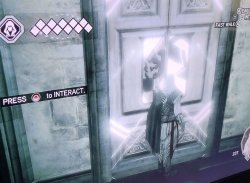
Auditore crypt Uplay map 498
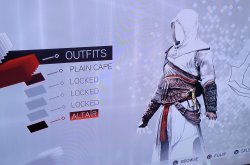
Uplay Altairs outfit 486
Uplay knives upgrade 474
Verizon App Store Bonus skin 41A
Maria Thorpe LongSword 56B
Fredricks Hammer 56C
Mace of the Bull 56D
Dark Oracle Bone Dagger 56E
Twins Rapier 56F
Boucharts blade 570
Arsenale di Venezia 3F6
Santa Maria dei Frari 3E4
Palazzo Medicci 3D2


Click on every pair of 0's in those locations (or just the ones you want to modify) and replace them by "01".

After you have finished doing modifications you also need modify the bytes located from offset 4 to 7 (both included). The value you need to type there is calculated using this tool: http://www.sunshine2k.de/coding/javascript/crc/crc_js.html
Here you need to select this configuration:
CRC Width: CRC-32
CRC parametrization: custom
Input reflected: yes
Result reflected: yes
Polynomial: 0x4c11db7
Initial value: 0x0000000
Final Xor value: 0x1bf3278a
CRC input Data: select Bytes and copy-paste all the bytes of the OPTIONS file (after you've modified it) from byte 8 to the end of the file (bothj included)

Then click calculate CRC and paste the Result CRC Value in the bytes located from 4 to 7 (both included). Now save and close HxD Editor.

The final step in bruteforce save data is resigning the OPTIONS file so that it can be used in your PS3 with your game (not all AC2 games are the same, the region can be different). You can resign it following this tutorial:

Now you need to copy the folder with the OPTIONS file into your USB. Notice that the name of the folder may be different from the one you initially downloaded, since the name of the folder matches the game's region/edition.

Finally, plug into your PS3 and copy it from your USB to your PS3, overriding the existing one. Again, make sure to backup your ps3 data before doing it just in case something goes wrong.
Hope it helps, let me know if you don't understand something!

 
there's no need to do manual hex editing or manual CRC calculation. The user just needs to use the "savepatch" scripts that we have shared before in the thread.

The script is compatible with BSD, just copy and add the script to BSD folder, like TITLEID.ps3savepatch
 
Ubi made it so that you cannot copy AC2 savefiles from PS3 to an USB, so you cannot bring them to your pc.

Yeah, I figured. I mentioned that possibility because at the time I was considering jailbreaking my OFW console in order to get my file but it's an alternative just in case of a desperate emergency. To be honest, I find it the whole situation really funny. Like "of all the titles, it had to be AC2 RIGHT?!".

This is the folder you will need to transfer to your USB later on, not only the OPTIONS file, but the entire folder, or else your PS3 won't recognize it as an OPTIONS file.

Oohhh... So that's why it didn't work for me. You see, I identified the files contained in the option files and saw that it was the same from the savegame folder. I thought "oh, I could just delete the .sav and .bak files and put the OPTIONS file right there, resign it using BSD and BOOM. But it didn't work because, althought deleted, BSD still recognized the .sav and .bak files and displayed them in the bottom left corner of the window program. Daaammn.

Yesterday I managed to get the latest (afaik) versions of the BSD (v4.8), the games.conf file (updated Sep 27th, 2020) , and put the AC2 disc hash key into the conf file. I got stuck with the OPTION file until I realized, thanks to your very user-friendly tutorial @ChestnutEnjoyer so thank you for that, that it's a complement of the savefile.

EDIT: OH, DUDE! The savefile you shared is divided in sequences! And it has one that's basically a starter savefile! Thanks a lot!!!

there's no need to do manual hex editing or manual CRC calculation. The user just needs to use the "savepatch" scripts that we have shared before in the thread.

The script is compatible with BSD, just copy and add the script to BSD folder, like TITLEID.ps3savepatch

@bucanero Yes, I also managed to create this file by using BSD's patch creator. The window showed two lines of code that I immediately recognized with the scripts that were shared here in previous posts. So I copy-pasted the scrpit and saved it as a ps3savepatch file. That's how it's done, right? or it was as simple as creating a txt file, putting the script there, and then change the file format?

One more thing I'd like to ask. I downloaded almost all AC2 savefiles shared on the internet but no single one of them was a starter save (0% progress) so, is it possible to obtain that save using Apollo on RPCS3? is the savefile totally compatible if I do all that was explained here in this post and then put it on my OFW ps3 as @Devildwarf suggested before?

Thank you all for your help! I should make some progress today.
 
Last edited:
It worked!
I've successfully recovered the missing content and I'm able to play all of'em in my OFW PS3. No need for getting saves from another PS3 or from RPCS3. It totally worked! For my first time doing this, I'm glad it was a total success. So thank you very much!!!:cheerful: You guys are all geniuses!:applouse:

AltairOutfit.jpg AuditoreCrypt.jpg

This will be a very cool Xmas gift for the AC community in general. I'll be working in the tutorial these next days and make sure to mention you guys and the forums. Credit where it is due.:tranquillity:

I'd like to do some more questions before calling it a day:
- In order to make the save available for everyone, I just need to select and press the "Unlock Save to work on any PS3 account" button in both the SAVE and OPTIONS files, right?
- Once I resigned both the SAVE and OPTIONS files, I can just delete the former on my PC and just transfer the OPTIONS files to my USB, yes? I see that both are necessary during all the process made on BSD but once all that is done, there's no more dependency, correct?
- I'm thinking in putting all the files I used on Mediafire so other people can use it and recover this missing content. Is there another cloud-storage website that you recommend?

Once again, thank you very much for this. You made my AC fan heart grow three times more.:eagerness:
 
I tried to download the savefile but Drive didn't let me.:confusion:

Are you sure Drive won't let you download it? I just tested it on both on my phone and on a different computer browser. I'm not signed into drive on either of them and I was able to download the files fine. Will it just not let you download or are you getting an error for it?

Is there a way to modify it using BSD?:confused3:

If by "modify", you mean update the account ID to work your PS3 profile, then yes, that's possible. Both the OPT file and save file I posted were updated for use with my personal PS3 profile, so it's definitely possible to update them again for use with yours.

Now if you mean to activate the bonuses like we're now able to do in ACII, then I don't think that's entirely possible yet. Unless it's been done recently, nobody has mapped the bytes that need to be edited to activate the UPlay bonuses in ACB. If you update the account ID on the OPT file, you should be able to import that to your PS3 and play that way with the majority of the UPlay bonuses. The capes are a bit trickier as they're linked to the save file, so until a way to activate them is figured out, we're stuck with the save file as it is.

Anybody feel free to correct me if this is wrong, my understanding BSD and save modification on the PS3 is admittedly limited.
 
Are you sure Drive won't let you download it? I just tested it on both on my phone and on a different computer browser. I'm not signed into drive on either of them and I was able to download the files fine. Will it just not let you download or are you getting an error for it?


If by "modify", you mean update the account ID to work your PS3 profile, then yes, that's possible. Both the OPT file and save file I posted were updated for use with my personal PS3 profile, so it's definitely possible to update them again for use with yours.

Now if you mean to activate the bonuses like we're now able to do in ACII, then I don't think that's entirely possible yet. Unless it's been done recently, nobody has mapped the bytes that need to be edited to activate the UPlay bonuses in ACB. If you update the account ID on the OPT file, you should be able to import that to your PS3 and play that way with the majority of the UPlay bonuses. The capes are a bit trickier as they're linked to the save file, so until a way to activate them is figured out, we're stuck with the save file as it is.

Anybody feel free to correct me if this is wrong, my understanding BSD and save modification on the PS3 is admittedly limited.
Maybe worth a try to check the saves from the PS4 ezio collection to see how it handles the capes there since they're uplay unlockables in that version.
 
I'm very happy you got it working! It would be awesome to have a tutorial for everyone in the AC community .
- In order to make the save available for everyone, I just need to select and press the "Unlock Save to work on any PS3 account" button in both the SAVE and OPTIONS files, right?
- Once I resigned both the SAVE and OPTIONS files, I can just delete the former on my PC and just transfer the OPTIONS files to my USB, yes? I see that both are necessary during all the process made on BSD but once all that is done, there's no more dependency, correct?
- I'm thinking in putting all the files I used on Mediafire so other people can use it and recover this missing content. Is there another cloud-storage website that you recommend?

Once again, thank you very much for this. You made my AC fan heart grow three times more.:eagerness:
- Take this with a grain of salt since this is the first game save I modify, but I don't think you can make the save available for everyone. PS3 savefiles are tied to:
  1. A console. I don't known if you can unlock a ps3 save file to work with any console.
  2. A user profile (account) . Pressing "Unlock Save to work on any PS3 account" would break the dependency with the user profile.
  3. A region or game edition. AC2 GOTY Edition has a different code, for instance. Creating an OPTIONS file resigned for every game region (or edition) would break this dependency. You can find all the region codes in the last lines of the games.conf file, separated by "/". There is around 22 of them.
Anyone feel free to correct me.

- You only need to transfer the OPTIONS file, correct. You could also transfer the .sav, but it would overwrite your previous save, so if you only want to unlock the missing stuff in your existing savefile you should only transfer the OPTIONS file.

- No idea about this.
 
Are you sure Drive won't let you download it?
Pretty sure, I just tried it and it returns an error "The file cannot be downloaded". It doesn't explain why.:confused3:
Now if you mean to activate the bonuses like we're now able to do in ACII, then I don't think that's entirely possible yet.
I was looking to compare the map byte because I have a 100% complete safefile of Brotherhood and every Uplay content redeemed and accesible, the only things I don't have are them capes. I don't mind that much but if that could help the community in unlocking those... But again, Drive doesn't let me download your saves.:confusion:
 

Similar threads

Back
Top