
PS2 Need Help with fresh install of internal HDD OPL.

almmiron

Member
Thanks in advance for being here <3

I've just installed my first time ever internal hdd. 1tb 2,5'' in official sony's network adapter. This is my first ever fat ps2. Just formated the hdd, with wlaunch elf).

I want to use opl and put about 800gb of ps2 isos.

How do I proper structure my partitions, folders, and what this thing about +opl partition being small (1, 2 or 3 gb), or do i make +opl partition with 800gb?

I will use HDL batch from github israpps (there is another tool?)

I've been reading some things about expand (broken) feature on wlaunch, and did not created any partitions yet. Will wait you guys respond me, to get things right from the start.

Wich step I make first?
 
  • Like
Reactions: TnA
Thanks in advance for being here <3

I've just installed my first time ever internal hdd. 1tb 2,5'' in official sony's network adapter. This is my first ever fat ps2. Just formated the hdd, with wlaunch elf).

I want to use opl and put about 800gb of ps2 isos.

How do I proper structure my partitions, folders, and what this thing about +opl partition being small (1, 2 or 3 gb), or do i make +opl partition with 800gb?

I will use HDL batch from github israpps (there is another tool?)

I've been reading some things about expand (broken) feature on wlaunch, and did not created any partitions yet. Will wait you guys respond me, to get things right from the start.

Wich step I make first?
Wlaunchelf should have created some system partitions. If you only want your HDD for Ps2 games (and use FMCB from MC) you can delete them. Also they're just a couple GB, so you can also leave them in case you'll ever want to use i.e. FHDB.
The important thing is to don't delete them after installing other things. So, delete them now or leave them forvever (maybe the second one is safer).

Then, create a +OPL partition, 2048MB (more than enough for a 1TB HDD, you can fit cover arts for all installed games, themes and many VMCs).

After you make the +OPL partition you can start OPL (so it will create all folders, THM, CHT, VMC, ART...). Then you can connect the HDD to PC for transfer your ISOs, and afterwards install the cover arts for the installed games.
You can also do it through Ethernet port if you prefer, but keep in mind that directly connecting the HDD to the PC (via SATA to USB 3.0 adapter) you'll get a transfer speed more than 10 times faster than ETH.

I suggest you to never delete a game, and if you really want to fit one more game when the HDD is full, delete the games starting from the last installed ones (the bottom games on Wle HDDmanager).

Remember to always power off the main power switch before connecting/disconnetting the Network Adapter and don't tighten the screws.
 
I've encountered some issues on the process:

To further clarify My setup:
-ps2 fat 3xxx
-internal 2,5'' sata 3 1tb hdd
-official sony network adapter with sata mod
-external usb sata hdd case, to put the hd on my pc.

goals:
-Put 800gb of games (some isos, some duallayer, some cd based, some bin/cue, some isos), use opl 1.1, be happy.

steps:
-Burned ulaunch (wLaunchELF Releases by SP193 and AKuHAK) ps2-home forums
wLaunchELF_v4.43a (rev288)-2020-03-19 (commit-f35bddd).zip
-launched ulaunch.elf on ps2, formated my hdd just fine, created +OPL partition ( i choose 02gb like you said). Ok

Errors dound until now:

-When I put hd on PC, and try to install my games with the hdl batch install tool, error 'APA PARTITION IS BROKEN'
IMAGE:
https://postimg.cc/Z0KvR8yt

-When i put back the hdd on ps2, some paritions made were missing, only 2 are shown now under hdd manager: _net and _mbr.
-Will try to redo the formating under hdd manager, try once more. If stuck, will return here.

obs:
Freehdboot won't install, my workaround was to install freeMCboot. Ok, but I couldn't understand why. Error is shown "failed to install". On MC, the install went ok, and it's fine for me.
Thanks again.
 
I've encountered some issues on the process:

To further clarify My setup:
-ps2 fat 3xxx
-internal 2,5'' sata 3 1tb hdd
-official sony network adapter with sata mod
-external usb sata hdd case, to put the hd on my pc.

goals:
-Put 800gb of games (some isos, some duallayer, some cd based, some bin/cue, some isos), use opl 1.1, be happy.

steps:
-Burned ulaunch (wLaunchELF Releases by SP193 and AKuHAK) ps2-home forums
wLaunchELF_v4.43a (rev288)-2020-03-19 (commit-f35bddd).zip
-launched ulaunch.elf on ps2, formated my hdd just fine, created +OPL partition ( i choose 02gb like you said). Ok

Errors dound until now:

-When I put hd on PC, and try to install my games with the hdl batch install tool, error 'APA PARTITION IS BROKEN'
IMAGE:
https://postimg.cc/Z0KvR8yt

-When i put back the hdd on ps2, some paritions made were missing, only 2 are shown now under hdd manager: _net and _mbr.
-Will try to redo the formating under hdd manager, try once more. If stuck, will return here.

obs:
Freehdboot won't install, my workaround was to install freeMCboot. Ok, but I couldn't understand why. Error is shown "failed to install". On MC, the install went ok, and it's fine for me.
Thanks again.

download and clone it " HDDOSD_100J_ATADP_DTL-H_FIX_48BIT_APPS.IMG " in any HDD that you want through PC using
HDDRawCopy and plug it into PS2 with a Network Adapter
from here https://archive.org/details/PS2_HDDOSD_100J_48BIT

And read this thread to update your OPL
https://www.psx-place.com/threads/how-to-boot-opl-gui-through-hddosd-with-opl-launcher.35547


And use HDL_dumb to install games into hdd
 
I've encountered some issues on the process:

To further clarify My setup:
-ps2 fat 3xxx
-internal 2,5'' sata 3 1tb hdd
-official sony network adapter with sata mod
-external usb sata hdd case, to put the hd on my pc.

goals:
-Put 800gb of games (some isos, some duallayer, some cd based, some bin/cue, some isos), use opl 1.1, be happy.

steps:
-Burned ulaunch (wLaunchELF Releases by SP193 and AKuHAK) ps2-home forums
wLaunchELF_v4.43a (rev288)-2020-03-19 (commit-f35bddd).zip
-launched ulaunch.elf on ps2, formated my hdd just fine, created +OPL partition ( i choose 02gb like you said). Ok

Errors dound until now:

-When I put hd on PC, and try to install my games with the hdl batch install tool, error 'APA PARTITION IS BROKEN'
IMAGE:
https://postimg.cc/Z0KvR8yt

-When i put back the hdd on ps2, some paritions made were missing, only 2 are shown now under hdd manager: _net and _mbr.
-Will try to redo the formating under hdd manager, try once more. If stuck, will return here.

obs:
Freehdboot won't install, my workaround was to install freeMCboot. Ok, but I couldn't understand why. Error is shown "failed to install". On MC, the install went ok, and it's fine for me.
Thanks again.

You can do as Nameless32 suggested, or also use this: PS2 - PFS BatchKit Manager (2TB) Support | PSX-Place

It's a very good program that allows you to do everything from PC (I just used it these days for solving a problem and it works very well). You can go to advanced menu > HDD Management

If I understood correctly you already have FMCB on MC, right? You only had problems installing FHDB.
Anyway, if you have FMCB you don't need FHDB.

Then, from HDD Management you can format the HDD (option 9), after it is done, check the system partition table (option 4) to see which partitions are been created (leave them or delete with option 2, do not delete __mbr).

Now create (option 1) +OPL partition (when asked write 2048, but also even making a mistake it will round up).

Now check again the system partition table to verify if all is alright. Disconnect the HDD from USB port (always with safe disconnecting), connect it again on the USB for double checking if it is all good (open again the program and from HDD management use option 6 Scan Partition Errors).

If everything is ok, it should mean all is right on HDD/PC side, so if you will have issues again after putting the HDD into the Ps2, most likely the cause is on Ps2 side (something faulty or a mistake by you, like not perfectly inserting the HDD/NA or not powering off the console from the main power. Or when modding the NA with the SATA board, the board's flat/power cables maybe aren't perfectly inserted).
 
Last edited:
Thank you all.

The first time, I just reformatted hdd, reconected, and the hdl dump recognized it just fine.

I've managed to install fhdb just by trying again...I prefer it over fmcb.

Games are running very well.
 
Thank you all.

The first time, I just reformatted hdd, reconected, and the hdl dump recognized it just fine.

I've managed to install fhdb just by trying again...I prefer it over fmcb.

Games are running very well.

Also, enable the Cache game list option in OPL settings.

When you'll have hundred of games installed it will take 15/20 seconds to normally load the list.
That option takes note of starting points of each game (so instead of scanning the entire HDD at each boot, OPL will just have to read the cache file. On my end i.e. it takes 3 secs. to load the gamelist with cache game list on, instead of 24 secs.).

Obviously, if you install/delete a game, you'll have to do a normal HDD boot up, for update the cache file (press SELECT button).
 
Last edited:
Thank you all.

The first time, I just reformatted hdd, reconected, and the hdl dump recognized it just fine.

I've managed to install fhdb just by trying again...I prefer it over fmcb.

Games are running very well.

I have a favor to ask you, only if you're installing games through SATA to USB adaptor (so you are connecting the HDD to PC).

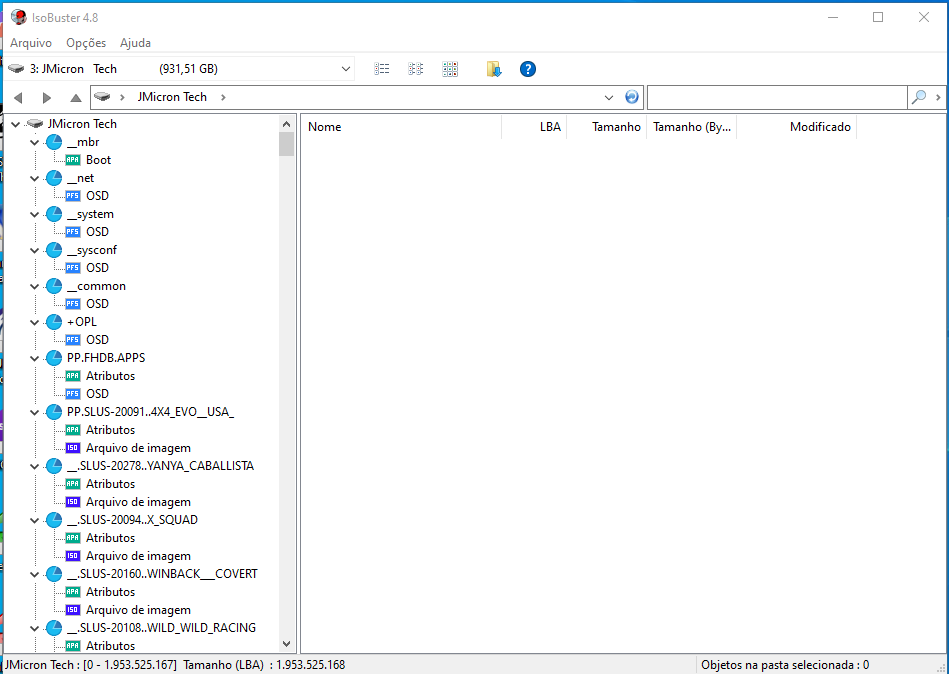
You should install IsoBuster (is only 14mb) and while the Ps2 HDD is connected, open it on the program and check the beginning of the HDD on the left column. Make a screenshot like this:

immagine2-jpg.35316


Is not life or death matter, so if you can't/don't want to do it, is fine, thank you anyway.
 
I have a favor to ask you, only if you're installing games through SATA to USB adaptor (so you are connecting the HDD to PC).

You should install IsoBuster (is only 14mb) and while the Ps2 HDD is connected, open it on the program and check the beginning of the HDD on the left column. Make a screenshot like this:

immagine2-jpg.35316


Is not life or death matter, so if you can't/don't want to do it, is fine, thank you anyway.


Well, actually, I've coose to open my pc case, and connected the hdd trough sata directly, for better speeds. But I'll do it anyway, cause I have a usb adapter laying around... will Update this post with the screenshot when I do.

UPDATE:
ps2drive.png

This was taken with my hdd connected do pc via generic 3.0 usb hdd case.
 
Last edited:
Perfect, thank you. A couple last questions:

1. Your current +OPL partition is 2048mb, or have you made it another size?

2. Wich program you used for formatting the HDD and for creating the +OPL partition, you've done everything with Wlaunchelf's HDDmanager?
 
OPL might have issues with partitions of that size. 3GB works fine! I am not quite sure where the limit is and/or what causes it.

2GB is more than enough for OPL stuff.

Anyway there are people with 5GB +OPL partition perfectly working. So yes, it'd need further investigation.

It can be one of those problems maybe related to Ps2/HDD compatibility (minor compatibility issues). Like the issue I have when pasting gamesaves on a HDD VMC (mounting the VMC with Ulaunchelf). I'd have to test it again now with the bigger +OPL partition. But I don't think the size has anything to do with the problem.
 

Similar threads

Back
Top