PS4 New HDD update error

Dacian Gherasim

Forum Noob
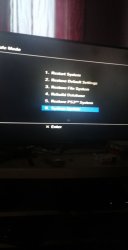
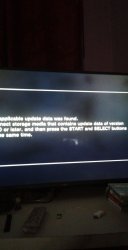
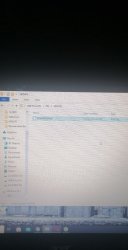
Hello all, well i ve bought a ps3 40gb with rebug, ive put a new hdd 1tb, ive read that i need to upgrade, so i made a flash drive wich is mbr fat32 there ive made path >PS3/UPDATE/PS3UPDAT.PUP< Ive put it inside, start the console and every time give me error >no applicable update data was found< .
Ive tryied 1 flash drive 8gb 3.0 fat32 mbr, 1 flash disk 128 3.0 fat32 mbr, 1 flash disk 64 2.0 fat32 mbr nothing, tryied also 3.5.0 version firmware, 3.5.5, the last one and every time gives me the same error.
Now the funny thing using some program ive opened the hdd which was there, and now i cannot use it on ps3.
I had read, i saw soo many videos, and every time gives me the same error >No applicable update data was found. Connect storage media that contains update data of versions 3.50 or later, and then press START and SELECT buttons at the same time.<
Btw can i make update using hdd trough usb? Ive tryied also update using Safe mode, didnt work.
Someone said that i could make update also on the hdd which is already inside, that should i put ps3updat.pup.
Sorry for my english. Tx for any help.
131018277_308286987068186_5005947246389314407_n.jpg 131418065_798040754080002_20474950709527585_n.jpg 131070523_500376827660490_99483460308127343_n.jpg
 
Last edited:
Any USB device in MSC mode, not encrypted (or exposing decrypted by controller via MSC), formatted with MBR partition table with one partition formatted in FAT32 file system will be visible. Anything else not.

Full path, using Windows nomenclature, must looks like this: "X:\PS3\UPDATE\PS3UPDAT.PUP". Case sensitive. Also remember to change in Windows setting to shows file extensions to avoid situation that You name file "PS3UPDAT.PUP.PUP", which will not work. And be ware to not name file as "PS3UPDATE.PUP" as this also will not work.

If both above rules are fulfilled, then update must be found. No matter if it is used from Safe Mode (recovery) or from XMB.

- - -

Alternative way to update on CFW is turning debug updates option on (only CFW with debug vsh or debug CFW kind) and update from "dev_hdd0/updater/00/*.pup". In update menu in XMB, should appear addition line with file name put inside updater dir
 
Any USB device in MSC mode, not encrypted (or exposing decrypted by controller via MSC), formatted with MBR partition table with one partition formatted in FAT32 file system will be visible. Anything else not.

Full path, using Windows nomenclature, must looks like this: "X:\PS3\UPDATE\PS3UPDAT.PUP". Case sensitive. Also remember to change in Windows setting to shows file extensions to avoid situation that You name file "PS3UPDAT.PUP.PUP", which will not work. And be ware to not name file as "PS3UPDATE.PUP" as this also will not work.

If both above rules are fulfilled, then update must be found. No matter if it is used from Safe Mode (recovery) or from XMB.

- - -

Alternative way to update on CFW is turning debug updates option on (only CFW with debug vsh or debug CFW kind) and update from "dev_hdd0/updater/00/*.pup". In update menu in XMB, should appear addition line with file name put inside updater dir

Hello, thank you for quick message, well i have it like that.
 

Attachments

  • 130971986_775480619673367_5682735492144624345_n.jpg
    130971986_775480619673367_5682735492144624345_n.jpg
    108.1 KB · Views: 63
Now i cannot access at all, ps3. It starts and ask for update, ive put the usb flash, and he start to seek, after that starts error.


Any USB device in MSC mode, not encrypted (or exposing decrypted by controller via MSC), formatted with MBR partition table with one partition formatted in FAT32 file system will be visible. Anything else not.

Full path, using Windows nomenclature, must looks like this: "X:\PS3\UPDATE\PS3UPDAT.PUP". Case sensitive. Also remember to change in Windows setting to shows file extensions to avoid situation that You name file "PS3UPDAT.PUP.PUP", which will not work. And be ware to not name file as "PS3UPDATE.PUP" as this also will not work.

If both above rules are fulfilled, then update must be found. No matter if it is used from Safe Mode (recovery) or from XMB.

- - -

Alternative way to update on CFW is turning debug updates option on (only CFW with debug vsh or debug CFW kind) and update from "dev_hdd0/updater/00/*.pup". In update menu in XMB, should appear addition line with file name put inside updater dir
 
Based on Your screenshot all is fine. But it is not sufficient to tell if above rules are fulfilled. :P

1. Run CMD or PS and type "diskmgmt.msc". Disk Managment tools should appear, click right mouse button on disk1 (or whatever Your pendrive is) and check if it is GPT or MBR.

2. Run CMD or PS and type "control", control panel should appears (if they didn't kill it in current Windows 10). Find folder options and check if You have this option unchecked:

"Hide extensions for known filetypes" (or something like that).

win_control_unhide-ext.jpg
 

Similar threads

Back
Top