My system is at 4.82 model CECH 2001A/B PS3 slim and for some reason, when I go to update, the system auto-detects 4.86 and doesn't give me the option to download via usb storage. Yes it's formatted to FAT32. I have disconnected my ethernet cable and removed all information for wireless to be picked up. Some advice or ideas for troubleshooting would be greatly appreciated.

You are using an out of date browser. It may not display this or other websites correctly.
You should upgrade or use an alternative browser.
You should upgrade or use an alternative browser.

are you on ofw/hfw or cfw?My system is at 4.82 model CECH 2001A/B PS3 slim and for some reason, when I go to update, the system auto-detects 4.86 and doesn't give me the option to download via usb storage. Yes it's formatted to FAT32. I have disconnected my ethernet cable and removed all information for wireless to be picked up. Some advice or ideas for troubleshooting would be greatly appreciated.
Louis Garry
Member
Try Restore Default SettingsMy system is at 4.82 model CECH 2001A/B PS3 slim and for some reason, when I go to update, the system auto-detects 4.86 and doesn't give me the option to download via usb storage. Yes it's formatted to FAT32. I have disconnected my ethernet cable and removed all information for wireless to be picked up. Some advice or ideas for troubleshooting would be greatly appreciated.
I am currently on OFW. trying to install cfw.are you on ofw/hfw or cfw?
did you use bgtoolset or old ps3xloit writer?I am currently on OFW. trying to install cfw.
or are you just installing a cfw pup straight from ofw?
I haven't done any of that. Was simply trying to use a checker pup to confirm that my system can be exploited. I'm just trying to figure out why my system automatically picks up firmware update 4.86 without guving me the option to update via flash drive.did you use bgtoolset or old ps3xloit writer?
or are you just installing a cfw pup straight from ofw?

Coldheart2236
Moderator
So you were trying to use the MinVerChk PUP to see if your console can install CFW? As Coro said, you can use bguerville's PS3 Toolset to check instead of using MinVerChk (though there's nothing at all wrong with that method). If compatible you can use the PS3 Toolset for the entire jailbreak process.I haven't done any of that. Was simply trying to use a checker pup to confirm that my system can be exploited. I'm just trying to figure out why my system automatically picks up firmware update 4.86 without guving me the option to update via flash drive.
If you're on OFW, under System Update you should see two options: 'Update via Internet' and 'Update via Storage Media'. Updating via Internet will automatically look for the latest OFW, which is 4.86. Whether you install it via internet or USB makes no difference since 4.86 OFW is exploitable either way. It's not like the days of 4.82 when if you updated to 4.83 you were stuck unless you had access to a hardware flasher.


I don't think MinVerChk should be relied on, we know that mods like spoofing can affect the calculation of the minimum applicable version.
It's much safer to use the PS3 Toolset's Flash Memory Manager which will not only display the minimum installable version anyway (same as MinVerChk) but will also check the metldr version.
If FMM detects the console as CFW compatible, you are guaranteed that the console is CFW compatible, no matter what MinVerChk says.
It's much safer to use the PS3 Toolset's Flash Memory Manager which will not only display the minimum installable version anyway (same as MinVerChk) but will also check the metldr version.
If FMM detects the console as CFW compatible, you are guaranteed that the console is CFW compatible, no matter what MinVerChk says.
No advantage whatsoever.
A jailbreak is a jailbreak, the 4.8x version it is done under does not matter.
A jailbreak is a jailbreak, the 4.8x version it is done under does not matter.
So you were trying to use the MinVerChk PUP to see if your console can install CFW? As Coro said, you can use bguerville's PS3 Toolset to check instead of using MinVerChk (though there's nothing at all wrong with that method). If compatible you can use the PS3 Toolset for the entire jailbreak process.
If you're on OFW, under System Update you should see two options: 'Update via Internet' and 'Update via Storage Media'. Updating via Internet will automatically look for the latest OFW, which is 4.86. Whether you install it via internet or USB makes no difference since 4.86 OFW is exploitable either way. It's not like the days of 4.82 when if you updated to 4.83 you were stuck unless you had access to a hardware flasher.
Should I just update to 4.86 then?I don't think MinVerChk should be relied on, we know that mods like spoofing can affect the calculation of the minimum applicable version.
It's much safer to use the PS3 Toolset's Flash Memory Manager which will not only display the minimum installable version anyway (same as MinVerChk) but will also check the metldr version.
If FMM detects the console as CFW compatible, you are guaranteed that the console is CFW compatible, no matter what MinVerChk says.
use bgtoolset to get jailbreak. then reboot and install cfw pup.Should I just update to 4.86 then?
do not need to update if you are on 4.82.
do not need hen ever for this ps3.
No, strictly speaking you don't need to, 4.82 is fine for jailbreaking.Should I just update to 4.86 then?
However, if I were you, before jailbreaking, I would update to ofw 4.84 if you intend to use Rebug REX 4.84 (with cex & dex support) or ofw 4.86 if you intend to use cex firmware only like Rebug Lite 4.86.

sandungas
Developer
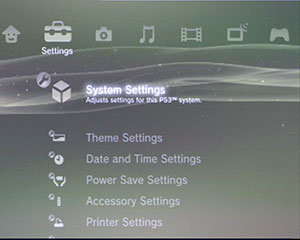
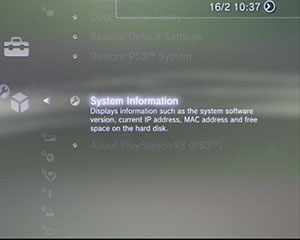
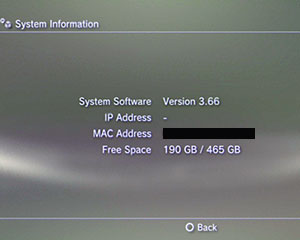
Thats imposible, if you disable or missconfigure all network connections the PS3 is not going to "detect" anythingSo I restored default settings, removed ethernet cable and have not set up a wireless connection and yet my system is still able to detect update 4.86
I think the misunderstanding here is the word "detect". Could be 2 different things... detecting the latest firmware available online.... or detecting the firmware you already have installed
It looks you already have 4.86 installed, thats why you see the number 4.86 offline
Similar threads
-
PS3 I'm an Idiot That Updated My PS3 to 4.93 OFW Before Jailbreaking
- Started by HandsOn91939
- Replies: 2
-
-
-