PS3 NoPSN Apps

bitsbubba

Super Moderator / Developer
Developer
Thread is outdated, for latest No-PSN packages visit this link: http://www.psx-place.com/threads/tu...pment-debugging-environment.13287/#post-78073
----------------------------------------------------------------------------------------------------------------​
Hey Guys & Gals,

I made a few of these for my own personal use (with the help from tutorials by strictlyfocused@PSX-Scene) but then got the bug and wanted to see how many I could do. Here they are the 8 that I've got working so far, I'm still looking into the others.

Amazon Instant Video v2.10-no PSN.pkg 11.0 MB
*pay per movie/show or Prime membership

Crackle v2.10~no PSN~no Ads~re-signed.pkg 22.4 MB

Crunchyroll v1.20-no PSN.pkg 20.1 MB
*requires activation (.rap)

Hulu+ v1.08 spoofed to v1.52-no PSN.pkg 29.8 MB
*requires subscription

IGN v1.00~no PSN~re-signed.pkg 16.1 MB

Netflix v2.19-no PSN.pkg 15.5 MB
*requires subscription

Plex v1.00~no PSN~re-signed.pkg 15.5 MB
*requires subscription (Plex Pass)

Popcornflix v1.00~No PSN.pkg 8.6 MB

SnagFilms v1.02~no PSN~re-signed.pkg 10.1 MB

YouTube v1.11~no PSN~re-signed.pkg 24.8 MB


Service / App
Size
Download / NotesS​
Amazon.PNG
Amazon Instant Video
11 MB
Amazon Instant Video v2.10-no PSN.pkg 11.0 MB
*pay per movie/show or Prime membership
Crackle.PNG
Crackle
22.4 MB
ICON0.PNG
Crunchyroll
20.1 MB
Crunchyroll v1.20-no PSN.pkg 20.1 MB
*requires activation (.rap)
hulu.PNG
Hulu+
29.8 MB
IGN.PNG
IGN
16.1 MB
netflix.PNG
NETFLIX
15.5 MB
Netflix v2.19-no PSN.pkg 15.5 MB
*requires subscription
PLEX.PNG
PLEX
15.5 MB
Plex v1.00~no PSN~re-signed.pkg 15.5 MB
*requires subscription (Plex Pass)
Popcorn Flix.PNG
Popcornflix
8.6 MB
Snag Films
10.1 MB
youtube.PNG
YouTube
24.8 MB
ICON01.PNG
WWE Network
15 MB
Requires Subscription
ICON02.PNG
MLB.tv
14.2 MB
MLB.TV no PSN updated to version 2.12
francesco.lanzillotta
source
ICON055.PNG
NBA Game Time
14.3 MB
NBA Game Times no PSN
francesco.lanzillotta
source
ICON044.png
Multiplayer.it
44 MB
Italian users:
Italian Gaming review Website (Fixed by Metion)
 
Last edited by a moderator:
Hello and thank you for the good news!

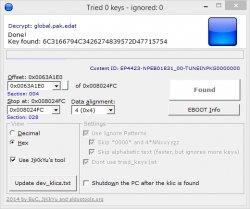
how to get the key to "app.sprx for the lazy" please...

if you want to decrypt app.sprx yourself and not use his prepatched app.sprx or my prebuilt pkg, make sure the EBOOT is in root of TrueAncestor SELF Resigner v1.91 (with resigner.exe) when trying to encrypt app.sprx (the key is found in the EBOOT by TrueAncestor SELF Resigner v1.91)
 
if you want to decrypt app.sprx yourself and not use his prepatched app.sprx or my prebuilt pkg, make sure the EBOOT is in root of TrueAncestor SELF Resigner v1.91 (with resigner.exe) when trying to encrypt app.sprx (the key is found in the EBOOT by TrueAncestor SELF Resigner v1.91)

looks like these no psn apps came in handy just in time aas it appears Sony has blocked spoofers at the moment.

Error 80710A06 for spoofers it appears.
 
looks like these no psn apps came in handy just in time aas it appears Sony has blocked spoofers at the moment.

Error 80710A06 for spoofers it appears.
I noticed that trying to download WWE, I thought PSN was down (watching Hulu+ now, take that $0nY :p)
 
I get the renew license message when I try to run your crunchyroll patched no psn pkg.
because it needs to be activated through PSN (I have no idea why as it's a free app) if you have the rap you can install it with PSNPatch/reActPSN. if no rap then delete my pkg download from PSN store then let it update then re-install my pkg

Edit: #mod also I had the wrong version for CrunchyRoll app, I've changed it in OP
 
Last edited:
[MENTION=6]bitsbubba[/MENTION] Great work man. I'm not sure how many or if any (except youtube) of these will work in the country I live in, but I will give them a go this weekend.
 
Plex no PSN: https://www.mediafire.com/?jcbapi86d82sv98 European version

Download and extract the application Plex (you can also choose to install it and get the file through an FTP client).
Enter the USRDIR folder (directory European dev_hdd0/game/NPEB02214/USRDIR/ inside the PS3).
Extract the files in a EBOOT.BIN EBOOT.ELF file and open it in a hex editor.
Press CTRL and F and in the search field type "EnablePSN = true" (offset 001D3FD0), you can just replace true to false, so "EnablePSN = false".
Save and close the hex editor, EBOOT.BIN rebuilt the file and reload it in the folder USRDIR.
 

Similar threads

Back
Top