
Sure, go ahead.Could it be a bug in GUI handling then? Should I open an issue on GitHub?
...wherever you have your games............Where to found this file ?

Sure, go ahead.Could it be a bug in GUI handling then? Should I open an issue on GitHub?
...wherever you have your games............Where to found this file ?
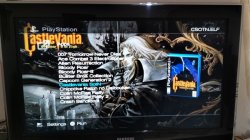
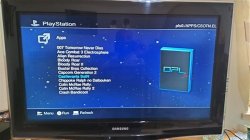
¿Cómo debo hacer OPL 1319 para ver las portadas de APPS?
Todo está bien en OPL 0.9.2 (y también en versiones más nuevas como la v. 1.0.0), consulte:
OPL 0.9.2
[ADJUNTAR]39967[/ADJUNTAR]
En cambio, en OPL 1319, como puede ver, enumera la ruta completa como ID de APLICACIONES, supongo que es por eso que no puede cargar las portadas (ya que se nombran como el elfo de la aplicación, no como la ruta completa):
OPL 1319
[ADJUNTAR]39968[/ADJUNTAR]
Supongo que fue un error. Tal vez usando el nuevo método de listado de aplicaciones que puedo resolver. Creo recordar que la configuración es muy lenta (tendría que crear 2 archivos para cada aplicación).
Intente agregar XX. antes de la identificación de la imagen. Disculpe mi inglés, estoy usando el traductor de Google.
Update on the second question. Removing the ps3 controller from the usb port, loading times and fmv stuttering are back to normal. Great to know, it could be useful for those who play from usb and want better performance, better to leave a free usb port and get a ps2 controller. Even if I don't understand the fact that it's happening to me only now. In any case, on ps2 slim deckard with latest opl beta versions, a good usb drive, and a free usb port makes launching games from usb comparable to launching games from dvd. Now I wanted to understand if someone can direct me to run games from usb exfat, to test and maybe discover further speed improvements, given that according to some the exfat format from usb improves the stuttering of fmvs.I wanted to test games in exfat format but I'm having a problem. I formatted a 16gb micro sd in exfat with windows default settings (32kb) I inserted it into the usb adapter (which I usually use with the same micro sd in fat32 without problems) but opl freeze on start up on the fmcb screen. If I remove the drive and insert it after starting opl, it lists my games but the screen stays frozen. What could be the reason? I tried the latest beta opl 1.2 1972 and 1968. fmcb 1951.
I also have another question. I went from a ps2 slim 70004 to a 77004 about one week ago. I prepared my sandisk cruzer force usb drive as I usually do when I copy new games from my pc, formatted it in fat32 and copied everything in one fell swoop. I inserted it in my new slim deckard with opl 1.2 1968 and big surprise: there is a considerable improvement in the speed of loading games, the stutters in fmvs have almost completely disappeared compared to the 70004 that I was using before. But all this lasted only a week, until tonight. Fmvs are stuttering again and loading times are slow again like on my old console. The strange thing is that in this week I have done nothing but only play, the drive has not been connected to the pc or deleted or copied new files. What could be the reason? Is fragmentation likely?
In any case, on ps2 slim deckard with latest opl beta versions, a good usb drive, and a free usb port makes launching games from usb comparable to launching games from dvd.
Yes, perhaps I expressed myself badly, in any case it remains comparable, almost the same. Now on usb If I encounter stuttering on fmv these are very light and almost unnoticeable compared to the past. Let's say that every part makes its small percentage of improvement: a slim from 7500 up, the excellent recent opl updates, a good usb drive and power limitation to a single usb port. Maybe one of them doesn't make much difference, but all together the difference is considerable. That's why I'd like to add the exfat format as well and see if it really improves the speed a bit. All this is inexplicable, the usb port is always 1.1, yet the improvements are there. This is because the optimization and management of the usb device can make a difference even if the speed of the usb port remains the same. Some argue that with some usb 3.1 drives reading games on ps2 happens faster albeit slightly. All things that I will test, for the moment I would like to solve the freeze problem in exfat. Anyone have any suggestions?Let's not exaggerate '^^
how do i change ps2 ip address in opl 0.9.2? for some reason it automatically sets up wrong settings and i can't see my games.

Exit the network settings screen hitting ok (if you exit pressing circle, settings won't be changed), then press X button on Save in OPL main menu (otherwise settings will revert back after you exit OPL).
i can't manually change ps2 ip settings in 0.9.2 it's like they're even different color and you can't navigate to them but you can change pc ip
I don't know why. Have you changed network settings using a newer OPL version perhaps?
Maybe you setted DHCP instead of static IP, OPL 0.9.2 doesn't have that option. Try to set the network config using a newer build (like OPL 0.9.3). Then it will correctly work also on 0.9.2


