
You are using an out of date browser. It may not display this or other websites correctly.
You should upgrade or use an alternative browser.
You should upgrade or use an alternative browser.

PS2 OpenTuna - An open source version of "Fortuna", based on reverse engineering! v2.0.1
- Thread starter alexparrado
- Start date

alexparrado
Developer
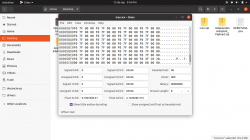
You didn't halve. It should look like this:Same as before, gets stuck when opening MC.
Showing you just in case I did something wrong, I have it like this:
View attachment 34878
Attachments
alexparrado
Developer
Ok, let's halve again, change f8 3f to fc 1fOk, now I have it like this, still getting stuck in the same place:
View attachment 34880
alexparrado
Developer
Mmmm that's not a good sign, Anyway, replace fc 1f with fa 2f.Ok, now it loads the icons and the corrupted icon is a blue cube, the exploit does not launch, it goes back to OSDSYS.
If this does not show a messed OSDSYS, then i'll need to adjust opentuna-tail.bin, but it'll be tomorrow.

blckbear_
Developer
Well now it gets stuck again before opening the MC. There's no hurry, do it whenever you can.Mmmm that's not a good sign, Anyway, replace fc 1f with fa 2f.
If this does not show a messed OSDSYS, then i'll need to adjust opentuna-tail.bin, but it'll be tomorrow.
I really really thank you for the help
alexparrado
Developer
It's ok, I'm interested about you're doing in order to update OpenTuna payload sources. That problem is easily fixed by adding more zeroes to opentuna-tail.bin just by trial and error. Then, repeating the halving/doubling approximation sequence until it works. Actually that's how I tuned icon for different ROM versions in Fat units.Well now it gets stuck again before opening the MC. There's no hurry, do it whenever you can.
I really really thank you for the help
blckbear_
Developer
Well I should have gone to sleep but I couldn't let this go lol.
I managed to make it launch the exploit and I'm using the SDK's ps2-packer instead of the windows binary provided, even if payloads are larger in size. I then used the latest OpenTunaRLE with the latest "res" you sent and the resulting icon was tuned a bit in order for it to work.
Here's the normal icon:
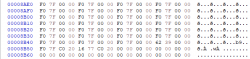
Here's the tuned icon (just added F07FC020 as without tuning I was getting a messed OSDSYS):
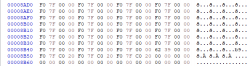
And attached you will see the two icons just for you to compare if you want.
I'll be updating my github fork with the changes I made.
After you guided me through tuning the icon I think I got what the idea of tuning is and well, I managed to do it.
Thank you very much for all the help @alexparrado !
Edit: here are the github repos for you to see the changes:
https://github.com/blckbearx/opentuna-installer
https://github.com/blckbearx/opentuna-payload
I managed to make it launch the exploit and I'm using the SDK's ps2-packer instead of the windows binary provided, even if payloads are larger in size. I then used the latest OpenTunaRLE with the latest "res" you sent and the resulting icon was tuned a bit in order for it to work.
Here's the normal icon:
Here's the tuned icon (just added F07FC020 as without tuning I was getting a messed OSDSYS):
And attached you will see the two icons just for you to compare if you want.
I'll be updating my github fork with the changes I made.
After you guided me through tuning the icon I think I got what the idea of tuning is and well, I managed to do it.
Thank you very much for all the help @alexparrado !
Edit: here are the github repos for you to see the changes:
https://github.com/blckbearx/opentuna-installer
https://github.com/blckbearx/opentuna-payload
Attachments
Last edited:
alexparrado
Developer
Well I should have gone to sleep but I couldn't let this go lol.
I managed to make it launch the exploit and I'm using the SDK's ps2-packer instead of the windows binary provided, even if payloads are larger in size. I then used the latest OpenTunaRLE with the latest "res" you sent and the resulting icon was tuned a bit in order for it to work.
Here's the normal icon:
View attachment 34881
Here's the tuned icon (just added F07FC020 as without tuning I was getting a messed OSDSYS):
View attachment 34884
And attached you will see the two icons just for you to compare if you want.
I'll be updating my github fork with the changes I made.
After you guided me through tuning the icon I think I got what the idea of tuning is and well, I managed to do it.
Thank you very much for all the help @alexparrado !
Edit: here are the github repos for you to see the changes:
https://github.com/blckbearx/opentuna-installer
https://github.com/blckbearx/opentuna-payload
Really good news, I guess you're the third person I know who assembled a working hacked icon. Congratulations.
alexparrado
Developer
alexparrado updated OpenTuna with a new update entry:
OpenTuna v2.0.0: Fat models compatibility added and more
Read the rest of this update entry...
OpenTuna v2.0.0: Fat models compatibility added and more
- OpenTuna is now compatible with each PS2 Console starting from SCPH-18000 up to SCPH-90010 and PS2 TV. (ROM versions ranging from 1.10 to 2.30). Protokernels (SCPH-10000 and SCPH-15000) are excluded and OpenTuna won't be ported to them (at least by me).
- Installer will automatically install OpenTuna, according to your PS2 model, in any of two MC slots.
- Hacked icons were fixed to minimize hanging on...
Read the rest of this update entry...
one small question: the new opentuna is compatible with all these models as is? Because although it is currently working fine for me, I wanted to have this memory card as a exploit for many consoles if needed, not just mine and unlike FMCB, there is no option to choose between multi install or single install.
alexparrado
Developer
one small question: the new opentuna is compatible with all these models as is? Because although it is currently working fine for me, I wanted to have this memory card as a exploit for many consoles if needed, not just mine and unlike FMCB, there is no option to choose between multi install or single install.
Once you install OpenTuna on MC, it'll only work on consoles with compatible ROM versions. For instance, if you installed OpenTuna using a 39001 model, that installation will work on any console powered by ROM versions 1.10, 1.20, 1.50 and 1.60.
As you mentioned multi-installation is not supported by current installer version. So, as workaround you can try manual installation by using proper PSU file according to target console, please check "How to Use" tab.
alexparrado
Developer
alexparrado updated OpenTuna with a new update entry:
Added CNF files to identify hacked icon version.
Read the rest of this update entry...
Added CNF files to identify hacked icon version.
OpenTuna installer and PSU files now include CNF files which help users to identify OpenTuna MC target:
- icon_fats.cnf : For consoles with ROM versions from 1.10 to 1.60.
- icon_fat170.cnf: For console with ROM version 1.70.
- icon_slims.cnf: For consoles with ROM versions from 1.90 to 2.30.
Read the rest of this update entry...

ahmedmoselhi
Member
hi alex,alexparrado updated OpenTuna with a new update entry:
Added CNF files to identify hacked icon version.
Read the rest of this update entry...
i need to do the following : i have ps2 slim with modchip but i need to install and launch opentuna from mc1 not mc0 automatically by using modchip. how can i do this?
alexparrado
Developer
Thanks for reporting. Did you run installer on same console you are using hacked MC? If so, try setting up your console in English language please.
alexparrado
Developer
If you plan to use your modchip in DEV1 mode, it's mandatory to use MC0 to launch mc0:/BOOT/BOOT.ELF. In the case of Matrix chip in INFMAN mode file is mc0:/MATRIXTEAM/MANAGER.ELF. So,hi alex,
i need to do the following : i have ps2 slim with modchip but i need to install and launch opentuna from mc1 not mc0 automatically by using modchip. how can i do this?
- AFAIK mc1 is not supported in modchips.
- What behavior do you expect?
- Why do you wanna use OpenTuna if you already have a Modchip installed?
alexparrado
Developer
Which ROM version does your console have 1.70 or 1.90?

chronoss
Member
Cant launch fmbc on the same, i create a hacked mc on other ps2Thanks for reporting. Did you run installer on same console you are using hacked MC? If so, try setting up your console in English language please.
Similar threads
-
 PS2 Free McTuna! OpenTuna Installers with Free MCBoots via PS2BBL!
- Started by Ripto
- Replies: 26
-

-
 PS3 4.92 Evilnat Custom Firmware (w/ Cobra v8.5) Released - CEX,PEX,D-PEX,DEX builds
- Started by STLcardsWS
- Replies: 41
-
PS3 Updating HEN to new 3.2.2 Version has stuffed up HEN completely
- Started by extra_anchovy
- Replies: 1