
You are using an out of date browser. It may not display this or other websites correctly.
You should upgrade or use an alternative browser.
You should upgrade or use an alternative browser.

PS2 OPL Manager - Tool to manage your games! 24
- Thread starter danielb
- Start date
Not sure... if they were showing before and you changed nothing.. they should still show up
There's no setting to hide them, other that the checkbox you talk about.
Hi. I figured out the problem. I was creating some temporary backups eariler in the day on my C drive, one was called C:\POPS. I ended up renaming the directory and when I re-opened OPL Manager, the POPS displayed correctly.

gamerman 5000
Developer
Hi,
I am using OPL Manager 22.3 to add my PS1 and PS2 games to get them ready to add to a new SSD and I noticed today that my PS1 games i entered into the /POPS directory are not showing up in the Home tab. The POPS checkbox is checked and my PS1 games are still in the POPS directory but nothing is showing. The POPS have been showing up correctly along with the correct ART files as of a few hours ago. There are no issues the PS2 games, only the PS1 games.
Is there a setting that may have gotten changes by accident on my end that would be causing the POPS to not show in OPL Manager? Please let me know if you need any other information.
Thanks in advance!!
Make sure you haven't changed the game directory and also check the names, these are the two main reasons why they don't appear in OPL manager.
Hi there, I'd like to help contribute to the OPLM art directory, as I noticed that a lot of games I have are missing covers, screenshots, etc. I saw that on the Manage Art tab there's a toggle option for not sharing to the OPLM servers, but I was curious if there was anything else I had to do other than just add the images and close the tab once they're added. They seem to be added on my end but unsure if there's a sync to server button, etc. Thanks!

danielb
Developer
danielb updated OPL Manager - Tool to manage your games! with a new update entry:
OPL Manager 22.4
Read the rest of this update entry...
OPL Manager 22.4
*Change POPS detection to also support the official way using conf_apps.cfg
*Update translations
Read the rest of this update entry...

Lambada
Member
Hello Daniel! Thanks for your great tool!
I have some sugestions for improvements. Please, take a look when you have time.
1) download/rename the Art based on the name of the PS1 POPs ELF games installed in APPs.
I ask this because games installed with POPs VCD Manager create files and folders like these:

Because of that the ART must be named like this:

And the VCD is named like this:

That way POPS VCD Manager installed games would be compatible with your ART Downloader. Maybe create another naming mode?
*I love the way POPS VC Manager install PS1 games because they add it to APPs tab without the need of conf_apps, but if there is Homebrew APP there, the POPs games are priority and stay at the top and in Alphabetic order, while the Homebrews stay at the bottom (ex: LaunchELF).
2) Ignore errors like this: POPs Games that doesn't have an ID as an executable (PSX.EXE)
And for precaution when downloading a ART for it, just name it according to the title, VCD or ELF (XX.GameName.ELF_***.***).
3) it would be cool to download PS2 CFGs with a local database and only copy to OPL the ones that the games are installed.
This way I could have my own DB of CFGs inside OPL Manager folder or maybe I could download a full set from someone and extract there (Example: https://github.com/Tom-Bruise/PS2-OPL-CFG-Database or https://github.com/HowlingWolfHWC/PS2-Art-and-Info-for-OPL-and-XEBPlus/tree/main/CFG
4) Use Retroarch Thumbnails pack from github or Emumovies packs to create a database of Game Title Screenshots
So we could choose to download 1 title screenshot + 1 random in-game screenshot in ART.


Keep up the good work!
I have some sugestions for improvements. Please, take a look when you have time.
1) download/rename the Art based on the name of the PS1 POPs ELF games installed in APPs.
I ask this because games installed with POPs VCD Manager create files and folders like these:
Because of that the ART must be named like this:
And the VCD is named like this:
That way POPS VCD Manager installed games would be compatible with your ART Downloader. Maybe create another naming mode?
*I love the way POPS VC Manager install PS1 games because they add it to APPs tab without the need of conf_apps, but if there is Homebrew APP there, the POPs games are priority and stay at the top and in Alphabetic order, while the Homebrews stay at the bottom (ex: LaunchELF).
2) Ignore errors like this: POPs Games that doesn't have an ID as an executable (PSX.EXE)
And for precaution when downloading a ART for it, just name it according to the title, VCD or ELF (XX.GameName.ELF_***.***).
3) it would be cool to download PS2 CFGs with a local database and only copy to OPL the ones that the games are installed.
This way I could have my own DB of CFGs inside OPL Manager folder or maybe I could download a full set from someone and extract there (Example: https://github.com/Tom-Bruise/PS2-OPL-CFG-Database or https://github.com/HowlingWolfHWC/PS2-Art-and-Info-for-OPL-and-XEBPlus/tree/main/CFG
4) Use Retroarch Thumbnails pack from github or Emumovies packs to create a database of Game Title Screenshots
So we could choose to download 1 title screenshot + 1 random in-game screenshot in ART.
Keep up the good work!
danielb
Developer
danielb updated OPL Manager - Tool to manage your games! with a new update entry:
OPL Manager 23
Read the rest of this update entry...
OPL Manager 23
*ARTs now should be PNG 8bit files for better performance.
Any ARTs not following this format will be marked in the ART Manager
To fix, re-download the updated ARTs.
*Fixed report with replacement ART not working for BG and SCR.
+Read APPs with title.cfg (APPS\APP_NAME\APP_NAME.ELF + APPS\APP_NAME\title.cfg)
Read the rest of this update entry...
SalvoGamer
Member
Hello guys, there is a small issue with this new version, it is great that it founds PS1 games APPs in the subfolders so you do not have to move every ELF out from its game folder to the APPS main root, but, when looking for cover arts, if you have already PS1 Games CD format cover arts it will not convert those arts in the right size to fit the APPS cover ARTS (PS2 Cover size) like it used to do the previous version, if not clear, with 22.3 you could have PS1 VCD in the POPS folder and OPL Manager was finding the ARTS, if you had even the PS1 games in the APPS folder you could then apply the PS1 game ART found for the VCD to your ELF (APPS) and OPL Manager was converting the ART in the right size to fit the APP cover, I hope I have been clear enough as EN is not my mother tongue language.danielb updated OPL Manager - Tool to manage your games! with a new update entry:
OPL Manager 23
Read the rest of this update entry...

psy1
PSX-Place Supporter
danielb updated OPL Manager - Tool to manage your games! with a new update entry:
OPL Manager 23
Read the rest of this update entry...
Hello danielb,
Thanks for the update, I notice OPL is loading the images faster now.

I spotted some missing art that's not in the database and some other stuff:
Missing Disc Art (as in the picture of the disc itself)
- 4x4 Evo (USA)
- Ben 10 - Protector of Earth (USA)
- Devil May Cry 3 - Dante's Awakening (USA) (En,Ja) (Special Edition)
- Dragon Ball Z - Budokai Tenkaichi 3 (USA) (En,Ja)
- Grand Theft Auto - San Andreas (USA) (v3.00)
- Grand Theft Auto - Vice City (USA) (v4.00)
- Kane & Lynch - Dead Men (USA) (Sneak Preview)
- Metal Slug 5 (USA)
- Mortal Kombat - Shaolin Monks (USA)
- Nick Jr. Dora the Explorer - Dora Saves the Mermaids (USA)
- PES 2013 - Pro Evolution Soccer (USA)
- Shaun Palmer's Pro Snowboarder (USA)
- Suffering, The - Ties That Bind (USA)
- WWE SmackDown! Here Comes the Pain (USA)
- Mark of Kri, The (USA) has bad disc art. The bottom of the disc is cut off. Confirmed from eBay pictures.
- Namco Museum (USA) has the correct cover art but the wrong disc art.
- Namco Museum 50th Anniversary (USA) has correct disc art but the wrong cover art. Confirmed by looking at eBay pictures. According to Redump, these two Namco titles have the same serial and that could explain why the art for these titles is mixed up in OPLM.
- Kane & Lynch - Dead Men (USA) (Sneak Preview) is also missing the cover art. This disc came in Hitman: Blood Money as part of a Hitman Trilogy box set. It should have the Hitman Trilogy cover art as shown here: https://www.vg247.com/games/hitman-trilogy
Last edited:
danielb
Developer
Just a short announcement, ART download will stop working in versions older than v23 soon.
Sorry, I don't accept art requests. but if you manage to find them, you can then share back to the server, so that everyone can use them! For that you can use the Batch Actions => Share ART option
Hi, not sure i understand what you mean...Hello guys, there is a small issue with this new version, it is great that it founds PS1 games APPs in the subfolders so you do not have to move every ELF out from its game folder to the APPS main root, but, when looking for cover arts, if you have already PS1 Games CD format cover arts it will not convert those arts in the right size to fit the APPS cover ARTS (PS2 Cover size) like it used to do the previous version, if not clear, with 22.3 you could have PS1 VCD in the POPS folder and OPL Manager was finding the ARTS, if you had even the PS1 games in the APPS folder you could then apply the PS1 game ART found for the VCD to your ELF (APPS) and OPL Manager was converting the ART in the right size to fit the APP cover, I hope I have been clear enough as EN is not my mother tongue language.
Hi,Hello danielb,
Thanks for the update, I notice OPL is loading the images faster now.
I spotted some missing art that's not in the database and some other stuff:
Missing Disc Art (as in the picture of the disc itself)
Other Notes:
- 4x4 Evo (USA)
- Ben 10 - Protector of Earth (USA)
- Devil May Cry 3 - Dante's Awakening (USA) (En,Ja) (Special Edition)
- Dragon Ball Z - Budokai Tenkaichi 3 (USA) (En,Ja)
- Grand Theft Auto - San Andreas (USA) (v3.00)
- Grand Theft Auto - Vice City (USA) (v4.00)
- Kane & Lynch - Dead Men (USA) (Sneak Preview)
- Metal Slug 5 (USA)
- Mortal Kombat - Shaolin Monks (USA)
- Nick Jr. Dora the Explorer - Dora Saves the Mermaids (USA)
- PES 2013 - Pro Evolution Soccer (USA)
- Shaun Palmer's Pro Snowboarder (USA)
- Suffering, The - Ties That Bind (USA)
- WWE SmackDown! Here Comes the Pain (USA)
If you end up adding these, let me know by replying.
- Mark of Kri, The (USA) has bad disc art. The bottom of the disc is cut off. Confirmed from eBay pictures.
- Namco Museum (USA) has the correct cover art but the wrong disc art.
- Namco Museum 50th Anniversary (USA) has correct disc art but the wrong cover art. Confirmed by looking at eBay pictures. According to Redump, these two Namco titles have the same serial and that could explain why the art for these titles is mixed up in OPLM.
- Kane & Lynch - Dead Men (USA) (Sneak Preview) is also missing the cover art. This disc came in Hitman: Blood Money as part of a Hitman Trilogy box set. It should have the Hitman Trilogy cover art as shown here: https://www.vg247.com/games/hitman-trilogy
Sorry, I don't accept art requests. but if you manage to find them, you can then share back to the server, so that everyone can use them! For that you can use the Batch Actions => Share ART option
Lambada
Member
Just a short announcement, ART download will stop working in versions older than v23 soon.
Hi, not sure i understand what you mean...
Hi,
Sorry, I don't accept art requests. but if you manage to find them, you can then share back to the server, so that everyone can use them! For that you can use the Batch Actions => Share ART option
What happens if I have a better quality DISC art than the one in DB? Is there a way to send?
I will attach it here Gradius V (Japan). The edges are smoother.
Also I have the correct Front Cover and DISC Art for PBPX_955.17
Network Adaptor Start-Up Disc (USA) (v1.01)
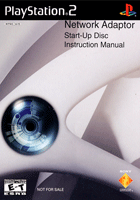
EDIT: Mods, please merge this post with the previous one. My bad!
Attachments
Last edited by a moderator:
Lambada
Member
Great, thanks for the tip. I just did it!Hi,
You can use the report function to suggest a replacement.
In the art manager for the game, click the down arrow in the art you want, and then click report.

1052
Member
He means this:not sure i understand what you mean
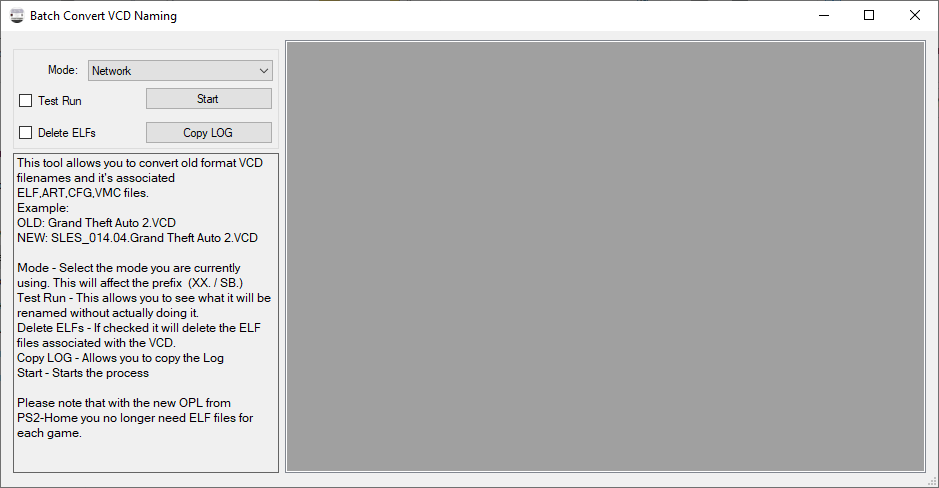
Can you please add a checkbox "Use ID for VCD files" to this window:I have Spider Man 2.VCD in the POPS folder. OPL Manager 22.3 suggests renaming it to SLES_036.23.Spider Man 2.VCD, but OPL Manager 22.4 no longer suggests renaming it (all VCDs have to be renamed manually).
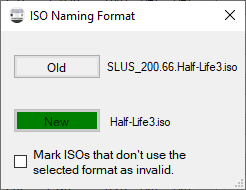
You already have a completely working code, please add just one checkbox or release this tool separately:
Similar threads
-
-

-
PS2 How to Rename PS1 games easily to Play on OPL via POPSTARTER using SMB/USB
- Started by eliminator14
- Replies: 1
-
