PS3 Overheat problems & CELL delidding

1) Remove the top and bottom plastic covers of the PS3
2) Flip it (to have the fan aiming to top)
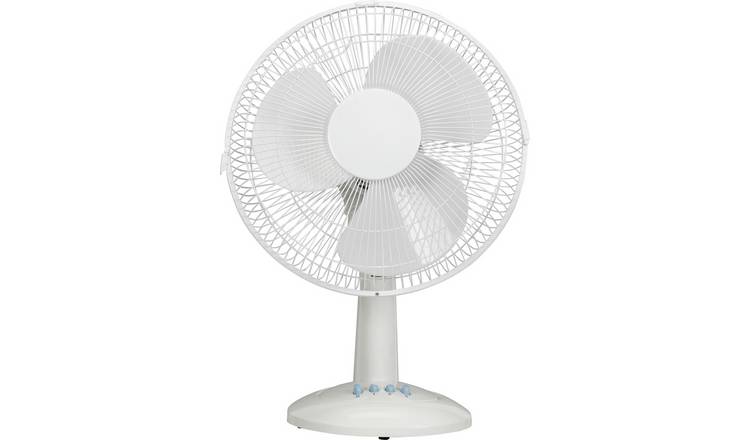
3) Use one of this to push more air into the heatsink https://media.4rgos.it/i/Argos/4251824_R_Z001A_UC17645637?w=750&h=440&qlt=70

By doing this the temperature should be reduced something around 10ºC or 15ºC... good enought to allow you to complete the firmware installation safelly
I decided to proceed with the IHS removal. I will follow this method of this guy ->
After that i will proceed with the firmware installation by your advice above.
Also my question is which firmware i should install. Also what is the procedure to do it. I don't want to make mistakes
 
After the attempt to remove the IHS most probably you are going to kill the PS3, so is no worthy to talk now about what to do after it

If you are really decided to remove the IHS (i suggest to dont do it yet) and you do it successfully without killing the PS3 we can talk later
 
Last edited:
After the attempt to remove the IHS most probably you are going to kill the PS3, so is no worthy to talk now about what to do after it

If you are really decided to remove the IHS (i suggest to dont do it yet) and you do it successfully without killing the PS3 we can talk later
Ok i will try to install firmware first. I think you're right. In that case we can actually find out if firmware can cause overheating. But can you guide me to that proces?
What firmware should i download. And do i need to just insert my ssd harddrive and install from usb the firmware there? I then still have my non ssd harddrive with the current DEX rebug.
 
I don't know how he can keep PS3 without bottom plate. How can you put fan and heatsinks together with motherboard without bottom plate? Top plate is easy to remove but i don't understand removing bottom plate. Also a small table fan will come very handy. After removing the top plate keep the fan pointed in front of PS3 for better air circulation. It will bring down temps by 5c in my guess.

Regarding IHS removal. You should understand the risk. Many people have destroyed their PS3s to fix the IHS. Its a risky job. But since its inevitable you should do it. First do as @sandungas has said. Try installing a fresh cfw.

By the way, you don't remove webman just be deleting it. First you have to disable its dynamic fan control and restore it to Syscon in webman settings. Then you can delete it by typing http://127.0.0.1/delete.ps3?uninstall in browser. Otherwise you might find your fan completely stop working.
 
I don't know how he can keep PS3 without bottom plate. How can you put fan and heatsinks together with motherboard without bottom plate? Top plate is easy to remove but i don't understand removing bottom plate. Also a small table fan will come very handy. After removing the top plate keep the fan pointed in front of PS3 for better air circulation. It will bring down temps by 5c in my guess.

Regarding IHS removal. You should understand the risk. Many people have destroyed their PS3s to fix the IHS. Its a risky job. But since its inevitable you should do it. First do as @sandungas has said. Try installing a fresh cfw.
By the way, you don't remove webman just be deleting it. First you have to disable its dynamic fan control and restore it to Syscon in webman settings. Then you can delete it by typing http://127.0.0.1/delete.ps3?uninstall in browser. Otherwise you might find your fan completely stop working.
I will reinstall fresh cfw just as you guys described to me. I just have a big standing fan which i will use (no worries) Also thanks for the advice on how to actually delete webman but as i'm now going to install fresh cfw on annother hdd i don't have to worrie about that for now. I just want to know which cfw i should download and install.
 
I have never switched from CEX to DEX or vise versa.

But for installing fresh CEX cfw in case you have already flashed your NOR/NAND is easy. All you need is a USB drive in FAT 32 format. Create a folder in its root "PS3", and in that a folder "UPDATE", and put the CFW inside that folder. Make sure that you rename your CFW to UPDAT.PUP . Then you can in update from XMB by going to settings and system update.

Make sure that you are installing same cfw as you already had before. Like 4.84. You can download Ferrox 4.84 or Rebug 4.84. Both have Cobra.
 
I have never switched from CEX to DEX or vise versa.

But for installing fresh CEX cfw in case you have already flashed your NOR/NAND is easy. All you need is a USB drive in FAT 32 format. Create a folder in its root "PS3", and in that a folder "UPDATE", and put the CFW inside that folder. Make sure that you rename your CFW to UPDAT.PUP . Then you can in update from XMB by going to settings and system update.

Make sure that you are installing same cfw as you already had before. Like 4.84. You can download Ferrox 4.84 or Rebug 4.84. Both have Cobra.
Ok that's easy. But if i want to try it on different hdd i just install it the way i installed the one i have now?
 
You'd have to convert back to CEX with Rebug Toolbox, otherwise you'll get an error during installation.
Ok i'll try that out. Have my console top cover off and house standing fan at full speed aimed close to the front of my ps3.
I hope it will be enough. I actually forgot to mention that i think that 4 small thermal pads are missing at the motherboard.
But i still think the overheat could be software related. I don't know how to convert to cex via rebug toolbox but i'm sure i'll figure it out. Thanks for the tip
 
Ok, i have succesfully converted to CEX. I then fitted a ssd hdd and i could format it and install firmware ferrox 4.84
So what should i install to see the temperatures?
 
I don't know how he can keep PS3 without bottom plate. How can you put fan and heatsinks together with motherboard without bottom plate? Top plate is easy to remove but i don't understand removing bottom plate. Also a small table fan will come very handy. After removing the top plate keep the fan pointed in front of PS3 for better air circulation. It will bring down temps by 5c in my guess.
I said to remove the plastic covers, see this photo
In this photo he have removed the top plastic cover, and he is removing the bottom plastic cover, shell, case or whatever is named
jrPSWIRYp3XOm6O3.huge

The point is you need to keep only that metal pieces he have in his hands, because this is the whole console... and forget about the plastics because are not needed in the tests, the plastics are an obstacle for the airflow... we dont want the plastics
The fan in a PS3 fat is at bottom... so you need to flip it and place it on top of a table, wit the heatsink and fan aiming to the room cellar, because this way you can place an aditional fan next to it pushing more additional air to the heatsink, like this
4251824_R_Z001A_UC17645637


By doing all this the temperature is going to be reduced a lot
 
Last edited:
Look, this photo represents a bit better what im talking about... it doesnt have motherboard or fan but what i mean is you need to place the PS3 "flipped down" on top of a table, like this
PlayStation-3-PS3-CECHA01-CECHE01-CECHB01-Heat-Sink.jpg


This way the fresh air goes directly into the fan, and the temperature is going to be a lot smaller (my guess is -10ºC or so)
And if you add another external fan like this "pushing" even more air into the fan is going to be even smaller (another -5ºC or more)
4251824_R_Z001A_UC17645637


Your CELL was around 85ºC... by doing all this is going to be in 70ºC or so, and this allows you to install firmwares, or to do some tests with software to try to fix the problem of your fan speeds... we dont know why it was happening, but the theory is a firmware installation could solve it

Your fan was doing this: speed1 -> speed2 -> speed3 -> stop (and repeat in a infinite loop)
 
Last edited:
Look, this photo represents a bit better what im talking about... it doesnt have motherboard or fan but what i mean is you need to place the PS3 "flipped down" on top of a table, like this
PlayStation-3-PS3-CECHA01-CECHE01-CECHB01-Heat-Sink.jpg

I don't know how this setup will work in fat model without bottom plate. I think this picture is from Slim or super slim. In fat, the system fan rests in bottom plastic plate. And heatsinks are not directly above the fan. So if you remove the bottom the heatsinks resting on bottom plate will be loose and system fan won't have a resting place. I mean, the whole system will be loose and there won't be any mounting screws to keep everything together. Also i don't know how PSU and BD drive will be placed. I haven't tried this before.

But anyway, he has managed to install cex successfully.
 
Last edited:
I don't know how this setup will work in fat model without bottom plate. I think this picture is from Slim or super slim. In fat, the system fan rests in bottom plastic plate. And heatsinks are not directly above the fan. So if you remove the bottom the heatsinks resting on bottom plate will be loose and system fan won't have a resting place. I mean, the whole system will be loose and there won't be any mounting screws to keep everything together. Also i don't know how PSU and BD drive will be placed. I haven't tried this before.

But anyway, he has managed to install cex successfully.
You're right, i can't take on my ps3 the bottom plate off otherwise there is no way the heatsinks will have a base support. But, by flipping the ps3 the heatsinks would gain support
and i think that is his point.
My ps3 is not noisy anymore but what software should i download and use to see the temperatures?
I will make a video and show temperatures here
 
Ok, i have succesfully converted to CEX. I then fitted a ssd hdd and i could format it and install firmware ferrox 4.84
So what should i install to see the temperatures?

You actually don't need a fan control software to view temperature. Multiman has option to see CPU/RSX Temperature.

But first thing you should do is install Control Fan utility. And you have to do it quick because you might overheat on syscon. After you install CFU, immediately start it from XMB after booting PS3. Now put it in Payload mode. And observe the temps.

Edit - Careful. Just because you don't hear your fan going loud doesn't mean its not overheating. There are technical flaws in PS3 system fan (stock sony fan control system) as it doesn't deal with high Temps (system fan will continue to run silent while PS3 is overheating badly). That's why you need a custom fan control software. Do not try to run any games.
 
You actually don't need a fan control software to view temperature. Multiman has option to see CPU/RSX Temperature.

But first thing you should do is install Control Fan utility. And you have to do it quick because you might overheat on syscon. After you install CFU, immediately start it from XMB after booting PS3. Now put it in Payload mode. And observe the temps.

Edit - Careful. Just because you don't hear your fan going loud doesn't mean its not overheating. There are technical flaws in PS3 system fan (stock sony fan control system) as it doesn't deal with high Temps (system fan will continue to run silent while PS3 is overheating badly). That's why you need a custom fan control software. Do not try to run any games.
Ok thanks for the advice. I will be home in 20 min and i will follow your advice.
 
Remember, that every time you run PS3, first thing you need to launch in CFU from XMB. While Webman has auto load boot function for fan control, CFU has to be manually started each time.

Do not run your PS3 without fan control software .... ever.
 
Remember, that every time you run PS3, first thing you need to launch in CFU from XMB. While Webman has auto load boot function for fan control, CFU has to be manually started each time.

Do not run your PS3 without fan control software .... ever.
From one problem to annother... I have placed the CFU pkg to the root of my usb. Ofcourse i have formatted it in FAT32 first.
Placed the usb at the right side of my ps3. Started the package manager and clicked on install packages from root directory.
I have to press the triangle otherwise he will give message nothing found. After i press triangle i get the option to install all packages and after i click it it gives error. With the rebug i had it wasn't a problem.
But it gives a error..
Edit: An error occurred during the install operation. (8002AE32)
That is the error.
 
Last edited:

Similar threads

Back
Top