PFS BatchKit Manager (2TB) Support

PS2 PFS BatchKit Manager (2TB) Support 1.2.0

I did. 1G. I also tried 512M. Still makes it 128M. When I try to make a new partition with ulaunchelf and choose 1G or 512M it also only makes it at 128M. I have over 8Gb available. When I run HDDChecker it says finds and fixes 1 error even if I run it multiple times in a row. Years ago I used ulaunchelf to expand opl partition but it broke VMC. That's why I deleted it. So I could make a fresh +opl partition but I can't seem to make one bigger than 128m. Now my artwork won't fit because I have over 300m of it but on the plus side, VMC works now. 700 games on a 2TB SATA HD but something must be borked. Maybe I should format it and do it all over. This program was my last try idea but no avail.
I even tried to make multiple dummy partitions of various sizes hoping one would work but it would only show and make the first one at 128M even though it will say partition complete for the others they aren't actually made. Weird.
 
APA-Chain is probably broken. You should make a fresh install of basically everything...!
 
APA-Chain is probably broken. You should make a fresh install of basically everything...!
That's what I was trying to avoid. Oh well. Live and learn. Hours of transferring all my games to PC and back. Thanks for your help. Your program works great had I not already broke my stuff.
 
  • Like
Reactions: GDX
That's what I was trying to avoid. Oh well. Live and learn. Hours of transferring all my games to PC and back. Thanks for your help. Your program works great had I not already broke my stuff.

It's definitely the best thing you can do. I had to do it with my 2TB HDD once. If you have a SATA to USB 3.0 adapter it won't take that long.

Make sure to do anything the right way.

After formatting, do not delete any system partition. Never delete a system partition.
 
@GDX firstly thanks for this amazing toolkit, it's really awesome.

I have some questions:
Is it possible to install PSBBN and/or XMB via your toolkit?
Is linux support possible?
When I want to rename HDL for PSBBN support (just to try the feature out) it says the partition should be named SLUS-12345.XX etc. But when I auto rename using the toolkit, it renames partitions to HDLX.. and not SLUS-12345.XX?
 
Hey, @cloudstrife

Thank you for your feedback.
I will address your questions one by one.
  1. No, it is not possible, at least currently, to install PSBBN/XMB cleanly without encountering problems with the hard drive. However, you can install it using an image.img for experimentation. It is not recommended for regular use because when you install games or a new partition, there may be geometry issues, and some partitions may become invisible.
  2. Linux support is not yet planned.
  3. This problem (bug) occurs if you have installed a game with an older version of hdl_dump or Winhiip that uses an outdated partition format. I recommend deleting this partition, then reinstalling the game with PFS Batchkit Manager to obtain the new partition format. Afterward, you can convert it to PSBBN/XMB.

    A big update will arrive soon on December 10 with a lot of improvements
 
Thanks for the response.

1. I see, I saw your demo on youtube and it's the slickest menu I have seen so far for the PS2, so here's to hoping.
2. Also fingers crossed :tranquillity:
3. I formatted my hdd with your wLaunchelf, and then installed latest FHDB. I then installed apps and games etc with PFS batchkit, here's some findings:

- Installed HDDOSD (Browser 2.0) and fixed the graphic artifacts, both went fine
- Created +OPL partition, went fine
- Installed PS1 and PS2 games with options 1 and 2 in the main menu and chose to install for HDDOSD and opted in for all art etc:
-- All ps1 games boot fine from the HDDOSD, although some have missing art, e.g. Frogger 2 (whereas Frogger 1 has art).
-- ps2 games have the HDL icon, although I chose to install art.
-- When hovering over ps2 titles, it says OPL Mini above the titles. Is there a possibility to not show this?
-- I installed a lot of apps, including those from SP193 (hdd checker etc.) Those appear as apps in the HDDOSD. Retroarch as well. However, there is a lot of corrupted data files. And I also installed OPL, wLaunchelf, launchElf KHN and they can't be found in the HDDOSD, although installation seemed to go well.

I had an idea for the installer:
Instead of always having to enter Y/N or a number, perhaps a default can already be given for the most plausible option most users would choose. For example in the same style arch linux gives this option, by capitalizing the most likely option, Y/n.

Looking forward to the upcoming update!
 
  • Like
Reactions: TnA
@cloudstrife
  • Icons in HDD OSD are 3D, bitmaps in "hdd0:/+OPL/ART/" have nothing to do it. Those are resources for OPL. If You want some other than HDL default one, You must prepare them by himself - easiest way is just take save icon (the same format).
  • Icons and system.cnf in which You have description of item can be updated/injected via HDL Dump or uLE ISR HDD.
  • APA partitions without icons, will be displayed as corrupted data.
  • OPL Mini is obsolete, use OPL-Launcher and at least OPL in version 1.1.0.
 
@cloudstrife
  • Icons in HDD OSD are 3D, bitmaps in "hdd0:/+OPL/ART/" have nothing to do it. Those are resources for OPL. If You want some other than HDL default one, You must prepare them by himself - easiest way is just take save icon (the same format).
  • Icons and system.cnf in which You have description of item can be updated/injected via HDL Dump or uLE ISR HDD.
  • APA partitions without icons, will be displayed as corrupted data.
  • OPL Mini is obsolete, use OPL-Launcher and at least OPL in version 1.1.0.

The ARTs are only available for OPL, but for HDD-OSD icons, the database is not yet very large, so it is normal that some have icons and others do not.

The "OPL Mini" in the title will be replaced in the next update, but you can already change the title by updating the partition header, which will prioritize the game title instead of "OPL Mini."

Regarding corrupted data, I'm not entirely sure; in general, it happens when the APA chain is broken or when an icon is missing for an application. However, I doubt it's due to a missing icon because, during installation, it automatically adds an icon by default to avoid this issue. The only time I corrupted my APA chain was by closing the PFS batch manager while installing a PS2 game. Otherwise, try launching HDD Checker from the PS2 to optimize the disk; this might fix the problem.

Yes, I'll see what I can do to simplify the choices.
 
@Berion, thanks for the insights.

@GDX
Ok, did the following.
optimized the disk via hdd checker, but no difference.

I then hooked my ps2 up again to the PC.

I injected opl-launcher for PS2 games and the headers for PS1, PS2 games and APPS (3d icon, art etc):
Advanced Menu > FHDB/HDD-OSD/PSBBN/XMB > Partitions Management > Inject OPL-Launcher (Launch PS2 games from HDD-OSD)
Advanced Menu > FHDB/HDD-OSD/PSBBN/XMB > Partitions Management > Update Partition Resources Header (Updates Title, Icons, Gameinfo, ART, KELF)

Y to all.

Started up the PS2. The only difference is that OPL Mini is now indeed gone and the full PS2 title is displayed. However, the HDL icon is still there. Also same PSX games have 3d icon, while others have the Generic one.

Thing is that installer logs that 3d icons etc are being installed and doesn't report assets not found or something, which makes me think everthing should be installed correctly, while it clearly isn't.

Also, if can contribute making missing 3d icons (game cases) for psx, please let me know how, I can make some.

I was wondering, when you inject OPL, does it take the latest beta OPL, stable or Mini OPL?

Lastly, I have also tried to reacht the ps2 using the NBD server:
Advanced Menu > HDD Management > NBD Server (Only to access PS2 HDD from network) > Mount Device

I first installed the driver and of course started NBD Server on PS2 in OPL (using static ip).
Whatever I do I get:
libwnbd.dll!WnbdIoctlCreate ERROR Could not create WNBD disk. Error: 1225. Error message: The remote computer refused the network connection.

I see this error is already issued under:
https://github.com/GDX-X/PFS-BatchKit-Manager/issues/33

It would be great if there's a solution for this, as it makes it easier to manage smaller things like injecting the header. Of course installing games will be a lot slower then when attached locally to PC.

Note that I can reach the PS2 with NBD using HDL Dumx and Pfsshell (using linux), so a connection with PFS Batchkit Manager should also work.

Hope this feedback can help in improving the Manager.

 
GDX updated PFS BatchKit Manager (2TB) Support with a new update entry:

PFS BatchKit Manager (2TB) Support

1.1.8 [10/12/2023]

- Added HDD Cache: Improves loading time; no need to scan partitions every time.
- Added LNG Language files transfer for OPL Resources.
- Added Full support for compressed formats (.Zip, .7z, .RAR) during installation of PS2 games.
- Added Option to hide HDL partitions while installing PS2 games.
- Added Improvement for detecting hidden, unhidden, or converted partitions.
- Added Further improvement for cloning HDD.
- Added Original date format for PSBBN info.sys....

Read the rest of this update entry...
 
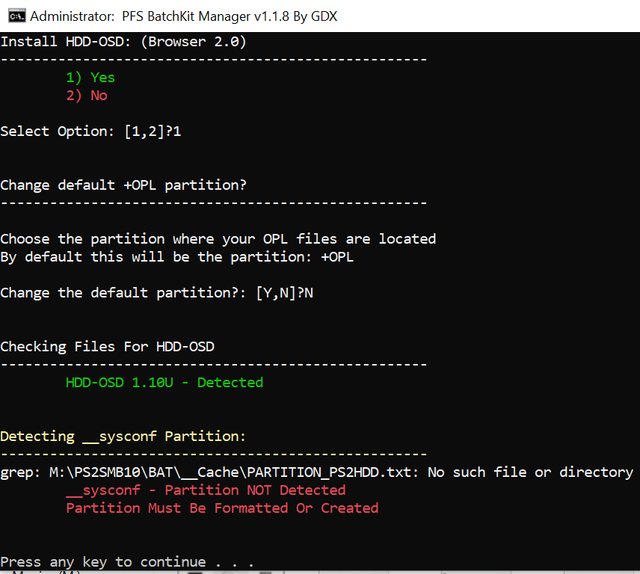
Loving your app, but running into an issue with your latest version (1.1.8).
I've gone right back to 1.0.2 and tried every other version, and they're all fine (except after you changed the script to not auto create the partition).
Hoping it's something simple.
Drive is IDE 40GB Official Sony from the SCPH-10210 HDD Kit.

 
Thank you for your feedback!

I don't have this bug but according to the error it is that the cache file does not seem to exist which is strange because it creates this file when the script starts

Are you using the NBD server by any chance?
 
Last edited:

Similar threads

Back
Top