PS3 Playing PlayStation Portable (PSP) games on your PS3

STLcardsWS

Administrator
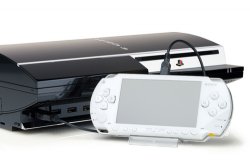
Playing PSP on your PS3
PlayStation_PortableOrange.png

  • PSP Games on your PS3
    Emulating some of the PSP library of games is possible with a Jailbroken PS3. Using the unlocked firmware's internal PSP emulator, there are 2 available modes: Remaster & Mini's we can utilize each giving different result depending on the title. These days many games have been tested and a Community Compatibility List has been setup over at PS3 Dev Wiki > HERE ,<, roughly about 60% of the PSP library is playable on a PS3.
    Quick look at a few games: Playable / Unplayable
    • Blitz Overtime
    • Call Of Duty: Roads to Victory
    • Crisis Core: Final Fantasy VII
    • Crazy Taxi: Fare Wars
    • F1 2009
    • F1 Gran Prix
    • God of War: Chains of Olympus (minor issue's)
    • Grand Theft Auto: Chinatown Wars
    • Grand Theft Auto: Liberty City Stories (PS2 version playable on PS3)
    • Grand Theft Auto:Vice City Stories (PS2 Version playable on PS3)
    • Gran Turismo
    • Metal Gear AC!D
    • Monster Hunter Freedom Unite
    • Ratchet & Clank: Size Matters
    • Tekken 6
    • See More @ https://www.psdevwiki.com/ps3/PSP_Classics_Emulator_Compatibility_List


  • Watch-the-Latest-TV-Shows-and-Movies-on-your-PSP-and-PS3-2.jpg

    Two quick guide by developer Aldostools
    (forum link) (2)
    Method #1
    1- PSP games can be emulated on PS3 in 2 modes: PSP Remaster or PSP Mini
    2- There is a PSP Launcher for each mode. They are included in webMAN MOD
    https://store.brewology.com/ahomebrew.php?brewid=310
    3- The compatibility of PSP games is relatively low. Near 60% are playable.
    Some games are playable as Mini, others as Remaster. Try the games with both launchers.
    Many games show glitches, have issues with save or freeze after few seconds.
    But the games that are compatible generally look better than PS2 games.
    4- The UMD should be dumped as ISO 9660. CSO -a popular format on PSP scene- are not compatible.
    5- The ISO should be placed in PSPISO folder at the root of USB, /dev_hdd0 or streamed by ps3netsrv
    6- The USB can be FAT32, NTFS, exFAT or ext2/3. FAT32 is recommended.
    The other file systems require prepISO to detect them.​

    In summary:
    1- Put the ISO in /PSPISO
    2- Use webMAN MOD to mount the games and PSP Launcher to play them.​


    Method #2
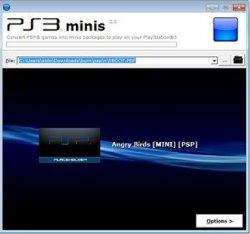
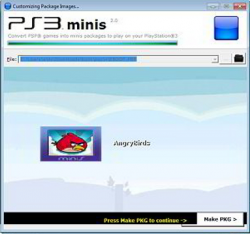
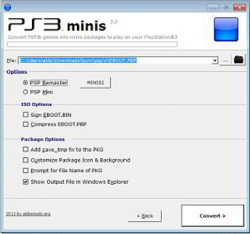
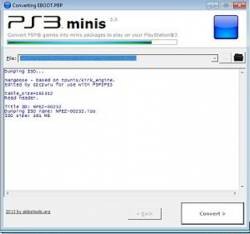
    A second method for launching PSP games involves the creation of a PKG using PSP2PS3 mini found in my PS3 Tools Collection. https://www.psx-place.com/threads/playing-psp-on-ps3.115/

    Using this method the PSP game is installed on internal HDD and launched directly from XMB.
    The compatibility could be slightly better due the tool includes configs for a few games.
    Also there are more options that can be tweaked.

    psp2ps3.PNG psp2ps3-4.PNG
    psp2ps3-2.PNG psp2ps3-3.PNG

  • >Tutorial's & Tips for Preparing/Playing PSP on PS3
    .
    Applying PSP Custom Config's

    How to get PSP Games into Full-Screen?


    Dumping your UMD


    Converting PBP to ISO


    PSP on PS3 Compatibility List


    Note about PSP Launcher's (
    via Aldostools)
    • There are 2 PSP Launchers: Minis (PSPM66820) and Remasters (PSPC66820)
      • MultiMAN uses only the PSP Remasters Launcher (PSPC66820)
      • webMAN MOD supports both (If you only installed Minis (PSPM66820), multiMAN will report an error.)

    Using NTFS & exFAT USB Drives on webMAN MOD (
    see PSP ISO Setup)

    Information about PSP Emulation

  • F.A.Q.
    .Supported Formats

    • Only ISO's are supported, CSO, ZSO & JAX are not supported

    Can PSP Games be played from Internal HDD / External HDD Storage?

    • Yes. Internal HDD & External Storage Devices are supported in mounting /launching PSP Games on your PS3

    Do i need prepISO and what is it for?

    • Optional. prepISO is a utility for the PS3 used when you have attached exFAT or NTFS storage devices to expand the PS3 Storage Capabilities beyond fat32 system.


    Official XMB Settings for PSP Gameplay
    .> via
    https://www.psdevwiki.com/ps3/Emulation#Special_notes
    .
    800px-XMB_PS1PS2PSP_game_settings.jpg
    • In XMB [Game Settings] [PSP™ Remaster - Screen Mode] (stored in XRegistry.sys/setting/game/pspemuViewmode)
      • Sets the display size of the screen during gameplay. This setting can only be used when outputting video to an HD TV
      • [Normal]
      • [Full Screen]
    • In XMB [Game Settings] [PSP™ Remaster - 3D Display] (stored in XRegistry.sys/setting/game/pspemu3dDisplay and pspemu3dDepthAdjust)
      • Sets whether or not to display Images in 3D.You can also adjust the depth of 3D images. This setting can only used when playing a stereoscopic 3D game using a 3D TV
      • [Off]
      • [On]
        • [7] (Strong)
        • [6]
        • [5] (Normal)
        • [4]
        • [3]
        • [2]
        • [1] (Weak)
    • In XMB [Game Settings] [PSP™ Remaster - Ad Hoc Mode Channel] (stored in XRegistry.sys/setting/game/pspemuAdhocModeCh)
      • Set a channel for use in ad hoc mode. Choose the same channel as the person you want to connect with
      • [Automatic]
      • [1]
      • [6]
      • [11]
    • In XMB [Game Settings] [PSP™ Remaster - Ad Hoc Mode] (stored in XRegistry.sys/setting/game/pspemuAdhocModeWlan)
      • Sets whether or not to use ad hoc mode over a wireless LAN
      • [Off]
      • [On]
 
Last edited:
We had a thread here before but was dated, so figured we needed to remake this post.
@aldostools as usual your great posting history and info you share made this easier to remake. Hopefully i covered everything (i am sure i missed something useful ).
I may add more details about the pkg method and the few configs .
 
Last edited:
We had a thread here before but was dated, so figured we needed to remake this post.
@aldostools as usual your great posting history and info you share made this easier to remake.
Hopefully i covered everything. I may add more details about the pkg method and the few configs .
under tips and tricks tab, dumping umb...remove "CSO". it was part of the next sentence you were quoting from.
 
Working:adoration:
Amagami EBKore Plus
Blazblue Calamity Trigger Portable

Not Working:apologetic:
Tales of Eternia JP(Freeze at Title)
Fate Unlimited Codes Portable(Try PS2 version)

Working but Major Problem:ambivalence:
Guilty Gear XX #Reload(Graphic Glitch)
Guilty Gear Judgment(Slash Can't Boot)
 
¿Alguien tiene alguna idea de por qué es difícil lograr que las cinemáticas de Daxter funcionen en PS3?:elf3:

Does anyone have an idea why it is difficult to get the daxter cinematics to work on ps3?
 
¿Alguien tiene alguna idea de por qué es difícil lograr que las cinemáticas de Daxter funcionen en PS3?:elf3:

Does anyone have an idea why it is difficult to get the daxter cinematics to work on ps3?
Iirc, the PSP emulator is supposed to be meant for the PlayStation mini games, so it's not really designed for full-fledged PSP games. That's why compatibility is terrible.
 
Si mal no recuerdo, el emulador de PSP está pensado para los minijuegos de PlayStation, por lo que en realidad no está diseñado para juegos de PSP completos. Por eso la compatibilidad es terrible.

La verdad que si la compatibilidad en juegos remaster es un dolor de cabeza y si el emulador esta limitado aun que aun seguire intentando como que casi lo logro por lo menos ahora hace como que quiere iniciar la cinematica pero se la termina salteando

The truth is that compatibility in remaster games is a headache and the emulator is limited, even though I will continue trying as I almost achieved it, at least now it acts as if it wants to start the cinematic but ends up skipping it.
 
Daxter_19.png
Ese juego está en la PS5. Lo compré después de que me encantara el primer juego. Es el único juego que me pasé en la PS3. También obtuve el platino. :)

Si es que vi que no funcionava y nadie lo intentava arreglar pues dije vamos aver que pasa aca como es mi saga de juegos favorita y solo falta este para que este cabal la saga en ps3 pues me puse a arreglarlo y ahora ya es un 70% funcional en ps3

Tengo pensado liverarlo cuando ya este perfectamente arreglado si es que lo logro de paso ya arregle otro juego de psp que es el ridge racer 1 y casi 1 dbz


If I saw that it didn't work and no one was trying to fix it, I said, let's see what happens here, as it is my favorite game series and the only thing missing is this one for the saga to be completed on PS3 , so I started to fix it and now it is 70% complete. functional on ps3 I plan to deliver it when it is perfectly fixed if I manage to do it by the way I already fixed another PSP game which is ridge racer 1 and almost 1 dbz
Daxter_20.png


Daxter_20.png
 

Similar threads

Back
Top