PS2 PlayStation 2 MECHACON Adjustment Program (PMAP)

How to determine your chassis model:

For most chassis models, your consoles device information sticker will have this:


Consoles older than D-chassis (A, A+, AB, B and C) will not have them. They will also have a wire mesh behind their fans (top: SCPH-15000 A-chassis, bottom: SCPH-39006 G-chassis):​

Chassismodel(s)
ASCPH-10000 (GH-001), SCPH-15000 (GH-003), DTL-H10000, DTL-T10000(H)
B/B'SCPH-30001 and DTL-H300xx (GH-004/GH-005)
C/C'SCPH-30001/2/3/4 (GH-006/GH-007)
A+SCPH-18000 (GH-003)
ABSCPH-18000 (GH-008)

Only the B-chassis had an AUTO-TILT motor. The B-chassis PlayStation 2 was a US-only release.
The early non-Japanese DebugStation (TEST/DEX) units are B-chassis.

The C-chassis does not have an auto-tilt motor, otherwise it is the same as the B-chassis.
If the EEPROM was updated before, then the chassis ID (as IDed by the tool) will be different from the B-chassis .
 
Nice info @sp193 Thanks for sharing, I wasn't aware there was a so many chassis models. Specially about chassis B. Until now I used v0, v1, v2, etc. to determine ps2 version, but it looks there is more models than I though.
 
Those version numbers are actually unofficial, and they do not always correspond to any chassis models.
For example, the SCPH-10000, SCPH-15000 and SCPH-18000 consoles were all lumped together under the "v0" version, but aren't the same.
 
Just a quick update. I've still had no luck, despite spending almost all of my free time on it.

I've taken apart a console and held the pins in place manually, ensuring they are all properly connected. I've tried swapping TX and RX around, but still nothing.

I've tried 2 different devices so far, too. Both appear as a USB serial port but don't seem to work properly with the PS2.

I'm using a Windows Vista x86 laptop if that makes any difference.

I'm going to buy another UART device tomorrow and try that.

Does anyone have any information that may help me? Should I change the default port settings of the USB serial port?

I will get this working if it's the last thing I do! :-)
 
Can you post a photograph of how you are connecting your device to the points? What is your mainboard model?

Did you try pressing the reset button?

Be sure of the COM port number. Even if your PC has no physical COM port, Windows may not assign the port number 1 to it.
The baud rate will be changed by PMAP, so you do not need to worry about it
 
Last edited:
Can you post a photograph of how you are connecting your device to the points? What is your mainboard model?

Did you try pressing the reset button?

Be sure of the COM port number. Even if your PC has no physical COM port, Windows may not assign the port number 1 to it.
The baud rate will be changed by PMAP, so you do not need to worry about it

Thank you for your reply :-)

I will take a photo when I'm back home this evening, but for now I have a little update.

I realised I was stupidly connecting to RST rather than 3.3v. I connected to 3.3v and the usual beeping sound in TEST mode disappeared, and the fan started spinning as fast as it could.

When I unplugged the UART device from the laptop, it stopped and the beeping sound came back.

Thank you for the information again sp193. I'll get there in the end :-)
 
That behaviour does not sound right. When I did try to get my SCPH-10000 connected though, I also had my share of weird problems like that. :|

I wish I could certainly help you more at this point, but I don't usually deal with the hardware. Sorry.

What we can do now, is to double-check your work.
 
Thank you for your reply :)

I will take a photo when I'm back home this evening, but for now I have a little update.

I realised I was stupidly connecting to RST rather than 3.3v. I connected to 3.3v and the usual beeping sound in TEST mode disappeared, and the fan started spinning as fast as it could.

When I unplugged the UART device from the laptop, it stopped and the beeping sound came back.

Thank you for the information again sp193. I'll get there in the end :)

Try setting your serial connection settings to 38400 baud rate and 7N1 (7 bits No parity 1 stop bit) I had noticed that the serial cable mods I found all said to set it to 8N1, however this was not correct for my ps2. (SCPH-39001 GH-022)

EDIT: After reading the source it turns out it is controlled by the program and is different.

I wish I had found this over the summer as I'm not allowed a soldering iron in my dorm. I just got an arduino due which I plan to use to sniff the hell out of everything and pass all information over bluetooth. I had tried to do so with an atmega328U and a MAX14830 but ultimately ran out of time as I was unable to etch a circuit board with fine enough traces. I'm getting off track so I'll leave it there.

;tldr Try setting your serial settings to 38400 7N1. I'll likely be destroying my ps2 come spring break.

Edit the serial connections on the PS2 I was using we're for the emotion engine. I am unsure if the settings are the same throughout the PS2 or not. However, I would highly recommend connecting to the ee tx pin and ensuring you get a proper output before attempting to use the program. It will at least let you know that you have correct settings and functionality on the OC end before attempting to proceed. You can very easily check to see if a serial cable is functioning by connecting it's tx to it RX. If you open and serial terminal program and send it something it should be echoed back. If anything is lost than then there is something wrong with the cable.

Just a side note, I'm an electrical engineering student. While I obviously don't know everything I will do my best to help with hardware related questions. If I am not 100% certain before giving advice I will be as transparent as possible.


Edit edit: The mechacon has an spi interface. Actually it's probably the syscon's eeprom with the spi interface. Or both, most likely the both have a dedicated hardware spi interface.

Slightly off topic now, but may someone give me a list of exactly what hardware we are able to communicate with directly though the open source sdk.
 
Last edited:
Edit the serial connections on the PS2 I was using we're for the emotion engine. I am unsure if the settings are the same throughout the PS2 or not.

As you have found, it's different. Here, 57600bps 8N1 is used. It also uses 3.3V instead of 1.8V.

Edit edit: The mechacon has an spi interface. Actually it's probably the syscon's eeprom with the spi interface. Or both, most likely the both have a dedicated hardware spi interface.

There have been various models of the MECHACON. The earlier models had an external EEPROM, until it was replaced with the CXR706080, which had the EEPROM integrated into it.

Slightly off topic now, but may someone give me a list of exactly what hardware we are able to communicate with directly though the open source sdk.

I'm not sure how to answer this question. There are lots of interfaces around the PS2.
What sort of interfaces do you have in mind?

In general, we have ways to control nearly all the interfaces that are documented to the licensed developers. We don't have a good i.Link module, but likely not many people have explored that anyway.
 
@sp193
Thank you for the huge amount of work doing for the ps2 scene!

I tried to calibrate my SCPH-50004 GH-023 silver ps2, but unfortunately it seems that there is some kind of incompatibility problem with my model.
A few information the program detected:
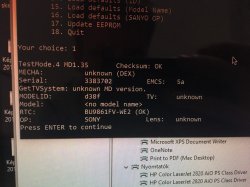
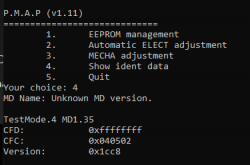
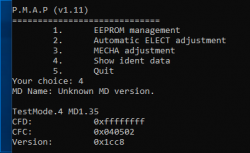
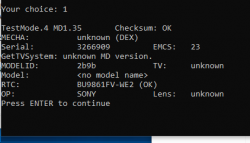
Testmode.4 MD1.35, MECHA:unknown(DEX) EMCS: 5a, MODELID:d38f
I saw in readme that MD1.35 is not in the supported mechacon list, but before start, I've checked if the scph-50004 is on the supported models list

Is it possible that there is a workaround to calibrate even this odd version of mechacon, too?
I saw on an other forum, that somebody had the same issue with this weird version of mechacon and scph 50004.

After the scph 50004 I tried to calibrate my other ps2, an scph-39004.
I could successfully calibrate it. After cleaning the lense, I could easily go below the targeted 3E00 jitter 256 value. I am happy, that now I have a properly calibrated fat ps2.
 
Please ensure that the connection to the UART on the MECHACON is good. Interference could cause weird things to happen.

But if you really do have a device that does not have a supported firmware, then nothing much can be done because the commands for each version tend to vary or require specific workarounds. I would not dare to make assumptions here.

MD1.36 was the very first version. It has always increased, so seeing a 1.35 is strange.
 
Please ensure that the connection to the UART on the MECHACON is good. Interference could cause weird things to happen.

But if you really do have a device that does not have a supported firmware, then nothing much can be done because the commands for each version tend to vary or require specific workarounds. I would not dare to make assumptions here.

MD1.36 was the very first version. It has always increased, so seeing a 1.35 is strange.
Thank you for your answer!

I think the connection was good, but next time I disassemble that ps2, I resolder the cables to the test points just to be sure.
It is strange, that on assemblergames somebody had the same issue detecting MD1.35 version on an SCPH-50003, GH-026, may some parts of Europe got some weird version of the mechacon.

This is a picture I took when trying to calibrate the ps2, but I don't think it helps much.
 

Attachments

  • photo_2019-04-05 13.20.08.jpeg
    photo_2019-04-05 13.20.08.jpeg
    168.6 KB · Views: 629
It is strange, that on assemblergames somebody had the same issue detecting MD1.35 version on an SCPH-50003, GH-026, may some parts of Europe got some weird version of the mechacon.

If you're sure that it's something that happens with certain PS2s, then it is possible that perhaps the commands got changed with even later revisions of the I/J-chassis PS2s. Maybe even the EEPROM memory map.

The direct problem here is that the values obtained by the tool are likely incorrect. As we can see here, the MECHACON is incorrectly identified as a DEX. There is also no model name too, but these problems might have been caused by the wrong EEPROM map being used, due to the MD version being wrong.

If you chose to view ident data (from the main menu), the values displayed there will reflect the erroneous data that is used by PMAP to derive various pieces of information about the PS2.
Command cfc is used to get the device version number and region, which returns the same values returned by sceCdMV()
Command cfd is used to determine the TestMode and MD.

The SCPH-10000 & SCPH-15000 do not support command cfc.
 
Last edited:
@sp193
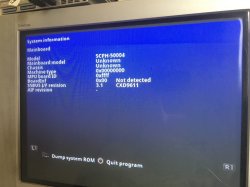
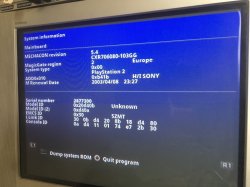
I checked ident data with pmap and ps2ident data, I attached the pictures I took. Unfortunately it seems like I have a strange version
 

Attachments

  • IMAGE 2019-04-28 14:08:09.jpg
    IMAGE 2019-04-28 14:08:09.jpg
    146.3 KB · Views: 709
  • IMAGE 2019-04-28 14:08:11.jpg
    IMAGE 2019-04-28 14:08:11.jpg
    146.2 KB · Views: 710
  • Képernyőfotó 2019-04-28 - 14.09.15.png
    Képernyőfotó 2019-04-28 - 14.09.15.png
    21.4 KB · Views: 619
Last edited:
I tried calibrating an other SCPH-50004, this one made by foxconn, and has a GH-026 motherboard, but I have the same result.
 

Attachments

  • Képernyőfotó 2019-06-08 - 20.03.41.png
    Képernyőfotó 2019-06-08 - 20.03.41.png
    23 KB · Views: 217
  • Képernyőfotó 2019-06-08 - 20.02.29.png
    Képernyőfotó 2019-06-08 - 20.02.29.png
    23.6 KB · Views: 451
If PS2Ident can read the model ID properly, then it means that the EEPROM layout is still correct, but somehow at least the cfc command did not work correctly over RS232. Either the command set was changed or your serial link has interference.

If the command set was changed, then only Sony has the information for communicating with such a model.
 
It would be great if Sony released the tools, but I guess it will never happen.
If the serial has interference, wouldn't the checksum would be bad? or at least not OK every time?

I think I give up, of course if a third working scph-50004 comes around, I'll try again.
I attached the specs PS2Ident generated.
 

Attachments

There's no checksum involved for the serial link protocol. So if the serial interface does not work well, then communications would likely go wrong.
 
I never said it was surely a problem with the drive...
Did you check the mainboard? That's what I've been trying to tell you to do. The flat cables for the tray switches plug into it. There should be continuity between the MECHACON and the tray switches.

The MECHACON is the device that monitors and controls the CD/DVD drive. If it cannot get the signal that the tray is in the closed position, then it would not know about the tray being closed.
are you the same sp193 from assemblergames? if so would this help me? https://web.archive.org/web/2017062...ion-2-mechacon-adjustment-program-pmap.61003/ and if it would how would i go about using it?
 

Similar threads

Back
Top