PS2 PlayStation 2 MECHACON Adjustment Program (PMAP)

are you the same sp193 from assemblergames?
Yes.

It would help you with diagnostics, from the console's end of things. You could perhaps use this to test the tray mechanism, by issuing the tray open and close commands. However, you already know that it cannot detect tray closure for some reason, so this tool may not necessarily give you any additional insight.

how would i go about using it?

From the first post:
As for the location of the test points (Tx, Rx, Gnd, 3.3V and RMC), please refer to the SONY service manuals.
You will need to connect a 3.3V RS232-compatible transceiver to Tx and Rx, and connect RMC to ground (it is pulled-up).
You need to identify these points on the MECHACON. Since Sony had a test jig tool which physically contacts with the cons, these points are accessible as contact points and may be grouped together.

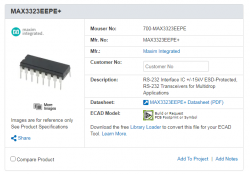
You need to connect a 3.3V RS232 driver like the MAX3323E. This would be to interface with a PC serial port. Then you can use the tool with the PS2.
 
Yes.


It would help you with diagnostics, from the console's end of things. You could perhaps use this to test the tray mechanism, by issuing the tray open and close commands. However, you already know that it cannot detect tray closure for some reason, so this tool may not necessarily give you any additional insight.


From the first post:

You need to identify these points on the MECHACON. Since Sony had a test jig tool which physically contacts with the cons, these points are accessible as contact points and may be grouped together.

You need to connect a 3.3V RS232 driver like the MAX3323E. This would be to interface with a PC serial port. Then you can use the tool with the PS2.
would this work? https://www.amazon.com/Download-Downloader-Compatible-Atomic-Market/dp/B00TNI2MQ0
 
Same problem here with a 50004, it's unrecognized/unsupported :apologetic:
I'm trying to give a look at the serial output and messing around with the source code of PMAP in hope of having a bit of luck!
 
What device do I need to hook up the solder points to?

Sorry about the rookie question. I've been repairing PS2s for a few years now and have been calibrating new lasers in using the skews which works but it never gets it perfect.

I've known about this program you've made for a few years now and have always wanted to try it out but I have no idea how to use it or what device to wire the PS2 to.

Thanks
 
What device do I need to hook up the solder points to?

Sorry about the rookie question. I've been repairing PS2s for a few years now and have been calibrating new lasers in using the skews which works but it never gets it perfect.

I've known about this program you've made for a few years now and have always wanted to try it out but I have no idea how to use it or what device to wire the PS2 to.

Thanks

Update: Is this what I'm after? Is there any other components I need to set this up or do I just wire up to the chip and have the output going directly to the serial port on my computer?
 

Attachments

  • Capture.PNG
    Capture.PNG
    42.9 KB · Views: 124
I suppose that is what you do need (a 3.3V RS232 transceiver) - but the datasheet for this tranceiver model indicates that 4x capacitors are required to support the charge pump for 3.3V operation.

Other that wiring this to the RX, TX, GND and 3.3V points, you need to ground the RMC pin. These points can be derived from the service manual for your model, or something similar.
 
I suppose that is what you do need (a 3.3V RS232 transceiver) - but the datasheet for this tranceiver model indicates that 4x capacitors are required to support the charge pump for 3.3V operation.

Other that wiring this to the RX, TX, GND and 3.3V points, you need to ground the RMC pin. These points can be derived from the service manual for your model, or something similar.

Thanks. Is RX and TX Rin Rout and Tin Tout on the data sheet?
 
I do not recall Sony naming those pins like that. The pins in question have nice pads (JLxxx) and are usually in close proximity to each other, as the official service centres have service tools that connect to these points. These are connected to the MECHACON, as you want to issue commands to it.
 
I do not recall Sony naming those pins like that. The pins in question have nice pads (JLxxx) and are usually in close proximity to each other, as the official service centres have service tools that connect to these points. These are connected to the MECHACON, as you want to issue commands to it.

No I mean the RS232 Transceiver. The pin out on the Mouser Datasheet doesn't mention rx and tx but has a "Rin Rout and Tin Tout" are they the same thing?

Also on the subject of the jl610 and 11 test points I've been looking them all up on each PS2 revision from C to I chassis and I've found them all but the C chassis. Pins 80 and 81 on the mechacon don't lead to a test point but the traces go directly under the mechacon then go into a via which leads to under the CD/DVD controller where it's a dead end (Version 3, C Chassis, Gh-06 SCPH30003). Do I have to solder directly to the mechacon?
 
No I mean the RS232 Transceiver. The pin out on the Mouser Datasheet doesn't mention rx and tx but has a "Rin Rout and Tin Tout" are they the same thing?

According to the Maxim MAX3323E datasheet, RxIN and TxOUT are for RS232, while TxIN and RxOUT are on the CMOS/TTL side (which should connect to the MECHACON).

Also on the subject of the jl610 and 11 test points I've been looking them all up on each PS2 revision from C to I chassis and I've found them all but the C chassis. Pins 80 and 81 on the mechacon don't lead to a test point but the traces go directly under the mechacon then go into a via which leads to under the CD/DVD controller where it's a dead end (Version 3, C Chassis, Gh-06 SCPH30003). Do I have to solder directly to the mechacon?
Hopefully, you won't need to solder onto the MECHACON's legs.

The pin jig tool is inserted into the expansion bay, while the console is assembled. It would have gone through a gap in the metal shielding.
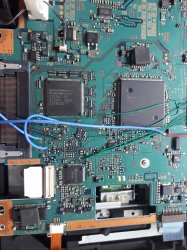
Since the GH-006 has a pretty messy layout, you might have to use a multimeter and do some guessing. The points may be close together, like the ones at point Y on this diagram. The 4 of them near CN604 and IC604.
I don't know if they're the ones you're looking for, but happy hunting.
 
So I just tried to use Pmap for the first time with no success. Do I absolutely need the transceiver chip if my PC already has a RS232 9 Pin Serial Port? I tried wiring TX RX and Ground directly to the serial port with nothing inbetween and the Pmap program wouldn't open. I also tried wiring the 3.3V to pin 1 of the serial with horrible results, I ended up having to replace the PS14 fuse *facepalm*.

Though one bit of success I had (I think) was when I grounded the RMC test point and I got the colour bar test screen, I'm assuming I did something right with that.

I need help with this lol I've had my PC for over 10 years and I've never once even touched its 9 pin serial port. If I do need a transceiver chip which one would you recommend?
 
On the B-chassis and later, grounding RMC will trigger the TESTMODE program (which starts up with coloured bars), in place of the standard OSD. On the A/A+ SCPH-10000 and SCPH-15000, nothing visible happens.

You needed that transceiver. I think you are fortunate if nothing else was blown up, for connecting the RS232 (Wikipedia says it is 25V) logic to 3.3V logic. Even if it did not cause damage, it would not have worked as 3.3V levels are insufficient to pull the TX pin to a high state in RS232.
I thought you already selected a device? The MAX3323E, wasn't it?

PMAP is a command-line program.
 
Last edited:
On the B-chassis and later, grounding RMC will trigger the TESTMODE program (which starts up with coloured bars), in place of the standard OSD. On the A/A+ SCPH-10000 and SCPH-15000, nothing visible happens.

You needed that transceiver. I think you are fortunate if nothing else was blown up, for connecting the RS232 (Wikipedia says it is 25V) logic to 3.3V logic. Even if it did not cause damage, it would not have worked as 3.3V levels are insufficient to pull the TX pin to a high state in RS232.
I thought you already selected a device? The MAX3323E, wasn't it?

PMAP is a command-line program.
Yeah it was a bad move, luckily the fuse did it's job and protected the board. I'll get the transceiver then. So when everything's connected up to the serial port will Pmap automatically see it?
 
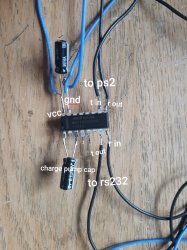
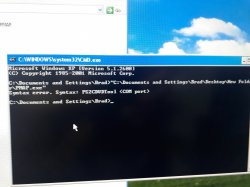
Ok so the chip came today and I wired everything up but when I load Pmap I get a syntax error. As far as I'm aware everything is where it should be, I've attached photos. Am I missing something? (The console is mod chipped btw so if that's an issue let me know)
20200629_142821.jpg 20200629_143250.jpg 20200629_143525.jpg
 
Syntax error. There is a problem with the command and arguments you entered. When you use a command-line program, you need to enter the program's filename, followed by zero or more arguments that the program accepts. Some arguments are mandatory.

In the case of this tool, the syntax is like this:
Code:
PMAP <COM port>
Where the <I>&lt;COM port&gt;</I> refers to the name of the RS232 port of your PC that you are using.

I've forgotten what it really expects, but it could be like this, if we take COM3 as an example:
Code:
PMAP COM3

It is also possible that it might have been expecting just the digit itself.
 
Syntax error. There is a problem with the command and arguments you entered. When you use a command-line program, you need to enter the program's filename, followed by zero or more arguments that the program accepts. Some arguments are mandatory.

In the case of this tool, the syntax is like this:
Code:
PMAP <COM port>
Where the <I>&lt;COM port&gt;</I> refers to the name of the RS232 port of your PC that you are using.

I've forgotten what it really expects, but it could be like this, if we take COM3 as an example:
Code:
PMAP COM3

It is also possible that it might have been expecting just the digit itself.

Of course right at the moment you send that reply my old PC decided to kick the bucket leaving me with no Serial port, long story short I bought a Serial to USB cable and it arrived today.

Typing the active COM port into the command prompt did the trick and pmap fired right up. However I got an rx error though I'm not surprised seeing as my transceiver at this point is a spider web of wires and caps and has likely blown from static shock or something. I've found a pre built MAX3233 circuit board with everything I need on it so I'll just get that.
 
You don't seem to have RENABLE, TXENABLE, VL and SHDN connected to VCC. So the chip might be in shutdown state, with both transmitter and receiver disabled.
You could consider doing a loopback test, to determine if the circuit works.

I'm not sure if you know, but you don't have to limit yourself to a Maxim device - they're only one manufacturer. My board is the FTDI232 (Or just some board that has a FTDI chip, with "FTDI232" on its bottom) from FTDI.
 
So I tried bridging those 4 points to VCC with a bit of success, I now get a different error, I think it's seeing the PS2 but it can't read from it. I tried a C and G chassis (GH-06 and 22) both do the same thing.
20200703_063805.jpg

I also tried the feedback loop. On the serial port side I got a response but after the signal goes through the chip and I bridge the rx and tx on the PS2 side it doesn't get a loop.

I'm pretty sure everything is wired up correctly. (In the photo it looks like the VCC and Ground are bridged but they're not)
20200703_063947.jpg
 

Similar threads

Back
Top