
You are using an out of date browser. It may not display this or other websites correctly.
You should upgrade or use an alternative browser.
You should upgrade or use an alternative browser.
PS2 PlayStation 2 MECHACON Adjustment Program (PMAP)
- Thread starter sp193
- Start date
every laser unit is unique in a way, and for the best reading performance they need software calibration. We don't have the the factory test discs for the calibration process, but using pmap and good quality discs during the calibration process is the closest we can get to a factory calibration. the playstation itself does the automatic calibration process, pmap "just" sends the commands to the mechacon to start for example cd reading calibration. So the point is, that even thoudh we can't adjust the angle of the laser on slims, but we can do the automatic software calibration process, just as we could do it on most of the fats before this version.Oh wow. How is calibration handled with a Slim model?


jjglanton
Forum Noob
jjglanton
Forum Noob
@cdq1985 Hi, I went ahead and found those test points on my own. Anyway, I started running into the same problem as you guys but I was able to proceed by restoring the EEPROM to the dump file that I created before I proceeded with the adjustments. Please update us if that solves your issue as well.
I mean it could've all just been a coincidence.
I mean it could've all just been a coincidence.
Last edited:
Hi, just found PMAP recently added slim dragon based mechacon support. But the test point information is very limited, only 7000X series service manual is there. How did you guys figure out the test points? I mean GND and 3.3V is pretty straightforward but what's the methodology finding TX, RX and RMC?
jjglanton
Forum Noob
Check out the "test points" page on the PS2 dev wiki. If what you're looking for isn't on there, shoot me a discord message, username: jjglanton. I've found test points for more revisions that aren't yet on the wiki. I just haven't had the time to edit and send in the photos yet.
Hi , I would really envoy the "test points" of the GH026 motherboard. Unfortunately the wiki doesn't have this occurence with a photo. Thank you for advance if you find the time.Check out the "test points" page on the PS2 dev wiki. If what you're looking for isn't on there, shoot me a discord message, username: jjglanton. I've found test points for more revisions that aren't yet on the wiki. I just haven't had the time to edit and send in the photos yet.
Hi , I would really envoy the "test points" of the GH026 motherboard. Unfortunately the wiki doesn't have this occurence with a photo. Thank you for advance if you find the time.
Attachments
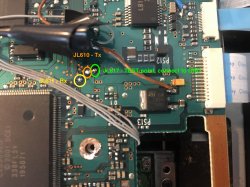
I have successfully soldered the wires on my motherboard, my lens is a brand new khs-400c. Is there a way to proceed to set the drive, I can't get anything better than a 7xxx or 8xxx with the jitter 256 command. Even touching the white wheels doesn't solve the problem. Maybe I miss a step before trying to get a 1xxx result.Thank you my lord, it's great. I tried 2 times by myself but the official documentation is definitely too hard for me.

roiman
Forum Noob
Hi guys.
Can someone of you help me with this error during electrical adjustments? What is it means?

The console is SCPH-77008 as you can see. I have the responce sence connection is fine. The console itself reads CDs just fine but no DVDs. During fisrt step of an adjustment laser moves quickly one time and CD make an attempt to rotate about 3 times.
Thanks.
Can someone of you help me with this error during electrical adjustments? What is it means?
The console is SCPH-77008 as you can see. I have the responce sence connection is fine. The console itself reads CDs just fine but no DVDs. During fisrt step of an adjustment laser moves quickly one time and CD make an attempt to rotate about 3 times.
Thanks.

iVirtualZero
Member
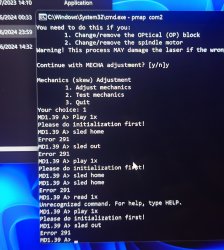
I only got upto step 20 from the guide on Reddit. My PS2 is a GH-019 with a Retro Gem, RePS2 and a Matrix Infinity. I removed the Matrix Infinity for this guide. But I keep getting Error Code 291. What does Error Code 291 mean? Is there a list of error codes and their meanings? I'm going to go over my install for this and will see if I can put a toggle switch in between RMC and GND to toggle in and out of test mode with the console off, or will just desolder the Adruino, to see if my console is working and see if i can reflash the console with lense changer. Last time I checked the console was with the mod chip installed and the 400C laser and would attempt to read both CD's and DVD's before giving me a disc read error. The console has been repaired before, recapped, laser, replaced 1 fuse, both BA Driver IC's for the CD and DVD as I remember frying them when I forgot to put the thermal pads back on and got no blue light with no video. Also every ribbon besides the spindle one has been replaced as well. So it should work unless i broke a ribbon cable again, or me removing the modchip has caused an issue. Or I may have missed something in the guide. Will first try and see if my console boots up.
Attachments
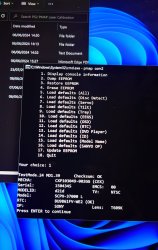
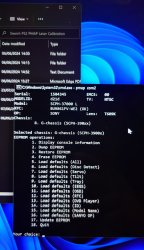
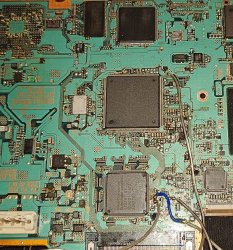
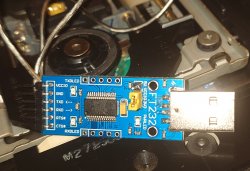
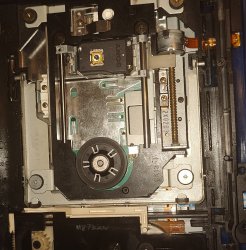
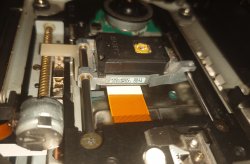
Last edited:
iVirtualZero
Member
You missed the initialization.
you can do it with "init skew" command. useful info in readme file that comes with pmap, it contains the right order of the commands, too
I tried that command and i get this error.
MD1.39 A> init skew
1. 0c44 SLED HOME - Rx-command error: 123
DVD-SL initialization failed.
Update: undid the Arduino and took the PS2 out of test mode, console boots up gives me typical disc read error on both CD and DVD Games but the laser sled motor is not working. The fpc ribbon is likely damaged again. I will probably fix the ribbon or solder in a small 2 pin connectors.
Last edited:
iVirtualZero
Member
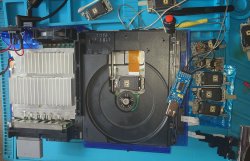
I'm having no luck with this, fixed my ribbons. But now no matter what my Drive won't initialize. I get error 123 ( 0c44 SLED HOME - Rx-command error: 123) and now error 291. The laser was powering up and moving but wouldn't spin/ detect the disc, swapped out the laser a bunch of times and got the same result and now the laser isn't even powering up or moving. Will have to take the console apart again to get it out of test mode, will just wire up a toggle switch between RMC and GND. This is not a simple tool to work with, I wish it came as an app that can be installed and used in Freemcboot or at least an explanation for what each error code means.
Guide I'm following: https://www.reddit.com/r/consolerep..._a_fat_ps2_using_pmap_to_calibrate_the_laser/
Update: I managed to wire up a Toggle Switch so I can get in and out of test mode whenever I turn off the console. And reseated the ribbon cables and reflowed the worm motor ribbon that i fixed. The laser is now lighting up again and moving, but the laser only reads for a few seconds before giving me a disc read error. I don't know if PMAP can fix this, but I got about 8 400C's to go through all set at 1200 plus and 1100 plus for the DVD and CD pots.
I tried a disc read error laser with PMAP and it gives me an Initialization error.
Mechanics (skew) Adjustment
1. Adjust mechanics
2. Test mechanics
3. Quit
Your choice: 1
MD1.39 A> sled home
MD1.39 A> init skew
4. 0ca50005 DVD-SL ADJUSTMENT (FIX GAIN) - Rx-command error: 122
DVD-SL initialization failed.
MD1.39 A> 0c44 SLED HOME - Rx-command error: 123
Another update: I managed to get a laser to read the single layer DVD almost near to the 1F00's but my laser isn't reading CD's I get an error instead. Do I need a new laser?
Here is the error:
Continue with automatic ELECT adjustment? [y/n]y
Insert test CD and press ENTER
8. 0c9700 CD DETECT ADJUSTMENT - Rx-command error: 121
Guide I'm following: https://www.reddit.com/r/consolerep..._a_fat_ps2_using_pmap_to_calibrate_the_laser/
Update: I managed to wire up a Toggle Switch so I can get in and out of test mode whenever I turn off the console. And reseated the ribbon cables and reflowed the worm motor ribbon that i fixed. The laser is now lighting up again and moving, but the laser only reads for a few seconds before giving me a disc read error. I don't know if PMAP can fix this, but I got about 8 400C's to go through all set at 1200 plus and 1100 plus for the DVD and CD pots.
I tried a disc read error laser with PMAP and it gives me an Initialization error.
Mechanics (skew) Adjustment
1. Adjust mechanics
2. Test mechanics
3. Quit
Your choice: 1
MD1.39 A> sled home
MD1.39 A> init skew
4. 0ca50005 DVD-SL ADJUSTMENT (FIX GAIN) - Rx-command error: 122
DVD-SL initialization failed.
MD1.39 A> 0c44 SLED HOME - Rx-command error: 123
Another update: I managed to get a laser to read the single layer DVD almost near to the 1F00's but my laser isn't reading CD's I get an error instead. Do I need a new laser?
Here is the error:
Continue with automatic ELECT adjustment? [y/n]y
Insert test CD and press ENTER
8. 0c9700 CD DETECT ADJUSTMENT - Rx-command error: 121
Attachments
Last edited:
roiman
Forum Noob
Hi folks.
I had solved my previous ELECT adjustment error "RX-command error:1 " by changing spindle motor. But now I have another one:
CD TPP NG: 37
CD TPP NG: 47
...
etc. Numbers are various due to CDs I inserted. ELECT process just halted after that message.

What is the problem I have now? Can you help me to solve it?
Thanks.
My console version is slim SCPH-77008.
I had solved my previous ELECT adjustment error "RX-command error:1 " by changing spindle motor. But now I have another one:
CD TPP NG: 37
CD TPP NG: 47
...
etc. Numbers are various due to CDs I inserted. ELECT process just halted after that message.
What is the problem I have now? Can you help me to solve it?
Thanks.
My console version is slim SCPH-77008.
roiman
Forum Noob
It's the log-file part of ELECT process
--- AUTO ELECT ADJUSTMENT START ---
MECHA type: 4
PlatWriteCOMPort: c11
PlatReadCOMPort : 0
PlatWriteCOMPort: c2200
PlatReadCOMPort : 0
PlatWriteCOMPort: c44
PlatReadCOMPort : 0
Open lid, insert test CD, close lid and press ENTERPlatWriteCOMPort: c44
PlatReadCOMPort : 0
PlatWriteCOMPort: c9700
PlatReadCOMPort : 0
PlatWriteCOMPort: ce10034
PlatReadCOMPort : 00034069F
CDmin(d)=660 CDstudy(d)=1695 CDmax(d)=1760 CDdet(f)=1130Optical Block Type (SONY) OK.
PlatWriteCOMPort: c10
PlatReadCOMPort : 0
PlatWriteCOMPort: ca301
PlatReadCOMPort : 003
PlatWriteCOMPort: cd313
PlatReadCOMPort : 026
CD FE LOOP GAIN OK: 38
PlatWriteCOMPort: cd323
PlatReadCOMPort : 045
CD TE LOOP GAIN OK: 69
PlatWriteCOMPort: c3000
PlatReadCOMPort : 0
PlatWriteCOMPort: ca8
PlatReadCOMPort : 0A2737F
CD TPP NG: 47
Adjustment result: 1
--- AUTO ELECT ADJUSTMENT FIN ---
MECHA type: 4
PlatWriteCOMPort: c11
PlatReadCOMPort : 0
PlatWriteCOMPort: c2200
PlatReadCOMPort : 0
PlatWriteCOMPort: c44
PlatReadCOMPort : 0
Open lid, insert test CD, close lid and press ENTERPlatWriteCOMPort: c44
PlatReadCOMPort : 0
PlatWriteCOMPort: c9700
PlatReadCOMPort : 0
PlatWriteCOMPort: ce10034
PlatReadCOMPort : 00034069F
CDmin(d)=660 CDstudy(d)=1695 CDmax(d)=1760 CDdet(f)=1130Optical Block Type (SONY) OK.
PlatWriteCOMPort: c10
PlatReadCOMPort : 0
PlatWriteCOMPort: ca301
PlatReadCOMPort : 003
PlatWriteCOMPort: cd313
PlatReadCOMPort : 026
CD FE LOOP GAIN OK: 38
PlatWriteCOMPort: cd323
PlatReadCOMPort : 045
CD TE LOOP GAIN OK: 69
PlatWriteCOMPort: c3000
PlatReadCOMPort : 0
PlatWriteCOMPort: ca8
PlatReadCOMPort : 0A2737F
CD TPP NG: 47
Adjustment result: 1
--- AUTO ELECT ADJUSTMENT FIN ---
Similar threads
-

-
PS2 Can PMAP do the same job as lenschanger? Should I stop using lenschanger?
- Started by IsuckatHAX
- Replies: 0
-
 PS2 RETROLauncher (Launcher created on Enceladus for Retroarch, POPStarter, Neutrino, wLE_ISR and OPL)
- Started by Boon Tobias
- Replies: 124
-
 PS2 Playstation 2 Master Disc Patcher for MechaPwn
- Started by MottZilla
- Replies: 64