
You are using an out of date browser. It may not display this or other websites correctly.
You should upgrade or use an alternative browser.
You should upgrade or use an alternative browser.
PS2 PlayStation 2 MECHACON Adjustment Program (PMAP)
- Thread starter sp193
- Start date
ExtremeCaliber
Member
Heya having the same issue forI'm having no luck with this, fixed my ribbons. But now no matter what my Drive won't initialize. I get error 123 ( 0c44 SLED HOME - Rx-command error: 123) and now error 291. The laser was powering up and moving but wouldn't spin/ detect the disc, swapped out the laser a bunch of times and got the same result and now the laser isn't even powering up or moving. Will have to take the console apart again to get it out of test mode, will just wire up a toggle switch between RMC and GND. This is not a simple tool to work with, I wish it came as an app that can be installed and used in Freemcboot or at least an explanation for what each error code means.
Guide I'm following: https://www.reddit.com/r/consolerep..._a_fat_ps2_using_pmap_to_calibrate_the_laser/
Update: I managed to wire up a Toggle Switch so I can get in and out of test mode whenever I turn off the console. And reseated the ribbon cables and reflowed the worm motor ribbon that i fixed. The laser is now lighting up again and moving, but the laser only reads for a few seconds before giving me a disc read error. I don't know if PMAP can fix this, but I got about 8 400C's to go through all set at 1200 plus and 1100 plus for the DVD and CD pots.
I tried a disc read error laser with PMAP and it gives me an Initialization error.
Mechanics (skew) Adjustment
1. Adjust mechanics
2. Test mechanics
3. Quit
Your choice: 1
MD1.39 A> sled home
MD1.39 A> init skew
4. 0ca50005 DVD-SL ADJUSTMENT (FIX GAIN) - Rx-command error: 122
DVD-SL initialization failed.
MD1.39 A> 0c44 SLED HOME - Rx-command error: 123
Another update: I managed to get a laser to read the single layer DVD almost near to the 1F00's but my laser isn't reading CD's I get an error instead. Do I need a new laser?
Here is the error:
Continue with automatic ELECT adjustment? [y/n]y
Insert test CD and press ENTER
8. 0c9700 CD DETECT ADJUSTMENT - Rx-command error: 121
0c9700 CD DETECT ADJUSTMENT - Rx-command error: 121
I was wondering if you ever managed to fix it? Thanks.
I don't know how exactly it fixed it because I called it a night. But I just downloaded the last stable release, loaded defaults for Sanyo (I have a 400R which is the same and the other 2 Sony options aren't for the 400r). Then did the elect adjustment, and worked fine.
Last edited by a moderator:

iVirtualZero
Member
I'm having no luck. I waited over a month for my replacement lasers to arrive only for them to not fix the issue I'm having. It seems like it's next to impossible to find a working replacement laser these days.Heya having the same issue for
0c9700 CD DETECT ADJUSTMENT - Rx-command error: 121
I was wondering if you ever managed to fix it? Thanks.
I don't know how exactly it fixed it because I called it a night. But I just downloaded the last stable release, loaded defaults for Sanyo (I have a 400R which is the same and the other 2 Sony options aren't for the 400r). Then did the elect adjustment, and worked fine.
Last edited:
ExtremeCaliber
Member
Damn that is unfortunate. I had this issue when I forgot to plug in the fan for the ps2 and it overheated during the elect adjustment. My laser is a 400r which is the same as the HD7 by sanyo, so I used the sanyo one as the other lasers for sony was for different lasers. But that leads to updating the eeprom to use the sanyo defaults, that was in the updating eeprom step and you'll see the option. That at least worked for me.I'm having not luck. I waited over a month for my replacement lasers to arrive only for them to not fix the issue I'm having. It seems like it's next to impossible to find a working replacement laser these days.
iVirtualZero
Member
Thanks i think I may have to just let go of the 400C's and try the other lasers out. Really just want it to read discs again.Damn that is unfortunate. I had this issue when I forgot to plug in the fan for the ps2 and it overheated during the elect adjustment. My laser is a 400r which is the same as the HD7 by sanyo, so I used the sanyo one as the other lasers for sony was for different lasers. But that leads to updating the eeprom to use the sanyo defaults, that was in the updating eeprom step and you'll see the option. That at least worked for me.
Last edited:
Performancemodchips
Member
Hi guys, is there a diagram for the GH-18 yet ? cheers
iVirtualZero
Member
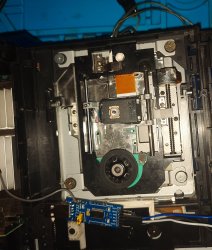
I got it working and figured it out. My Eeprom was corrupted. I set my adjustment gear on my assembly to 11 o'clock for the 400c laser and then updated the Eeprom along with setting it to all defaults in the Eeprom settings and now it reads discs. Even after tuning where I was able to get my 400c into the 2's I had to update the Eeprom again since the CD games were booting up really slow. Now it instant boots all PS2 discs and PS1 games. Here is my Reddit post about the fix.
https://www.reddit.com/r/consolerepair/s/orGxXBbTF5
https://www.reddit.com/r/consolerepair/s/orGxXBbTF5
Attachments
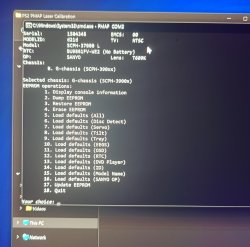
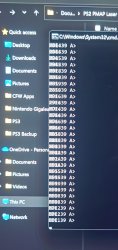
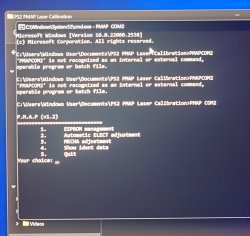
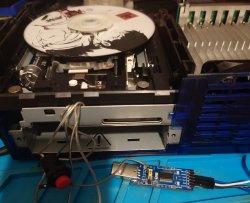
iVirtualZero
Member
Have a look at the test points page. https://www.psdevwiki.com/ps2/Test_points/MechaCon_UARTGH-040 diagram test points ? who has it ?
iVirtualZero
Member
Sounds like that's an issue with the laser. You may need to tweak the pots or the adjustment gear or may need to replace the laser. But before you try that, did you update the Eeprom?after using this the ps2 detects ps1/ps2 games but goes right back to the browser screen after trying to load it. It's done it with 3 lasers now (GH-013 mobo). What could cause this?

finalman
Member
I've got a SCPH-30002 PS2 with a GH-007 motherboard that is coming up as unknown/unsupported chassis. See log. Also included is the PS2Ident v0.850 console details and they mechacon backup.
How do I deal with this?
EDIT: If anyone knows the developer get them to PM me here so they can let me know what I can provide to get my chassis variant added to the app.
How do I deal with this?
EDIT: If anyone knows the developer get them to PM me here so they can let me know what I can provide to get my chassis variant added to the app.
Attachments
Last edited:

akuhak
Developer
@finalman did you used last version from here? https://github.com/ps2homebrew/PMAP/releases/tag/latest
Also, you didnt provide pmap.log from app folder.
Also, you didnt provide pmap.log from app folder.
finalman
Member
@finalman did you used last version from here? https://github.com/ps2homebrew/PMAP/releases/tag/latest
Just tried but still the same.
Also, you didnt provide pmap.log from app folder.
Just added to my previous message attachments. This is from the latest dev build version.
Last edited:
finalman
Member
hmm, kinda strange - did you choose chassis in the selection menu? It seems like it is not selected.
Funny that you say that I actually have a GH-006 system that I wanted to test the same laser in the last few days and it did popup with a chassis selection but the GH-007 motherboard in question never does.
iVirtualZero
Member
Thanks to PMAP i managed to get another PS2 working. I would like to make disclaimer before anybody wants to use the PMAP, make sure you have a functional PS2 first.
Disclaimer
Your console should at least attempt to read discs for it to work with PMAP. The laser should move up and down and it should light up, make sure it has no damage. The spindle should spin, no grinding sound, the worm motor should work, the plastic cog for that goes over the worm motor shouldn't be worn out. The tray should open along with the Blue Tray light being present. And with video being present on the screen. And the disc should at least spin. Make sure there are no blown fuses, no damaged FPC cables, no dead lasers, and no dead Driver Chips like the BA5815FM chip, and the BA6664FM chip which is present on V4 to V7 Revision PS2's.
Replacing Capacitors may also need to be considered. Other consoles from the same era like the GameCube, Dreamcast and the Og Xbox are having disc reading issues. Due to the aging capacitors. So picking up a kit from Console5 or ordering them separately from DigiKey/ Mouser may need to be considered for the laser to work properly. Thanks to a Recap, I can get my PS2 to read discs instantly in the low 1300s to the 1400s resistance range extending the life of my lasers.
Disclaimer
Your console should at least attempt to read discs for it to work with PMAP. The laser should move up and down and it should light up, make sure it has no damage. The spindle should spin, no grinding sound, the worm motor should work, the plastic cog for that goes over the worm motor shouldn't be worn out. The tray should open along with the Blue Tray light being present. And with video being present on the screen. And the disc should at least spin. Make sure there are no blown fuses, no damaged FPC cables, no dead lasers, and no dead Driver Chips like the BA5815FM chip, and the BA6664FM chip which is present on V4 to V7 Revision PS2's.
Replacing Capacitors may also need to be considered. Other consoles from the same era like the GameCube, Dreamcast and the Og Xbox are having disc reading issues. Due to the aging capacitors. So picking up a kit from Console5 or ordering them separately from DigiKey/ Mouser may need to be considered for the laser to work properly. Thanks to a Recap, I can get my PS2 to read discs instantly in the low 1300s to the 1400s resistance range extending the life of my lasers.
Last edited:
iVirtualZero
Member
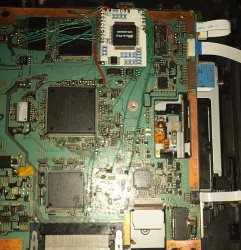
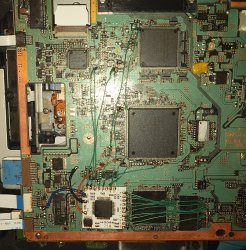
One thing i realised about most Modchips, mainly the Clone Modchips, is they have the tendency to corrupt the eeprom on the PS2, causing the disc drive to not read discs. Once I uninstall the Modchip and run the PMAP program to update the eeprom, that problem is fixed and the PS2 starts reading discs again. Can this issue be fixed? Should I run the PMAP program with the Modchip installed in my case it's the Modbo that has done this and the Mars Pro, both are clone modchips where some of there features don't work. In my case the Modbo showed the Matrix logo at boot and I was able to access the menu and with the Mars Pro, it wouldn't be detected at all, no Toxic Os and no Toxic OS menu and yet that chip also seems like it corrupted the eeprom.
Update I figured it out. I'm encountering Mechacon Crash issues, which also affects V7 and V8 PS2's. Not just V9 and V10's. The Pic Fix mod will be needed to get my Modchip working properly.
https://www.reddit.com/r/ps2/s/43dAQralgn
Update I figured it out. I'm encountering Mechacon Crash issues, which also affects V7 and V8 PS2's. Not just V9 and V10's. The Pic Fix mod will be needed to get my Modchip working properly.
https://www.reddit.com/r/ps2/s/43dAQralgn
Attachments
Last edited:
I got the same error tooHere is the error:
Continue with automatic ELECT adjustment? [y/n]y
Insert test CD and press ENTER
8. 0c9700 CD DETECT ADJUSTMENT - Rx-command error: 121
Also this error: 0ca50103 CD AUTO ADJUSTMENT (FIX GAIN) - Rx-command error: 122
It turned out that when I Update EEPROM (from EEPROM Management) I choose SONY instead of SANYO.
I revived 2 FATs, one didn't read any disks at all, and the other did, but after 2 minutes. Now both read the disks when turned on.
Thank you!
Similar threads
-

-
PS2 Can PMAP do the same job as lenschanger? Should I stop using lenschanger?
- Started by IsuckatHAX
- Replies: 0
-
 PS2 RETROLauncher (Launcher created on Enceladus for Retroarch, POPStarter, Neutrino, wLE_ISR and OPL)
- Started by Boon Tobias
- Replies: 124
-
 PS2 Playstation 2 Master Disc Patcher for MechaPwn
- Started by MottZilla
- Replies: 64