Playstation 3 - CECHE01 help needed

ast

Forum Noob
Hi everyone, new here.

I found my old PS3 and dusted it off and tried to play some games for old times sake. I updated it and tried inserting game discs, and it doesn't do anything. I can see the icon top corner circling so it is clearly reading the disc/acknowledging its existence, but nothing shows up. Other things seems to work fine with it, this was the limited edition MGS bundle, so it might be one of the earliest ones? It is definitely a chunky boi.

Anyways, should I just give up on it or is there anything I can do? mod wise or software hacks etc.?

Thank you all! Merry Christmas and Happy New Year
 
It's wierd, some guy a few weeks ago had a similar issue. I think he updated the console and after that it wouldn't reconize any disc. If you didn't touch the internals, and the BD drive was running fine before the update, probably you have a problem there with the FW. Which version it had before and now after update?

I only remember CECH-Es with the MGS4 bundle though.
 
  • Like
Reactions: ast
It's wierd, some guy a few weeks ago had a similar issue. I think he updated the console and after that it wouldn't reconize any disc. If you didn't touch the internals, and the BD drive was running fine before the update, probably you have a problem there with the FW. Which version it had before and now after update?

I only remember CECH-Es with the MGS4 bundle though.

I just rechecked and you are right! it is CECHE01, not sure if I can change the title.
Unfortunately I can't remember the firmware before as I didn't check before updating and it had been many years since I had it on, but the new FW would be the latest I guess 4.87.
 
Anyways, should I just give up on it or is there anything I can do? mod wise or software hacks etc.?

I wouldn't give up on it, even if the BD drive is totally fragged, there's still workarounds for broken drives, especially for old CFW-capable consoles (NOBD-CFW) I'd start with the quoted post below.

In order to make it work, you'll have to install a custom firmware and then load ISO files from internal HDD or an external source.

Welcome to the forum!

Hello everyone! I've been repairing consoles for quite some time now and the usual enigma that i come across is people getting stuck in "infinite update loops" due to their BD being broken, or if the bd gets faulty people usually come across a black screen when they try to enter a game, and since helpful tips and solutions are scattered all over the internet i thought i'd make a guide that explains everything, so that hopefully you can finally fix your looped PS3! Now before we start i should mention that this guide is mainly regarding PHAT models of the PS3! I've also made a YouTube video where i explain all about the PS3 and which PS3 should you buy in 2020, you can find the video on this link:
If you can stop by and maybe toss a like i would greatly appriciate it! Now lets go back to dealing with a broken BD!

Now, if you already didn't know, in order to prevent people from swapping out the original drive from the console, Sony designed the BD in a way that only that specific original drive that came with the PS3 from the factory is able to work properly meaning that only that specific drive will read discs and etc. We usually say that the drive is MARRIED to the motherboard. So if anything happens to that orignal drive you'd have to pay a visit to one of their licensed repair shops. Now the way that the PS3 recognizes the original drive is that the actual drive has a little printed circuit board that is attached to the bottom of the drive , this board is called a daughter/logic board and trough this board the PS3 communicates with the actual drive, all data that is read by the laser from a disc goes trough this board, and as you can see this board is super important, as trough this board the PS3 "knows" that the right drive is inside of the console. Now every time you launch game the PS3 sends multiple signals to the logic board to ensure that everything is alright with the BD, so if something goes wrong, for an example, the laser gets faulty or the motor of the laser stops working, trough the logic board the PS3 will see that something is wrong with the BD and you will get a black screen. So lets try to separate the actual drive to two parts:
the logic board and actual body of the drive(laser, laser assembly, mechanical parts, disk sensor..).
Now if any of these things get faulty, the PS3 will see that there is a faulty drive and give you a black screen.
The same thing happens when you update the firmware, at around 60%-70%, the PS3 will send check signals to ensure that every thing is okay with the drive, and if it isn't you won't be able to go pass this check and the PS3 will continue to restart it self and fail at the exact same spot.

If, by any chance, the fault is not on the logic board but instead somewhere inside of the body of the drive, all you gotta do is find a compatible BD, and swap the logic board found in that working drive, with the logic board of the original drive and boom, the problem is solved! The way that you can find a compatible BD is trough the PS3 devwiki bluray chart: https://www.psdevwiki.com/ps3/Bluray_Drive
The logic board of the compatible drive, needs to have all the same ribbon connectors that the original logic board of the original drive had. Usually, all BD410 drives have compatible logic boards, even if they have different ribbon interfaces(PATA 60P or SATA 24P) the actual guts of the drive are the same all trough the BD410 range, the same goes for BD400 range. Be aware that you CAN'T put a logic board from a BD 400 drive inside of a BD410 drive as the entire laser assembly is vastly different, which means that the ribbon connectors on the logic boars are different.

But what happens if the logic board is faulty? Well, then the problem gets a bit more complicated, as now you actually have to get a whole new replacement drive rather than just swapping logic boards. The way that you can be sure that the original logic board is faulty is by doing all the steps from above, and if you still keep getting the same results, then yes, the org. logic board is faulty. Now that you have to get an entire new drive, in order to make that drive able to read discs, you have to REMARRY that replacement drive to the motherboard. In order to do the remarry process, your console HAS TO BE JAILBROKEN! The reason why is that in order the remarry a drive you have access something that's called "factory service mode". As the name implies, this was made for servicing PS3's in repair shops, and in order to access it you'd need a jig that contains signed code by Sony that will allow you to access FSM. Now with CFW you do not need a jig as you can access FSM very easily but in theory its supposed to be done this way! Anyway, back to the topic at hand, as i said your PS3 needs to jailbroken in order to do the remarry process.

Now if your console is already jailbroken, well that's very good news for you, as all you gotta do is download a specific piece of CFW that's called NOBD CFW, and then put it onto your USB and then wack it onto your PS3! This piece of CFW actually disables all of the Blu-Ray drive checks so even with this you can play games off of your HDD no problem, but our end goal is to remarry a new working drive. Once you have NOBD installed, all you now need is a spare working drive, now this is quite interesting, as you can remarry ANY COMPATIBLE DRIVE TO YOUR PS3! The great part about this is that the only criteria that makes a drive compatible, is the interface that it uses, or rather the ribbon cable. So if we look at the chart we can see that models from CECHA all the way to CECHK have the same ribbon cables(PATA 60P), which makes all of the drives that use this ribbon cable compatible with motherboards that have this ribbon socket, so if i have CECHG console i can easily remarry a drive that is from CECHH console even though the CECHG uses a BD400 drive and the CECHH uses the BD410 drive. So, now that you have everything you need, you are ready to the re-marry process, and i will link a tutorial for the remarry process that was made by great Louay:
https://www.psx-place.com/threads/how-to-remarry-blueray-drive-on-cfw-ps3-step-by-step.26913/

Don't be intimidated, just follow all the steps patiently and you will get your PS3 to its full glorious working state in no time!

But wait, what if your console isn't jailbroken?! Well than you are in a bit of a pickle, cuz in order to do the re-marry process you will have to do the famous PS3 Xploit which will jailbreak your console and then after you've done that, then you can install NOBD CFW, and then you can re-marry a new drive. You can find the PS3 Xploit guide that was made by awesome MrMario2011 here:

You are probably wondering, how will i be able to the xplot if i can't update my firmware, i will just get stuck in the update loop right? Well, unfortunetley you are right, but if I told you that there is a way to bypass all the BD checks during the update? Yes, there is a way you can bypass all the checks, and the way that you can do that is by putting a specific replacement drive, and that specific replacement drive HAS TO HAVE the exact same, logic board version that the original drive had, and ofc it needs to be in working order! If you pay attention to the Blu-Ray drive chart you will see that all daughter boards have model labels like this, BMD-xxx. So you will have to take your original faulty drive, dissasemble it, and take a look at the logic board and find the actual logic board model that is written on the back of the logic board, and then come back to the chart and determine which replacement drive you will need (from what model) to find. The reason why this works is that during the update, the PS3 doesn't actually check for the actual married drive, it only checks for the EXACT SAME version/model drive that was originally married to the motherboard, so if you get the same version as the BD that is married to your PS3 you will get pass this check without any problems. If you look at the chart again you will see that logic also have different controllers on them, so your replacement drive HAS to also have the exact same controller version on its daughter board. This gets a bit more complicated when you realize that PS3's are also region based, so as you can see on the chart, a CECHG for an examp., has two different versions of the logic boards in the actual drive, CECHK also has different logic boards versions even though the BD drive model is the same! This is due to region policies as these logic boards have different controllers which would probably prevent you from playing certain games. Now if you have CECHH mode, then its a bit easier for you as there are no differences in the logic boards trough out the model range! However, your console might have a different drive in it than the one that's displayed on the chart because somebody else could have re-married a completely different drive before you got the console, or maybe you did!
The only way to be 100% certain of which model of the logic board you need to find is by disassembling the original drive and checking the model number of the board! Now, all of this has been said without taking a certain factor into account, and that factor is that it could be very hard to find a proper replacement drive as people could have remarried different drives to their consoles and you could buy a certain console model hoping to salvage the Blu-Ray drive but the drive that is inside that model is from a completley different model! As i said, if your console isn't jailbroken, the problem can get a lot worse since it could be very painful to find a proper replacement drive, but it's a risk you have to take in order to fix your console!

Now if you cannot find a proper replacement drive, that meets all the criteria, then all you can really do is use a Hardware Flasher, and flash the NOR/NAND chip which in result will make your console fit to accept CFW, and then put NOBD CFW on it and then do the remarry process with any compatible blu ray drive.

Unfortunately, there aren't any other ways for you to fix your looped console, and you do have to rely on a bit of luck. I have seen people swapping hdd's between a looped PS3 and a normal working one, but since i cannot vouch for the reliability of that fix, i won't be quoting it, but if you guys had any other positive experineces or if there is a method that i have missed, please comment it down below so that it helps out other people including myself! I've fixed 6 consoles that were looped so far and i am always open to learning new things!

I am sorry for such a long post, and i know it could have been shorter without my narrative tone but it is what it is, i apologize again please dont hate me! Also if you can check out my video that i mentioned it would reallyyy mean a lot to me! Thanks and have an awesome day!

 
I just rechecked and you are right! it is CECHE01, not sure if I can change the title.
Done, thread title changed

Btw, your problem with the bluray drive is something minor, because you said you can see the "activity" icon moving around when you insert a disc in the drive, this means that the drive is detecting the disc... so overall we can say your BD drive is working normally
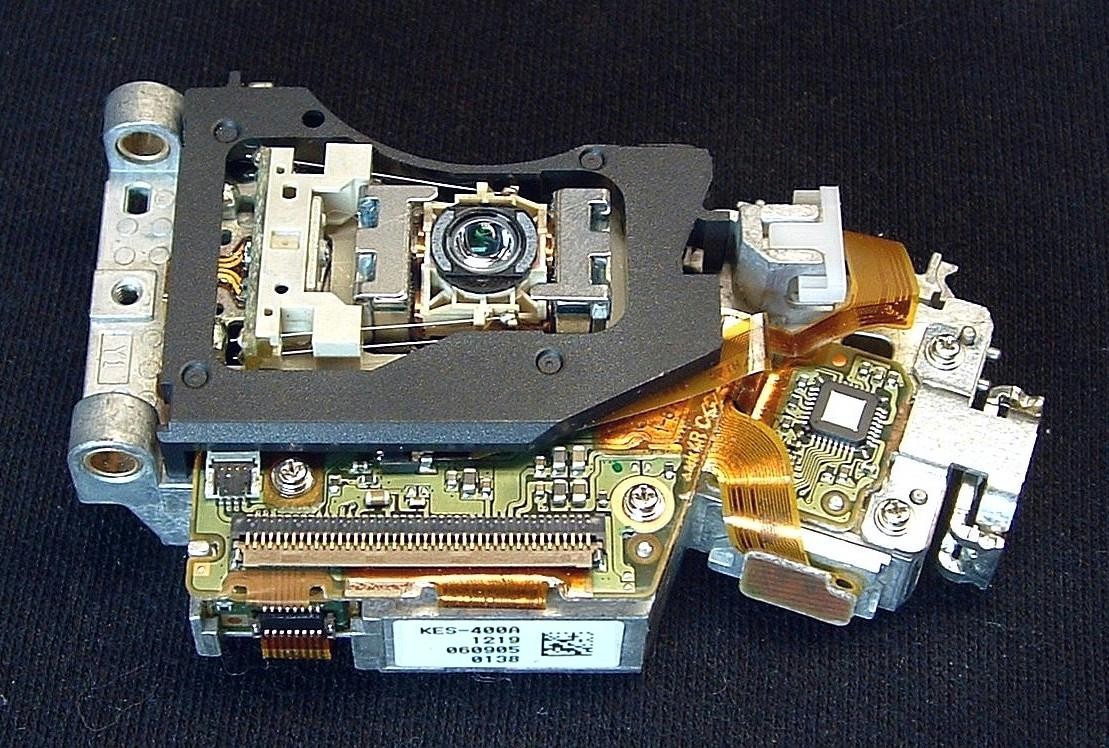
The problem you have most probably is related with the laser pickup only, just to be clear, im talking about this part named KES-400A
https://www.psdevwiki.com/ps3/KES-400A
KES-400A-lateral-top.jpg


Maybe it have a lot of dust cummulated in the lens just because the console has been collecting dust for the last years... or maybe is damaged because it had lot of usage... both things are normal, dont worry
You could try to clean it, or buy a new one... is easy to replace, and doesnt needs any calibration, just remove the old one, and mount the new one

Anyway... fixing the laser pickup is something optional... if you are going to install a CFW there is no need to have the laser pickup working, so i suggest you to ignore it by now... is better if you focus your attention in learning about how to install a CFW (and later at some point you can reconsider again in buying a new laser pickup)

Btw... there are some CFW named "noBD" intended to be used by people with problems in the BD (Blueray Drive)... but the BD of your PS3 seems to be working perfect ! (ok, i know this could sound a bit confusing)
In other words... you can install the normal CFW's, are the CFW's used by most people (and dont install the "noBD" CFW's, this ones are not for you)
 
I wouldn't give up on it, even if the BD drive is totally fragged, there's still workarounds for broken drives, especially for old CFW-capable consoles (NOBD-CFW) I'd start with the quoted post below.

In order to make it work, you'll have to install a custom firmware and then load ISO files from internal HDD or an external source.

Welcome to the forum!
Thanks I gave it a read and it seems the paragraph you posted refers to a damaged BD? i.e. getting stuck in loops or black screen etc. Mine doesn't do any of that, the drive takes in a disc the normal way makes the normal sounds, it just won't show the disc in the menu, but the "busy" icon will be visible on the top right corner. Well I guess I am not sure if mine is a hardware failure or software. Maybe I missed something relevant I will give it another read later.

Done, thread title changed

Btw, your problem with the bluray drive is something minor, because you said you can see the "activity" icon moving around when you insert a disc in the drive, this means that the drive is detecting the disc... so overall we can say your BD drive is working normally
The problem you have most probably is related with the laser pickup only, just to be clear, im talking about this part named KES-400A
https://www.psdevwiki.com/ps3/KES-400A
KES-400A-lateral-top.jpg


Maybe it have a lot of dust cummulated in the lens just because the console has been collecting dust for the last years... or maybe is damaged because it had lot of usage... both things are normal, dont worry
You could try to clean it, or buy a new one... is easy to replace, and doesnt needs any calibration, just remove the old one, and mount the new one

Anyway... fixing the laser pickup is something optional... if you are going to install a CFW there is no need to have the laser pickup working, so i suggest you to ignore it by now... is better if you focus your attention in learning about how to install a CFW (and later at some point you can reconsider again in buying a new laser pickup)

Btw... there are some CFW named "noBD" intended to be used by people with problems in the BD (Blueray Drive)... but the BD of your PS3 seems to be working perfect ! (ok, i know this could sound a bit confusing)
In other words... you can install the normal CFW's, are the CFW's used by most people (and dont install the "noBD" CFW's, this ones are not for you)

Yes I can see the "activity" icon busy when it is reading the disc, just won't show up. Should I open and clean the lens then? If so is there a guide on it here on psx?
Well I wasn't aware of CFW being an option, does this need additional hardware hack or is it possible to do through software only? Maybe I need a started CFW guide to read on for my model... Well as long as I can fix it with minimal effort to play games on it again I will take that route.

Thanks for all the help so far, it really is an active community. I didn't expect this much traction!
 
That busy icon is a good signal, it means the circuit boards inside the BD are working fine... maybe i should not be mentioning this at this point to you but you are going to hit with that info anyway so better to know beforehand
The requirement for using a standard CFW (very convenient if you want to be synced with most people) is to have that circuit boards working
But the laser pickup i mentioned in my previous post is not a requirement because is not doing any "logic" task... is just a part that wears out with the usage

The people with damage in the circuit boards, the ribbon cables, or without BD drive needs to install a "noBD" CFW (otherway they are not able to boot any game or app, and are not able to install new firmwares). But you dont need that

I thought you was interested in installing a CFW, anyway thats another story, and as mentioned you could do it right now, and forget about the damaged laser because is not needed in CFW, sure is better if you have it, is easy to replace it, and is not expensive so you decide what to do with it

In the meantime you should try to clean the spherical surface of the lens, this is a bit tricky, i was talking about it here, is not a manual though
https://www.psx-place.com/threads/serious-laser-issues-scph-39003.22649/#post-160001

Incase you damage the laser while trying to clean it... well... it was not reading before that anyway, so nothing to lose, just try it (and be careful while doing it)

And btw, try to insert a CD disc (some music), or a DVD film, and try to play them in the PS3 media player... if they plays this is a clear signal that the laser pickup is damaged
 
That busy icon is a good signal, it means the circuit boards inside the BD are working fine... maybe i should not be mentioning this at this point to you but you are going to hit with that info anyway so better to know beforehand
The requirement for using a standard CFW (very convenient if you want to be synced with most people) is to have that circuit boards working
But the laser pickup i mentioned in my previous post is not a requirement because is not doing any "logic" task... is just a part that wears out with the usage

The people with damage in the circuit boards, the ribbon cables, or without BD drive needs to install a "noBD" CFW (otherway they are not able to boot any game or app, and are not able to install new firmwares). But you dont need that

I thought you was interested in installing a CFW, anyway thats another story, and as mentioned you could do it right now, and forget about the damaged laser because is not needed in CFW, sure is better if you have it, is easy to replace it, and is not expensive so you decide what to do with it

In the meantime you should try to clean the spherical surface of the lens, this is a bit tricky, i was talking about it here, is not a manual though
https://www.psx-place.com/threads/serious-laser-issues-scph-39003.22649/#post-160001

Incase you damage the laser while trying to clean it... well... it was not reading before that anyway, so nothing to lose, just try it (and be careful while doing it)

And btw, try to insert a CD disc (some music), or a DVD film, and try to play them in the PS3 media player... if they plays this is a clear signal that the laser pickup is damaged

Okay so I opened the PS3 and uncovered the BluRay Disc drive and it seems to be a bit different than the photo you sent (maybe cause it is an early model?) and followed the guide to "clean" it but really there was minimal dust, perhaps cause I didn't play on it much and when not in use I had it covered and stoveaway.
DFVyJAP


Next I cleaned it with Q-tips and lens wipes gently and reconnected everything. I tried three things: A BluRay movie disc, a game, and a DVD. None of them would show up. The loading icon would however show "busy".
 
You can see the BD parts that belongs to each PS3 model in this table https://www.psdevwiki.com/ps3/Bluray_Drive#Bluray_Drive_Revisions
The names of every part colored in blue are links to other pages of wiki (with photos, etc...)

Im not sure what to tell after the test where it looks like is not able to read DVD and BD (you didnt tryed CD though), when none of them works is like if we dont have any hnt that could help in the diagnostic

Try other test btw, power on the PS3 without any disc, then stick one ear on top of the plastic case (literally) and insert a disc of any kind
You should hear a "click" noise repeated several times, in a heathy laser that click only happens 2 or 3 times only

Edit:
That click noise is the laser lens (the one you just cleaned up) moving up and down to focus in the disc surface
If the click is repeated lot of times (more than 5) it means that the laser is not able to focus
 
Last edited:
If cleaning the lens didn't fix the issue, don't touch anything else, re-assemble and look for other options for now. You better leave that laser part at last, believe me.

@sandungas what really bothers me is this problem with a not working BD drive after an update. Could be that you can lose "pairing" with the mobo while doing it? If the BD drive was working fine prior the update, we could say.

"I tried three things: A BluRay movie disc, a game, and a DVD. None of them would show up. The loading icon would however show "busy"."

Also this.
 
If cleaning the lens didn't fix the issue, don't touch anything else, re-assemble and look for other options for now. You better leave that laser part at last, believe me.
I agree, what i said about cleaning the lens is because ive seen some lenses that have cummulated a layer of very thin dust on top of it, and is very notable when looking at it with the bare eye
You know.. that lens needs to be completly transparent like glass... and what im saying about the cummulated dust is very different

If you didnt had that layer of dust and made a basic cleanup of the lens surface (not needed to insist much on it, just a couple of passes with the cotton stick wet with alcohol should be enought).. thats enought tests by now, it seems the problem was not caused by a cummulation of dust

Btw, insist inserting the BD disc game lot of times... if at some point you see the icon of the game in the XMB this is another signal that the electronics are working fine (is just the lens in the laser pickup is a almost completly blind)

@sandungas what really bothers me is this problem with a not working BD drive after an update. Could be that you can lose "pairing" with the mobo while doing it? If the BD drive was working fine prior the update, we could say.

"I tried three things: A BluRay movie disc, a game, and a DVD. None of them would show up. The loading icon would however show "busy"."

Also this.
I think that was a coincidence, a firmware installation should not modify the BD
Is true that the firmware updates contains another "firmware" for the BD controller chip, but the last time sony updated the BD firmware was in 4.60... and im not even sure if that BD firmware version was applicable to the CECHE PS3 model
https://www.psdevwiki.com/ps3/Bluray_Drive_Firmware

In the talk page there is some more speculative info about which PS3 model is the "owner" of every BD firmware update
https://www.psdevwiki.com/ps3/Talk:Bluray_Drive_Firmware

In other words... i think the only way to damage the BD firmware while updating the operative system firmware is incase that installation of a BD firmware to the BD controller chip fails... but doesnt seems to be posible, dunno
 
If there're something that I learnt with these optical drives, is that you don't have to touch them if you don't want to lose a lot of hours trying to figure out what the hell is going on.

What I recommend to OP would be test other DVD/CDs and test simple PS3 games, like some FIFA, Battefield, an arcade racing game and such. Those games are only one layer, not double like most of the PS exclusives, so these games will be read even easier than those that have double layer, I found that with a BD from a slim, sadly for me (@#$%).

If you aren't able to get anything, then proceed to reinstall the last OFW via secure mode. And if that doesn't work, you could try installing 4.87 CFW as sandudas said, and then go for the "remarry BD" way, as I believe something happened during that update. Is better than trying to replace a laser, that's for sure.

But if you want to go for the hardware path, I'll leave you a video that was really helpful when I fixed a BC BD. With this you can discard a laser in bad state.

 
Back
Top