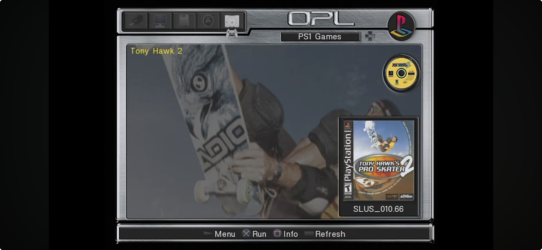
PS2 Playstation One Games

Ok so I am confused as hell and there's a lot of conflicting information out there. Can a PS2 running OPL play PS1 games from a USB drive? Yes, I know the PS2 is backwards compatible with the PS1 but it's at a non profit community center aka we have no fliping money to buy games, everything is donations. I spent most of yesterday trying to figure out how to do it and the video I just followed didn't work because it's 4 years old. So, is it actually possible? Could it run on a MX4ISO because that would be a lot easier unless it has to be FAT32.
 
Last edited:
Thanks. I'll look into later this week.

You can launch PS1 games through POPStarter (+POPS):
https://www.psx-place.com/threads/popstarter.19139/.
If you want to launch games directly look for wLE_kHn_20200810 in the attachments.

User guide:
https://web.archive.org/web/2023080...ssin/popstarter-documentation-stuff/wiki/Home.

BDM Assault (for MX4SIO support):
https://www.psx-place.com/threads/bdmassault.42352/.


Reason for editing: fixed links.
I am confused about renaming the .elf file. You only have one file, do I just download it multiple times?

I
You can launch PS1 games through POPStarter (+POPS):
https://www.psx-place.com/threads/popstarter.19139/.
If you want to launch games directly look for wLE_kHn_20200810 in the attachments.

User guide:
https://web.archive.org/web/2023080...ssin/popstarter-documentation-stuff/wiki/Home.

BDM Assault (for MX4SIO support):
https://www.psx-place.com/threads/bdmassault.42352/.


Reason for editing: fixed links.
I give up. This is way to fucking complicated, it should be put the fucking files in the pops folder and that's it. Every .elf file just crashes, what's the point of having a pops folder included in OPL if it doesn't work. Is there some setting I am missing or something? I just found the application start mode and turned that to manual but that didn't work.
 
I am confused about renaming the .elf file. You only have one file, do I just download it multiple times?

Which file you have in mind? POPSTARTER.ELF?
If yes, then you can download it many times or simply copy this file it in the same folder:
ssdadf2.png

Shortly after you can rename it to e.g. XX.Vikings.ELF.
Next file to XX.Crash.ELF, etc.
sssd6663.png


I give up. This is way to fucking complicated, it should be put the fucking files in the pops folder and that's it. Every .elf file just crashes, what's the point of having a pops folder included in OPL if it doesn't work. Is there some setting I am missing or something? I just found the application start mode and turned that to manual but that didn't work.

OPL means Open PS2 loader and this app is for launching PS2 games, not PS1.
Did you bother yourself to read:
https://web.archive.org/web/2023120...arter-documentation-stuff/wiki/quickstart-usb.

You also need this additional file in POPS folder: POPS_IOX.PAK - MD5 checksum: a625d0b3036823cdbf04a3c0e1648901.
Search for it e.g. using DuckDuckGo, Google, etc.

Here is how your POPS folder might looks like:
dertty55.png


When you have all the file just launch an ELF file (e.g. mass:/POPS/XX.Diablo.ELF).
 
Which file you have in mind? POPSTARTER.ELF?
If yes, then you can download it many times or simply copy this file it in the same folder:
View attachment 47921
Shortly after you can rename it to e.g. XX.Vikings.ELF.
Next file to XX.Crash.ELF, etc.
View attachment 47922


OPL means Open PS2 loader and this app is for launching PS2 games, not PS1.
Did you bother yourself to read:
https://web.archive.org/web/2023120...arter-documentation-stuff/wiki/quickstart-usb.

You also need this additional file in POPS folder: POPS_IOX.PAK - MD5 checksum: a625d0b3036823cdbf04a3c0e1648901.
Search for it e.g. using DuckDuckGo, Google, etc.

Here is how your POPS folder might looks like:
View attachment 47923

When you have all the file just launch an ELF file (e.g. mass:/POPS/XX.Diablo.ELF).
Then how come I've seen videos of people playing PS1 games from OPL? There's even a section for them in the OPL manager, seems kind of weird to have a section for something the app can't do. Your VCD files need to be in your POPS folder? And yes I read it.
 
en how come I've seen videos of people playing PS1 games from OPL? There's even a section for them in the OPL manager, seems kind of weird to have a section for something the app can't do.

Because OPL may work as a loader. Something like wLaunchELF, but way too limited and buggy.
But it is not its main purpose.
That is why you have APPS and in some forks PS1 section\bookmark.
Original OPL does not have PS1 bookmark and support for it.

Your VCD files need to be in your POPS folder?

Yes they do.

And yes I read it and it wasn't much help since they split the instructions into three different storage methods and I wasn't sure which one to follow.

In your 1st post you mentioned a USB drive and MX4ISO, so I am a bit confuse.
If you want to use MX4ISO or a USB drive read the guide for USB:
https://web.archive.org/web/2023120...arter-documentation-stuff/wiki/quickstart-usb.

The only difference between MX4ISO and USB are the "drivers".
For the USB you do not any additional steps.
For MX4ISO you have to download MX4SIO for POPStarter.7z from here, unpack it and put on your memory card (mc?:/POPSTARTER).
 
POPSLoader simplify the process to preparing POPS emulator and its module pack. All the rest, POPSLoader handle itself (including BDMA drivers for all devices; POPStarter executable etc.). However, for BDMA, the PS2 Memory Card or MMCE is mandatory. User can also freely name disc images.

In upcoming week, there will be released last update before focusing on GUI.

OPL doesn't supporting PSX games. OPL DB does via build-in POPStarter. Random people on eg. YT are not aware what OPL DB is, what fork meaning etc. etc. The only valid source of knowledge are developers and well known scene enthusiasts, not random ppl.
 
POPSLoader simplify the process to preparing POPS emulator and its module pack. All the rest, POPSLoader handle itself (including BDMA drivers for all devices; POPStarter executable etc.). However, for BDMA, the PS2 Memory Card or MMCE is mandatory. User can also freely name disc images.

In upcoming week, there will be released last update before focusing on GUI.

OPL doesn't supporting PSX games. OPL DB does via build-in POPStarter. Random people on eg. YT are not aware what OPL DB is, what fork meaning etc. etc. The only valid source of knowledge are developers and well known scene enthusiasts, not random ppl.
Ok then what is this? Because that seems to be a guide on how to play PS1 games on OPL.

Because I had heard you could only do it via a USB. I don't have a POPSTARTER folder on my memory card and there's nothing like that in the zip file, do you mean bdm_assault.irx? I also have zero space left in UlaunchElf but don't know what I can delete to give me more space.
Because OPL may work as a loader. Something like wLaunchELF, but way too limited and buggy.
But it is not its main purpose.
That is why you have APPS and in some forks PS1 section\bookmark.
Original OPL does not have PS1 bookmark and support for it.


Yes they do.


In your 1st post you mentioned a USB drive and MX4ISO, so I am a bit confuse.
If you want to use MX4ISO or a USB drive read the guide for USB:
https://web.archive.org/web/2023120...arter-documentation-stuff/wiki/quickstart-usb.

The only difference between MX4ISO and USB are the "drivers".
For the USB you do not any additional steps.
For MX4ISO you have to download MX4SIO for POPStarter.7z from here, unpack it and put on your memory card (mc?:/POPSTARTER).
 
At least now I know that you have not read user guide at all.
Info about supported devices was at the 1st page of the guide (the link for the guide was in the 2nd message):
ddsaer.png

User guide: https://web.archive.org/web/2023080...ssin/popstarter-documentation-stuff/wiki/Home.

MX4SIO for POPStarter.7z: https://www.psx-place.com/threads/popstarter.19139/.
Archive after downloading:
sssd.png

After uncompressing\extracting files you should get POPSTARTER folder:
pop2.png

Files in POPSTARTER folder:
pop3.png

Once everything has been extracted simply copy POPSTARTER folder to a USB device.
From a USB device copy this folder to a memory card.

But in the it does not matter now because you have found a YouTube video how to do it better.
Good luck.
 
I think the confusing part lies on the matter in which the guy sets file placement, not knowing where the OP intends to take the PS1 files for use on OPL.

Latest iterations of OPL, 1.1 Stable Build onwards tries their best to opt away from maintaining the PS1 GAMES tab on their OPL. If you intend to use MX4SIO in order to play PS1 games, follow the advise on this thread. If you still opt to use USB, either you can still use OPL DB builds, although we can somehow say that you can follow the video posted in the replies, but it'll be tough for you to use the MX4SIO since you'll be using different versions of the OPL, indirectly tampering the config files inside it, aside from most of us here trying to answer questions on setups that we might not be currently using.

We'll try our best to till help you though.
 
POPStarter does not support anything but FAT32 on USB, APA HDD and SMB v1 and never will anything else. However, for supporting USB it seeking USB drivers on Memory Card. This was used for fooling him by feeding his desires by wrappers instead real USB drivers. These wrappers translating USB calls etc. to target device/fs (exFAT on USB, MX4SIO, MMCE, i.Link, UDPBD).

Nothing in files placement is random. Everything which using POPStarter, must follow its rules. Nothing has changed here since beginning decade ago.

And again, OPL never has PS1 tab...
 
Ok then what is this? Because that seems to be a guide on how to play PS1 games on OPL.

Because I had heard you could only do it via a USB. I don't have a POPSTARTER folder on my memory card and there's nothing like that in the zip file, do you mean bdm_assault.irx? I also have zero space left in UlaunchElf but don't know what I can delete to give me more space.
Ok, so what's my next step? Because there's no POPSTARTER folder, do I make one? And like I said I don't have any space in UlaunchElf, I have 590 KB left on the memory card that has all of my programs on it.

POPStarter does not support anything but FAT32 on USB, APA HDD and SMB v1 and never will anything else. However, for supporting USB it seeking USB drivers on Memory Card. This was used for fooling him by feeding his desires by wrappers instead real USB drivers. These wrappers translating USB calls etc. to target device/fs (exFAT on USB, MX4SIO, MMCE, i.Link, UDPBD).

Nothing in files placement is random. Everything which using POPStarter, must follow its rules. Nothing has changed here since beginning decade ago.

And again, OPL never has PS1 tab...
Pretty sure this is a PS1 tab.

I think the confusing part lies on the matter in which the guy sets file placement, not knowing where the OP intends to take the PS1 files for use on OPL.

Latest iterations of OPL, 1.1 Stable Build onwards tries their best to opt away from maintaining the PS1 GAMES tab on their OPL. If you intend to use MX4SIO in order to play PS1 games, follow the advise on this thread. If you still opt to use USB, either you can still use OPL DB builds, although we can somehow say that you can follow the video posted in the replies, but it'll be tough for you to use the MX4SIO since you'll be using different versions of the OPL, indirectly tampering the config files inside it, aside from most of us here trying to answer questions on setups that we might not be currently using.

We'll try our best to till help you though.
I think the main issue is I just found out there's no POPSTARTER folder on UlaunchElf and that there's no space left.

At least now I know that you have not read user guide at all.
Info about supported devices was at the 1st page of the guide (the link for the guide was in the 2nd message):
View attachment 48002
User guide: https://web.archive.org/web/2023080...ssin/popstarter-documentation-stuff/wiki/Home.

MX4SIO for POPStarter.7z: https://www.psx-place.com/threads/popstarter.19139/.
Archive after downloading:
View attachment 48003
After uncompressing\extracting files you should get POPSTARTER folder:
View attachment 48005
Files in POPSTARTER folder:
View attachment 48004
Once everything has been extracted simply copy POPSTARTER folder to a USB device.
From a USB device copy this folder to a memory card.

But in the it does not matter now because you have found a YouTube video how to do it better.
Good luck.
I definitely read the guide but since it wasn't working and I am a visual learner I turned to Youtube and watched the latest USB one I could find. Seems like the issue is due to putting the files in the wrong folder and not having the right folder.
 

Attachments

  • Screenshot 2026-06-12 at 5.21.42 PM.png
    Screenshot 2026-06-12 at 5.21.42 PM.png
    1.3 MB · Views: 4

Similar threads

Back
Top