Resource icon

PS3 Pop-fe a utility to create PSX Classics packages for PS3 v1.16

its been brought up before here
https://www.psx-place.com/threads/adding-software-manuals-when-converting-isos.25302/#post-194466
but not sure if anyone had any success with it, might be worth looking into again to see

EDIT:- This github says it can extract manual's so that might also be helpful
https://github.com/mrlucas84/psxtract

Very nice. This looks promising. I won't have time to decrypt and try to reverse engineer the file format in the near future (can you try to decrypt one and see if the decrypted content looks recognizable?)
If we can create our own manuals that would be awesome.
 
Last edited:
Very nice. This looks promising. I won't have time to decrypt and try to reverse engineer the file format in the near future (can you try to decrypt one and see if the decrypted content looks recognizable?)
If we can create our own manuals that would be awesome.
Once decrypted using psxtract it appears to be the PSP Document format, there is already software for making unencrypted PSP manuals (the source code comes with it too) so that might be useful in making them for the PSP side, the PS3 side would need a extra step of encrypting them though.
 
Once decrypted using psxtract it appears to be the PSP Document format, there is already software for making unencrypted PSP manuals (the source code comes with it too) so that might be useful in making them for the PSP side, the PS3 side would need a extra step of encrypting them though.

Thanks. I found a tool in C that generates them for PSP and they seem trivial. Just a small header and a set of PNG files so that should be trivial to add in python. At least for PSP. Later on can try to add encryption for it for PS3.
I will give it a try to add for PSP in a little while.
 
Last edited:
I have updated pop-fe to make it generate software manuals and been testing it with Abe's Oddysee and it seems to work well.
It is only supported for PSP at this time. It can be used with the command line pop-fe.py or the UI in pop-fe-psp.py.

To use it you specify a location for the scans using the new --manual argument.
--manual can either be a https link (to a zip file), a local zip file or a directory containing scans to use for the manual.

The images are rescaled to 480 pixels wide and up to 480 pixels high. It will try to retain the aspect ration when resizing the images but will not scale the height to more than 480 pixels (or else the PSP will consider the DOCUMENT.DAT to be corrupted).
Smaller than 480 pixels in height is fine but they can not be larger. It they are higher than the 272 pixel vertical size of the PSP screen then you can scroll the picture up and down using then Up/Down on the D-pad in the PSP software manual viewer.
Are these limits and the file format worth documenting on the wiki?

The images can be in any format and will be automatically converted to PNG.

It is also possible to specify a https link to the manual in gamedb.py but I have only done so so-far for Abe's Oddysse so I could test it.

Please give it a try, and also if you want, send pull requests to add more links to gamedb.py to that the manuals are added automatically.

TODO: Try to see if it is possible to get it to work for PS3.

Sigh, time to go and re-generate all the PS Classics for the PSP, once again.
 
Last edited:
I have added links to scans for the manual for about 250 games or so and have about 350 more games to add before I need to look for additional resources to grab scanned manuals to use to generate DOCUMENT.DAT.

If you are curious, generate a GRANDIA EBOOT.PBP/DOCUMENT.DAT for PSP and check it out. It really looks good.

I would really like to encrypt the DOCUMENT.DAT so that t works on PS3 too but I have made littel progress.
Does anyone know how to encrypt this file so it works on PS3 and can tell me teh exact commands to use?

Best would be if we could do this encryption using make_npdata since we have sourcecode to this and I already have a partial reimplementation of it in python. Help and pointers appreciated since I am pretty much a newbie wehn it comes to NPD files.

Update:
So, I can encrypt and decrypt DAT files now so that they work on PS3. Using existing DOCUMENT.DAT files from the PS3. I can however not generate unencrypted DOCUMENT.DAT files since it looks like the file format is different compared to DOCUMENT.DAT on the PSP.
Similar but different and a whole lot of new fields that are unknown :-(
 
Last edited:
Ok, some progress. In pop-fe, the branch 'softwaremanual' I have code to encrypt or dectypt a DAT file to/from a PGD file.
Example: document.py --decrypt DOCUMENT.DAT

Now, the decrypted file still differs a bit from PSP in that the file contains 40-byte blocks that are plaintext on the PSP but are encrypted on the PS3. The encryption key must be static as you can copy the file from one account/game/PS3 to a different accoutn/game/PS3 and the PS3 will still show the manual.
So some reverse engineering is required to figure out which crypto is used and what key and iv is used.

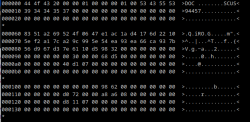
This is what the header of a decrypted DOCUMENT.DAT looks like:
foo.png
The block from 0x60 to 0x88 is encrypted. When decrypted the bytes in 0x84-0x88 is a 32 bit integer for the number of PNG files that follows. I think it should be 47 in this case. Most of the rest of the bytes should probably be 0x00.

Then, looking at bytes 0x88 to 0x8b, this shoud be the offset to where in the file the PNG section starts. It says here 0x3298
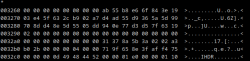
but if we look at this offset we see
foo2.png
but here it looks like the data starts 0x30 bytes earlier, at offset 0x3268. Again, what comes here is also what looks like a 40 byte blob of something. Possibly also encrypted as the data at offset 0x60 but it could also be a hash over the file that follows?
We see the IHDR tag starting at offset 0x32c4, which means that the 8 byte PNG signature should start at 0x32b8. But those 8 bytes do not look like a PNG header, instead they look like random or encrypted data.

Reverse enginnering is required here I think.
 
Spent some more time on it.
The file format for PS3 DOCUMENT.DAT is slightly different than the format for PSP.
On PS3, the number of pages in the manual is stored in plaintext as a uint32 at offset 0x3200.

The gameid is stored in ASCII as 9 bytes starting at offset 0xc0.
This does not have to match the actual game so you can take the file for SCES00321 (==PAL Grandia) and put it in URSDIR/CONTENT for a different game and the manual will show up.
You can not change this to something else like SCES00333 because this will trigger something and "manual not found" so there is probably a signature somewhere that covers this.

There is what looks like a 40 byte signature at the very end. Just after the final IEND tag of the final PNG file.
I tried to see if this was the same 40-byte signature that is used for an integrity check for ISO.BIN.DAT but it is not.
It is either a different algorithm or a different curve.

At this point I am putting this on the backburner for now. I think we would need to disassemble ps1_newemu.self in order to figure
out what it does when opening these files. But that is not something I can do :-(
 
Update: I have now added links to 953 different software manuals, so a decent chunk of ps1 games but a lot are still missing. Though I now ran out of places to harvest links from so this is all for now.
Software manual only work for PSP. I do not have more cycles to try to reverse engineer the modified and cryptographically signed? format that PS3 uses :-(
 
I'm having an issue with Bloody Roar II. Something with fetching the images. I am able to add my own image files, but the cursor keeps circling and I'm unable to hit create pkg.
Fetching SND0
Failed to parse file https://images.launchbox-app.com/d3a7fc00-9bf0-4aff-8d63-72a05dc21847.png
Exception in Tkinter callback
Traceback (most recent call last):
File "tkinter\__init__.py", line 1892, in __call__
File "pop-fe-ps3.py", line 381, in on_path_changed
File "pop-fe-ps3.py", line 279, in update_assets
AttributeError: 'NoneType' object has no attribute 'resize'
 
I have had a similar problem with certain PNG's not loading, im not sure but it might be related to transparency, when i open in Microsoft paint and just save as PNG it loses transparency and then they load ok (not 100% sure if this is the cause though), maybe that will help @Ronnie Sahlberg fix it
 
I have had a similar problem with certain PNG's not loading, im not sure but it might be related to transparency, when i open in Microsoft paint and just save as PNG it loses transparency and then they load ok (not 100% sure if this is the cause though), maybe that will help @Ronnie Sahlberg fix it

The issue happens when it tries to fetch images from it's own database. I'm able to add my own images after the error happens, but the program won't let me use them and the make pkg button is made null. It's like, once the error happens, it's done, you can't go any further. And you could try Paint 3d that's baked into Windows, it saves transparency.
 
The issue happens when it tries to fetch images from it's own database. I'm able to add my own images after the error happens, but the program won't let me use them and the make pkg button is made null. It's like, once the error happens, it's done, you can't go any further. And you could try Paint 3d that's baked into Windows, it saves transparency.
Thanks i didn't know about Paint 3d (never used it), i usually just use GIMP2 if i need a transparent PNG,
But what i ment was the error is caused by the invalid PNG, i mean sure it shouldn't Softlock the program, that is a bug for sure,
For the softlock im looking at the code it appears to be missing a IF statement for self.pic0 and self.pic1 which i think is the cause, im going to compile a version now and test it to see if it works, if the PNG won't load it will hopefully just show a white box instead of a softlock, i will edit this post in a short while with the build IF it works, or just a update if it doesn't.

EDIT:- Ok here is a test build, this was built in Msys2 so it has a lot more DLL's included, if there is any problem encoding anything just grab the ffmpeg from the official release and throw it into the same folder (for some reason on msys2 it compiles the ffmpeg dll's instead of the exe)
Anyway this will hopefully stop the crash when it can't read a PNG
https://www.mediafire.com/file/3rae...3_DevilDwarf_Compile_7th_August_2023.zip/file
 
Last edited:
I'm having an issue with Bloody Roar II. Something with fetching the images. I am able to add my own image files, but the cursor keeps circling and I'm unable to hit create pkg.

Ah, the issue is that sometimes Pillow just will not parse an image we get correctly.
So I need to check that we actually could convert it into an image before I start processing it.
I have checked in a fix for this (and also swapped the PIC0 for bloody roar 2 to a different image that works).

Please try v1.0.15 it contains a fix for this.
 
I used the version from the link above. When trying to convert the 4 disk game Wing Commander III - Heart of the Tiger, it always fails. It works for about 3 minutes then it just gives up, it says it created the pkg, but it did not.

Creating C:/Users/striz/Desktop/Wing Commander III Heart of the Tiger.pkg
DISC SLUS00019
TITLE Wing Commander III Heart of the Tiger
Scanning for audio tracks
GameID pop-fe-ps3-work/SLUS00019
Create EBOOT.PBP at pop-fe-ps3-work/SLUS00019/USRDIR/CONTENT/EBOOT.PBP
Create ISO.BIN.DAT pop-fe-ps3-work/SLUS00019/USRDIR/ISO.BIN.DAT
Signing pop-fe-ps3-work/SLUS00019/USRDIR/ISO.BIN.DAT
Create ISO.BIN.EDAT
Create PKG
Traceback (most recent call last):
File "pkg.py", line 595, in <module>
File "pkg.py", line 590, in main
File "pkg.py", line 438, in pack
MemoryError
[16312] Failed to execute script 'pkg' due to unhandled exception!
Finished. C:/Users/striz/Desktop/Wing Commander III Heart of the Tiger.pkg created
 
I used the version from the link above. When trying to convert the 4 disk game Wing Commander III - Heart of the Tiger, it always fails. It works for about 3 minutes then it just gives up, it says it created the pkg, but it did not.

I tried to create a ps3 pkg with that 4 disk game (SLUS00019) here and it works.
The actual creation of the PKG is not done by pop-fe but it is calling out to the pkg tool in PSL1GHT.

This is the command line it uses to create the PKG:

python3 PSL1GHT/tools/ps3py/pkg.py -c UP9000-SLUS00019_00-0000000000000001 pop-fe-work/SLUS00019 wc.pkg

This is if you use the comamnd line tool. If you use pop-fe-ps3 it will probably be 'pop-fe-ps3-work/SLUS00019' instead.
Can you try running this from the command line and see if you can reproduce it?
You may need to run it normally again first, until you see the text

Create PKG

When this text is printed pop-fe has finished creating the entire directory structure for the game and it is stored in pop-fe-ps3-work/SLUS00019. Try to run it until it prints that text, then abort the program and try running the python command line above to manually create the the PKG.

pkg.py complains that it failed due to a memory error.
How much memory do you you have? It could be that it is running out of memory.
How much free disk space do you have?

I think it is a matter of pkg.py just running out of memory. That line that it fails on is
fileData = fp.read()
which is a line where it tries to read a file into a memory buffer and this causes a memory error.


Are you on windows? Windows have support for virtual memory. Can you try increasing the amount of virtual memory it uses? Say try to increase it by using 5Gb or so more as virtual memory. I can't help here on the exact details as I don't use windows (I can tell you how to do it on linux though) but google should help.
Adding more virtual memory will slow things down a bit but the drawback is that you have more "memory" available and in this case a "slower" experience might be better than a "fails with memory error" experience.

 
Last edited:
This is an excellent application. It should be stickied in the Must Have Tools section. There isn't much to improve from here. Maybe a fancier GUI, and scanning all the ATRAC3 files and adding them. I have one .pkg with 50 .aea tracks. Maybe find the biggest one and save it. Besides that, it's great. I just cranked out 250 PSX .pkg in about a week.
 

Similar threads

Back
Top