Ronnie Sahlberg
Developer
Early version of Pop-fe2. A utility that creates PS2Classic games for PS3.
https://github.com/sahlberg/pop-fe2
Can be run from command line or via a UI that is similar to pop-fe-ps3.
Supports windows and windows binaries can be downloaded from the github page on the actions tab.
For windows:
-----------------
Download the latest release from : https://github.com/sahlberg/pop-fe2 and unpack the ZIP file.
For more up-to-date versions, there is a scratch build made everytime something in the repository changes. These can also be downloaded but you need to be logged in to a github account or the download links will not show up:
Go to https://github.com/sahlberg/pop-fe2 select the actions tab, pick the most recent build and the link to download the latest scratch build of pop-fe2-ui will be at the bottom.
NOTE: ONLY games that are fully curated in :https://github.com/sahlberg/pop-fe2/blob/master/gamedb.py will look good on the XMB. Right now this is only ~200-300 of the more popular NTSC-U releases.
Any game NOT curated in the database can still be converted but they will not have game-cover, background image or logo. There will not be any sound at all on the XMB. I.e. they will look completely terrible in the XMB which defeats the whole purpose of converting them into PS2 Classic format in the first place.
A workaround for this is to install a "art pack" from https://archive.org/details/ps2-opl-cover-art-set. This provides assets for many many of the games but is was created for very low resolution screens like OPL on a PS2 and definitely not aimed at a much much higher resolution screen like the PS3 XMB. Low resolution assets are better than no assets at all.
Download the ART pack and install as the ART subdirectory in the pop-fe2-ps3 folder next to the pop-fe2-ps3.exe binary.
If you want high quality assets, and of course you do, it is fortunately very easy to add links to
curated assets to the database:
1, fork the repository on github and switch to your fork
2, in the github ui, edit the gamedb.py file and update the data for
your game. You need to specify links for all of icon0,pic0,pic1 and snd0
3, save your changes and create a commit
4, click the buttons to turn this into a pull request and then I will merge it into upstream.
Note, as soon as you save and create a commit, you should get a new build being done
under the actions tab in your repository. You will be able to download an updated version
of pop-fe2-ui there in a few minutes.
Example of how my fav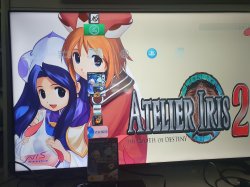 torite game in the Atelier Iris series look like:
https://github.com/sahlberg/pop-fe2
Can be run from command line or via a UI that is similar to pop-fe-ps3.
Supports windows and windows binaries can be downloaded from the github page on the actions tab.
For windows:
-----------------
Download the latest release from : https://github.com/sahlberg/pop-fe2 and unpack the ZIP file.
For more up-to-date versions, there is a scratch build made everytime something in the repository changes. These can also be downloaded but you need to be logged in to a github account or the download links will not show up:
Go to https://github.com/sahlberg/pop-fe2 select the actions tab, pick the most recent build and the link to download the latest scratch build of pop-fe2-ui will be at the bottom.
NOTE: ONLY games that are fully curated in :https://github.com/sahlberg/pop-fe2/blob/master/gamedb.py will look good on the XMB. Right now this is only ~200-300 of the more popular NTSC-U releases.
Any game NOT curated in the database can still be converted but they will not have game-cover, background image or logo. There will not be any sound at all on the XMB. I.e. they will look completely terrible in the XMB which defeats the whole purpose of converting them into PS2 Classic format in the first place.
A workaround for this is to install a "art pack" from https://archive.org/details/ps2-opl-cover-art-set. This provides assets for many many of the games but is was created for very low resolution screens like OPL on a PS2 and definitely not aimed at a much much higher resolution screen like the PS3 XMB. Low resolution assets are better than no assets at all.
Download the ART pack and install as the ART subdirectory in the pop-fe2-ps3 folder next to the pop-fe2-ps3.exe binary.
If you want high quality assets, and of course you do, it is fortunately very easy to add links to
curated assets to the database:
1, fork the repository on github and switch to your fork
2, in the github ui, edit the gamedb.py file and update the data for
your game. You need to specify links for all of icon0,pic0,pic1 and snd0
3, save your changes and create a commit
4, click the buttons to turn this into a pull request and then I will merge it into upstream.
Note, as soon as you save and create a commit, you should get a new build being done
under the actions tab in your repository. You will be able to download an updated version
of pop-fe2-ui there in a few minutes.
Example of how my fav
torite game in the Atelier Iris series look like:
Last edited: