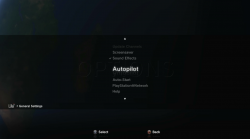
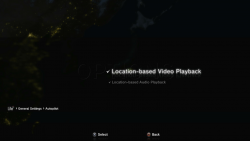
PS3 Possibility of a Life With Playstation Revival? (Request) (sans folding@home)

Ok so I made some progress. I think 1.21 must support both formats, which is lucky for us, and I think the offline format supports most of the same stuff if not ALL of it. I have not figured out how to do some things yet though in the offline xml format. See below.
This is so awesome, such a step up from where it was in unsupported state.
Here is a build that can work 100% offline (Including not signed into PSN and internet disabled). It has placeholder data added from the beta xml that @marciolsf found in the 1.10 beta pkg. Its a kinda cool time capsule of news from 2007 :)

This means it now shows 117 cities all offline, pretty cool!

I did add Dublin, Belfast and Edinburgh cos western Europe was kinda empty. :)

This pkg is v1.00, with v1.10 (non beta) files added on top, then v1.20 on top, then 1.21 on top. Then of course spoofed to 1.22 to block the shutdown update. This combined pkg is probably how most peoples installs will have ended up if they kept it installed, as pkg installs/updates can never delete files, only overwrite. Unless they add a clean up as part of the code in the app of course.

DOWNLOAD Life_With_PlayStation_v1.21_NPIA00002_Offline_Test1.pkg

I have not figured out how to add the thumbnails/media in the offline format yet, or add urls for the news stories, or add the little weather icons on the globe. I think they can all be added though including media links, just need to trial and error loads of different syntaxes, shouldn't be too hard though if lots of us try?

I have not really looked much into adding more stuff offline yet, wanted to get something packaged to share. This is what it looks like now.

View attachment 46466


For debugging the app further for online, and for figuring out more offline RSS XML syntax THIS should help ;) (I got some help with those. Massive thanks for that. ;) )

In there you will find decrypted sprx/self from 1.21 and 1.10 beta. This can tell us a lot about the responses needed. Few snippets from when I had a quick look.

View attachment 46469 View attachment 46470 View attachment 46471

This area in particular shows all the xml elements supported in the offline xml for the Live channel, it doesnt show exactly how to use them but we can guess that with some trial and error.

View attachment 46472


See also keep in mind, potentially as a Plan B, worst case, if we cant reverse the authentication, we could maybe have webman update the local xmls with a script on boot up, so have it update this way, bypassing all of the security.


Also I think we should all look out for dumps from consoles from before 1.22 update was installed (NPIA00002 and NPIA00007), or even after if it wasn't removed (unlikely). There might be more files in there that can help with taking it further, related to other channels other than "Live" and Folding@Home".

Ok so I made some progress. I think 1.21 must support both formats, which is lucky for us, and I think the offline format supports most of the same stuff if not ALL of it. I have not figured out how to do some things yet though in the offline xml format. See below.

Here is a build that can work 100% offline (Including not signed into PSN and internet disabled). It has placeholder data added from the beta xml that @marciolsf found in the 1.10 beta pkg. Its a kinda cool time capsule of news from 2007 :)

This means it now shows 117 cities all offline, pretty cool!

I did add Dublin, Belfast and Edinburgh cos western Europe was kinda empty. :)

This pkg is v1.00, with v1.10 (non beta) files added on top, then v1.20 on top, then 1.21 on top. Then of course spoofed to 1.22 to block the shutdown update. This combined pkg is probably how most peoples installs will have ended up if they kept it installed, as pkg installs/updates can never delete files, only overwrite. Unless they add a clean up as part of the code in the app of course.

DOWNLOAD Life_With_PlayStation_v1.21_NPIA00002_Offline_Test1.pkg

I have not figured out how to add the thumbnails/media in the offline format yet, or add urls for the news stories, or add the little weather icons on the globe. I think they can all be added though including media links, just need to trial and error loads of different syntaxes, shouldn't be too hard though if lots of us try?

I have not really looked much into adding more stuff offline yet, wanted to get something packaged to share. This is what it looks like now.

View attachment 46466


For debugging the app further for online, and for figuring out more offline RSS XML syntax THIS should help ;) (I got some help with those. Massive thanks for that. ;) )

In there you will find decrypted sprx/self from 1.21 and 1.10 beta. This can tell us a lot about the responses needed. Few snippets from when I had a quick look.

View attachment 46469 View attachment 46470 View attachment 46471

This area in particular shows all the xml elements supported in the offline xml for the Live channel, it doesnt show exactly how to use them but we can guess that with some trial and error.

View attachment 46472


See also keep in mind, potentially as a Plan B, worst case, if we cant reverse the authentication, we could maybe have webman update the local xmls with a script on boot up, so have it update this way, bypassing all of the security, so this is why the offline format is especially important as well. It allows for loads of cool custom stuff too.


Also I think we should all look out for dumps from consoles from before 1.22 update was installed (NPIA00002 and NPIA00007), or even after if it wasn't removed (unlikely). There might be more files in there that can help with taking it further, related to other channels other than "Live" and Folding@Home".
This is so awesome. I am so glad this finally got some love. This is such a big step in the right direction from where it was.
 
earthtv.com has expired certs and webcams.travel has had a domain change, maybe this could be causing some issues?
Those will be an issue at some point maybe, probably not too big a deal in the grand scale of things.

We're not that far yet though. Ideally need some pros to do some reverse engineering on the prx files!

funny-gif-car-road-inverted.gif
 
Ok so I made some progress. I think 1.21 must support both formats, which is lucky for us, and I think the offline format supports most of the same stuff if not ALL of it. I have not figured out how to do some things yet though in the offline xml format. See below.

Here is a build that can work 100% offline (Including not signed into PSN and internet disabled). It has placeholder data added from the beta xml that @marciolsf found in the 1.10 beta pkg. Its a kinda cool time capsule of news from 2007 :)

This means it now shows 117 cities all offline, pretty cool!


I did add Dublin, Belfast and Edinburgh cos western Europe was kinda empty. :)

This pkg is v1.00, with v1.10 (non beta) files added on top, then v1.20 on top, then 1.21 on top. Then of course spoofed to 1.22 to block the shutdown update. This combined pkg is probably how most peoples installs will have ended up if they kept it installed, as pkg installs/updates can never delete files, only overwrite. Unless they add a clean up as part of the code in the app of course.

DOWNLOAD Life_With_PlayStation_v1.21_NPIA00002_Offline_Test1.pkg

I have not figured out how to add the thumbnails/media in the offline format yet, or add urls for the news stories, or add the little weather icons on the globe. I think they can all be added though including media links, just need to trial and error loads of different syntaxes, shouldn't be too hard though if lots of us try?

I have not really looked much into adding more stuff offline yet, wanted to get something packaged to share. This is what it looks like now.

View attachment 46466


For debugging the app further for online, and for figuring out more offline RSS XML syntax THIS should help ;) (I got some help with those. Massive thanks for that. ;) )

In there you will find decrypted sprx/self from 1.21 and 1.10 beta. This can tell us a lot about the responses needed. Few snippets from when I had a quick look.

View attachment 46469 View attachment 46470 View attachment 46471

This area in particular shows all the xml elements supported in the offline xml for the Live channel, it doesnt show exactly how to use them but we can guess that with some trial and error.

View attachment 46472

See also keep in mind, potentially as a Plan B, worst case, if we cant reverse the authentication, we could maybe have webman update the local xmls with a script on boot up, so have it update this way, bypassing all of the security, so this is why the offline format is especially important as well. It allows for loads of cool custom stuff too.


Then this below looks a lot like some of kind of key, and its right there next to the cmd challenge. Probably directly related to the authentication response.


View attachment 46475

I think one important thing from that prx is this xml format. I don't know its used right now. It is possible it saves some data locally in that format.

Code:
<aas>
<accountid></accountid>
<password></password>
<sessionid></sessionid>
<status></status>
</aas>


Also I think we should all look out for dumps from consoles from before 1.22 update was installed (NPIA00002 and NPIA00007), or even after if it wasn't removed (unlikely). There might be more files in there that can help with taking it further, related to other channels other than "Live" and Folding@Home".
This is awesome! I will try the pkg soon [emoji2]
Slowly but surely we'll get it working again hopefully
 
Ok so I made some progress. I think 1.21 must support both formats, which is lucky for us, and I think the offline format supports most of the same stuff if not ALL of it. I have not figured out how to do some things yet though in the offline xml format. See below.

Here is a build that can work 100% offline (Including not signed into PSN and internet disabled). It has placeholder data added from the beta xml that @marciolsf found in the 1.10 beta pkg. Its a kinda cool time capsule of news from 2007 :)

This means it now shows 117 cities all offline, pretty cool!


I did add Dublin, Belfast and Edinburgh cos western Europe was kinda empty. :)

This pkg is v1.00, with v1.10 (non beta) files added on top, then v1.20 on top, then 1.21 on top. Then of course spoofed to 1.22 to block the shutdown update. This combined pkg is probably how most peoples installs will have ended up if they kept it installed, as pkg installs/updates can never delete files, only overwrite. Unless they add a clean up as part of the code in the app of course.

DOWNLOAD Life_With_PlayStation_v1.21_NPIA00002_Offline_Test1.pkg

I have not figured out how to add the thumbnails/media in the offline format yet, or add urls for the news stories, or add the little weather icons on the globe. I think they can all be added though including media links, just need to trial and error loads of different syntaxes, shouldn't be too hard though if lots of us try?

I have not really looked much into adding more stuff offline yet, wanted to get something packaged to share. This is what it looks like now.

View attachment 46466


For debugging the app further for online, and for figuring out more offline RSS XML syntax THIS should help ;) (I got some help with those. Massive thanks for that. ;) )

In there you will find decrypted sprx/self from 1.21 and 1.10 beta. This can tell us a lot about the responses needed. Few snippets from when I had a quick look.

View attachment 46469 View attachment 46470 View attachment 46471

This area in particular shows all the xml elements supported in the offline xml for the Live channel, it doesnt show exactly how to use them but we can guess that with some trial and error.

View attachment 46472

See also keep in mind, potentially as a Plan B, worst case, if we cant reverse the authentication, we could maybe have webman update the local xmls with a script on boot up, so have it update this way, bypassing all of the security, so this is why the offline format is especially important as well. It allows for loads of cool custom stuff too.


Then this below looks a lot like some of kind of key, and its right there next to the cmd challenge. Probably directly related to the authentication response.


View attachment 46475

I think one important thing from that prx is this xml format. I don't know its used right now. It is possible it saves some data locally in that format.

Code:
<aas>
<accountid></accountid>
<password></password>
<sessionid></sessionid>
<status></status>
</aas>


Also I think we should all look out for dumps from consoles from before 1.22 update was installed (NPIA00002 and NPIA00007), or even after if it wasn't removed (unlikely). There might be more files in there that can help with taking it further, related to other channels other than "Live" and Folding@Home".

That's awesome! I suggest we user your package as our common basis for any future improvements, that way we're not risking reinventing the wheel.

In one of my packages (it's an NPIA0002, i think the 1.21 version), the aas_authkey is present in /data/live_info/property.xml, as such

<key>aas_authkey1</key><value>nnmlpdwItda6aqiqLxzaygzw9ojxr{pm</value>

But I hadn't seen that entry on the lifeInfoClient.prx that you found, so that's awesome! Now we know what the rest of the authentication keys are supposed to look like.

I think your idea for using webman is a good fall back... We know what the file looks like and where it's supposed to live. We'd still have to figure out where/how to populate it with up-to-date stuff. I was thinking if we source an RSS news feed, the transformations into our format should be pretty straight forward. The current news sources are dead, so we'll have to implement new feeds one way or another.

Thinking the step after that, as long as we're having to come up with a new RSS source, it would be neat if we could have a couple of different sources to choose from (general news/gaming/etc...)
 
That's awesome! I suggest we user your package as our common basis for any future improvements, that way we're not risking reinventing the wheel.
Definitely, sounds good. If anyone wants to mod it and release updated versions feel free.

Note that test pkg it does have my PCs LAN IP instead of the dead domain in some of the configs. so that needs to be fixed in the next version.

In one of my packages (it's an NPIA0002, i think the 1.21 version), the aas_authkey is present in /data/live_info/property.xml, as such

<key>aas_authkey1</key><value>nnmlpdwItda6aqiqLxzaygzw9ojxr{pm</value>
Yeah, I seen that, also a different one I think somewhere in an older version.

We should also play with older versions too as we found with Home the formats get more complex, with more encryption added on top in some cases. It uses blowfish somewhere anyway as seen in an xml in one of the versions. Possibly libsecure too.

But I hadn't seen that entry on the lifeInfoClient.prx that you found, so that's awesome! Now we know what the rest of the authentication keys are supposed to look like.
It's a start anyway.

I think your idea for using webman is a good fall back... We know what the file looks like and where it's supposed to live.
That's it, Could even be a way to show system info maybe, also I think if we figure out the offline format fully it would allow anyone to have their own mods showing. Like for example add their own house to the globe, or whatever. :)

I had random idea where we can replace the aas url with a webman mod calls to download the xml and save it to the right location. :)

upload_2025-8-25_17-57-7.png


It actually almost works, but not quite out of the box, For one thing it keep on quitting the app and redownloading in a loop. But I'm sure it can be done, webman mod has lots of scripting capabilities.

We'd still have to figure out where/how to populate it with up-to-date stuff. I was thinking if we source an RSS news feed, the transformations into our format should be pretty straight forward. The current news sources are dead, so we'll have to implement new feeds one way or another.
For sure, for testing I have a cheap VPS running a php server and Home beta server already, so if needed I can host something there. It would be nice to do it in php if possible as easy to work on and see what's going on, and for anyone with notepad and xampp to tweak too rather than a compiled app. Also I'm biased towards php cos I'm semi familiar with it after recreating the minibots arena API for Playstation Home that had 47 end points. :o

So yeah, Some kind of a bridge API basically that can go between existing news and weather APIs and feed it the right xmls. Pretty easy to have both RSS xml formats supported too if webman mod was going to download and replace.

Thinking the step after that, as long as we're having to come up with a new RSS source, it would be neat if we could have a couple of different sources to choose from (general news/gaming/etc...
That's it, Another thing I was thinking about is being able to clone the Live channel plugin, and then have multiple of it showing different info. It should be doable hopefully.

Then add it to this default_channel_list.xml, or the served one if we can get that far.

upload_2025-8-25_18-0-5.png


Ideas would be endless then if we could add custom channels. Could have one with music videos linked, or showing airports or football stadiums or anything really, even with the globe textures modded maybe.

upload_2025-8-25_18-2-10.png
 
Last edited:
I had random idea where we can replace the aas url with a webman mod calls to download the xml and save it to the right location

Hahaha, this one made me laugh. That would circumvent the entire auth process... if we can get that to work, then we could just skip reverse engineering the auth and focus on adding features right away.

I love the idea of just adding more channels -- the basic plumbing is already there and it's all on XML, so it shouldn't be that hard. I think they meant for additional functionality to be added as channels. The current channels are tied to folders under the /data/plugins folder, so in theory if we wanted to create a test channel, we need to add the following to default_channel_list.xml

<item>
<title>TEST</title>
<lwp:channelId>FLWP00003</lwp:channelId>
<lwp:plugin name="TEST" url="file://%s/data/plugins/test/test.xml" />
<lwp:iconset url="data/plugins/live/menu/" pubDate="Sat, 19 Apr 2008 12:00:00 +0000">
<lwp:icon url="Live_Channel.png" type="image/png" width="520" height="340" resolution="1080" icontype="menu" />
<lwp:icon url="Live_Channel_Icon.png" type="image/png" width="94" height="61" icontype="option" />
</lwp:iconset>
<lwp:entitlement channel="in_service"/>
<lwp:about url="http://www.playstation.com/life/livech/about/" />
</item>

Then we go back under /data/plugins and clone the /plugins/live folder as /plugins/test. I'm sure we'll have to customize the test.xml file further, i think all the references are the full path (/data/plugins/live/*)
 
Last edited:
Hi Devil! What do the archived pkgs do? Are they dependencies

As for the game trailer channel, I guess one could clone the live channel and change the earth to a blue playstation orb, with those "city lights" being around it like a ring.

Hover on it and itll show up general info or trailers, I guess its best use to link a playstation news RSS feed haha. This can be a good replacement if we cant find the original anymore
 
I also found some more files, nothing majorly useful right now but they should still be archived

Thanks! I decided to go back and reorganize all my files, extractions, WIP, etc... Something curious is that even though the package I had been testing with is based off of 1.21, when I go back and compare with an extraction I know it came out of a 1.21 package, i get tons and tons of differences
upload_2025-8-26_8-17-5.png


I then compared it to all my other extracts that I had at the time, and it doesn't match any of them! I know for sure it's NPIA00002, and a backup of the SFO says it's 1.21, but as the compare shows, they're both very different. Maybe there are different 1.21 versions out there.... I'm not sure what to make of that right now, so I think I'm going to set that aside and focus on the offline package you created.

I had a really long weekend and didn't make a ton of progress, but I did try out adding a test channel in my (mystery) package and sadly it didn't work. Maybe once I have the offline package installed it'll actually work.
 
Hi Devil! What do the archived pkgs do? Are they dependencies
Not sure exactly about all those, the 7MB fah.pkg seems to be like a switch over pkg where it changed name from fah to lwp.

The CUP and CUI files i have no idea. They're very old.

The lwp.pkg wont extract for me, maybe corrupt. EDIT actually its fine, its also labelled as 1.00 in the param.sfo..

Then the proper shutdown update is interesting just cos it has the original message it showed telling people the service had ended.


As for the game trailer channel, I guess one could clone the live channel and change the earth to a blue playstation orb, with those "city lights" being around it like a ring.

Hover on it and itll show up general info or trailers, I guess its best use to link a playstation news RSS feed haha. This can be a good replacement if we cant find the original anymore

Yeah, it will be interesting to see what mods we can do. We will need more people to get involved really with experimenting.

Thanks! I decided to go back and reorganize all my files, extractions, WIP, etc... Something curious is that even though the package I had been testing with is based off of 1.21, when I go back and compare with an extraction I know it came out of a 1.21 package, i get tons and tons of differences
Interesting, Hmm, Yeah, its starting to look like they were hot swapping pkgs without changing version or something.

Cos also I see this on nopsn.org

upload_2025-8-26_15-24-47.png


Then with the final pkg, now its a 0 byte pkg, but obviously at one time it was the 1.22 pkg I linked above. Also if you check the ps3 update xml at https://a0.ww.np.dl.playstation.net/tpl/np/NPIA00002/NPIA00002-ver.xml

Well it says the size is 10789792 which doesn't match either v1.22.
 
Last edited:
Not sure exactly about all those, the 7MB fah.pkg seems to be like a switch over pkg where it changed name from fah to lwp.

That sounds about right... IIRC, it originally was just the folding@home client. The extracted 1.00 package doesn't seem to have the channel functionality, just the essentials for the folding stuff. I remember when sony released the LWP update and introduced the concept of channels, and that's when folding became a channel.

I've been wanting to start documenting all these changes and differences, maybe on a spreadsheet we can share.
 
This what I have, I renamed the pkgs by long content id and version from PARAM.SFO. Cos we cant really trust filenames.

EDIT LINK FIXED:
https://drive.google.com/file/d/1AKdMEIh5hMo5BKsM3DsNIGLQhuAX2HwI/view?usp=sharing


"DEV" is the 2007 pkg that installs to game category
"DUMP" is the 2008 version from the zip pkg up for easy install
"_2" is a second pkg that would have had same name going by the above naming convention.

Code:
Package Filename--------------------------------------------------------------- sha1--------------------------------------------------- md5
IP9100-NPIA00002_00-0000111122223333-A0090-V0132-PE.pkg: db07be041a1375cd38474492aed10c6d9c3eff02: c1d381a32c4df7f2387df621bdf9883c
IP9100-NPIA00002_00-0000111122223333-A0100-V0100-PE.pkg: c5b45631bb707144612368c502722c06992f7d79: 63efb69a08ba28e76d1449cc2b4f2ae3
IP9100-NPIA00002_00-0000111122223333-A0100-V0100-PE_2.pkg: cc58d5dcb4a9fc72b30b9ebc47d6b1bf77eff531: 847eec2415ebb6372e9edff96f5ede18
IP9100-NPIA00002_00-0000111122223333-A0110-V0110-PE.pkg: 00d838cc67b05c1da8779db538984d998cc438c3: b840fde9f6953c1bb14dced835d579cc
IP9100-NPIA00002_00-0000111122223333-A0120-V0120-PE.pkg: 625c0f6d6fec7ae33b5d5390c66cc28dc46c33d1: efee78a130c2a4f7efed61ce9bbd3fdf
IP9100-NPIA00002_00-0000111122223333-A0121-V0121-PE.pkg: 85d074b23605c02a93739a5958af953e1ce00a63: 4f489a8a0b1a1576c338d961c339b0b3
IP9100-NPIA00002_00-0000111122223333-A0122-V0100-PE.pkg: f8f61b175ca90dc7f8481d84e4222872f13a14f0: 5d89452b0c28838fc4d44a6d8342d050
IP9100-NPIA00002_00-0000111122223333_V0100_2008_DUMP.pkg: b2803ed63df24c6c1e9a55c7312abfc55d7228a2: 59f082454c569838dce9d4e53774a0cd
IP9100-NPIA00002_00-0000111122223333_V0132_2007_DEV.pkg: cdd135fb2b5aa3afa4a5a7759efe096d4aa1af52: 788f6082f96d83808f7f3279d6ec0fdc
IP9100-NPIA00002_00-2008072208980901-A0100-V0100-PE.pkg: 72044857f306eed80bfb4c839650820fcd57d5ff: e3a9f16043e6e0e8322d88b926e6294a
IP9100-NPIA00007_00-0000111122223333-A0110-V0110-PE.pkg: 2d44f6eb9cd3ae9bcbc9e8df1b0b86092041e3e5: 7fdcc60bd62abdf61ac2852551129622
 
Last edited:
Nice! I'll go with that as well. My challenge has been that theres so many packages and so many files inside, it's becoming challenging to find stuff.

What do you think is the difference between A**** and V**** ? It looks like they map to the package version (1.00, 1.20, etc) but then what's 0090 and 0132?
 
Its like app version and pkg version I think, but I don't think we can tell too much from those. The app version is semi reliable. We can just use them for own identifiers to tell them apart in discussion, along with pkg size.

Can also maybe tell approximate age by firmware requirement, but its not 100% reliable either.

upload_2025-8-26_19-54-57.png


I've been wanting to start documenting all these changes and differences, maybe on a spreadsheet we can share.

Sounds good, yeah, we need to hash check each files within the pkgs really.

So many differences, I see some have commented out plugins, some have none.

upload_2025-8-26_20-45-7.png


upload_2025-8-26_20-48-4.png


upload_2025-8-26_20-56-5.png
 
Last edited:
Original LWP release blog post

https://blog.playstation.com/2008/09/17/start-your-"life-with-playstation"/

Comments are great! A snapshot of a simpler time.

View attachment 46495

View attachment 46496

View attachment 46497

View attachment 46498

View attachment 46499


P.S. I fixed the google drive link in my last post, I was on my phone and added wrong one before.
Haha, people complaining about some features while we dont even have it working anymore officially since 2012 [emoji23] we all wish we were in their positions

Most interesting post is the one from 2008 about not being able to read the text on a SD tv, guy would have been blown away upon getting 1080p output using hdmi
 
Little bit of progress, this is how to add urls to the default_city_info.xml RSS XML format for each news story/item, they do work to open the web browser then which is cool, no limitation on this offline method so far.

upload_2025-8-27_14-29-20.png


upload_2025-8-27_14-30-48.png


We need to figure out how these are used too

live:thumbnail
live:media
live:cloud
live:mark
live:bullet
live:gradient
live:autopilot
live:zoom
live:cityId
live:text
live:overlay
live:style
 
We need to figure out how these are used too

live:thumbnail
live:media
live:cloud
live:mark
live:bullet
live:gradient
live:autopilot
live:zoom
live:cityId
live:text
live:overlay
live:style

I thought (grain of salt here) that autopilot is for when you leave the controller alone and then the game just starts moving from city to city. Maybe it's a way to prioritize locations?
 
I had a bunch of packages already, and I wasn't sure if I already had the same packages you provided, but with a different name. With some AI help, I created this powershell script that compares all the packages in a folder and tell us which ones have the same MD5 hash and which ones are unique.

upload_2025-8-27_8-37-47.png


At least now we can tell if we come across something new.
 

Attachments

Back
Top