
You are using an out of date browser. It may not display this or other websites correctly.
You should upgrade or use an alternative browser.
You should upgrade or use an alternative browser.
PS3 Project RSX Boost: Overclock your Retail PS3 RSX Speeds (ps3 cfw only)

Mitsu™
Senior Member
Use a program like HxD to open it and search your actual RSX speeds, like "500/650". Then you should find directly the desired line.I will get to posting about my LVL 1's but how do I do that? I used cobras lvl 1 dump and I got it on my usb and not exactly sure where to go from here.
It looks like this :
Code:
rsx65 a06 650/900 vpe:ff shd:3f [K4A049400:1:2:16:c:c:3:8:2] [1c:0:2:0:1:2:0] [2:1:0]Use a program like HxD to open it and search your actual RSX speeds, like "500/650". Then you should find directly the desired line.
It looks like this :
Code:rsx65 a06 650/900 vpe:ff shd:3f [K4A049400:1:2:16:c:c:3:8:2] [1c:0:2:0:1:2:0] [2:1:0]
Alright, will do that when I eventually get home
Ok, here are some modded firmwares based on Evilnat Beta9 I need some help getting data on doing it all by myself would take more time than I have. vRAM is 650 - 950 in 25MHz increments. GPU is 550 - 850 in 50MHz Increments. The files all seemed to compile correctly but as usual use at your own risk and ideally have a hardware flasher.
The intent in these files is for me to document improvements one step at a time to identify and work out various factors;
- Performance improvement at each step
- At what GPU frequency performance plateaus
- At what vRAM frequency performance plateaus
- Calculate GPU fillrate improvements at each step
- Calculate vRAM in Gbp\s bandwidth improvements
- Temperature increases at each step
To be more specific I want to determine how bottlenecked the RSX is on both the core frequency and vRAM sides.Not essential but it would also be useful to know the model(s) of PS3 these are tested on so I can categorise things more.
The 550\650 file is a safety net of sorts so people can try it first before jumping to the 600MHz files to try and circumvent lemon GPUs that can't OC for squat. If this file produces artifacts do NOT try using the other files go back to whatever firmware you were using. For anyone that might have a lemon GPU I have included files leaving the GPU stock and just increasing vRAM frequency.
These files have been made with methodology and responsibility in mind I won't be able to get the data I want with random frequencies being tried and likewise I've done everything I can to ensure nobody bricks their console. In an ideal situation I'd have liked to test vRAM frequency increases with the GPU core at stock but as MFW builder doesn't allow for that, then I've done the next best thing that will get me the data I want.
Legend:
500- 675- CEX- PS3UPDAT
GPU speed vRAM speed firmware type standard update file name
Note: Delete everything prefixing PS3UPDAT it is just to tell you what each file is.
https://mega.nz/file/PpAyRTrK#KO9JiuY_y2gR_sgR30e6IHY5xnYBreWvj7g6j4tD8CA
The intent in these files is for me to document improvements one step at a time to identify and work out various factors;
- Performance improvement at each step
- At what GPU frequency performance plateaus
- At what vRAM frequency performance plateaus
- Calculate GPU fillrate improvements at each step
- Calculate vRAM in Gbp\s bandwidth improvements
- Temperature increases at each step
To be more specific I want to determine how bottlenecked the RSX is on both the core frequency and vRAM sides.Not essential but it would also be useful to know the model(s) of PS3 these are tested on so I can categorise things more.
The 550\650 file is a safety net of sorts so people can try it first before jumping to the 600MHz files to try and circumvent lemon GPUs that can't OC for squat. If this file produces artifacts do NOT try using the other files go back to whatever firmware you were using. For anyone that might have a lemon GPU I have included files leaving the GPU stock and just increasing vRAM frequency.
These files have been made with methodology and responsibility in mind I won't be able to get the data I want with random frequencies being tried and likewise I've done everything I can to ensure nobody bricks their console. In an ideal situation I'd have liked to test vRAM frequency increases with the GPU core at stock but as MFW builder doesn't allow for that, then I've done the next best thing that will get me the data I want.
Legend:
500- 675- CEX- PS3UPDAT
GPU speed vRAM speed firmware type standard update file name
Note: Delete everything prefixing PS3UPDAT it is just to tell you what each file is.
https://mega.nz/file/PpAyRTrK#KO9JiuY_y2gR_sgR30e6IHY5xnYBreWvj7g6j4tD8CA

Tanzu15
Member
You're fine bro. Artifacts happen anywhere in any level. I always test the first level. If there's zero artifacts or crashes in 30 minutes it's fully stable. Your PS3 for sure does 850 on the core. From my experience If you can get to 800 core stable the chips actual highest OC is likely 850. If you win the big silicon lottery, it would be 900.@Tanzu15 is there a particular level/mission you like to try in Crysis HD ? I'm currently at 800MHz on core / 950MHz VRAM and it seems to be fine !
View attachment 43182

RIP-Felix
Senior Member
Same here! 750 core starts showing artifacts. Haven't had a single crash tho! I even tried 800 and it was pretty much the same.
Memory running 1000 MHz no problem. So right now I'm sticking to 700/1000 and maybe I'll test +1000 MHz on the memory when we get the chance
And yes, memory bnandwith plays a huge role in some games!
Nice to see you got another slim after the accident. Devoted fan! <3

cech 2500 I get slight artifacting in gta 4 on 650mhz core I posted before about it nothing I can do about it.
I had a CECH2504A With Date Code 1A i tested some Clocks and yesterday i tried some PUP's, my Maximum in VRAM was 850mhz and i tried to go to 900Vram after my Console finished the update it came first the Evilnat Logo after the Logo i got a Blackscreen also. I removed the power adapter fast and get into recovery and flashed the older Pup 850/850 and it works. After this i tried several games and no issues found. Then i tried to go up to 900GPU/850Vram and it worked too, but i think its not so good stable for some Games
MY RSX IS A : CXD5300GGB 1049HCJ
@RIP-Felix hey, i'm trying to find the FAB ID from the lv1 dump but I'm lost once I open it in HxD like you said. I try searching for my clock speed but it doesn't show up. Might be doing something wrong...
I registered to share my experience. I have 2508b (russian regional model) with date code 0d. I've come this way: 600\750->700\900->750\1000->850\1025 and 850\1050 almost completely turned my console into a brick. recovery mode stucked up and I had to freeze the console in the freezer for 30 minutes, after that I rolled back to 850\1025, which work absolutely stably. It was scary, but deep down I craved this dangerous feeling. I have found memory clock limit, but the core clock limit has not been found yet by me. I urge everyone to be extremely careful after 1000mhz mem clock, I was careless, but I was ready to brick my console without regrets.
ps: sorry for my bad english. it was very interesting and joyful for me to take part in overclocking testing.
Please post your LV1 RSX string. And dat codes if you can. @Tanzu15 I need your highest stable clock for your 2501A. You said it reached "950." IDK if that meat VRAM or Core. So the LV1 will clear that up for me.One of my 300 day 2501B January does 850 core and 975 memory. My other 2501B January as well, does 900 core 975 memory fully stable for both, this one is 117 days. And the one I talked to you about in the DMs, that died cause of the dumb board flexing, was doing 900/950, could do 975 but hadn't tried it yet. That one was 6 days up time and December and was again 2501B.
The LV1 RSX strring contains a lot number for the RSX. It says the Fab it was made at, which design/specification line, and VIDbin. These are needed to help piece together this mystery - what makes some clock higher.
I just added about 25 more consoles to the dataset from your reports, but most of you are not including the LV1 string I need to complete the dataset.
Tanzu15
Member
No i meant core. The highest core is 900 stable. And I got fantastic news. One of my January's was crashing at 900 core. No artifacting , would just system crash. But. I decided to do an experiment. Exchanged the power supply with a higher watt from the 20xx slim models, and replaced the 200DB model. Bro! It actually stabilized the damn OC and isn't crashing anymore at all. Fully stable. So now I have 2 fully stable 900 cores. I can't believe these power supplies actually give more power to the system to stabilize the overclock. I gotta stock up on the 20xx power supplies. And when I have the time I'll start getting lvl 1 dumps. One thing you know already is these are January 2011 2501B! Yes not the A, only Bs. For some reason Bs give me higher OCs. A's don't do well.Please post your LV1 RSX string. And dat codes if you can. @Tanzu15 I need your highest stable clock for your 2501A. You said it reached "950." IDK if that meat VRAM or Core. So the LV1 will clear that up for me.
The LV1 RSX strring contains a lot number for the RSX. It says the Fab it was made at, which design/specification line, and VIDbin. These are needed to help piece together this mystery - what makes some clock higher.
I just added about 25 more consoles to the dataset from your reports, but most of you are not including the LV1 string I need to complete the dataset.
@Mitsu™ the power supply method actually worked bro. The best power supply is the 220w 20xx slim models. Since they work perfectly on 25xx.
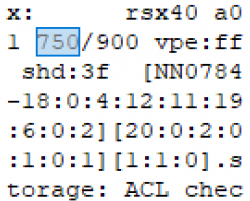
Please post your LV1 RSX string. You can dump it using CFM dumping tools. Open it in HxD and search for your current clock speeds. For example, "700/900". Then post the information here so we have a record of it.
View attachment 43168
Here you go my good man. I'm assuming this is the LVL1 RSX string you are looking for. The dies color is black but take this with a grain of salt because I looked through the seller who sent me the ps3 to get that info when I asked to semd me a pic of the MB itself. The console is a Franky CECHA00 with a 40nm RSX with tantalum caps soldered on the tantalACEr boards. It has 43 days on it 732 On/600 Off,123 improper shutdowns. The motherboard revision is COK-001. I also do not know about who was the manufacture of the RSX. I hope this is enough info for you
Attachments
Tanzu15
Member
@RIP-Felix I have like 8 PS3 slims. It's gonna take me some time. I'll try getting you all the lvl1 strings during the weekend. I have a mess of PS3 slims and tons of parts all over my room. My obsession with this is insane. So hopefully all that data you gather, helps with this data sheet. Have you learned anything at all with the current data you have?
@RIP-Felix I have like 8 PS3 slims. It's gonna take me some time. I'll try getting you all the lvl1 strings during the weekend. I have a mess of PS3 slims and tons of parts all over my room. My obsession with this is insane. So hopefully all that data you gather, helps with this data sheet. Have you learned anything at all with the current data you have?
i remember when I used to have 4 BC ps3 Lmfao. I had an obsession with them because I think they are really cool despite the reliability issues. One broken one I was tempted to send to studio halabi too fix, one cehce01 franky, a cecha01 i was curious if it was frankensteined already, and the monster of a cecha00 franky im using now. I sold the cecha01, i ended up giving the franky ceche01 to my mom for her game rooms she's making, and the broken cecha01 im gonna tinker with and see if i can master delids and possibly try to get into BGA level repair.
Mitsu™
Senior Member
I will try 850 on core. I need to know !You're fine bro. Artifacts happen anywhere in any level. I always test the first level. If there's zero artifacts or crashes in 30 minutes it's fully stable. Your PS3 for sure does 850 on the core. From my experience If you can get to 800 core stable the chips actual highest OC is likely 850. If you win the big silicon lottery, it would be 900.
Great !No i meant core. The highest core is 900 stable. And I got fantastic news. One of my January's was crashing at 900 core. No artifacting , would just system crash. But. I decided to do an experiment. Exchanged the power supply with a higher watt from the 20xx slim models, and replaced the 200DB model. Bro! It actually stabilized the damn OC and isn't crashing anymore at all. Fully stable. So now I have 2 fully stable 900 cores. I can't believe these power supplies actually give more power to the system to stabilize the overclock. I gotta stock up on the 20xx power supplies. And when I have the time I'll start getting lvl 1 dumps. One thing you know already is these are January 2011 2501B! Yes not the A, only Bs. For some reason Bs give me higher OCs. A's don't do well.
@Mitsu™ the power supply method actually worked bro. The best power supply is the 220w 20xx slim models. Since they work perfectly on 25xx.

Glad to know it works ! It opens up new perspectives

I wonder if in case of a semi brick (= recovery mode, artifacts on screen and difficulties to reinstall an update), these PSUs could help.
Last edited:
No i meant core. The highest core is 900 stable. And I got fantastic news. One of my January's was crashing at 900 core. No artifacting , would just system crash. But. I decided to do an experiment. Exchanged the power supply with a higher watt from the 20xx slim models, and replaced the 200DB model. Bro! It actually stabilized the damn OC and isn't crashing anymore at all. Fully stable. So now I have 2 fully stable 900 cores. I can't believe these power supplies actually give more power to the system to stabilize the overclock. I gotta stock up on the 20xx power supplies. And when I have the time I'll start getting lvl 1 dumps. One thing you know already is these are January 2011 2501B! Yes not the A, only Bs. For some reason Bs give me higher OCs. A's don't do well.
@Mitsu™ the power supply method actually worked bro. The best power supply is the 220w 20xx slim models. Since they work perfectly on 25xx.
900 core is absolutely insane, I wonder is 1000 core stable is possible if you get a good power supply to along with a crazy 2500 slim. Can you imagine the potential of the 28nm rsx on the super slim if those end up being jailbroken as well? A literal ps3 pro
Out of curiosity, what's the highest OC people were able to achieve. I remember seeing 900/950 which is absolutely ridiculous and I saw someone was able to get 1200 VRAM although I'm not sure how legit that is
Last edited by a moderator:
Tanzu15
Member
Yeah try 850. From what I've learned. If you can eat 800 without issue, 850 will and should be the final fully stable step. 900 is a tough one. So I've been testing more. And I had my crash with 900 even with the psu upgrade. Though, the psu allows the 900 to last longer. I noticed with the top off the temps were cooler and it lasted longer. Until I put the lid back on and the temps crept up. It doesn't like 60c or above. The frequency seems to be temperature sensitive too. So it seems it's a fail for now.I will try 850 on core. I need to know !
Great !
Glad to know it works ! It opens up new perspectives
I wonder if in case of a semi brick (= recovery mode, artifacts on screen and difficulties to reinstall an update), these PSUs could help.
Edit: Yup. The 900 core is temperature sensitive. Just like when With a lot of cold air I was able to recover my near brick, low temps can stabilize overclocks. So I put my fan speed to 80% loud as F%$# but hugged 55 to 56c at all times. Crysis did not crash at all. If it hits 59 or 60. PS3 freezes. @RIP-Felix what do you make of that? This is interesting as hell. So cause it means cooling is a bottleneck too. Keeping temps at 55 or below on RSX has benefits to Overclocking. And crysis is the harshest test, so tons of other games would be even more stable. But I see no artifacting at all, just crashing if it hits 59 or 60 and above. Sadly my 45% fan speed cannot grant that temp. Unless the top of shell is off. Which is why during testing it was running cooler and didn't crash on me.
Last edited:
Mitsu™
Senior Member
Mmh... Interesting.Yeah try 850. From what I've learned. If you can eat 800 without issue, 850 will and should be the final fully stable step. 900 is a tough one. So I've been testing more. And I had my crash with 900 even with the psu upgrade. Though, the psu allows the 900 to last longer. I noticed with the top off the temps were cooler and it lasted longer. Until I put the lid back on and the temps crept up. It doesn't like 60c or above. The frequency seems to be temperature sensitive too. So it seems it's a fail for now.
Edit: Yup. The 900 core is temperature sensitive. Just like when With a lot of cold air I was able to recover my near brick, low temps can stabilize overclocks. So I put my fan speed to 80% loud as F%$# but hugged 55 to 56c at all times. Crysis did not crash at all. If it hits 59 or 60. PS3 freezes. @RIP-Felix what do you make of that? This is interesting as hell. So cause it means cooling is a bottleneck too. Keeping temps at 55 or below on RSX has benefits to Overclocking. And crysis is the harshest test, so tons of other games would be even more stable. But I see no artifacting at all, just crashing if it hits 59 or 60 and above. Sadly my 45% fan speed cannot grant that temp. Unless the top of shell is off. Which is why during testing it was running cooler and didn't crash on me.
Can we consider an OC stable or viable if heat dependent ?
Good question.
When testing, we should probably let the temps rise to 70°C, just to be sure.
Tanzu15
Member
That would mean putting fan speed to 30%. On crysis that could easily hit 75c. And mind you my system has been fully cleaned and MX-6 thermal paste used. Id never want my PS3 to ever hit 70c for any reason. 65c already bothers me. But with my all time 45% fan speed, I seem to keep a Max of 64c. And yes, temperature is a big variable to Overclocking. That's the same on pc. But it's kinda hard to know with PS3. But the principle is the same. The cooler the PS3 runs the more stable it is. A better cooling solution can help PS3s have extra stability. I'm just surprised 59-65c is a temp that the chip or system doesn't like at all. But I guess that's how silicon works.Mmh... Interesting.
Can we consider an OC stable or viable if heat dependent ?
Good question.
When testing, we should probably let the temps rise to 70°C, just to be sure.
Mitsu™
Senior Member
Now I wonder if 800 core and 850 core are stable over 60°C.That would mean putting fan speed to 30%. On crysis that could easily hit 75c. And mind you my system has been fully cleaned and MX-6 thermal paste used. Id never want my PS3 to ever hit 70c for any reason. 65c already bothers me. But with my all time 45% fan speed, I seem to keep a Max of 64c. And yes, temperature is a big variable to Overclocking. That's the same on pc. But it's kinda hard to know with PS3. But the principle is the same. The cooler the PS3 runs the more stable it is. A better cooling solution can help PS3s have extra stability. I'm just surprised 59-65c is a temp that the chip or system doesn't like at all. But I guess that's how silicon works.
I'm in the same situation, never letting my PS3s exceeding 60, so I don't know.
Quoting ChatGPT (yep, it's useful sometimes) :
In summary, for an OC to be considered stable, it must be able to run without crashing at typical operating temperatures. If it crashes when exceeding 60°C, then it is not stable, and adjustments need to be made to either the cooling solution or the overclock settings.
It's often better to aim for a slightly lower overclock that remains stable across a wider range of temperatures to ensure long-term reliability and component health.
Last edited:
Littlecarsyo
Forum Noob
Halo semuanya saya ingin bertanya tentang ps3 saya yang mengalami black screen setelah mengupdate ps3 overclock 800/950 lalu saya mencoba untuk mengembalikan ps3 saya lewat safe mode ke ps3 ofw 4.91(saya pikir jika saya mengubah nya ke ofw akan normal lagi) dan ternyata hal tersebut membuat masalah baru lagi.

Hello everyone I want to ask about my ps3 which experienced a black screen after updating the ps3 overclock 800/950 then I tried to restore my ps3 via safe mode to ps3 ofw 4.91 (I thought if I changed it to ofw it would be normal again) and apparently it made a new problem again
Hello everyone I want to ask about my ps3 which experienced a black screen after updating the ps3 overclock 800/950 then I tried to restore my ps3 via safe mode to ps3 ofw 4.91 (I thought if I changed it to ofw it would be normal again) and apparently it made a new problem again
Last edited by a moderator:
Similar threads
-
PS3 [Guide] Sourcing the right PS3 for the best Overclocking performance
- Started by M4N14C
- Replies: 1
-
 PS3 {CFW Release} 4.92.2 Evilnat Custom Firmware (w/ Cobra v8.5) - Includes: CEX/PEX/D-PEX) + noBD/BT
- Started by Evilnat
- Replies: 1
-

-
 PS3 PS3HEN w/ Linux & Overclocking Support? BadHTAB A hardware-software based hypervisor (lv1) exploit
- Started by STLcardsWS
- Replies: 52