
You are using an out of date browser. It may not display this or other websites correctly.
You should upgrade or use an alternative browser.
You should upgrade or use an alternative browser.
PS3 Project RSX Boost: Overclock your Retail PS3 RSX Speeds (ps3 cfw only)

WailkyS5M5
Member
Woooow nice idea, is this even possible and will it change anything at all?Have anyone try using this overclock on rpcs3 Laptop/PC? How much can you reach different performance?
Sent from my SM-A505FN using Tapatalk
Replaced the 8 caps for the RSX on my 2501A slim with PANASONIC 2R5TPE470M7 and added 3 then 4 more caps to the back of the board the same way RIP-Felix added 3 in his youtube video, for a total of 12 caps on the RSX. I wanted to try 950/950 as previously I could only achieve 900/950 stable @ 1.225V, anything more than ~1.24V led to random poweroffs/NLOD/1002 err. and 950/950 at even 1.24V was not stable
At 950MHz RSX the artifacts in the XMB stopped appearing at ~1.28V, so I stuck to 1.28V and tried GTA V. When loading GTA V the console would NLOD after 1-4 seconds of rendering 3D. Increasing the voltage to 1.3V still crashed GTA V when the game starts rendering 3D and would make my slim 'NLOD' even after fully power cycling the console without even turning it on, but lowering the voltage down and power cycling the console 'fixes' it.
I also tried 900/1000 'for fun' but it led to a black screen/no picture until I left the console to sit for a bit and pointed a fan at it, and I was miraculously able to get picture again and flash back to 900/950 via XMB. Didn't have to pull out my E3 flasher thankfully lol
I promise I cleaned up the flux after I took the 1st and last pics, i took pics before cleaning oops, I'll get better pics eventually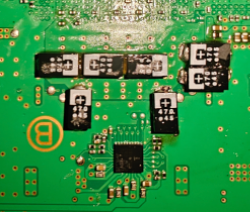
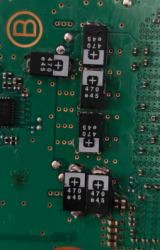
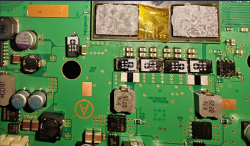
At 950MHz RSX the artifacts in the XMB stopped appearing at ~1.28V, so I stuck to 1.28V and tried GTA V. When loading GTA V the console would NLOD after 1-4 seconds of rendering 3D. Increasing the voltage to 1.3V still crashed GTA V when the game starts rendering 3D and would make my slim 'NLOD' even after fully power cycling the console without even turning it on, but lowering the voltage down and power cycling the console 'fixes' it.
I also tried 900/1000 'for fun' but it led to a black screen/no picture until I left the console to sit for a bit and pointed a fan at it, and I was miraculously able to get picture again and flash back to 900/950 via XMB. Didn't have to pull out my E3 flasher thankfully lol
I promise I cleaned up the flux after I took the 1st and last pics, i took pics before cleaning oops, I'll get better pics eventually
Did you measure the capacitance of the original caps?Replaced the 8 caps for the RSX on my 2501A slim with PANASONIC 2R5TPE470M7 and added 3 then 4 more caps to the back of the board the same way RIP-Felix added 3 in his youtube video, for a total of 12 caps on the RSX. I wanted to try 950/950 as previously I could only achieve 900/950 stable @ 1.225V, anything more than ~1.24V led to random poweroffs/NLOD/1002 err. and 950/950 at even 1.24V was not stable
At 950MHz RSX the artifacts in the XMB stopped appearing at ~1.28V, so I stuck to 1.28V and tried GTA V. When loading GTA V the console would NLOD after 1-4 seconds of rendering 3D. Increasing the voltage to 1.3V still crashed GTA V when the game starts rendering 3D and would make my slim 'NLOD' even after fully power cycling the console without even turning it on, but lowering the voltage down and power cycling the console 'fixes' it.
I also tried 900/1000 'for fun' but it led to a black screen/no picture until I left the console to sit for a bit and pointed a fan at it, and I was miraculously able to get picture again and flash back to 900/950 via XMB. Didn't have to pull out my E3 flasher thankfully lol
I promise I cleaned up the flux after I took the 1st and last pics, i took pics before cleaning oops, I'll get better pics eventuallyView attachment 43813 View attachment 43814 View attachment 43812

RIP-Felix
Senior Member
I saw a YT video were someone saw decent gains with that game. With just the standard 600/750 OC. Enough to make the slowdowns that were a bit game breaking, into an enjoyable experiance. So I think you have a good chance of improving it to your satisfaction.@LuanTeles what is the recommended option for overclocking EvilNat CFW on a CECHL01 with fresh thermal paste? as it is recommended by your PS3 4K Pro. also my game Katamari Forever has lag too so hoping it'd improve that.

Of courseHas anyone OCed a 40nm Frankie?
RIP-Felix
Senior Member
That's not how this works. The closet thing to a safe OC is the 600/750. Start there and put in the time to increase cautiously there after.
An H model has the 90nm RSX, which doesn't clock very well. You might be able to get to 650/800, but YOU CANNOT START THERE. If you do, it's likely it'll brick.
Also, the 90nm RSX has a heat dependent defect and OC'ing it will increase the heat, making a YLOD more likely.
An H model has the 90nm RSX, which doesn't clock very well. You might be able to get to 650/800, but YOU CANNOT START THERE. If you do, it's likely it'll brick.
Also, the 90nm RSX has a heat dependent defect and OC'ing it will increase the heat, making a YLOD more likely.

Dariush Aghaee
Member
Where the "68" comes from?use webman mod to keep it at 68c. It will mitigate one of the factors that reduce relibility.
Sent from my SM-A346E using Tapatalk
Any specific fan speed for this model? Thanksuse webman mod to keep it at 68c. It will mitigate one of the factors that reduce relibility.

Mitsu™
Senior Member
That's the default temperature limit in WebmanMod.Where the "68" comes from?
Sent from my SM-A346E using Tapatalk
But I quote Aldo :
"It is generally accepted that the normal temperature for the PS3 is between 65°C and 75°C. Any temperature below that range is desirable. Above 75°C for long periods can damage the internal components in mid or long term."
Of course, for a FAT, 68°C is a safer limit than 75°C.
For a Slim, the lower the better too, but 70°C or even 72°C is reasonable. It's more a matter of noise tolerance :y
There is no specific fan speed by model. Too many variables from one user to another, even with the same model.Any specific fan speed for this model? Thanks
You'll have to do some tests to find a balance.
What I recommend you is to load a demanding game, set a minimum fan speed of 28% with a temperature limit of 68 or 70°C. Then, after an hour of gaming, you'll see how the fan speed stabilize and it will give you an idea of a minimum speed to set.
Personal example :
I load the 4th mission of Crysis and stay at the beginning, in the water for a good hour.
Old picture but whatever

You need to do a similar experiment with your FAT to determine an optimal minimum speed for it

As for the maximum fan speed, I'd recommend to keep a margin of 10-15%. So for a minimum fan speed of 35% →45 or 50%.
Btw, that's just a personal advice but 750/800 on a FAT is asking for a YLOD. I wouldn't exceed 650MHz on core. I hope I'm wrong, though

Last edited:
Thanks i Wil try more things on it and 1 more thing do you think there's a possibility that a 90nm can be a overclocked as high like a slim? I know probably the answer is going to be no but have anyone thought how much a silicon 90nm winner can go?That's the default temperature limit in WebmanMod.
But I quote Aldo :
"It is generally accepted that the normal temperature for the PS3 is between 65°C and 75°C. Any temperature below that range is desirable. Above 75°C for long periods can damage the internal components in mid or long term."
Of course, for a FAT, 68°C is a safer limit than 75°C.
For a Slim, the lower the better too, but 70°C or even 72°C is reasonable. It's more a matter of noise tolerance :y
There is no specific fan speed by model. Too many variables from one user to another, even with the same model.
You'll have to do some tests to find a balance.
What I recommend you is to load a demanding game, set a minimum fan speed of 28% with a temperature limit of 68 or 70°C. Then, after an hour of gaming, you'll see how the fan speed stabilize and it will give you an idea of a minimum speed to set.
Personal example :
I load the 4th mission of Crysis and stay at the beginning, in the water for a good hour.
Now, I know that my fan need to be set at 34% minimum to keep temps below 70°C in heavy games (with a room temperature of 23-24°C these days. That's an important factor and one of the reasons why there's no universal optimal settings). That's for my 2504A slim.Old picture but whatever
You need to do a similar experiment with your FAT to determine an optimal minimum speed for it
As for the maximum fan speed, I'd recommend to keep a margin of 10-15%. So for a minimum fan speed of 35% →45 or 50%.
Btw, that's just a personal advice but 750/800 on a FAT is asking for a YLOD. I wouldn't exceed 650MHz on core. I hope I'm wrong, though
Mitsu™
Senior Member
Overclocked as much as an early slim (20XX), maybe (so 650-700/800-850), but honestly that's risky for these models.Thanks i Wil try more things on it and 1 more thing do you think there's a possibility that a 90nm can be a overclocked as high like a slim? I know probably the answer is going to be no but have anyone thought how much a silicon 90nm winner can go?
For sure, a 90nm RSX won't have the same potential/room as smaller revisions.
And even with adequate cooling, I doubt that an overclocked 90nm FAT will have a long life... (they're already dying at stock frequencies, so...).
Better find a 21XX or 25XX slim if you're interested in OCing, and let this poor FAT breathe :')
Iam Very enthusiastic with this overclock that's why iam so interested btw i don't got crysis to test it with the way you told me sadly but i think i found the right fan speed I'll continue until i reach 1 hour but this thing doesn't go more then 60Overclocked as much as an early slim (20XX), maybe (so 650-700/800-850), but honestly that's risky for these models.
For sure, a 90nm RSX won't have the same potential/room as smaller revisions.
And even with adequate cooling, I doubt that an overclocked 90nm FAT will have a long life... (they're already dying at stock frequencies, so...).
Better find a 21XX or 25XX slim if you're interested in OCing, and let this poor FAT breathe :')
Attachments
Mitsu™
Senior Member
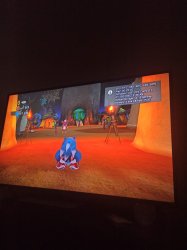
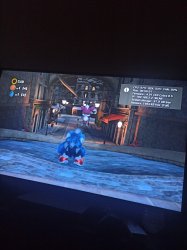
Sonic Unleashed is a good test too !Iam Very enthusiastic with this overclock that's why iam so interested btw i don't got crysis to test it with the way you told me sadly but i think i found the right fan speed I'll continue until i reach 1 hour but this thing doesn't go more then 60
A fan speed of 60% is a bit extreme I think (and probably very loud !).
If it stays that low after an hour, I would try to lower the speed a bit. If it manages to stay below 68°C, this is already perfect !
RIP-Felix
Senior Member
I would just let webMan Do it's dynamic thing and keep the console at 68c. Best comprimise of fan noise and reliability.
The reason for the 90nm relibility issue is because the underfill expands just before it softens between 70-75C. The expansion causes a tensile pressure spike on the bumps, over time cracking them. That's each time the temp crosses that 70c line. Once above that temp, normal expansion forces bend and crack the bumps over time, because the underfill is more tacky than hard. It doesn't provide support to the bumps anymore.
The rule with underfill is to keep the temps significantly below that transition zone (Thermal glassification temperature, Tg). Personally I think 68C is best comprimize with fan noise, but I worry about local hotspots achiving temps higher than that. Which is the reason for the safe margin. Somthing like 65C or even 60C might be better, but achieving that is hard to do without turning the fan into a jet engine. It would seriously ruin the experiance unless you wear headphones. So a balance betwrrn noise and temps have to be struck. I think 68C is a good one.
Note. This only applies to the 90nm RSX. 65 and 40nm do not have bad underfill. They can operate upwards 75C no problem. However, when overclocking I've noticed that they really don't like temps above 65C. Above that they start artifacting, especially with higher core clocks. I'm not sure what the mechanism is there. Something to do with how temps affect parasitc impeedance and capacitance in the transitors. I need to do more research on that.
The reason for the 90nm relibility issue is because the underfill expands just before it softens between 70-75C. The expansion causes a tensile pressure spike on the bumps, over time cracking them. That's each time the temp crosses that 70c line. Once above that temp, normal expansion forces bend and crack the bumps over time, because the underfill is more tacky than hard. It doesn't provide support to the bumps anymore.
The rule with underfill is to keep the temps significantly below that transition zone (Thermal glassification temperature, Tg). Personally I think 68C is best comprimize with fan noise, but I worry about local hotspots achiving temps higher than that. Which is the reason for the safe margin. Somthing like 65C or even 60C might be better, but achieving that is hard to do without turning the fan into a jet engine. It would seriously ruin the experiance unless you wear headphones. So a balance betwrrn noise and temps have to be struck. I think 68C is a good one.
Note. This only applies to the 90nm RSX. 65 and 40nm do not have bad underfill. They can operate upwards 75C no problem. However, when overclocking I've noticed that they really don't like temps above 65C. Above that they start artifacting, especially with higher core clocks. I'm not sure what the mechanism is there. Something to do with how temps affect parasitc impeedance and capacitance in the transitors. I need to do more research on that.
Last edited:
Similar threads
-
PS3 [Guide] Sourcing the right PS3 for the best Overclocking performance
- Started by M4N14C
- Replies: 1
-
 PS3 {CFW Release} 4.92.2 Evilnat Custom Firmware (w/ Cobra v8.5) - Includes: CEX/PEX/D-PEX) + noBD/BT
- Started by Evilnat
- Replies: 1
-

-
 PS3 PS3HEN w/ Linux & Overclocking Support? BadHTAB A hardware-software based hypervisor (lv1) exploit
- Started by STLcardsWS
- Replies: 52