
PS3 Project RSX Boost: Overclock your Retail PS3 RSX Speeds (ps3 cfw only)

Test results running crysis

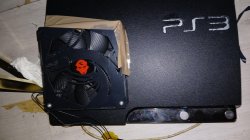
Custom 120mm fan:off

Ps3 fan:20% speed

After 5 mintues gpu hits 75c+ and crashs and overclock becomes unstable

Test 2

Custom 120mm fan:On

Ps3 fan:20% speed

After 30 mintues of testing gpu temperature stays 64c the whole time sometimes drops to 63c temperature never rises above 64c

Gpu core:900mhz

Vram:1Ghz

Overvolt:not yet gonna apply it soon

Project name:1ghz

For those saying your gonna shorten the life of your ps3 I know what am doing

I'll probably get bored before it dies so let me enjoy the whole ps3 to its limits

Next mod for this ps3:led mod for ps3 logo and fan
 

Attachments

  • 20250131_191828.jpg
    20250131_191828.jpg
    325.3 KB · Views: 137
No i tried it myself, usually it would bring me back to the stock speeds, but when i opened it with as "administrator", somehow it decided to give me this
I don't remember the exact name of the options, but both the rebuilder options should be unchecked when making a RSX overclock pup. I don't know if what's happened to you can cause that specifically, but it can cause a brick. I have a feeling that that's what's happened.
 
Test results running crysis

Custom 120mm fan:off

Ps3 fan:20% speed

After 5 mintues gpu hits 75c+ and crashs and overclock becomes unstable

Test 2

Custom 120mm fan:On

Ps3 fan:20% speed

After 30 mintues of testing gpu temperature stays 64c the whole time sometimes drops to 63c temperature never rises above 64c

Gpu core:900mhz

Vram:1Ghz

Overvolt:not yet gonna apply it soon

Project name:1ghz

For those saying your gonna shorten the life of your ps3 I know what am doing

I'll probably get bored before it dies so let me enjoy the whole ps3 to its limits

Next mod for this ps3:led mod for ps3 logo and fan
Overclocked or not, the ps3 will last a long time. By the time it dies, you'd have played every game you'd ever play on it. And got all the enjoyment from it.
 
is there a way to know my RSX model type without opening the console ?

and which RSX type consider to be the best or go highest ?

asking about the 2500 series model only since its the best so far.
 
is there a way to know my RSX model type without opening the console ?

and which RSX type consider to be the best or go highest ?

asking about the 2500 series model only since its the best so far.
Look for a dec 2010 or jan 2011.

But honestly it doesn't matter that much because most 2501 can hit 700/900 and that's all you need.
If you cap and volt mod then you can probably get an extra 100mhz on core without unreasonable voltages.
 
Look for a dec 2010 or jan 2011.

But honestly it doesn't matter that much because most 2501 can hit 700/900 and that's all you need.
If you cap and volt mod then you can probably get an extra 100mhz on core without unreasonable voltages.

yup I already know that, but my question is different.

I see some people mentioning RSX chip numbers. I just want to know if there's a way to know that on the console webman settings. So I won't need to open it.
 
is there a way to know my RSX model type without opening the console ?

and which RSX type consider to be the best or go highest ?

asking about the 2500 series model only since its the best so far.
Nope, unfortunately, opening it is the only method. Dates aren't 100% reliable, even if it's true that you're more likely to find a champion by buying a Dec 2010/Jan 2011 model.

If you want a great overclocker, look for a CXD5300CGB (good potential) or a CXD5300GGB (absolute champion).

This will tell you the fab (Toshiba, Sony, TSMC) but not the revision.

As far as I know, for example, a CXD5300GGB from Toshiba or TSMC will still perform better than a CXD5300A1GB from Sony.
So, knowing the RSX revision is important, and knowing the fab helps to sort them further within the same revision (Sony's seem to have the greatest potential).
 
Nope, unfortunately, opening it is the only method. Dates aren't 100% reliable, even if it's true that you're more likely to find a champion by buying a Dec 2010/Jan 2011 model.

If you want a great overclocker, look for a CXD5300CGB (good potential) or a CXD5300GGB (absolute champion).


This will tell you the fab (Toshiba, Sony, TSMC) but not the revision.

As far as I know, for example, a CXD5300GGB from Toshiba or TSMC will still perform better than a CXD5300A1GB from Sony.
So, knowing the RSX revision is important, and knowing the fab helps to sort them further within the same revision (Sony's seem to have the greatest potential).

thank you, exactly what I needed.

I have 2 jan 2011 for now.

1 can reach 900/875 and the other one 750/975 both stable, I can make them run higher but not stable because freezing happens after 3h gameplay. Surely the RSX is not the same on both.
 
Thank you man i really appreciate it so i can now Overclock the 4.92 with no problems?

pretty much. if you've never built an oc firmware, select the 4.xx cex tarballs box, uncheck both rebuilder boxes (not doing so could cause a brick), select the rsx oc box, select what you want from the drop down box on the top right, then build. that's pretty much it.
 
Back
Top