gmanarte
Member
Due to the new safer methods i now know that my Frankie does 800MHz on the core. Memory im still trying to find out. I am at 950 currently
What RSX chip you reballed with it?

Due to the new safer methods i now know that my Frankie does 800MHz on the core. Memory im still trying to find out. I am at 950 currently

I don't know, i had it done. I didn't do it myself. So final frequencies are 800/975What RSX chip you reballed with it?

The FAB ID was spelled out by testbench firmware, which is how we now know the Fabs that founded the silicon die are 1 = TOSHIBA, 2 = SONY and 4 = TSMC. Now that we know this information, sure it could be built into CFW and various tools. @M4j0r might know more about the other information contained in that tuplet (bracketed string). There is clearly more information contained there.
D/S line I think stands for "design/specification" line, which would be the specific fabrication line it came off of at that FAB manufacturer. TSMC for example has many, since they're the largest semiconductor mnf in the world.
Sony and Toshiba were a joint venture on the RSX and SONY sold TOSHIBA their 1st floor DS line at Nagasaki FAB2. So TOSHIBA chips were made on the 1st floor and SONY chips were made on the 2nd. Same building complex, different owners, but they would have both been packaged by the same place. Where the die was soldered to the interposer and underfill was applied. Most likely at Oita TEC. TSMC has their own facilities and packaging partners.
I have been keeping track of this info for a while and grabbed any unique RSX info dumps shared, but I haven't read the entire thread yet. It expands as fast as I can read it!
Something I feel compelled to say is I doubt there's a connection between the date code and higher clocking 40nm RSXs. So far we don't have enough lvl1 dumps with the RSX string of people with 25xx models at their highest OC to establish a trend. I can confirm there are 40nm RSXs made by TSMC, SONY, and TOSHIBA. But only a couple reports from people with high clocks.
If people with a BRICK WISH want to help me to see if there is a trend here, I need you to...
Here's what I have so far....
- Find you highest stable overclock
- dump lvl1 using CFW tools
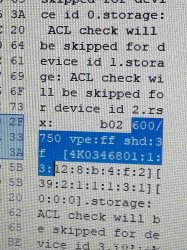
- Open the lvl1 dump it in HxD and search for your clock speeds. For example, if you have default clocks search for "500/650" and it'll take you right to this info...View attachment 42990
- Post that in this thread with the following information.
- CFW tools --> dimp tools --> dump SYSCON error log. This contains the platform ID which I can use to find your model number and motherboard revision. It also containg the console's uptime, how much it's been used. Newer chips likely can clock higher. The errorlog may register YLOD events related to instability or insufficient filtering. This is useful information.
- MNF Date/Code
- Color of the die if you happen to know it
- Model number of your RSX if you know it. It's written on the IHS of your RSX. If you clean the paste or delid (only if know what UR doing) pay attention to this.
Side note:
RSX Node (nm) DIE FAB MFG DS VIDBin MODEL No. MB rev. lvl1 RSX String DAYS ? 40 ? 2 SONY 3 0 CECH-2500 ? rsx40 a01 600/750 vpe:ff shd:3f [L6B882200:0:2:16:10:5:3:0:2][1d:0:a:0:1:0:1][1:1:0] 70 ? 40 ? 2 SONY 3 0 CECH-2501B JSD-001 rsx40 a01 900/950 vpe:ff shd:3f [L4B576500:0:2:14:c:17:3:0:1][2f:0:a:0:1:0:1][1:1:0] 42 ? 40 ? 1 TOSHIBA 2 0 CECH-2511A ? rsx40 a01 600/750 vpe:ff shd:77 [AP0022017:0:1:3:e:18:2:0:1][2a:0:a:0:1:0:1][1:1:0] 39 ? 40 ? 1 TOSHIBA 2 0 ? ? rsx40 a01 600/750 vpe:ff shd:3f [AP0023203:0:1:d:17:1a:2:0:1][26:0:a:0:1:0:1][1:1:0] NA CXD5301DGB 40 Silver 4 TSMC 6 0 FRANKY COK-002 rsx40 a01 500/650 vpe:ff shd:3f [N4M735-23:0:4:17:14:c:6:0:1][24:0:e:0:1:0:1][1:1:0] ? 40 ? 4 TSMC 6 0 CECH-2100 SUR-001 rsx40 a01 600/750 vpe:ff shd:3f [NN2391-04:0:4:4:c:6:6:0:2][23:0:a:0:1:0:1][1:1:0] ? 40 ? 4 TSMC 6 0 CECH-25xx JSD-001 rsx40 a01 600/750 vpe:ff shd:3f [NN9634-19:0:4:13:4:f:6:0:2][27:0:e:0:1:0:1][1:1:0] CXD2982BGB 65 Blue 2 SONY 3 0 CECHK06 DIA-002 rsx65 a03 1f4/28a vpe:ff shd:3f [H8D341900:1:2:16:f:c:3:7:1][1c:0:2:0:1:2:0][2:1:0] ? 65 ? 2 SONY 3 0 CECH-Lxx VER-001 rsx65 a06 600/750 vpe:ff shd:3f [J5E248000:1:2:a:c:9:3:8:2][1d:0:2:0:1:2:0][2:1:0] ? 65 ? 2 SONY 3 0 CECH-Lxx VER-001 rsx65 a06 700/800 vpe:ff shd:3f [J2D948400:1:2:8:d:b:3:8:1][1c:0:2:0:1:2:0][2:1:0] CXD2982GB 65 Pink 1 TOSHIBA 2 0 CECHJ02 DIA-002 rsx65 a05 1f4/28a vpe:ff shd:3f [AP0009984:1:1:e:13:a:2:5:1][1c:0:2:0:1:2:0][2:1:0] CXD2982GB 65 Blue 1 TOSHIBA 2 0 CECHK02 DIA-002 rsx65 a05 1f4/28a vpe:ff shd:3f [AP0009644:1:1:15:10:6:2:5:2][3d:0:2:0:1:2:0][2:1:0] 174 CXD2991GB 65 GOLD 1 TOSHIBA 2 0 FRAMED VER-001 rsx65 a05 1f4/28a vpe:ff shd:6f [AP0012532:1:1:15:14:a:2:5:2][1c:0:2:0:1:2:0][2:1:0] NA CXD2991BGB 65 Blue 1 TOSHIBA 2 0 CECH-K02 DIA-002 rsx65 a05 1f4/28a vpe:ff shd:3f [AP0010333:1:1:9:15:14:2:5:1][1c:0:2:0:1:2:0][2:1:0] 173 CXD2991GB 65 ? 1 TOSHIBA 2 0 CECH-P01 VER-001 rsx65 a06 650/800 vpe:ff shd:77 [AP0011387:1:1:c:10:b:2:5:2][1d:0:2:0:1:2:0][2:1:0] ? 65 ? 1 TOSHIBA 2 0 CECH-Kxx DIA-002 rsx65 a05 600/750 vpe:ff shd:3f [AP0009981:1:1:18:a:c:2:5:1][1c:0:2:0:1:2:0][2:1:0] CXD2971-1GB 90 Blue 2 SONY 3 3 CECHG02 SEM-001 b07 1f4/28a vpe:ff shd:7e [H3C662200:1:2:a:f:b:3:12:2][16:3:2:0:1:3:1][0:0:0] ? 90 ? 2 SONY 3 2 DECR-1000A TMU-520 b03 600/775 vpe:ff shd:3f [G8B644200:1:2:13:8:a:3:f:1][39:2:0:0:1:3:1][0:0:0] CXD2971DGB 90 Blue 1 TOSHIBA 2 3 CECHG02 SEM-001 b08 500/650 vpe:ff shd:3f [AP0008495:1:1:b:10:c:2:11:1][16:3:1:1:1:3:1][0:0:0] CXD2971DGB 90 Blue 1 TOSHIBA 2 3 CECHC02 COK-002 b08 500/650 vpe:ff shd:3f [AP0006466:1:1:13:b:12:2:f:2][16:3:1:1:1:3:1][0:0:0]
my CECH-2501a has a CXD5300 40nm RSX. That's the 1st revision of 40nm RSX there are. The 30xx model tends to have a CXD5301 revision and early SS models have the CXD5302. Since those later revisions are in consoles that cannot be overclocked without full custom firmware the only way to see if they can overclock higher is to remove them and solder them onto an earlier model. I do not want to condone the harvesting of 40nm RSX to put onto other 40nm containing models. So what I'm talking about here is the Frankenstein Phat mod.
If there are efficiency improvments in these later model revision 40nm RSXs, a backwards compatible model with a new old stock CXD5301 for example should be able to clock higher than any 25xx model. It has a larger heatsink meant for a 90nm after all. And it has a voltage regulation designed for more power hungry chips. At high clocks a frankie should be able to deliver more stable voltage and dissipate more heat.
Hey! Take it back! ;p
what models can do 800/1000 without more voltage?

If you want to test what overclock is max for your system install webman go to settings scroll down and look at the in game gpu core even if its to much for the console its just going to crash and rebootSo I have a CECHA00 with evilnat 4.92 OC and noticed that it works perfect on every game I've tried, including heavy ones like MGS4, Killzone2 and Castlevania LOS (this last one seems to be the heaviest on RSX because it is unlocked in framerate and I get the highest temps of around 67-68C at just 28% Fan speed). There is one game though that shuts down the PS3 and goes to blinking red light when I play it, and that is TLOU (despite temps not exceeding 63-64C). I reverted back to 4.92 NO OC and it works without issues. Is there any way to stabilize the OC firmware by giving it a tiny bit more voltage? Any tips? I'm happy with 600/750 I don't want higher freqs, just possibly a small amount of extra voltage.
Alternatively if extra voltage isn't an option, is there any kind dev in here who can help modify the OC version of the latest evilnat, and create a few versions with slightly lower clocks on either RSX or VRAMs for me to test to see if it's the RSX or the VRAMs that are unstable? I would greatly appreciate it! Ping me if so
Did you check syscon errors? probably tokins can't give enough power for overclocked gpuSo I have a CECHA00 with evilnat 4.92 OC and noticed that it works perfect on every game I've tried, including heavy ones like MGS4, Killzone2 and Castlevania LOS (this last one seems to be the heaviest on RSX because it is unlocked in framerate and I get the highest temps of around 67-68C at just 28% Fan speed). There is one game though that shuts down the PS3 and goes to blinking red light when I play it, and that is TLOU (despite temps not exceeding 63-64C). I reverted back to 4.92 NO OC and it works without issues. Is there any way to stabilize the OC firmware by giving it a tiny bit more voltage? Any tips? I'm happy with 600/750 I don't want higher freqs, just possibly a small amount of extra voltage.
Alternatively if extra voltage isn't an option, is there any kind dev in here who can help modify the OC version of the latest evilnat, and create a few versions with slightly lower clocks on either RSX or VRAMs for me to test to see if it's the RSX or the VRAMs that are unstable? I would greatly appreciate it! Ping me if so


My CXD2982BGB can do 700-975 with incredibly minor artifacting in heavy games, 750-975 is super artifacty but not a crash. 1000 on vram is an instant crash but 975 is rock solid. I think this thing could do 800mhz or so with a light voltage boost but I'm not willing to do that and I'm content with 650-975What have people OC'd the later phat models with the 65nm processors to? Those are the most reliable fat model systems and interested in seeing how well they OC compared to a slim and original phat.
My CXD2982BGB can do 700-975 with incredibly minor artifacting in heavy games, 750-975 is super artifacty but not a crash. 1000 on vram is an instant crash but 975 is rock solid. I think this thing could do 800mhz or so with a light voltage boost but I'm not willing to do that and I'm content with 650-975
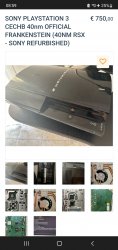
NoGuys is this a good price for a Frankie made from Sony;
I got my sony frankie for $35.Guys is this a good price for a Frankie made from Sony;
Ohh ow you are lucky! I was thinking of buying one of them but they are soooooo expensive yikes better grab a slim i guess...I got my sony frankie for $35.
Did you decide to cut the price?


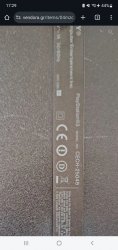
Any tip on this model overclock; some say 750 max some 950 on core i appreciate any reply
Yoooo you are still alive i thought you died this server/group got to driedYou have to try it yourself.

Yoooo you are still alive i thought you died this server/group got to dried

Dump lv1 and check who fabricated your RSX, that can narrow it downOhh ow you are lucky! I was thinking of buying one of them but they are soooooo expensive yikes better grab a slim i guess...
Any tip on this model overclock; some say 750 max some 950 on core i appreciate any reply

Dump lv1 and check who fabricated your RSX, that can narrow it down
Or just test with 50mhz increments clock and 25mhz increments ram while playing some demanding games that fully utilise the RSX like the last of us, gta 5, Uncharted 2 and 3
You can now just increase it with your phone or PC via webmanMOD in the browser while playing, no need to install any firmwares or anything
When you start seeing artifacts, go back and that's your stable overclock