PS1 PS One SCPH-101 turns on but shows no video or sound

Hello guys i need some help please i have a friend who gave me his ps1 with a new laser ksm-440 bam the model of the ps1 is scph-5502.it comes on and shows the ps logo then goes to memorycard.it only spins 2 times then stops.i have other 2 laser kit assembly's that is working i tested it in my other 2 ps1 consoles i have a scph-1002 and scph-9002 and both the lasers works fine.in the 5502 console all the lassers does the same thing only spins 2 times then stops.
 
Joe, you need to give more information. Have you determined that your video cable is ok? Have you tried the same video cable and TV with another PS1 console and it works? You need to eliminate other potential causes so you can be sure that it is the system itself with the fault. If the system is at fault there could be multiple causes. Having no video or sound could be caused by a damaged connector. Or it could be caused by capacitor failure.

If you have never repaired any electronics before I would not recommend starting with a PSOne as there are many very small components and it's very easy to cause more damage in an amateur attempt to repair it. The way you would diagnose the no video or audio would be to work your way from the output connector and follow the path into the system to try to locate where the problem is. The easiest thing you can do is take a good look at the connector on the console and see if anything looks damaged. The same inspection should be done on your video cable. If possible you should test the same video cable on the same TV with another PS1 (or PS2) console.

Ramb0, do you own a multi-meter? If you do, you can measure the resistance on the laser's potentiometer. You could try adjusting it *VERY* slightly to see if you can make it work in the 5502 console. You would want to adjust the resistance to be lower. But you need to change it in very small steps and testing each time. Lowering the resistance will boost the power to the laser. Too much power will burn out/damage the laser. But it's possible that the 5502 board needs just slightly more power to get a good signal.

Or you could have some other problem. You could have some component on the board that is damaged or a trace that was damaged.

I want to stress that you should not try to repair these things if you don't know what you are doing. You can easily damage other things as well as damage things beyond repair if you do something wrong. There are people out there with experience repairing these things that you could hire to do the work for you. Or you could sell your non-working system as non-working and buy a working replacement. The non-working one will hopefully go to someone that is capable of repairing it.

Just be cautious and learn as much as you can before attempting any electronics repair.
 
Hey yes i do have a multimeter the reading on the laser was 880 ohms before i adjusted it then i adjusted the potentiometer to 660 ohms but still it is doing the same thing only spins 2 times then stops.there was a modchip installled then i took it out.i thought maybe that modchip went bad but still the same.

What i dont understand is the same laser that spins 2 times and stops does not want to anything in my other 2 consoles but in the 5502 it spins 2 times and i saw the lens goes up and down 2 times. When i put the old laser back that i found inside the 5502 it is also doing the same thing.the old laser that was in the 5502 works fine in my other 2 consoles.it lets me to think there is definitely something wrong on the 5502 motherboard. What i did also i took out the laser ksm 440 bam and put it in my other 2 assembles and still doing the same thing but what i saw is the assembly for the bam works cause the spindle spins fine and load up my original game disc with the other lasers on my other 2 consoles.

I dont have a oscilloscope to adjust the focus bios or the focus gain not sure if that will help.
 
Joe, you need to give more information. Have you determined that your video cable is ok? Have you tried the same video cable and TV with another PS1 console and it works? You need to eliminate other potential causes so you can be sure that it is the system itself with the fault. If the system is at fault there could be multiple causes. Having no video or sound could be caused by a damaged connector. Or it could be caused by capacitor failure.

If you have never repaired any electronics before I would not recommend starting with a PSOne as there are many very small components and it's very easy to cause more damage in an amateur attempt to repair it. The way you would diagnose the no video or audio would be to work your way from the output connector and follow the path into the system to try to locate where the problem is. The easiest thing you can do is take a good look at the connector on the console and see if anything looks damaged. The same inspection should be done on your video cable. If possible you should test the same video cable on the same TV with another PS1 (or PS2) console.

yes i did i tried many av cables but still the same and also the disk engine is not spine when i put a cd so is something wrong
 
I dont have a oscilloscope to adjust the focus bios or the focus gain not sure if that will help.

If the board has the manual focus and gain adjustments you do need to adjust them to their correct values when you change the laser. I know that the SCPH-100X series have these and they should be properly calibrated when you install a new laser. Later models have automatic control and I believe they only have the laser assembly adjustment that can be made.

Joe, are you using the original Sony power supply or something else? Using the wrong power supply can cause many problems. It could also be your power supply may need repair or replacement.

If using an original working power supply still results in no video, no sound, and not disc spinning you should probably sell it as non-working and buy a working unit. It may be repairable but it really needs to be looked at by someone with experience repairing electronics. Fixing it yourself is a significant time and money investment to get to the level of skill and experience needed as well as the tools you may need to buy to do the job. For most people it isn't worth it. Either sell it or find someone who does repair work that will take care of it.
 
Joe, are you using the original Sony power supply or something else? Using the wrong power supply can cause many problems. It could also be your power supply may need repair or replacement.

If using an original working power supply still results in no video, no sound, and not disc spinning you should probably sell it as non-working and buy a working unit. It may be repairable but it really needs to be looked at by someone with experience repairing electronics. Fixing it yourself is a significant time and money investment to get to the level of skill and experience needed as well as the tools you may need to buy to do the job. For most people it isn't worth it. Either sell it or find someone who does repair work that will take care of it.

i'm using a charger of psp my ps1 is 7v and the psp charger is 5v is that a problem or not because my ps1 works with the psp charger or i need a 7v power supply
 
i'm using a charger of psp my ps1 is 7v and the psp charger is 5v is that a problem or not because my ps1 works with the psp charger or i need a 7v power supply
Your PSP charger won't hold as much as PSOne console needs at least 7.5V to be working. If you still have original PS2 slim adapter, then you can try to use it although not really recommended to use for a long time.
 
Do not use other power supplies with electronics just because it fits into it. You can damage electronics by using the wrong power supply. As amirzaim said, the 5v from the PSP power supply is not correct for the PSOne. This explains all of your problems. Use the correct power supply and it will probably work again.
 
Your PSP charger won't hold as much as PSOne console needs at least 7.5V to be working. If you still have original PS2 slim adapter, then you can try to use it although not really recommended to use for a long time.

Do not use other power supplies with electronics just because it fits into it. You can damage electronics by using the wrong power supply. As amirzaim said, the 5v from the PSP power supply is not correct for the PSOne. This explains all of your problems. Use the correct power supply and it will probably work again.

but what if i use 7v power supply and the problem still on so what i should do?
 
No need to worry about that until you test it with the correct power supply. We know for certain that 5v is too low for the PSOne to operate correctly. It is possible and even likely that your problems are all a result of using the wrong power supply.

If you use the correct power supply and still have problems they may not be the same problems so there is no reason to speculate now until you have tested it with the correct power supply. I highly recommend getting an official Sony power supply for the PSOne. Part number SCPH-113. Output DC 7.5v, Center Positive, 2 amps.
 
No need to worry about that until you test it with the correct power supply. We know for certain that 5v is too low for the PSOne to operate correctly. It is possible and even likely that your problems are all a result of using the wrong power supply.

If you use the correct power supply and still have problems they may not be the same problems so there is no reason to speculate now until you have tested it with the correct power supply. I highly recommend getting an official Sony power supply for the PSOne. Part number SCPH-113. Output DC 7.5v, Center Positive, 2 amps.

but i saw a movie in youtube that talks about my problem the man changed a 3 capacitors and then the ps1 runs so smoothly could that problem it's because of the capacitors
 
Again, all your problems can be explained by the use of the wrong power supply. The power LED will likely still turn on with a 5v input. But many of the other parts will likely have insufficient power to operate.

You could have bad capacitors, but unless testing with the correct power supply still results in no video or audio it's too soon to worry about that. And if you do have bad capacitors, that is a job for someone with experience repairing electronics with very small parts. Absolutely not for a beginner. The PSOne has very small surface mounted parts and a beginner with a soldering iron could easily do permanent damage to it.

Back to the power supply, you have a good chance that using the correct power supply will fix your problems. The good news is that PSP power supply probably didn't damage the system. They are the same polarity thankfully. Once you try the correct power supply you should post if it fixed the problems.
 
Again, all your problems can be explained by the use of the wrong power supply. The power LED will likely still turn on with a 5v input. But many of the other parts will likely have insufficient power to operate.

You could have bad capacitors, but unless testing with the correct power supply still results in no video or audio it's too soon to worry about that. And if you do have bad capacitors, that is a job for someone with experience repairing electronics with very small parts. Absolutely not for a beginner. The PSOne has very small surface mounted parts and a beginner with a soldering iron could easily do permanent damage to it.

Back to the power supply, you have a good chance that using the correct power supply will fix your problems. The good news is that PSP power supply probably didn't damage the system. They are the same polarity thankfully. Once you try the correct power supply you should post if it fixed the problems.

today i bought a 12v power supply the ps1 worked with sound a video seems that had enough power but there is a buzzes comes from the disk spinning why is that
 
Last edited:
Probably because you're still using the wrong power supply. Using a 12v power supply will permanently damage your system. Stop using random power supplies. The PSOne expects 7.5v DC input. 12v is extremely higher than expected. You will damage the power circuitry in the system. You may have caused damage to the disc motor. Perhaps even the laser.

Go buy a SCPH-113 power supply. Nothing else. Go to eBay, search "scph-113" and buy an original Sony power supply. If you're lucky nothing has been severely damaged yet from your incorrect power supply.
 
Probably because you're still using the wrong power supply. Using a 12v power supply will permanently damage your system. Stop using random power supplies. The PSOne expects 7.5v DC input. 12v is extremely higher than expected. You will damage the power circuitry in the system. You may have caused damage to the disc motor. Perhaps even the laser.

Go buy a SCPH-113 power supply. Nothing else. Go to eBay, search "scph-113" and buy an original Sony power supply. If you're lucky nothing has been severely damaged yet from your incorrect power supply.

ok i'll but it as soon as i find it
 
Probably because you're still using the wrong power supply. Using a 12v power supply will permanently damage your system. Stop using random power supplies. The PSOne expects 7.5v DC input. 12v is extremely higher than expected. You will damage the power circuitry in the system. You may have caused damage to the disc motor. Perhaps even the laser.

Go buy a SCPH-113 power supply. Nothing else. Go to eBay, search "scph-113" and buy an original Sony power supply. If you're lucky nothing has been severely damaged yet from your incorrect power supply.

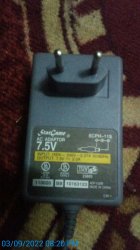
hello today i bought that one is that what you are talking about
 

Attachments

  • 20220903_202021.jpg
    20220903_202021.jpg
    635.7 KB · Views: 76
That is not an original Sony power supply, but it appears to be a clone that outputs the correct power. Give it a try. It may resolve your problems.
 
That is not an original Sony power supply, but it appears to be a clone that outputs the correct power. Give it a try. It may resolve your problems.

i did gave it try and it worked perfectly but the sound that coes from the disk spine still there should i fix it or buy a new one
 
The sound it makes and what it could mean is hard to know without hearing it. The sound could be normal, or it could be that the mechanism needs maintenance. If you can play your games without problems then don't worry about it.
 

Similar threads

Back
Top