PS1 ISO generation on PS3

I'm back. Had a really good weekend (was a at my car club annual event, and the weather was amazing in the lakelands all weekend compared to home, where on the return trip we were met with torrents of rain and flooding!), but I'm catching up on what I missed over the weekend. Am I right in saying you found some bugs and fixed them over the weekend then? Ready for me to download an updated version? (this here? https://github.com/sahlberg/pop-fe/releases)

I can assure people I've got relative file names in my .cue file. They don't contain the folder path structure, just the actual filename reference (with .bin at the end). They are like this by default from imgburn. I didn't change that aspect at all. I just adjusted the original name.bin to the modified one when I chose a different .bin filename from the default after having this necessary step pointed out to me.

I'll be looking forward to trying this out again hopefully tonight when i get home from work.
Welcome back, sounds like you had a really good time, congrats.
Yeah Ronnie managed to sort the bug that was caused by games with capital letters in the CUE filename (although took us awhile to work out what the issue was), And he uploaded the new version at the releases page, so hopefully that will fix some of the games you was having issues with, if there are still games having issues please post them here and we can try and help more,
Good luck.
If you still do have issues with filenames we could maybe try a different program for making the cue+bin or something if we cant figure it out. But hopefully it will all work in the new version.
 
Right, I couldn't get online last night, so here I am cup of tea in hand, and 9 mins away from leaving the house for work.

I've just tried MicroMachines V3 again.

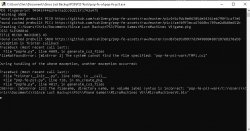
This is the result I'm getting:
screenshot5.png


Any ideas? Path too long? What is the "TMP1.cu2" file it cannot find?

This is from the version updated 2 days ago from the link I checked with you yesterday in my previous post.
 
Right, I couldn't get online last night, so here I am cup of tea in hand, and 9 mins away from leaving the house for work.

I've just tried MicroMachines V3 again.

This is the result I'm getting:View attachment 44322

Any ideas? Path too long? What is the "TMP1.cu2" file it cannot find?

This is from the version updated 2 days ago from the link I checked with you yesterday in my previous post.
Hey Again, its saying it can't find the cue file.
So i decided to try and recreate this, i dont have this particular game so i just changed the game ID of a game i do have to match to try and see if i could recreate this, took me awhile but i think i finally have it, when you open a .bin file in Pop-fe it does that, you need to open the .CUE file instead, this is important with a lot of games, when i open the .bin file i get this error
recreation.jpg
but opening the cue instead lets it create the pkg fine.
So basically in pop-fe click the play button then locate the .cue file and NOT the .bin
Hopefully this will solve your issues. Good luck Rissy
 
CUE2 is CUE replacement. It is needed for PSIO, so users who has deleted CUE and want convert images from there to PS3, can do that by POP-FE. That's why this file is seeking. It is not your case anyway so forgot about it.
 
Hey Again, its saying it can't find the cue file.
So i decided to try and recreate this, i dont have this particular game so i just changed the game ID of a game i do have to match to try and see if i could recreate this, took me awhile but i think i finally have it, when you open a .bin file in Pop-fe it does that, you need to open the .CUE file instead, this is important with a lot of games, when i open the .bin file i get this error
View attachment 44324
but opening the cue instead lets it create the pkg fine.
So basically in pop-fe click the play button then locate the .cue file and NOT the .bin
Hopefully this will solve your issues. Good luck Rissy

Ah right. Without any instruction of what file it's looking for, sometimes I've chosen the .cue and others i've chosen the .bin. So now that I know its supposed to be the .cue file you select, I'll try that, and stick to that. Maybe a note on the HMI wouldn't go amiss. [file entry box to select the file desired - accessed by "play button"] with ".cue" written in the grey area after the file entry box?
 
Excellent! Success! Thank you!

MicroMachinesV3 worked like a charm (it seems. Not tried it on the PS3 yet). I then move back on to Resident Evil 2. I hope I chose all the right options for this one. You can see that I got a message on the black screen from this screenshot. What does this mean?
I'm not sure what else I could use except imgburn....?
screenshot6.png
 
Excellent! Success! Thank you!

MicroMachinesV3 worked like a charm (it seems. Not tried it on the PS3 yet). I then move back on to Resident Evil 2. I hope I chose all the right options for this one. You can see that I got a message on the black screen from this screenshot. What does this mean?
I'm not sure what else I could use except imgburn....?
View attachment 44327
It looks like imgburn makes images of some games with a PREGAP that CUE2CU2 doesn't like, it probably preferes the redump format of cue files, but it looks like it still made the image, i would test it first and see if it works anyway, check the sound and music are playing correctly and if they are then i wouldnt worry too much, if they are not then it will need sorting, You could try dumping the image with another tool maybe (like Redumper or one of the other tools the redump project use), not sure, maybe @Ronnie Sahlberg or @Berion might have some other ideas. But glad it fixed MicroMachines :) hopefully you will be able to enjoy these games on PS3 again now.
 
It looks like imgburn makes images of some games with a PREGAP that CUE2CU2 doesn't like, it probably preferes the redump format of cue files, but it looks like it still made the image, i would test it first and see if it works anyway, check the sound and music are playing correctly and if they are then i wouldnt worry too much, if they are not then it will need sorting, You could try dumping the image with another tool maybe (like Redumper or one of the other tools the redump project use), not sure, maybe @Ronnie Sahlberg or @Berion might have some other ideas. But glad it fixed MicroMachines :) hopefully you will be able to enjoy these games on PS3 again now.

I've got plenty of games to convert still. Around 50 (PSone that is. Not even started looking at PS2 games yet). I've just been testing the water with a few until I knew what I was doing and had a successfully repeatable method so that I don't waste too much time going down the wrong path and have to double back.

Are there links to these other tools for copying the CDs?
 
I've got plenty of games to convert still. Around 50 (PSone that is. Not even started looking at PS2 games yet). I've just been testing the water with a few until I knew what I was doing and had a successfully repeatable method so that I don't waste too much time going down the wrong path and have to double back.

Are there links to these other tools for copying the CDs?
there is a lot of programs out there for it, if you want your dumps to be like the redump dumps then you need something like Media Preservation Frontend (MPF) which includes 3 different tools for ripping games, or there are older tools you could try like CloneCD or CDRWin (only use old versions, so v3 or 4 of both), they are the original tools people used years ago for makin cue/bin format games (there is a lot of others too, it might be worth trying a few and seeing which works the best) CloneCD and CDRWin though are paid apps but have trial versions which is usually enough to just make a cue+bin (or cloneCD makes .img .cue .sub .ccd but they should work still) so don't go buying them (unless you really want too). There is probably over 100 apps that can make cue+bin though so maybe try a few and see if any don't give that error, good luck.
EDIT:-
here is a link to MPF, if your drive works with it, its probably the best to get a full copy that you can then match against the redump database to see it has dumped properly and wont cause issues with CUE2CU2 hopefully
https://github.com/SabreTools/MPF
 
Last edited:
If you see post #11. you'll see I've already tried MPF. My Laptop DVD drive is incompatible it says, so refused to even attempt the operation (I think this is a bit off personally, as there's not necessarily a suggestion that mine is proven to produce rubbish results, so it should at least let you try rather than completely distrusting without attempt. What happened to innocent until proven guilty!?)

What I'll probably do then, is do ALL my discs using imgburn, noting which ones possibly have a similar exception to RE:2, and then once I've hopefully just got a short list of a few "troublesome" ones, I'll try these again with another app, and hopefully be able to do these successfully within the trial period (unless it's a try once and that's your lot situation).

I didn't understand how to "match against the redump database". Can this be explained to me? I tried to read some instructions, but it might as well have been written in Swahili. I couldn't understand it.
 
If you see post #11. you'll see I've already tried MPF. My Laptop DVD drive is incompatible it says, so refused to even attempt the operation (I think this is a bit off personally, as there's not necessarily a suggestion that mine is proven to produce rubbish results, so it should at least let you try rather than completely distrusting without attempt. What happened to innocent until proven guilty!?)

What I'll probably do then, is do ALL my discs using imgburn, noting which ones possibly have a similar exception to RE:2, and then once I've hopefully just got a short list of a few "troublesome" ones, I'll try these again with another app, and hopefully be able to do these successfully within the trial period (unless it's a try once and that's your lot situation).

I didn't understand how to "match against the redump database". Can this be explained to me? I tried to read some instructions, but it might as well have been written in Swahili. I couldn't understand it.

Yeah MPF is very picky with drives, if you know how to use the redumper tool (as a stand alone WITHOUT MPF) its not quite as picky but still has issues on a lot of drives (luckily my extenal drive works with it though since its ASUS). But yeah if the redump tool isnt working try a old version of clonecd (v3 or 4) or maybe CDRWin (v3 or 4 again) if you can get it working (might not on modern drives), and try those dumps with it to see if its any different, both are easy to find old versions of and have a trial mode just to test it,
And when i match against the redump database i tend to just use the Redumper tool to make a perfect image then compare the resulting MD5 against the one in the redump.org database, The images i dump with imgburn very rarely match 1=1, this doesn't mean they are "bad" images, the game will most likely still be fully playable, its just not a exact 1=1 copy by the redump team standards (for preservation its important but for normal use its probably not as important). Anyway good luck and yeah making a list of all the problematic games is a good idea, i assume it would be games with CDDA and a PREGAP that would cause issues, i guess time will tell :).

EDIT:- Also could you post the contents of your RE2 .cue file ? im just curious what the issue looks like (i don't own RE2 anymore, i had it once upon a time but no longer)
 
If you see post #11. you'll see I've already tried MPF. My Laptop DVD drive is incompatible it says, so refused to even attempt the operation (I think this is a bit off personally, as there's not necessarily a suggestion that mine is proven to produce rubbish results, so it should at least let you try rather than completely distrusting without attempt. What happened to innocent until proven guilty!?)

What I'll probably do then, is do ALL my discs using imgburn, noting which ones possibly have a similar exception to RE:2, and then once I've hopefully just got a short list of a few "troublesome" ones, I'll try these again with another app, and hopefully be able to do these successfully within the trial period (unless it's a try once and that's your lot situation).

I didn't understand how to "match against the redump database". Can this be explained to me? I tried to read some instructions, but it might as well have been written in Swahili. I couldn't understand it.
OK been testing other programs, i found one that can make images like Redump and should work on any drive, its called Retroarch, just go into it and use the DUMP function and it will create a .cue with a lot of binary tracks (1 for each song and the first track as the data track) and it will work better with pop-fe, hope this helps, i will test more programs later and post the results,
I dont have RE2 so i couldnt test it with that but i do own Bust a Move 2 (Puzzle bobble 2 in other countries) and that has the same issues with a imgburn cue/bin,
Anyway this should let you dump RE2 and any other CDDA games without that error. Good luck
 
Amazing thank you!

I'm struggling for time this week. Everything is getting in the way of me doing anything with PS3 related stuff right now. Most significantly since I discovered the passenger footwell in my car was 1/2" full of rain water!

Hoping to catch my breath and get on to this as soon as possible. But might be next week now at this rate.

Please have patience. I'm not dropping this thread or ignoring anyone. It's just life getting in the way!

EDIT:
I take it this is it? https://www.retroarch.com/?page=platforms

Do I click on the "Download Stable" button?

You asked for the .cue contents of my RE:2 discs. This is them. Split between the Leon disc and the Claire disc

Code:
FILE "ResidentEvil2Leon.bin" BINARY
  TRACK 01 MODE2/2352
    INDEX 01 00:00:00
  TRACK 02 AUDIO
    PREGAP 00:02:00
    INDEX 01 59:13:29

FILE "ResidentEvil2Claire.bin" BINARY
  TRACK 01 MODE2/2352
    INDEX 01 00:00:00
  TRACK 02 AUDIO
    PREGAP 00:02:00
    INDEX 01 59:46:17
 
Last edited:
Amazing thank you!

I'm struggling for time this week. Everything is getting in the way of me doing anything with PS3 related stuff right now. Most significantly since I discovered the passenger footwell in my car was 1/2" full of rain water!

Hoping to catch my breath and get on to this as soon as possible. But might be next week now at this rate.

Please have patience. I'm not dropping this thread or ignoring anyone. It's just life getting in the way!

I take it this is it? https://www.retroarch.com/?page=platforms

Do I click on the "Download Stable" button?


You asked for the .cue contents of my RE:2 discs. This is them. Split between the Leon disc and the Claire disc

Code:
FILE "ResidentEvil2Leon.bin" BINARY
  TRACK 01 MODE2/2352
    INDEX 01 00:00:00
  TRACK 02 AUDIO
    PREGAP 00:02:00
    INDEX 01 59:13:29

FILE "ResidentEvil2Claire.bin" BINARY
  TRACK 01 MODE2/2352
    INDEX 01 00:00:00
  TRACK 02 AUDIO
    PREGAP 00:02:00
    INDEX 01 59:46:17
No worries most of us are adults here and its understandable that things come before testing ps1 games on a ps3, but i am thankful to you for letting me know how ur getting on, its always nice to see and hear how people are getting on.
And good luck getting your car sorted, i hope it doesn't cost too much to fix.
Yeah that is Retroarch and the stable version is fine, if you download the portable version you won't need to install it either, but thats your choice, once you have it then run it and click DUMP on the main screen (3 or 4 options down on the right side of the screen i think),
And thanks for the cue files, yeah thats similar to what i get on bust a move 2 (CDDA game too) so i guess any games with audio tracks will have issues with imgburn, but retroarch should fix the errors, good luck.
 
Car is filling with water even with a car cover over it (clearly not very water proof!) I'm on the bike to and from work until I can get it fixed. Got it booked in with the windscreen company who replaced the windscreen 8-9 weeks ago. They said "our exeperienced technician will carry out a thorough dye applied water investigation on your car in order to remove any liability on our part for the work carried out". Basically, they're out to prove it's not their fault, irrespective of how they do that. I explained the water is coming down from north of the glove box, which is quite a bit above the airbox with the AC evaporator, and the car is filling with water even when not being used, let alone running the AC! So considering the windscreen is right above this, for me, that's conclusive, as it never leaked rain water before the new screen went in!

I'll build a list of games which throw up an error from the imgburn rip, and try those with this Retroarch tool instead. I'll let you know how i get on. Assault Rigs is having a similar issue. Command & Conquer Red Alert seemed ok (until I fully test these on the console of course). I'll just do what i can, when i can. I have to stop there for now, as I've got an appointment to make and have to get ready to leave now (walking with an umbrella!)

I'll keep you posted.
 
Right, I'm having a bit of a PS3 night tonight. I've had a couple of sessions at it, all be it briefly each time, since last posting. I'm still making my way through burning copies and converting them. I have a specific issue with one game though. I'm having trouble using imgburn with "Overboard!". It doesn't seem to do the same as other titles. It seems to take an enourmous amount of time to not do that much, and progress 0% along the progress bar. After about 7 mins (longest attempt), I've bailed and moved on to another game. I'vr tried twice and each time it seems to do the same thing. Has anyone found that Overboard! wont copy using imgburn? Or am I just not being patient enough?
 
Right, I'm having a bit of a PS3 night tonight. I've had a couple of sessions at it, all be it briefly each time, since last posting. I'm still making my way through burning copies and converting them. I have a specific issue with one game though. I'm having trouble using imgburn with "Overboard!". It doesn't seem to do the same as other titles. It seems to take an enourmous amount of time to not do that much, and progress 0% along the progress bar. After about 7 mins (longest attempt), I've bailed and moved on to another game. I'vr tried twice and each time it seems to do the same thing. Has anyone found that Overboard! wont copy using imgburn? Or am I just not being patient enough?
it could be a sctach on the disc or something maybe ? did you try other programs like Retroarch to see if that can dump it ? maybe try any other program for making iso's like CloneCD or CDRWin (trial versions, dont buy them unless you need too) maybe 1 of them can dump it, IF the disc is not damaged and still not copying there might be some sort of protection, After using google to look up the issue a few people have encountered the same issue with that particular game so i guess its probably not just you, some people recommend using Alcohol120% on it but that doesn't make cue+bin so not sure if the output will work with Pop-fe, you would need to test that.
But i would personally Try Retroarch first, its a CDDA audio game.
Also any luck getting the car windowscreen sorted ?
 
Interesting others have had problems with this same game. I never thought of Googling it, i'll admit. The CD is flawless. No scratches. When it comes to trying out another program, this game will be on the list for that too now.
 
Best but ancient application for dumping Mode 2/M2F2 discs was CDRWin from Goldenhawk. Nowadays, just use ImgBurn but if it indeed fails for some reason on that game, stick to ReDump application for disc ripping.

Alcohol 120% is fine but producing proprietary formats: MDF and MDS (image + sheet). CloneCD is another, it producing IMG+CCD+CUE (just rename img to bin and change it in cue too; ccd is replacement for cue). You need to read what settings to use to rip properly a psx game. Default one will results dumping failing or produce broken data.

None of these apps will rip discs secured by so called weak sectors (but none original games was ever secured by that method).
 
Interesting others have had problems with this same game. I never thought of Googling it, i'll admit. The CD is flawless. No scratches. When it comes to trying out another program, this game will be on the list for that too now.

It does sound like a damaged / scratched disk.

It is a CD-ROM so the datalayer is very very close to the print/label side of the disc.
When you look for scratches on a CD-ROM, don't look at the black "underside" of the disc. That side is very far from the data layer so you can have pretty deep scratches on that side and it will often not affect the disc at all.

The side to look for scratches is the print/label "upside" side of the disc.
This layer is super close to the actual data layer and even a tiny tiny almost invisible scratch on this side can make the disc completely unreadable.
 
Back
Top