sargentfart
Member
So before today, the image would display 4:3 correctly with the upscaler off.
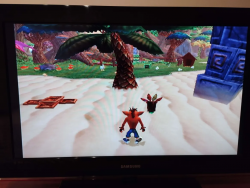
However, I'm not sure if it's because I messed with the HDMI settings but now when I launch PS1 and PS2 games, they take almost the entire screen, only very little black bars left on the sides and it's not even centered.
I have messed around with the upscaler (off, normal and fullscreen). Off is the option I had and it worked flawlessly until today, it's the mode that is having this issue. Normal does fix the problem but it makes my PAL PS2 games unplayable and fullscreen funnily enough looks less stretched than off.
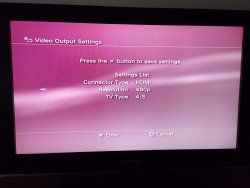
I then tried to mess with the HDMI settings in Display settings. Used custom, automatic, 480p, 720p, etc. Nothing changed.
The PS3 is a CECHA01, using Evilnat 4.91. ps2_emu for ps2 games and ps1_netemu for ps1 games, both have the exact same issue. Some type of internal setting in the console is most likely forcing widescreen even when the upscaler is off because even the horizontal black bars are gone.
I would say it could also be the TV but the fact that it worked fine before makes it questionable. I have also tried different HDMI slots from the TV. I can force it 4:3 on my TV settings but it doesn't fix this problem entirely.
I will leave a picture.
However, I'm not sure if it's because I messed with the HDMI settings but now when I launch PS1 and PS2 games, they take almost the entire screen, only very little black bars left on the sides and it's not even centered.
I have messed around with the upscaler (off, normal and fullscreen). Off is the option I had and it worked flawlessly until today, it's the mode that is having this issue. Normal does fix the problem but it makes my PAL PS2 games unplayable and fullscreen funnily enough looks less stretched than off.
I then tried to mess with the HDMI settings in Display settings. Used custom, automatic, 480p, 720p, etc. Nothing changed.
The PS3 is a CECHA01, using Evilnat 4.91. ps2_emu for ps2 games and ps1_netemu for ps1 games, both have the exact same issue. Some type of internal setting in the console is most likely forcing widescreen even when the upscaler is off because even the horizontal black bars are gone.
I would say it could also be the TV but the fact that it worked fine before makes it questionable. I have also tried different HDMI slots from the TV. I can force it 4:3 on my TV settings but it doesn't fix this problem entirely.
I will leave a picture.