PS3 PS1 & PS2 games are forced widescreen

So before today, the image would display 4:3 correctly with the upscaler off.
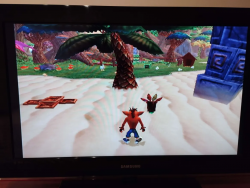
However, I'm not sure if it's because I messed with the HDMI settings but now when I launch PS1 and PS2 games, they take almost the entire screen, only very little black bars left on the sides and it's not even centered.

I have messed around with the upscaler (off, normal and fullscreen). Off is the option I had and it worked flawlessly until today, it's the mode that is having this issue. Normal does fix the problem but it makes my PAL PS2 games unplayable and fullscreen funnily enough looks less stretched than off.

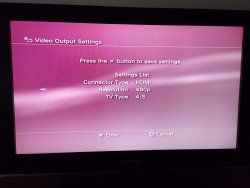
I then tried to mess with the HDMI settings in Display settings. Used custom, automatic, 480p, 720p, etc. Nothing changed.

The PS3 is a CECHA01, using Evilnat 4.91. ps2_emu for ps2 games and ps1_netemu for ps1 games, both have the exact same issue. Some type of internal setting in the console is most likely forcing widescreen even when the upscaler is off because even the horizontal black bars are gone.

I would say it could also be the TV but the fact that it worked fine before makes it questionable. I have also tried different HDMI slots from the TV. I can force it 4:3 on my TV settings but it doesn't fix this problem entirely.

I will leave a picture.
 

Attachments

  • IMG_20250406_222620.png
    IMG_20250406_222620.png
    968.6 KB · Views: 149
I think PS2 PAL games won't look as its NTSC counterparts. There were some discussions about this issue here on the forums, and it was fixed in one of Evilnat's CFW 4.91 betas.

Try searching the forums, on the CFW 4.91 thread.
 
So I realized that because this is an A01, the upscaler doesn't work for all PAL games; sometimes it only results in a black screen, either immediately or after starting the game. I also found that, for example, Shadow Hearts 2 can randomly crash if the upscaler is on, specifically the PAL version. If I disable the upscaler and use my MClassic, for example, no upscaling occurs. Unfortunately, it wasn't developed for the PAL region.
 
I think PS2 PAL games won't look as its NTSC counterparts. There were some discussions about this issue here on the forums, and it was fixed in one of Evilnat's CFW 4.91 betas.

Try searching the forums, on the CFW 4.91 thread.

The problem I have isn't because PAL games don't upscale, it's because it forces widescreen with the upscaler off. NTSC and PAL. It was working correctly when I first installed Evilnat 4.91 and now it does this widescreen thing when it shouldn't.
If I enable the upscaler (Normal), it displays 4:3 correctly but then PAL games either lose signal eventually or display a black screen. Though I'd rather play with the upscaler off.

I guess I can try to re-install Evilnat, or another updated variant I guess.
Edit: still happens, updated to 4.92
Edit 2: This is what happens if I force 480p, 4:3 on the display settings:
 

Attachments

  • IMG_20250407_120917.jpg
    IMG_20250407_120917.jpg
    674.5 KB · Views: 65
Last edited:
The problem I have isn't because PAL games don't upscale, it's because it forces widescreen with the upscaler off. NTSC and PAL. It was working correctly when I first installed Evilnat 4.91 and now it does this widescreen thing when it shouldn't.

I've never mentioned the upscaler in my post, you misquoted it!.

What I've said was (and I repeat) that there were some talkings about a similar issue on the CFW 4.91 release thread, and that it was fixed in one of the betas.

Another thing you can try is to downgrade to FW 4.84 and verify if the issue happens on that version too.
 
I've never mentioned the upscaler in my post, you misquoted it!.

What I've said was (and I repeat) that there were some talkings about a similar issue on the CFW 4.91 release thread, and that it was fixed in one of the betas.

Another thing you can try is to downgrade to FW 4.84 and verify if the issue happens on that version too.

My bad.
Anyway, tried 4.84, same problem.

Edit: Idk if this is relevant but when I use the upscaler, on my TV settings the option to adjust to screen is enabled ingame. However, without it it just forces either 16:9 or 4:3, the option to adjust to the screen is greyed out. Same happens if I set the XMB to 480p. Other systems I have that do 480p like my OG Xbox this isn't an issue.
 
Last edited:
The issue on 4.91 Evilnat could be related to the new mods by kozarovv included by default in some versions.
https://www.psx-place.com/threads/release-ps1-and-ps2-emulator-mods.45083/

However, 4.84.2 Rebug includes the standard emulators. Therefore the issue should be something else:
- Upscaler settings in XMB > Settings > Display Settings > Video Output Settings
- TV settings
- HDMI cable
- Some patch applied to the game

For PS1/PS2 games, you could try switching the emulator from ps1_emu to ps2_netemu to verify if the issue persists.

Both settings can be found in the collapsed "Scan for content" section of /setup.ps3 of webMAN MOD.

You also could try a different game to check if you have different results.
 
Ok I figured it out. When you disable the upscaler, the horizontal black bars are gone unless it's a specific game or a PAL game.
So setting the TV to 4:3, it will remember next time you boot a PS1 or PS2 game. For some reason, Monsters Inc Scare Island (PAL exclusive) doesn't work with the upscaler enabled or disabled on ps2_emu unlike other PAL games - it gets frozen on a black screen after the PS2 logo. Though I can use netemu for that one since it was an official classic or get the PS1 version.

The way I figured it out is because I launched a ps1 game on an older Slim I had laying around with the same PS1 game I used to test this and the image in 4:3 was exactly the same with the upscaler disabled, no horizontal black bars.

Apologies for wasting time but maybe this can serve as a lesson for others who may think there is a problem with the aspect ratio.
 
Last edited:

Similar threads

Back
Top