
PS2 Classics issue with Widescreen patch

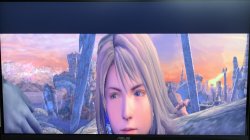
Hi, Ever since I got the ps3 super slim with hen I've been digging through my ps2 game collection trying to add widescreen patches. I was able to patch all supported games with no problems, all except FF X which, although the 16:9 patch appears to have been applied, the screen appears to be "flooded" and with a thick black line above the screen. image. I thought about solving by changing the screen alignment of my monitor, but it's only a temporary solution since I should always change it as soon as I want to use it normally. So I was wondering if it was possible to find a different solution to the problem.

if it helps: I patch the iso with PS2 Patch Engine by pelvicthrustman and use Devina's .pnach file. Then I use ps2 classics gui to make it .BIN.ENC and finally I mount it with Webman.

Attached I share the photo that demonstrates the problem with FF X
 

Attachments

  • IMG_2898.jpeg
    IMG_2898.jpeg
    1.3 MB · Views: 66
Hi, Ever since I got the ps3 super slim with hen I've been digging through my ps2 game collection trying to add widescreen patches. I was able to patch all supported games with no problems, all except FF X which, although the 16:9 patch appears to have been applied, the screen appears to be "flooded" and with a thick black line above the screen. image. I thought about solving by changing the screen alignment of my monitor, but it's only a temporary solution since I should always change it as soon as I want to use it normally. So I was wondering if it was possible to find a different solution to the problem.

if it helps: I patch the iso with PS2 Patch Engine by pelvicthrustman and use Devina's .pnach file. Then I use ps2 classics gui to make it .BIN.ENC and finally I mount it with Webman.

Attached I share the photo that demonstrates the problem with FF X
Have you checked the widescreen patched ISO with PCSX2 to make sure its not a problem with the patch ? (and by this i mean to make sure its compatible with your version of the game and with ps2 engine, i have seen some patches that are not compatible with ps2 engine), if it doesn't happen with the same iso in PCSX2 then its probably something the ps3 is doing, but if it does happen then its highly likely that its the patched iso's problem, Also check the SLES or SLUS (or whatever region you are using) to make sure its correct and maybe post that info here, it might help people replicate this.
 
Have you checked the widescreen patched ISO with PCSX2 to make sure its not a problem with the patch ? (and by this i mean to make sure its compatible with your version of the game and with ps2 engine, i have seen some patches that are not compatible with ps2 engine), if it doesn't happen with the same iso in PCSX2 then its probably something the ps3 is doing, but if it does happen then its highly likely that its the patched iso's problem, Also check the SLES or SLUS (or whatever region you are using) to make sure its correct and maybe post that info here, it might help people replicate this.
Yep, I've already tested the exact same iso with PCSX2 and it works perfectly, so it's clearly a ps3 issue. Also, the .pnach file I added is for SCES-50493 and matches my copy of FF X.

Edit: I was wondering if it was possible to adjust the screen alignment by editing the .pnatch file, maybe that could solve the issue, but I don't know how those files work and maybe I'm just talking nonsense
 
Yep, I've already tested the exact same iso with PCSX2 and it works perfectly, so it's clearly a ps3 issue. Also, the .pnach file I added is for SCES-50493 and matches my copy of FF X.

Edit: I was wondering if it was possible to adjust the screen alignment by editing the .pnatch file, maybe that could solve the issue, but I don't know how those files work and maybe I'm just talking nonsense
well you could try but i do find it odd its changing the Y axis that much only on ps3, does the original ame (withougt patching) play ok on ps3 ? try your original game iso and double check its ok on ps3 first,
you could try messing with the values and try and find which is causing the issue (just use 1 of the patches at a time and find the cause then try altering the code to make it work for you), you could also try patching the ISO directly using a hex editor and the search function with the codes from ps2wide just incase its a PS2 engine problem.
 
well you could try but i do find it odd its changing the Y axis that much only on ps3, does the original ame (withougt patching) play ok on ps3 ? try your original game iso and double check its ok on ps3 first,
you could try messing with the values and try and find which is causing the issue (just use 1 of the patches at a time and find the cause then try altering the code to make it work for you), you could also try patching the ISO directly using a hex editor and the search function with the codes from ps2wide just incase its a PS2 engine problem.
Already done that, I've tried the original iso and it works fine.
I'll try messing with values, guess I'll have to do a lot of trial and error :tongue:
 
yeah, once you find which is the offending piece of code hopefully you can fix it by altering the values (the 2nd part of the code, first part is the address and shouldn't be changed)
 

Similar threads

Back
Top