PS2 PS2 slim con OPL non legge i giochi da CD/PS2 slim with OPL does not read games from CDs

Just make sure you give it the same drive letter and that the folder names don't change so you don't conflict with the "conf_apps.cfg" file.

ok perfect.....

With many, many ps1 and ps2 games (salvaged from CDs) is it possible to place them on multiple usb sticks?
 
ok perfect.....

With many, many ps1 and ps2 games (salvaged from CDs) is it possible to place them on multiple usb sticks?

Do you mean make a backup?
Of course you can convert them to iso files and take care not to exceed the capacity of your USB device.
 
not a backup, but for example: usb stick1 (games from A-F), usb stick2 (games from G-M)... and so on.....

I understand now.
It is possible and as I said, put the same drive letter on all of them if what you want is to use them in OPL.
I recommend a 1T hard drive.
 
A normal 1TB USB external hard drive? Better if SSD? For defragmenting such a large disk, given that (I think) it must be formatted in fat32, is it convenient to have it?
 
A normal 1TB USB external hard drive? Better if SSD? For defragmenting such a large disk, given that (I think) it must be formatted in fat32, is it convenient to have it?

You can have it in FAT 32 or you can have it in EXFAT either way you have to defragment.
If you don't usually do it, I recommend doing it as part of the maintenance of the device, not only these disks but also those of your PC.
I myself use one from 1T, you can defragment it in parts, just try to see the files that are being moved, when it finishes moving a specific one it is time to press "Stop" on your defragmenter.
and then continue with the defrag task later.
Talking about these capacities in disks is already very common, technology advances rapidly.
 
You can have it in FAT 32 or you can have it in EXFAT either way you have to defragment.
If you don't usually do it, I recommend doing it as part of the maintenance of the device, not only these disks but also those of your PC.
I myself use one from 1T, you can defragment it in parts, just try to see the files that are being moved, when it finishes moving a specific one it is time to press "Stop" on your defragmenter.
and then continue with the defrag task later.
Talking about these capacities in disks is already very common, technology advances rapidly.

Ok...but normale HDD or SSD ?
 
Try removing write protection from your USB drive by doing the following:

1.Press "Windows+R" key

2.- In the Dialog box write:

Code:
diskpart

3.-In the command console type:

Code:
list disk

4.-See which number corresponds to your USB device

5.-Write the following:

Code:
select disk n

where "n" is the number of your USB.

6.-Once your device is selected, write:

Code:
attributes disk clear readonly

7.-When the process is finished, close the console and disconnect your USB.

8.-Connect your USB to the PC again and see if it is solved.


It starts again with the usual problem: it goes into writing block....now even following the procedure you indicated doesn't solve anything....is there a reason why it goes into protection?
 
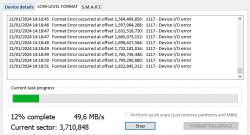
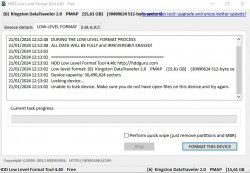
With "HDD-LLF-Low-Level-Format-Tool/" the flash drive is not formatted....the data remains
even if the process gets to the bottom and it says "low level formatting ok"


I tried again with HDD-LLF: this is the result
 

Attachments

  • Immagine 2024-01-21 121430.jpg
    Immagine 2024-01-21 121430.jpg
    107.5 KB · Views: 19
Last edited:
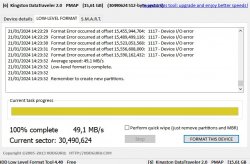
Now this...
 

Attachments

  • Immagine 2024-01-21 141858.jpg
    Immagine 2024-01-21 141858.jpg
    104 KB · Views: 18
  • Immagine 2024-01-21 142346.jpg
    Immagine 2024-01-21 142346.jpg
    116.3 KB · Views: 13
Ok...but normale HDD or SSD ?

I would say "SSD" but since I don't have one, I don't know if it can be used on a PS2.

for 1tb hdd disk what is better: fat32 or exfat?

With exfat you can store files larger than 4 GB, currently OPL has releases with this format.

It starts again with the usual problem: it goes into writing block....now even following the procedure you indicated doesn't solve anything....is there a reason why it goes into protection?

It may be a "Virus", perform a "low level" format as I told you, if after that it remains the same, there is nothing to do, so it is considered broken.

I'm trying to do the procedure with low level formatting

Good.

With "HDD-LLF-Low-Level-Format-Tool/" the flash drive is not formatted....the data remains
even if the process gets to the bottom and it says "low level formatting ok"
I tried again with HDD-LLF: this is the result

Now this...

I'm afraid there's nothing more that can be done my friend, we have a broken and unusable device.
 
I would say "SSD" but since I don't have one, I don't know if it can be used on a PS2.


With exfat you can store files larger than 4 GB, currently OPL has releases with this format.


It may be a "Virus", perform a "low level" format as I told you, if after that it remains the same, there is nothing to do, so it is considered broken.


Good.


I'm afraid there's nothing more that can be done my friend, we have a broken and unusable device.


thanks for your help and patience....I think it is now more logical (given the large amount of games) to buy an external hdd and proceed with the project with that
 
I would say "SSD" but since I don't have one, I don't know if it can be used on a PS2.

With exfat you can store files larger than 4 GB, currently OPL has releases with this format.


so, for example, if I insert an ISO taken from a 4.5GB DVD, there is no longer any need to divide the file into several parts with USBUTIL? Do I copy it whole onto the disc?
 
I purchased a Seagate basic 1tb....I had copied what was left on my USB stick (now no longer working) onto a PC hard disk....I formatted the new disk with exfat....I tried to copy from the PC disk to an external disk....connected to the PS2...but when I enter mass:/ I don't see anything...why?
 
I understand now.
It is possible and as I said, put the same drive letter on all of them if what you want is to use them in OPL.
I recommend a 1T hard drive.

Maybe I understood where the mistake is: first the USB stick was G:/ now the HDD disk is N:/ is this the mistake and the reason why I don't see any files when I enter mass:/ ????
Unfortunately, however, the letter G:/ as HDD disk is already occupied with numerous graphic catalogs set in other programs....setting everything again would be too much. How can I "restart" with a clean installation with the new HDD disk?
 
So, OPL 1.1.0 supports disk formatting with exfat ?

If I'm not wrong it should be version 1.2.0

I purchased a Seagate basic 1tb....I had copied what was left on my USB stick (now no longer working) onto a PC hard disk....I formatted the new disk with exfat....I tried to copy from the PC disk to an external disk....connected to the PS2...but when I enter mass:/ I don't see anything...why?

OPL recognizes that format, UlaunchElf does not. For that you had to have installed OPL on your memory card, as indicated before.

Maybe I understood where the mistake is: first the USB stick was G:/ now the HDD disk is N:/ is this the mistake and the reason why I don't see any files when I enter mass:/ ????
Unfortunately, however, the letter G:/ as HDD disk is already occupied with numerous graphic catalogs set in other programs....setting everything again would be too much. How can I "restart" with a clean installation with the new HDD disk?

In that case it is easier to modify the paths in your "conf_apps.cfg" file with the new letter of your hard drive.
 

Similar threads

Back
Top