PS2 PS2 slim con OPL non legge i giochi da CD/PS2 slim with OPL does not read games from CDs

Sorry..forgive me....BUT I GOT LOST!!!...you are dealing with someone who is ignorant on the subject....and also with your infinite patience and passion for this thing....you have to make me understand the step by step things....
In the meantime, I rummaged around the house and found a USB stick that could do the trick for us: format it in fat32 and copy the necessary files (Wlaunchelf+OPL)....
At this point I believe the external disk can be formatted directly in exfat... without intermediate steps...
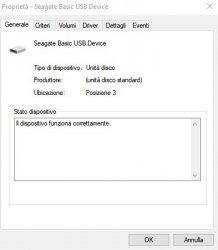
all correct? I put the screenshot of the disk in exfat with indication of the pertition: it should be correct
 

Attachments

  • MBR_discoPS2.jpg
    MBR_discoPS2.jpg
    26.6 KB · Views: 23
Sorry..forgive me....BUT I GOT LOST!!!...you are dealing with someone who is ignorant on the subject....and also with your infinite patience and passion for this thing....you have to make me understand the step by step things....
In the meantime, I rummaged around the house and found a USB stick that could do the trick for us: format it in fat32 and copy the necessary files (Wlaunchelf+OPL)....
At this point I believe the external disk can be formatted directly in exfat... without intermediate steps...
all correct? I put the screenshot of the disk in exfat with indication of the pertition: it should be correct

You need to select the "Volumes" tab to see the partition table.
 
I inserted the ulaunchelf 4.38 DVD and the USB stick (fat32) with "x:/boot/BOOT-EXFAT.ELF" and "x:/OPNPS2LD/files" inside (credits+detailed_changelog+license+OPNPS2LD-v1.2.0 -Beta-2070-234a36c+readme). I started PS2 and from the ulaunchelf 4.38 menu I deleted the folders+files in mc0 for BOOT and ONPPS2LD. Then I copied the +files folder for BOOT and OPNPS2LD from the USB stick to mc0. Turned off the PS2, removed the DVD and USB stick. Rebooted the PS2, at the matrix logo I held down R1 (as I have done several times now), but instead of the wlaunchelf screen appearing in this case, the usual screen of the PS2 started without disk appeared: browser etc etc.... what's happening ? Maybe the files "BOOT-EXFAT.ELF" and "OPNPS2LD-v1.2.0-Beta-2070-234a36c" are too long and need to be renamed?
 
I inserted the ulaunchelf 4.38 DVD and the USB stick (fat32) with "x:/boot/BOOT-EXFAT.ELF" and "x:/OPNPS2LD/files" inside (credits+detailed_changelog+license+OPNPS2LD-v1.2.0 -Beta-2070-234a36c+readme). I started PS2 and from the ulaunchelf 4.38 menu I deleted the folders+files in mc0 for BOOT and ONPPS2LD. Then I copied the +files folder for BOOT and OPNPS2LD from the USB stick to mc0. Turned off the PS2, removed the DVD and USB stick. Rebooted the PS2, at the matrix logo I held down R1 (as I have done several times now), but instead of the wlaunchelf screen appearing in this case, the usual screen of the PS2 started without disk appeared: browser etc etc.... what's happening ? Maybe the files "BOOT-EXFAT.ELF" and "OPNPS2LD-v1.2.0-Beta-2070-234a36c" are too long and need to be renamed?

You must rename as indicated before (see references).
 
Rename it, it works now....
So now I can copy the backup of games etc etc from PC to external HDD formatted in exfat? Then by connecting it everything should work like it did at the beginning...right?
 
I tried starting OPL manager which, indicating the correct path on the external disk, the program correctly downloads the images of the covers, CDs, etc. etc....of some it finds nothing or almost nothing...is there a way to recover the image and attach it?
 
Now the external disk reads it....in OPL menù "BDM" games the inserted ones appear (CD or DVD works and games load), in OPL menù "APPS" I find the list of inserted games (VCDs to be clear)....I start one that used to start...now it doesn't start anymore... black screen and end....maybe the inserted popstarter is no longer compatible with wLaunchELF and OPL 1.2.0 ?
 
Last edited:
I tried starting OPL manager which, indicating the correct path on the external disk, the program correctly downloads the images of the covers, CDs, etc. etc....of some it finds nothing or almost nothing...is there a way to recover the image and attach it?

The images go in the "ART" folder with their corresponding nomenclature (See the following guide).

https://www.psx-place.com/threads/tutorial-art-images-in-opl-via-usb.41611/

Now the external disk reads it....in OPL menù "BDM" games the inserted ones appear (CD or DVD works and games load), in OPL menù "APPS" I find the list of inserted games (VCDs to be clear)....I start one that used to start...now it doesn't start anymore... black screen and end....maybe the inserted popstarter is no longer compatible with wLaunchELF and OPL 1.2.0 ?

Use exfat compatible launcher.

https://www.psx-place.com/resources/popsloader.1396/
 
So I delete the "popstarter" folder and related file from the HDD and replace it with "POPSLoader v1.0.0 - rev3"?
Conversion of files to VCD to be redone or do I keep what has already been done? Placing VCD files as before?
 
So I delete the "popstarter" folder and related file from the HDD and replace it with "POPSLoader v1.0.0 - rev3"?
Conversion of files to VCD to be redone or do I keep what has already been done? Placing VCD files as before?

I haven't tried it friend, but what I understand is that with that launcher POPSTARTER will work for you in an exfat format.
Ask in that thread if you have more questions.

EDIT: Or here

https://www.psx-place.com/threads/popsloader.42474/#post-378578
 
Last edited:
Avevo provato a formattare il disco esterno in fat32 con EaseUS Partition master, ma secondo me qualcosa non funzionava... la PS2 non riusciva a vedere cosa c'era dentro.... Sì, il processo di formattazione è stato semplice
 
Avevo provato a formattare il disco esterno in fat32 con EaseUS Partition master, ma secondo me qualcosa non funzionava... la PS2 non riusciva a vedere cosa c'era dentro.... Sì, il processo di formattazione è stato semplice

I thought you wanted it exfat.
 
Yes, of course with exfat....since with partition master the same thing didn't "work" (the ps2 didn't read the disk even if it seemed to be in fat32) and some advantages of having exfat, such as loading large files without dividing them into more set off

The difficulty is to understand if POPSLoader needs the same procedure for the transformation from CD to bin+cue, then to VCD and then what? I couldn't find any links/steps for PS1 games to use on POPSLoader....
 
Last edited:
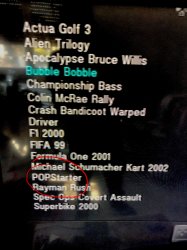
One strange thing: I deleted the POPStarter folder+files from x:/APPS. I copied the folder+files BIN/ to mass:/ as indicated for POPSLoader....I went to the APPS screen with OPL, list of loaded games complete...but the word POPStarter still appears....in any case starting same thing happens in a game: black screen.
 

Attachments

  • APPS.jpg
    APPS.jpg
    795 KB · Views: 27

Similar threads

Back
Top