PS2 PS2 Slim with OPL 1.1.0: Using the Eye Toy Cam

It appears your router isn't assigning a name to anything other than the shared folder on your USB device.
This way, everything is working correctly.
Let's rule out a possible DHCP configuration issue with your router and try manually assigning an IP address to the PS2.

Do the following:

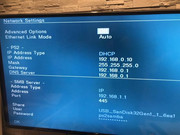
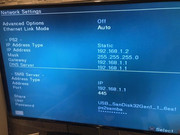
1. Open OPL and go to the network settings.

2. Configure the following parameters:

IP Address Type Static

IP Address 192.168.1.2
Mask 255.255.255.0
Gateway 192.168.1.1
DNS Server 192.168.1.1

Save the changes and check if the games are listed in OPL.
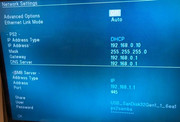
 
that's how it is
Edit:
Since the router isn't assigning a name to your USB device, leave the "ETH Prefix Path" field blank, as your folders and games are in the root directory.
 
Last edited:
I removed "USB_SanDisk32Gen1_1_6ea1" from the ETH Prefix Path (settings screen). It still returns the error "301: Unable to access SMB server."
Perhaps I should leave the "share" field blank in the network settings screen (SMB server section)?

 
Perhaps I should leave the "share" field blank in the network settings screen (SMB server section)?

No, if you do that OPL won't know what your shared resource is.

I usually resolve SMB server connection errors with the following steps:

1.-Download OPL v1.1.0

2. Delete the "OPL" and "OPNPS2LD" folders from the following path:
mc0:/
Note: Deleting the "OPL" folder will force OPL to erase all its configuration, essentially resetting it to its factory settings. This is effective in resolving issues like the one you're experiencing, especially if you've opened multiple versions of OPL.

Note: If you already have OPL version 1.1.0, you only need to delete the "OPL" folder.

3. Copy the new OPL, which is usually located in a folder called "OPNPS2LD", to the mc0:/ directory.

4. Access your router's settings and temporarily disable the firewall for testing purposes. Save the changes.

5. Launch OPL and reconfigure the network settings. Check if the games are now listed on the network.

Try DHCP first, then try static IP.
 

Attachments

Here I am again... unfortunately work has kept me "blocked" for two weeks.... yes, I already have opl v1.1.0 installed... you tell me to completely delete the OPL folder and copy the contents of the OPNPS2LD folder back into mc0: , you mean the OPNPS2LD folder and its contents into mc0 right?? So once I restart OPL, the folder I previously deleted is recreated again?
 
I thought you were already playing with your router, friend.:D Your case has become a real challenge, which makes it even more exciting.
As I said before, one of the options that can be complicated, even difficult to guide you through, for playing over the network is through the router directly, since each model is different.

There are still a few things you can try before we run out of options.

you tell me to completely delete the OPL folder and copy the contents of the OPNPS2LD folder back into mc0: , you mean the OPNPS2LD folder and its contents into mc0 right?? So once I restart OPL, the folder I previously deleted is recreated again?

Delete the OPNPS2LD folder only if you don't have OPL version 1.1.0. Download it from the attached file I sent you and copy it back to your memory card.

If you already have it, just delete the "OPL" folder.

That's correct, the folder is recreated once you save a configuration in OPL.
 
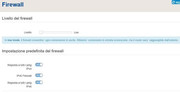
After deleting the OPL folder, I could only set up the modem's firewall this way (low mode):


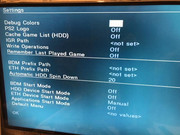
then I manually set "eth device start mode"


then I tried to set the server for DHCP and static connection


I started OPL and tried to load games in ETH: usual error 301
 
Your setup is correct.

Try the following:

Remove the username and password from your router's settings for the shared resource and leave these fields blank in OPL.

Note: Remember to save the changes after each configuration in both the router and OPL.

Check if the games appear.
 
Is the firewall level set on the router okay? I mean "low mode"...I can't do anything else, as you can see from the screenshot.

Maybe there is something wrong with these samba settings?
 
Last edited:
It's set to a low level, so it shouldn't cause any problems.

It's important to note that for this test you should only use your router's local (LAN) connection, not the WAN.

In other words, disconnect the cable coming from the street to your router.
 
Question: Why do I have to disconnect the router from the external data cable? If after this test the 301 error returns, what are the remaining solutions? If there are any?
 
Lowering your router's firewall security level leaves you completely vulnerable to cyberattacks. It's like removing a country's customs. Any malicious person could pass through without any restrictions, carrying any weapon to cause harm. Reducing the security level is like telling the customs officer, "Have a coffee and take a break."

Once the test is complete, return the firewall security level to "medium."

As I mentioned, there are still several things you can try before concluding with 95% certainty that you have a faulty Ethernet port on your console.

Try the following:
Try changing the hosting name to something shorter, like "samba."
 
What do you mean for changing hosting name with "samba"? Maybe there are others settings in OPL that we forgot to set?
….for checking ps2 lan port, could we try setting eth games with pc connection ? maybe with "ping" from PC to check connection ?
 
Last edited:
What do you mean for changing hosting name with "samba"?

I mean, change the name of your shared resource.

Change this:

USB_SanDisk32Gen1_1_6ea1

to this:

samba

Maybe there are others settings in OPL that we forgot to set?

You've already done all the necessary configuration in OPL and everything is correct.

….for checking ps2 lan port, could we try setting eth games with pc connection ? maybe with "ping" from PC to check connection ?

That's what we'll do later as a final step, and you've hit the nail on the head. So far, we've verified that the server is working correctly since you can access it from your PC.

I just wanted to avoid further complex configurations and rule out any alternatives, no matter how simple they may seem.

First, try the steps I gave you:

1. Remove the username and password from the shared resource.
2. Shorten the hosting name.
 
With this modem/router, it's not possible to change the name for the inserted dongle.
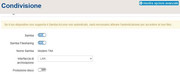
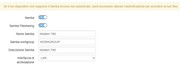
Perhaps there's something in these settings that could help? For example, the "Samba name" is indicated...

 
yes, I already tried last time...but nothing

if I try to ping from my pc to the ps2's IP to check if the port is working?
 
Okay, do the following:

1. Using your phone's flashlight, check the Ethernet port slot on both the console and the router. Verify that the metal pins are properly aligned and not bent.

2. Make sure the Ethernet cable clicks when you plug it into both ends.

3. If everything looks good, use a can of compressed air to clean the slots on both the console and the router.

4. Test the connection again by trying different ports on your router.
 
I'm sure there are no problems with the router: it powers several LAN devices at home...and everything works fine......currently the PS2 is connected to a LAN switch along with other devices that work correctly.
 

Similar threads

Back
Top