
You are using an out of date browser. It may not display this or other websites correctly.
You should upgrade or use an alternative browser.
You should upgrade or use an alternative browser.

Berion
Developer
It cannot be OS (it cannot run in background providing libs and services; such functionality comes first with PS3 and X360) but at least as simple application launcher it is fully possible. The problem is... no one want write it. 
There is already XMB implementation in Argon and Open PS2 Loader v0.7, application launching and ps2 initialization code is already in ps2sdk for years if not beginning. Today it can be even start with a console (via FMCB EMBED.ELF (for MC) and SoftDEV2 Installer (for HDD)). The only thing needed to code is configuration file, context menu, and of course skinning.
There is already XMB implementation in Argon and Open PS2 Loader v0.7, application launching and ps2 initialization code is already in ps2sdk for years if not beginning. Today it can be even start with a console (via FMCB EMBED.ELF (for MC) and SoftDEV2 Installer (for HDD)). The only thing needed to code is configuration file, context menu, and of course skinning.
Berion
Developer
A little more fun with it. Example of three different themes: Korium, Omnis and XEB Ribbon.
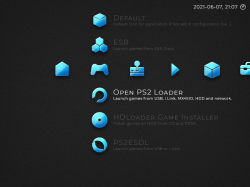
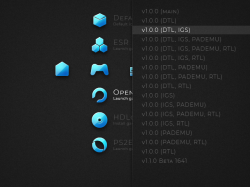
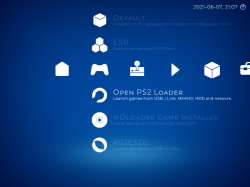
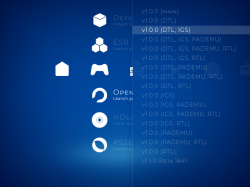
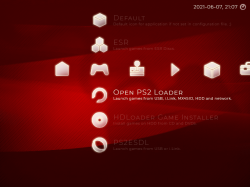
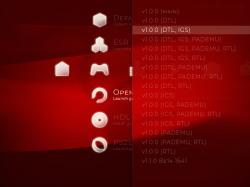
Example of fully customizable config (including users!):
@HWNJ @alexparrado ? ^^
Example of fully customizable config (including users!):
Code:
startdir = $game
module0 = "mc0:/XMB/USBD.IRX"
module1 = "mc0:/XMB/USBDKB.IRX"
module2 = "mc0:/XMB/ILINK.IRX"
module3 = "mc0:/XMB/MX4SIO.IRX"
module4 = "mc0:/XMB/DS34.IRX"
osdsys = rom0:/OSDSYS
theme = "XEB Ribbon"
title = "Text example of title menu showing in top-left corner"
user_name = "Berion"

# organize categories order in menu
cat_order_0 = $home
cat_order_1 = $game
cat_order_2 = $retro
cat_order_3 = $media
cat_order_4 = $system
cat_order_5 = $exploits
cat_order_6 = $settings

# hiding or displaying categories in menu
cat_show_0 = 1
cat_show_1 = 1
cat_show_2 = 1
cat_show_3 = 1
cat_show_4 = 1
cat_show_5 = 0
cat_show_6 = 1

# organize apps order in menu
# "parrent"   under what category should be displaying
# "name"   app name displaying
# "icon"   path to app icon (if user will not provide any, "sub_app_elf.png" will be used)
# "desc"   app description under app name displaying
# "sub_name"    app version or revision listed in context menu
# "sub_path"   direct path to executable on:
#      "cdrom0:"  PS2 CD/DVD disc in drive
#      "mass0:"  USB mass storage
#      "ilink0:"  i.Link mass storage (S400)
#      "sd0:"  MX4SIO (MicroSD card)
#      "flash0:"  DESR internal flash
#      "mc0:"  PS2 Memory Card
#      "hdd0:"  PFS partition on HDD

item_00_parrent = $game
item_00_icon = "mc0:/XMB/themes/XEB Ribbon/sub_app_opl.png"
item_00_name = "Open PS2 Loader"
item_00_desc = "Launch games from USB, i.Link, MSX4SIO, HDD and network."
item_00_sub_name_00 = "v1.0.0 (main)"
item_00_sub_name_01 = "v1.0.0 (DTL)"
item_00_sub_name_02 = "v1.0.0 (DTL, IGS)"
item_00_sub_name_03 = "v1.0.0 (DTL, IGS, PADEMU)"
item_00_sub_name_04 = "v1.0.0 (DTL, IGS, PADEMU, RTL)"
item_00_sub_name_05 = "v1.0.0 (DTL, IGS, RTL)"
item_00_sub_name_06 = "v1.0.0 (DTL, PADEMU)"
item_00_sub_name_07 = "v1.0.0 (DTL, PADEMU, RTL)"
item_00_sub_name_08 = "v1.0.0 (DTL, RTL)"
item_00_sub_name_09 = "v1.0.0 (IGS)"
item_00_sub_name_10 = "v1.0.0 (IGS, PADEMU)"
item_00_sub_name_11 = "v1.0.0 (IGS, PADEMU, RTL)"
item_00_sub_name_12 = "v1.0.0 (IGS, RTL)"
item_00_sub_name_13 = "v1.0.0 (PADEMU)"
item_00_sub_name_14 = "v1.0.0 (PADEMU, RTL)"
item_00_sub_name_13 = "v1.0.0 (RTL)"
item_00_sub_name_14 = "v1.1.0 Beta 1641"
item_00_sub_path_00 = "mass0:/XMB/APP/OPL/OPNPS2LD-v1.0.0.ELF"
item_00_sub_path_01 = "mass0:/XMB/APP/OPL/OPNPS2LD-v1.0.0-DTL_T10000=1---.ELF"
item_00_sub_path_02 = "mass0:/XMB/APP/OPL/OPNPS2LD-v1.0.0-DTL_T10000=1-IGS=1--.ELF"
item_00_sub_path_03 = "mass0:/XMB/APP/OPL/OPNPS2LD-v1.0.0-DTL_T10000=1-IGS=1-PADEMU=1-.ELF"
item_00_sub_path_04 = "mass0:/XMB/APP/OPL/OPNPS2LD-v1.0.0-DTL_T10000=1-IGS=1-PADEMU=1-RTL=1.ELF"
item_00_sub_path_05 = "mass0:/XMB/APP/OPL/OPNPS2LD-v1.0.0-DTL_T10000=1-IGS=1--RTL=1.ELF"
item_00_sub_path_06 = "mass0:/XMB/APP/OPL/OPNPS2LD-v1.0.0-DTL_T10000=1--PADEMU=1-.ELF"
item_00_sub_path_07 = "mass0:/XMB/APP/OPL/OPNPS2LD-v1.0.0-DTL_T10000=1--PADEMU=1-RTL=1.ELF"
item_00_sub_path_08 = "mass0:/XMB/APP/OPL/OPNPS2LD-v1.0.0-DTL_T10000=1---RTL=1.ELF"
item_00_sub_path_09 = "mass0:/XMB/APP/OPL/OPNPS2LD-v1.0.0--IGS=1--.ELF"
item_00_sub_path_10 = "mass0:/XMB/APP/OPL/OPNPS2LD-v1.0.0--IGS=1-PADEMU=1-.ELF"
item_00_sub_path_11 = "mass0:/XMB/APP/OPL/OPNPS2LD-v1.0.0--IGS=1-PADEMU=1-RTL=1.ELF"
item_00_sub_path_12 = "mass0:/XMB/APP/OPL/OPNPS2LD-v1.0.0--IGS=1--RTL=1.ELF"
item_00_sub_path_13 = "mass0:/XMB/APP/OPL/OPNPS2LD-v1.0.0---PADEMU=1-.ELF"
item_00_sub_path_14 = "mass0:/XMB/APP/OPL/OPNPS2LD-v1.0.0---PADEMU=1-RTL=1.ELF"
item_00_sub_path_13 = "mass0:/XMB/APP/OPL/OPNPS2LD-v1.0.0----RTL=1.ELF"
item_00_sub_path_14 = "mass0:/XMB/APP/OPL/OPNPS2LD-v1.1.0-Beta-1641-7758357.ELF"

item_01_parrent = $game
item_01_icon = "mc0:/XMB/themes/XEB Ribbon/sub_app_hdlgi.png"
item_01_name = "HDLoader Game Installer"
item_01_desc = "Install games on HDD from CD and DVD5."
item_01_sub_name_00 = "v0.821 (2018-12-08)"
item_01_sub_path_00 = "mass0:/XMB/APP/HDLGI/HDLGI_0821.ELF"

item_02_parrent = $game
item_02_icon = "mc0:/XMB/themes/XEB Ribbon/sub_app_ps2esdl.png"
item_02_name = "PS2ESDL"
item_02_desc = "Launch games from USB or i.Link."
item_02_sub_name_00 = "v0.810 D"
item_02_sub_name_01 = "v0.825 OB"
item_02_sub_path_00 = "mass0:/XMB/APP/PS2ESDL/PS2ESDL v0.821.elf"
item_02_sub_path_01 = "mass0:/XMB/APP/PS2ESDL/PS2ESDL v0.825.elf"

item_03_parrent = $game
item_03_name = "ESR"
item_03_icon = "mc0:/XMB/themes/XEB Ribbon/sub_app_esr.png"
item_03_desc = "Launch games from ESR Discs."
item_03_sub_name_00 = "R9b GUI TEST2"
item_03_sub_name_01 = "R9b GUI TEST2 Dark"
item_03_sub_name_02 = "R10f DVD Direct Off"
item_03_sub_name_03 = "R10f DVD Direct"
item_03_sub_name_04 = "R10f DVD Memory Card"
item_03_sub_name_05 = "R10f DVD Direct Off, Disco"
item_03_sub_name_06 = "R10f DVD Direct, Disco"
item_03_sub_name_07 = "R10f DVD Memory Card, Disco"
item_03_sub_path_00 = "mass0:/XMB/APP/ESR/a.ELF"
item_03_sub_path_01 = "mass0:/XMB/APP/ESR/b.ELF"
item_03_sub_path_02 = "mass0:/XMB/APP/ESR/c.ELF"
item_03_sub_path_03 = "mass0:/XMB/APP/ESR/d.ELF"
item_03_sub_path_04 = "mass0:/XMB/APP/ESR/e.ELF"
item_03_sub_path_05 = "mass0:/XMB/APP/ESR/f.ELF"
item_03_sub_path_06 = "mass0:/XMB/APP/ESR/g.ELF"
item_03_sub_path_07 = "mass0:/XMB/APP/ESR/h.ELF"

# for the rest apps, follow above template
# "user_1.cfg" added another user to menu under Home category. Users should be switchable without app rebooting.
@HWNJ @alexparrado ? ^^
Attachments
Last edited:

HWNJ
Developer
tktagmedia
Member
I still question the validity of this work. I know some legit sources have claimed to see this in action, but I'm still skeptical.
HWNJ
Developer
If it is fake, then why all these bugs where discovered and fixed in both, PS2SDK and PCSX2?:
https://github.com/ps2dev/ps2sdk/pull/235
https://github.com/PCSX2/pcsx2/issues/4902
https://github.com/PCSX2/pcsx2/issues/4903
They were all found while remaking the XEB+ dashboard in a new engine.
https://github.com/ps2dev/ps2sdk/pull/235
https://github.com/PCSX2/pcsx2/issues/4902
https://github.com/PCSX2/pcsx2/issues/4903
They were all found while remaking the XEB+ dashboard in a new engine.

If it is fake, then why all these bugs where discovered and fixed in both, PS2SDK and PCSX2?:
https://github.com/ps2dev/ps2sdk/pull/235
https://github.com/PCSX2/pcsx2/issues/4902
https://github.com/PCSX2/pcsx2/issues/4903
They were all found while remaking the XEB+ dashboard in a new engine.
Can it be loaded by PS3 ps2 emu?
HWNJ
Developer
I haven't tried that...Can it be loaded by PS3 ps2 emu?
HWNJ
Developer
By the way:
https://twitter.com/HowlingWolf8/status/1449488385949700097
https://twitter.com/HowlingWolf8/status/1449489208708636677
There I am showcasing a feature:
XEB+ unlocks every language in every region. You can use French, Italian, Portuguese, German, Spanish and Dutch on JPN, RUS, CHN consoles and Japanese on USA, EUR ones.
There I am showcasing a feature:
XEB+ unlocks every language in every region. You can use French, Italian, Portuguese, German, Spanish and Dutch on JPN, RUS, CHN consoles and Japanese on USA, EUR ones.
Last edited:
HWNJ
Developer
It is not a "live CD" / "live DVD".First time I see this, correct me if I am wrong but this works as a kind of live cd or dvd with an xmb-ps3 menu type interface and it allows you to run homebrews and games. Will it have auto start properties or does it have to be run after the console is turned on?
It is an OSDSYS (PS2 Browser) replacement and an alternative to FMCB.
It can be launched as System Update (meaning will autoboot like FMCB) and also can be launched from exploits like OpenTuna.
PS: You can also add OPL and other stuff to the menu:

HWNJ
Developer
I'm still skeptical.
So setting the language there overwrite the BIOS language settings, right? I'm asking just to be sure, since you made the SH2 example but it has the language selection into option menu.
Games like Dragon Quest VIII automatically set the BIOS language (no language selection option in game).
HWNJ
Developer
It dies not overwrites it in the NVM. It changes it on the fly, so, if you exit to the real browser, there will be no change in there, but, once you're back on XEB+, the language will be set to your "custom" pick. Get it?So setting the language there overwrite the BIOS language settings, right?
And, yes, it will work on games like Dragon Quest VIII.

P10God
Member
It is not a "live CD" / "live DVD".
It is an OSDSYS (PS2 Browser) replacement and an alternative to FMCB.
It can be launched as System Update (meaning will autoboot like FMCB) and also can be launched from exploits like OpenTuna.
Any word on a release date? Or beta release?
HWNJ
Developer
http://www.hwc.nat.cu/ps2-vault/hwc-projects/xebplus/Any word on a release date? Or beta release?
P10God
Member
Yeah, cheers. Seen that.
It dies not overwrites it in the NVM. It changes it on the fly, so, if you exit to the real browser, there will be no change in there, but, once you're back on XEB+, the language will be set to your "custom" pick. Get it?
With "overwrites" I meant that. From the SH2 video you can only tell there's a "language unlock", so I asked to be sure. Thank you for the confirmation.

MonkeyBoyJoey
Member
This project is interesting. Will we be able to make our own skins for it?


