https://hddguru.com/software/2005.10.02-MHDD/mhdd_manual.en.html
Cutting the drive (size change)
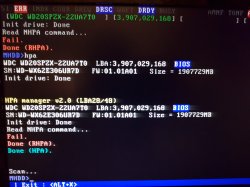
Use HPA command to limit size of a drive. You will be asked about new MaxLBA number, just enter how many sectors you want to use. To uncut the drive, use NHPA command. Please repower the drive before using NHPA command. According to ATA/ATAPI standard, you can use HPA functions only once per drive's power cycle.
In the line most at at top you can see how many sectors are visibles in your hdd = 3,907,029,168
That counter doesnt includes the sectors hidden by HPA... but at this point you are not sure if your hdd already have HPA enabled
As far i remember... you can find the real number of sectors (visibles+hidden) by using the RHPA command, is going to show you a number, if the number matches it means that hdd doesnt have the HPA enabled
Incase the hdd had HPA enabled you need to use the command NHPA to disable it, this should make the number at top to change (and the hdd capacity increases a bit)
And the next step is to enable HPA again... the command is going to ask you for a new number of sectors (it needs to be something smaller than the 3,907,029,168, because this seems to be the total of your hdd)
----------------
But something very important... you need to have the hdd connected by SATA (port0 preferably) in your PC motherboard, otherway if you connected it by USB or other means there are some commands that doesnt works
MHDD is really a "low level" hdd tool, the way how it communicates with the hdd is a bit special... this is why is so slow doing tasks... but is the most relliable hdd tool i know