
You may recall a pack of Cover Tools that Rudi Rastelli released a couple of weeks ago here on the psx-place.com forums (link) since that release, the developer has been working on a completly re-worked version. This release comes with that familiar look/functionalityof other tools by Rudi Rastelli such as PS3 ISO Tools, PSN Liberator & PS3 Game Updater. Features found in this release include the ability to FTP covers to your PS3, Resize covers with ease, features added to find missing covers and [Break]ss[/Break]more as seen in the developer release details found below:
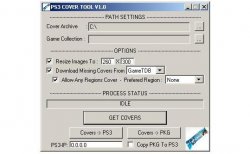
Download: PS3 COVER TOOL V1.0Rudi Rastelli (ReadME) said:Rudi Rastelli (Release Quote) said:Hi !
I've re-worked my old cover tool and it's totaly different and at least it's now what i want it to be.
I slightly renamed it to PS3 COVER TOOL. Take it as a restart and i want to start with v1.0 for it's 1st version.
Ok... here we go:PS3 COVER TOOL V1.0
by Rudi Rastelli
Credits:
- No0bZiLLa, aldostools
Features:
- Searches an existing cover collection for covers which suits exactly to your game collection
- If covers are missing program tries to find them online and add them to the cover collection
- You can select a prefered region for the online search
- Covers which suit to your game collection can be optionally be resized to the resolution needed for multiMAN/webMAN
- Covers which suit to your game collection can be transfer to PS3 (via FTP)
- Covers which suit to your game collection can be packed as a PKG and optionally transfered to PS3 (via FTP)
Getting started:
or
- 1a)Copy your cover collection (if u have one) to 'CoverArchive'-folder (in 'PS3 COVER TOOL' folder)
- 1b)Select your cover collection folder at 'CoverArchive'
- 2) Select your 'PS3ISO'-folder or your 'GAMES'-folder at 'Game Collection'
- 3) Select your prefered region(language) at 'Prefered Region'
Notes:
- If your 'Game Collection' is on PS3 i recommend using a little program called "NetDrive". It allows to map PS3 as a real netdrive. 'NetDrive' is a 30 days trial, but allows to use 1 connection if expired. And that's all you might need. You need some tips for configuration ? See below !
- If program finds a cover in 'Cover Archive' that matches the GameID nothing will be downloaded no matter which settings you've made. This means: You 1st have to delete a cover from 'Cover Archive' whenever you want another version.
- On 1st hand any covers in any resolution have to be in 'CoverArchive'
- Covers which suit to your game collection will be optionally resized and copied to 'MyGameCollectionCovers'-folder (in 'PS3 COVER TOOL' folder)
- When downloading high quality covers with the selected region will prefered
- Whenever a cover with the selected region isn't available then the english cover will be prefered
- In 'CoverArchive' this name scheme is used for downloaded covers: '[GameID]_[Region]_[Quality].jpg'
- Created PKG-file is named 'MyGameCollectionCovers.pkg'
- last but not least a request: If you own covers in your prefered language not being in the online database please upload them to 'www.gametdb.com' and help growing the database.To help you with that task you will find a note in log file for each cover that has downloaded but does not have your prefered region.
Tips:
- 'NetDrive' :
- 1. Click 'Add Drive'
- 2. Typ = FTP
- 3. Name = MyPS3 (or whatever you like)
- 4. URL = ftp://[IP of your PS3]
- 5. User = anonymous
- 6. Password = ps3
- 7. Check 'Save Passwort'
- 8. Click 'Save'
- 9. Click 'Connect' next to the name you've choosen(see 3.)
- Distored resized covers:
- While testing i had some rare covers which looks somehow distored.
- To fix this go into 'Cover Archive' open these covers in eg in 'Paint' and then save them.
- No re-run PS3 COVER TOOL and the resized covers should be ok now.







