PS3 PS3 FAT CECHC04 - COK-002 - GLOD - no video on HDMI and Component

It's likely to be the power supply, as he has another PS3 he was working on he can check by swapping out the power supply.

Also he has the PSU exposed, if you touch the power supply you will get a shock, so it's best to put the lid backnon and only take it off when you are about to reassemble the console and put it all back together.

Sent from my SM-G988B using Tapatalk
 
Please explain to me what you were doing on it that you got the shock, or rather why were you handling the motherboard energized? Because unless I was doing a Syscon read, I don't see any reason to.

Or was the shock static?
I'm curious now, we can't miss it after so much research LOL

Take the opportunity to comment, if he is not lighting the red LED, if the problem is not in the source, check the capacitors and other components in the shock area, see if anything is cracked, cracked or shorted.
I accidentally touched the top of the psu, when tried to plug the touchboard flat cable into the MB.
It was quite painful, so, I think it was 220v through me. The problem with it, as far as i remember, that the plug wasnt connected to the psu. :s
But im not sure.
 
Lol, it's happened to me before, it doesn't normally knock out the power supply, so it's likely to be your touch pad cable. You was working on another PS3 so try that one.

Sent from my SM-G988B using Tapatalk
 
I accidentally touched the top of the psu, when tried to plug the touchboard flat cable into the MB.
It was quite painful, so, I think it was 220v through me. The problem with it, as far as i remember, that the plug wasnt connected to the psu. :s
But im not sure.
from the way you explained, i assume the power supply is missing the top cap and that you touched the capacitors... i don't think so, i did the same on a ps2 slim and on purpose a 400v capacitor on ps1, i don't know how i'm alive =)

But seriously, you didn't touch the 220v direct, you touched the top of the capacitors and others, which are energized but it's not direct power from the outlet and it was probably direct current, because if it was alternating, neither you nor I would be around anymore :rolleyes:

as recommended, change the source and if there is no signal, change the PCB with the red led or the flat cable at least.

next time, do not connect any component with the MB energized, as it can burn the components;)
 
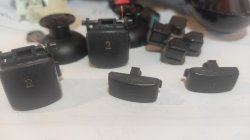
The one which was high temps is working now. its pkgi some games at the moment. But to help my mind a bit i managed to save a faulty (rubber caps is missing, and did a lot of misfeel by touch buttons, even if it was not held in hand, it was giving commands to the ps3, which came out pretty silly...) But was managed to get rid of the simptomps and is working now flawlessly. :)
So I might be a bit more happier then I've been a few days ago, and my mind is not as depressed as it were, to get myself shocked. :Đ
 
This is how dirty it was.
 

Attachments

  • IMG_20220407_143147.jpg
    IMG_20220407_143147.jpg
    3.8 MB · Views: 34
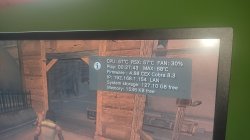
Dunno what happened since last time but it seems to be ok.
Only difference I've put the top on. :o
 

Attachments

  • IMG_20220408_174331.jpg
    IMG_20220408_174331.jpg
    5 MB · Views: 53
Last edited:
Go into webman and set the minimum speed to 33 percent.

This means it will run at 32 percent and go to 33 and above if the console reaches 68 degrees.


Test the console from cold and then check rhe temps after 30 minutes game play

Sent from my SM-G988B using Tapatalk
 
I've played with fan speeds before read your comment, and set The fan to 33%. This way while pkgi download was about 62° for CPU. 56° for RSX.
:)
I'll put my headset up. Lol
 
Last edited:
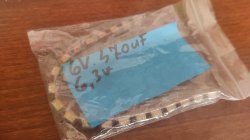
Ah. Look I found the 2 years ago ordered tantal caps. Will these be okay for a RLOD unit?
 

Attachments

  • IMG_20220410_133852.jpg
    IMG_20220410_133852.jpg
    4.4 MB · Views: 26
Depends if it needs caps or not, you can try piggybacking the chips starting with the RSX topside and see if it boots.

Sent from my SM-G988B using Tapatalk
 
Back
Top