PS3 FAT STBY LED BUT WONT TURN ON

Cuthbert Mhoja

Forum Noob
Guys I need your help on something. So I have a PS3 fat that when it's connected to power it shows the red led meaning that stand by voltage is present but as soon as you press the power button it goes green for 1 second then the console shut itself off
 
I really need help on how I can fix this issue my self, am new to console repairs but am down for putting in some time to learn how to repair them
 
I understand, you have a problem that I call blackout, which is when we are going to turn on the game and it turns off completely without beep or indicator led.
this is because the 12V line is short circuited, you removed this short, almost always the device comes back.

First of all, don't be in a hurry when trying to solve your problem. I know it's bad to go 5 or 10 days without playing, but it's better than completely losing the device and then finding out that the error was simple, I've already lost PS3 and PS2 that way trying to fix it fast.
what is your fat model? just for me to have an idea of where to test on the motherboard.

when did the problem start? Was it after a power outage, lightning or something abnormal that you believe could have caused him to have the error? because it's not overnight that the console has this problem without a light or lightning outage, at least in Fat's.
For now, if you are confident to disassemble your console without breaking anything, I recommend that you remove the HDD, the reader and its flat cables and if in your model the bluetooth card is connected to the motherboard by a flat cable, remove it and its cables, and remove the fan too, try to turn it on again but only with power supply and motherboard, if the error does not occur, we already know that some of the removed items is causing the error. If it persists, we will have to go to the motherboard.

if possible answer me both questions before disassembling it.

 
I understand, you have a problem that I call blackout, which is when we are going to turn on the game and it turns off completely without beep or indicator led.
this is because the 12V line is short circuited, you removed this short, almost always the device comes back.

First of all, don't be in a hurry when trying to solve your problem. I know it's bad to go 5 or 10 days without playing, but it's better than completely losing the device and then finding out that the error was simple, I've already lost PS3 and PS2 that way trying to fix it fast.
what is your fat model? just for me to have an idea of where to test on the motherboard.

when did the problem start? Was it after a power outage, lightning or something abnormal that you believe could have caused him to have the error? because it's not overnight that the console has this problem without a light or lightning outage, at least in Fat's.
For now, if you are confident to disassemble your console without breaking anything, I recommend that you remove the HDD, the reader and its flat cables and if in your model the bluetooth card is connected to the motherboard by a flat cable, remove it and its cables, and remove the fan too, try to turn it on again but only with power supply and motherboard, if the error does not occur, we already know that some of the removed items is causing the error. If it persists, we will have to go to the motherboard.

if possible answer me both questions before disassembling it.
Okay so this is a friend's PS3 FAT model CECHL03 he just said that it doesn't power on. So I have already disassembled the entire console and I've tried to only power on the console with just motherboard and power supply and when I trigger the power button that's when it goes green for a split second then immediately turns off.

I do have good equipment to get me through the task such as thermal cam,DCPSU,a multimeter, soldering station, hot air station and a microscope I just need guidance on how to understand how electricity flows on these consoles, a diagram would be very helpful
 
Last edited:
put your multimeter on continuity scale, let's test what is shorted.
take his power supply, and where there are the two holes that the motherboard pins go, put the multimeter tips and test if it is shorted, if it is, discard the power supply and consider buying a new one.
now do the same on the motherboard. On the two pins that are connected to the 12V of the source, test with the multimeter if it is shorted, if there is no continuity, the problem is in the source, if there is, the short is in the MB.
We don't have the diagram for VER 001 boards, it was leaked only for COK-00X and SEM 001, the most you'll get are people with problems on this board showing how to solve it.
Take it easy because when the ps3 closes short on the 12V line, all the components on the board also show a short on the multimeter, I had a SEM 001 like this and it was difficult to remove it because all the capacitors without exception were also shorted, it only disappeared when I took two large filter capacitors in the RSX line, so everything went back to normal.
 
put your multimeter on continuity scale, let's test what is shorted.
take his power supply, and where there are the two holes that the motherboard pins go, put the multimeter tips and test if it is shorted, if it is, discard the power supply and consider buying a new one.
now do the same on the motherboard. On the two pins that are connected to the 12V of the source, test with the multimeter if it is shorted, if there is no continuity, the problem is in the source, if there is, the short is in the MB.
We don't have the diagram for VER 001 boards, it was leaked only for COK-00X and SEM 001, the most you'll get are people with problems on this board showing how to solve it.
Take it easy because when the ps3 closes short on the 12V line, all the components on the board also show a short on the multimeter, I had a SEM 001 like this and it was difficult to remove it because all the capacitors without exception were also shorted, it only disappeared when I took two large filter capacitors in the RSX line, so everything went back to normal.
I tested both PSU and Motherboard as you instructed and it turns out the PSU is not shorted however those two pins for the 12V do infact have continuity so I assume the short is on the motherboard
 
put your multimeter on continuity scale, let's test what is shorted.
take his power supply, and where there are the two holes that the motherboard pins go, put the multimeter tips and test if it is shorted, if it is, discard the power supply and consider buying a new one.
now do the same on the motherboard. On the two pins that are connected to the 12V of the source, test with the multimeter if it is shorted, if there is no continuity, the problem is in the source, if there is, the short is in the MB.
We don't have the diagram for VER 001 boards, it was leaked only for COK-00X and SEM 001, the most you'll get are people with problems on this board showing how to solve it.
Take it easy because when the ps3 closes short on the 12V line, all the components on the board also show a short on the multimeter, I had a SEM 001 like this and it was difficult to remove it because all the capacitors without exception were also shorted, it only disappeared when I took two large filter capacitors in the RSX line, so everything went back to normal.
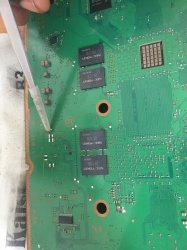
Right so I went through some video on youtube and It turns out he had a similar problem to the one I had but he was speaking spanish so he took out these three caps near the HDMI port and BOOOOM short is gone from the 12V line but now When I press the power button it goes green for a good minute and then goes to blinking red. So one problem solved one more to go, what can I do for the blinking red led ?
 
Right so I went through some video on youtube and It turns out he had a similar problem to the one I had but he was speaking spanish so he took out these three caps near the HDMI port and BOOOOM short is gone from the 12V line but now When I press the power button it goes green for a good minute then starts to blink yellow for a bit and then goes to blinking red. So one problem solved one more to go, what can I do for the blinking red led ?
 

Attachments

  • image.jpg
    image.jpg
    1.9 MB · Views: 129
Back
Top